
Introducció
Thank you for choosing the VENTION 3FT 8K HDMI 2.1 Cable. This cable is designed to provide high-speed audio and video transmission, supporting advanced features such as 8K@60Hz, 4K@120Hz, Dynamic HDR, eARC, and HDCP 2.2 & 2.3. This manual provides essential information for proper setup, operation, maintenance, and troubleshooting to ensure optimal performance.
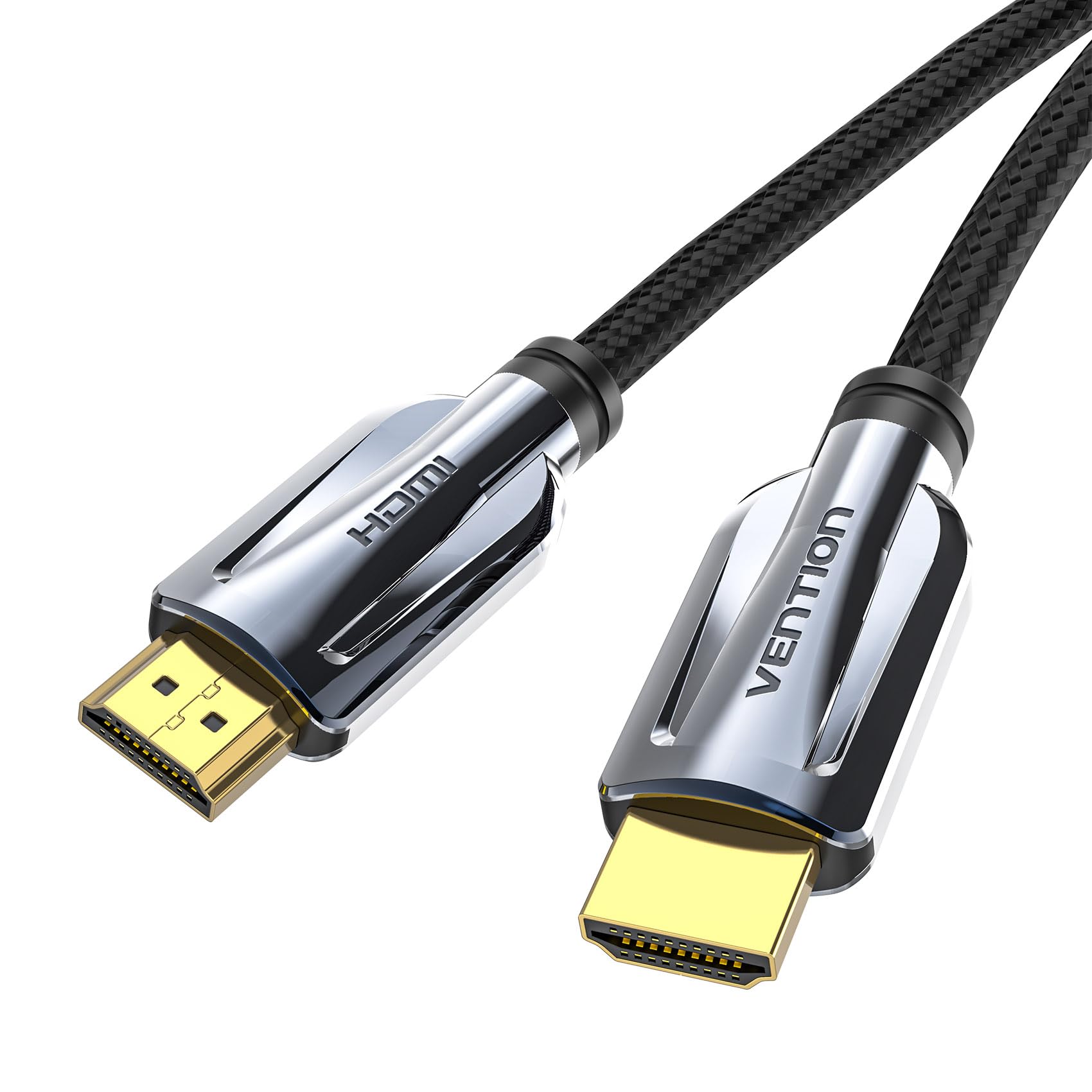
Image: VENTION 3FT 8K HDMI 2.1 Cable. This image displays the cable itself, highlighting its braided design and metallic connectors.

Image: Ultra 8K@60HZ HDMI Cable Features. This graphic illustrates the cable's capabilities including 48Gbps bandwidth, Dolby Atmos, Dolby Vision, Dynamic HDR, eARC, HDCP 2.2 & 2.3, and DTS:X support.
Instruccions de configuració
Follow these steps to connect your VENTION HDMI 2.1 cable:
- Identifica els ports: Locate the HDMI output port on your source device (e.g., gaming console, Blu-ray player, PC) and the HDMI input port on your display device (e.g., TV, monitor, projector). Ensure both devices support HDMI 2.1 for full functionality.
- Connectar el cable: Gently insert one end of the VENTION HDMI cable into the HDMI output port of your source device.
- Connecta a la pantalla: Insert the other end of the HDMI cable into the HDMI input port of your display device.
- Connexió segura: Ensure both ends are firmly seated in their respective ports. The cable is plug-and-play and does not require additional software or drivers.

Image: Stable Support for High Refresh Rates. This image shows a gaming setup, illustrating the cable's ability to support stable 8K@60Hz, 4K@144Hz, and 2K@240Hz resolutions, preventing flickering or black screens.
This HDMI 2.1 cable is backward compatible with HDMI 2.0b/2.0a/1.4/1.3/1.2/1.1 standards, allowing use with a wide range of devices.
Instruccions de funcionament
Once connected, the VENTION HDMI 2.1 cable operates automatically. Your devices should detect the connection and negotiate the best possible audio and video settings.
- Transmissió d'alta velocitat: The cable supports a bandwidth of 48Gbps, enabling resolutions up to 8K@60Hz and 4K@120Hz.
- HDR dinàmic: Enjoy enhanced contrast, brightness, and color depth with Dynamic HDR support.
- eARC (canal de retorn d'àudio millorat): Transmit full-resolution audio signals, including object-based audio formats like Dolby Atmos and DTS:X, from your TV to a compatible soundbar or AV receiver.
- HDCP 2.2 & 2.3: Ensures compatibility with protected content from streaming services and Blu-ray players.

Image: Ultra Fine Contrast in 8K. This graphic compares 1080P, 4K, and 8K resolutions, highlighting the superior detail and contrast provided by 8K, along with support for Dolby, 3D, 120Hz, and HDR.

Image: HDMI 2.1 vs HDMI 2.0 Bandwidth Comparison. This image visually compares the 48Gbps bandwidth of HDMI 2.1 with the 18Gbps of HDMI 2.0, emphasizing the capability for pure 8K viewplaer.
Manteniment
To ensure the longevity and optimal performance of your VENTION HDMI 2.1 cable, follow these maintenance guidelines:
- Manejar amb cura: Avoid excessive bending, twisting, or pulling of the cable, especially near the connectors. The nylon braided jacket provides durability, but extreme stress can still cause damage.
- Mantenir net: Periodically wipe the cable and connectors with a soft, dry cloth to remove dust and debris. Do not use liquid cleaners directly on the connectors.
- Emmagatzema correctament: When not in use, coil the cable loosely. Avoid tight coiling or kinking, which can damage the internal wires.
- Protegir els connectors: Keep the gold-plated connectors free from dirt and moisture. If necessary, use a small brush to gently clean any debris from the connector pins.

Image: Robust Nylon Braided Cable Design. This image highlights the durable nylon braided jacket and the 'ULTRA Certified Cable' logo, indicating superior protection and flexibility.

Image: Cable Construction Details. This graphic details the cable's features: gold-plated & aluminum alloy case for minimal interference, multiple shielding (aluminum foil + metal braiding) to prevent interference, and high toughness cotton braided exterior for durability.
Resolució de problemes
If you encounter issues with your VENTION HDMI 2.1 cable, refer to the following common problems and solutions:
| Problema | Causa possible | Solució |
|---|---|---|
| No video or audio signal | Loose connection, incorrect input selection, incompatible device settings. |
|
| Flickering screen or intermittent signal | Cable damage, signal interference, resolution/refresh rate mismatch. |
|
| Sense àudio o mala qualitat d'àudio | Incorrect audio settings, eARC not enabled, incompatible audio receiver. |
|
| 8K@60Hz or 4K@120Hz not achieved | Source/display limitations, cable quality, incorrect settings. |
|
Especificacions
Key technical specifications for the VENTION 3FT 8K HDMI 2.1 Cable (Model AAL):
| Característica | Detall |
|---|---|
| Marca | VENCIÓ |
| Número de model | AAL |
| Tipus de cable | HDMI 2.1 |
| Longitud | 3 peus (aprox. 0.91 metres) |
| Velocitat de transferència de dades | 48 gigabits per segon (Gbps) |
| Resolucions suportades | 8K@60Hz, 4K@120Hz, 4K@144Hz, 2K@240Hz |
| Funcions compatibles | Dynamic HDR, eARC, HDCP 2.2 & 2.3, 3D, Dolby Atmos, DTS:X |
| Tipus de connector | HDMI mascle a mascle |
| Material del connector | Gold-plated, Zinc Alloy Casing |
| Jaqueta de cable | Nylon Braided (Cotton Mesh) |
| Material conductor | Premium Tinned Copper |
| Blindatge | Aluminum Foil + Metal Braided Mesh |
| Dispositius compatibles | Televisions, Monitors, Projectors, PS5, PS4, Apple TV, Roku TV, Laptops, Desktops |
| Color | Gris |
| Pes de l'article | 4.2 unces |
Garantia i Suport
VENTION products are manufactured to high-quality standards. For specific warranty information, please refer to the warranty card included with your product or visit the official VENTION website. If you require technical assistance or have questions regarding your HDMI cable, please contact VENTION customer support through their official channels.
Si us plau, conserveu el comprovant de compra per a qualsevol reclamació de garantia.