
1. Introducció
This manual provides detailed instructions for the assembly, operation, and maintenance of your FLEXISPOT Electric Standing Desk. Please read this manual thoroughly before use to ensure proper function and safety. Keep this manual for future reference.
2. Informació de seguretat
Precaucions de seguretat importants:
- Always keep the desk area clear of obstructions to prevent collisions during height adjustments.
- Do not use the desk at its maximum height without proper anchoring to prevent tip-overs.
- Follow the assembly instructions carefully to ensure the desk is properly set up and stable.
- Ensure all cables are managed to avoid entanglement during movement.
- Mantingueu els nens i les mascotes allunyats de l'escriptori durant el funcionament.
3. Contingut del paquet
Verifiqueu que tots els components siguin presents abans de començar el muntatge. Si falta alguna peça o hi ha alguna peça danyada, poseu-vos en contacte amb el servei d'atenció al client.
- Desktop (Natural Desktop + White Frame, 48 inch)
- Desk Legs/Frame (Alloy Steel)
- Control Panel with USB Ports
- Calaix d'emmagatzematge extraïble
- Maquinari de muntatge (cargols, eines)
- Adaptador d'alimentació
- Manual d'instruccions
4. Muntatge i muntatge
The FLEXISPOT Electric Standing Desk is designed for quick assembly. All necessary tools are included.
- Step 1: Attach Desk Legs to Desktop
Carefully place the desktop upside down on a soft, clean surface to prevent scratches. Attach the desk legs to the designated mounting points on the underside of the desktop using the provided screws. Ensure all connections are secure.
Image: Fully assembled FLEXISPOT Electric Standing Desk, showcasing the natural desktop, white frame, integrated drawer, and control panel with USB ports.
- Step 2: Install Control Panel and Drawer
Mount the control panel to the front edge of the desktop as indicated in the diagrams. Connect the motor and power cables to the control panel. Slide the pull-out storage drawer into its designated slot beneath the desktop.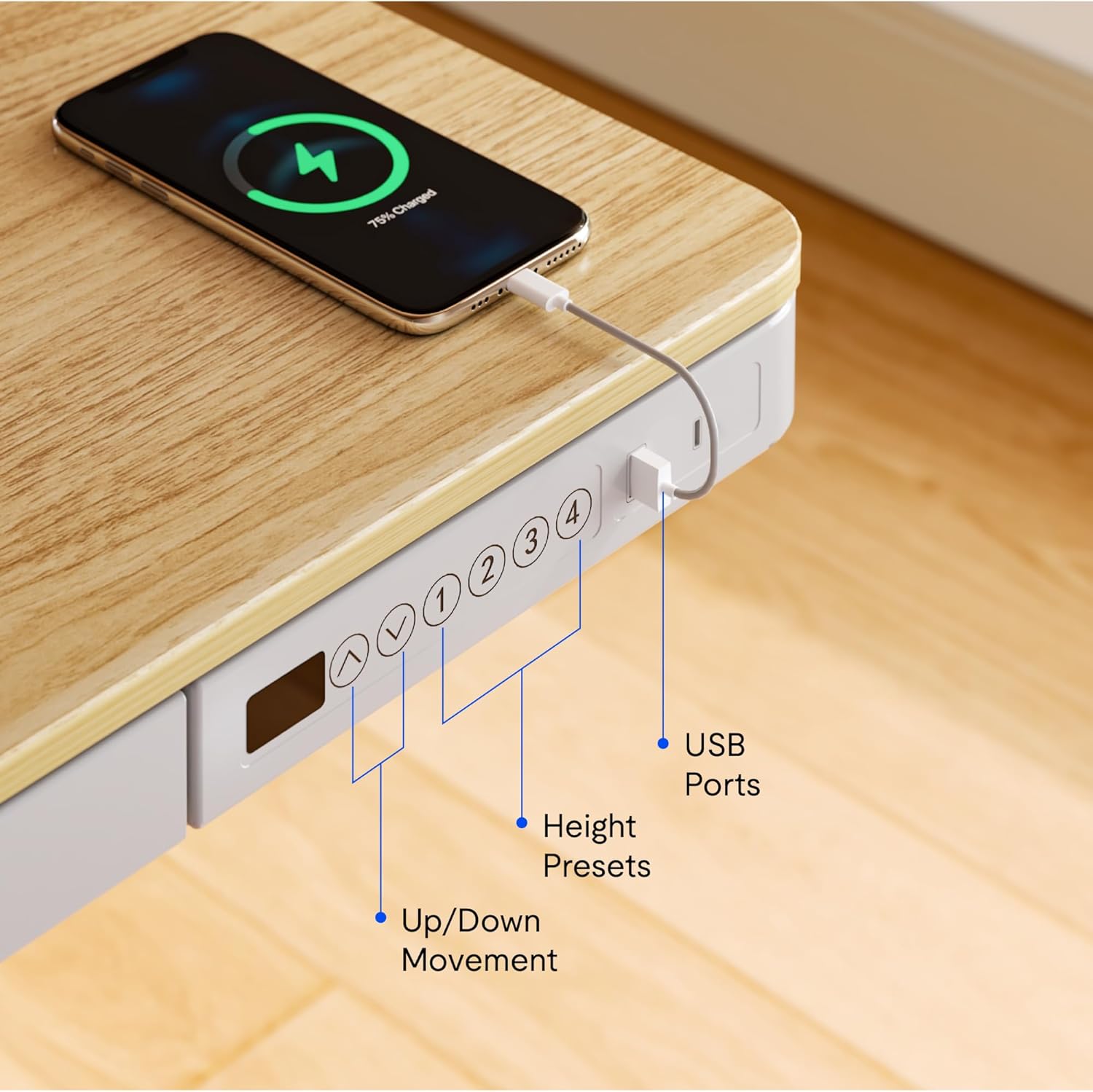
Imatge: Primer pla view of the desk's control panel, highlighting the up/down movement buttons, four height preset buttons, and the integrated USB charging ports.
- Step 3: Connect Power and Cable Management
Connect the power adapter to the control panel and then to a power outlet. Organize cables using the provided cable management solutions to ensure they do not interfere with desk movement.
Image: The desk frame from below, showing the crossbar and anti-collision system designed to enhance stability and safety during height adjustments.
5. Instruccions de funcionament
Your FLEXISPOT Electric Standing Desk offers convenient features for adjusting height and charging devices.
5.1 Ajust d'alçada
- Moviment amunt/avall: Utilitza el Up i Avall arrow buttons on the control panel to manually adjust the desk height. The desk can transition smoothly between 28.3 inches and 47.6 inches.
- Height Presets: The control panel features four programmable memory presets. To save a desired height, adjust the desk to the preferred level, then press and hold one of the numbered preset buttons (1, 2, 3, or 4) until the display flashes or a beep is heard. To recall a saved height, simply press the corresponding preset button.
- Sistema anticol·lisió: The desk is equipped with an anti-collision system that automatically stops movement if an obstruction is detected, preventing damage to the desk or objects.
5.2 ports de càrrega USB
The integrated control panel includes USB charging ports. Connect your electronic devices to these ports for convenient charging directly from your desk.
5.3 Funció de bloqueig infantil
To activate the child lock, press and hold the "Lock" button (often represented by a padlock icon) on the control panel for a few seconds until the display indicates it is locked. Repeat the process to unlock.
5.4 Integrated Storage Drawer
Utilize the pull-out storage drawer for organizing office supplies and keeping your workspace tidy. The drawer is designed to blend seamlessly with the desk's aesthetic.

Imatge: Detallada view of the integrated pull-out drawer, showing its dimensions (approximately 23.6 inches wide, 11.2 inches deep, and 2 inches high) and its capacity for storing various office items.
6. Manteniment
- Neteja: Netegeu l'escriptori i el marc amb un drap suauamp drap. Eviteu productes de neteja abrasius o productes químics agressius.
- Gestió de cables: Reviseu i reorganitzeu els cables periòdicament per evitar que s'enredin i garantir un funcionament suau.
- Inspecció: Regularly inspect all screws and connections to ensure they remain tight and secure.
7. Solució De Problemes
Si teniu algun problema amb el vostre escriptori, consulteu les solucions habituals següents:
- L'escriptori no es mou:
- Check if the power cable is securely connected to both the desk and the power outlet.
- Ensure the child lock is not activated.
- Reset the desk by unplugging it for 30 seconds and then plugging it back in.
- Moviment o soroll irregular:
- Comproveu que l'escriptori estigui col·locat sobre una superfície plana.
- Check for any obstructions beneath or around the desk legs.
- Assegureu-vos que tots els cargols de muntatge estiguin ben apretats.
- Ports USB que no es carreguen:
- Confirm the desk is powered on.
- Try a different USB cable or device to rule out a faulty accessory.
If problems persist, please contact FLEXISPOT customer support.
8. Especificacions
| Característica | Detall |
|---|---|
| Marca | FLEXISPOT |
| Número de model | B0CKW2Q436 |
| Desktop Surface Dimensions (W x D) | 47.4" d'amplada x 23.8" de profunditat |
| Dimensions totals del producte (P x A x A) | 48"D x 48"W x 28.3"H (Note: Desktop surface is 47.4"W x 23.8"D) |
| Color | Natural/Blanc |
| Material base | Acer d'aliatge |
| Tipus de material superior | Bambú |
| Pes de l'article | 74 lliures |
| Altura mínima | 28.3 polzades |
| Altura màxima | 47.6 polzades |
| Gruix de la taula | 2.6 polzades |
| Recomanació de pes màxim | 110 lliures |
| Components inclosos | Pull-out storage drawer, USB ports |
| Muntatge requerit | Sí (inclou totes les eines de muntatge) |

Image: Summary of key specifications including desktop size (47.4"x23.8"), height range (28.3"-48"), max loading capacity (100 lbs), and 5-year warranty.
9. Garantia i Suport
9.1 Informació de la garantia
The FLEXISPOT Electric Standing Desk typically comes with a 5-year warranty, covering manufacturing defects and motor functionality. For specific warranty terms and conditions, please refer to the documentation included with your product or contact FLEXISPOT customer service.
9.2 Atenció al client
For technical assistance, warranty claims, or any questions regarding your FLEXISPOT product, please contact FLEXISPOT customer support. Contact information can usually be found on the manufacturer's weblloc web o a l'embalatge.
You may also refer to the seller, FlexiSpot, for support inquiries. They offer 30-day easy returns.