
1. Informació de seguretat
Please read all instructions carefully before using the iZEEKER Projector. Keep this manual for future reference.
- Font d'alimentació: Feu servir només l'adaptador de corrent especificat. Assegureu-vos que el volumtage és compatible amb la teva regió.
- Ventilació: Do not block ventilation openings. Ensure adequate space around the projector for proper airflow to prevent overheating.
- Medi ambient: Avoid exposing the projector to rain, moisture, direct sunlight, or extreme temperatures. Do not place it near heat sources.
- Neteja: Unplug the projector before cleaning. Use a soft, dry cloth. Do not use liquid or aerosol cleaners.
- Protecció ocular: No mireu directament a la lent del projector quan estigui encès.amp is on. The iZEEKER projector utilizes diffuse reflection technology to reduce blue light exposure and eye fatigue.
- Nens: Keep the projector out of reach of small children. Supervise children when the projector is in use.
- Desmuntatge: No intenteu desmuntar ni reparar el projector vosaltres mateixos. Encarregueu totes les tasques de manteniment a personal qualificat.

2. Contingut del paquet
Verifiqueu que tots els elements que s'enumeren a continuació s'inclouen al vostre paquet:
- iZEEKER Projector (Model: iPL320)
- Adaptador d'alimentació
- Control remot
- Cable HDMI
- Cable AV
- Manual d'usuari
- Customized Tripod

3. Producte acabatview
3.1 Característiques clau
- Bluetooth 5.2: For enhanced audio experience with external Bluetooth speakers or headphones. Note: Bluetooth is for audio output only, not for screen mirroring.
- Alta brillantor i resolució: 12000 Lux brightness and native 1080P resolution with 100% NTSC color reproduction and 10000:1 contrast ratio for clear, realistic images.
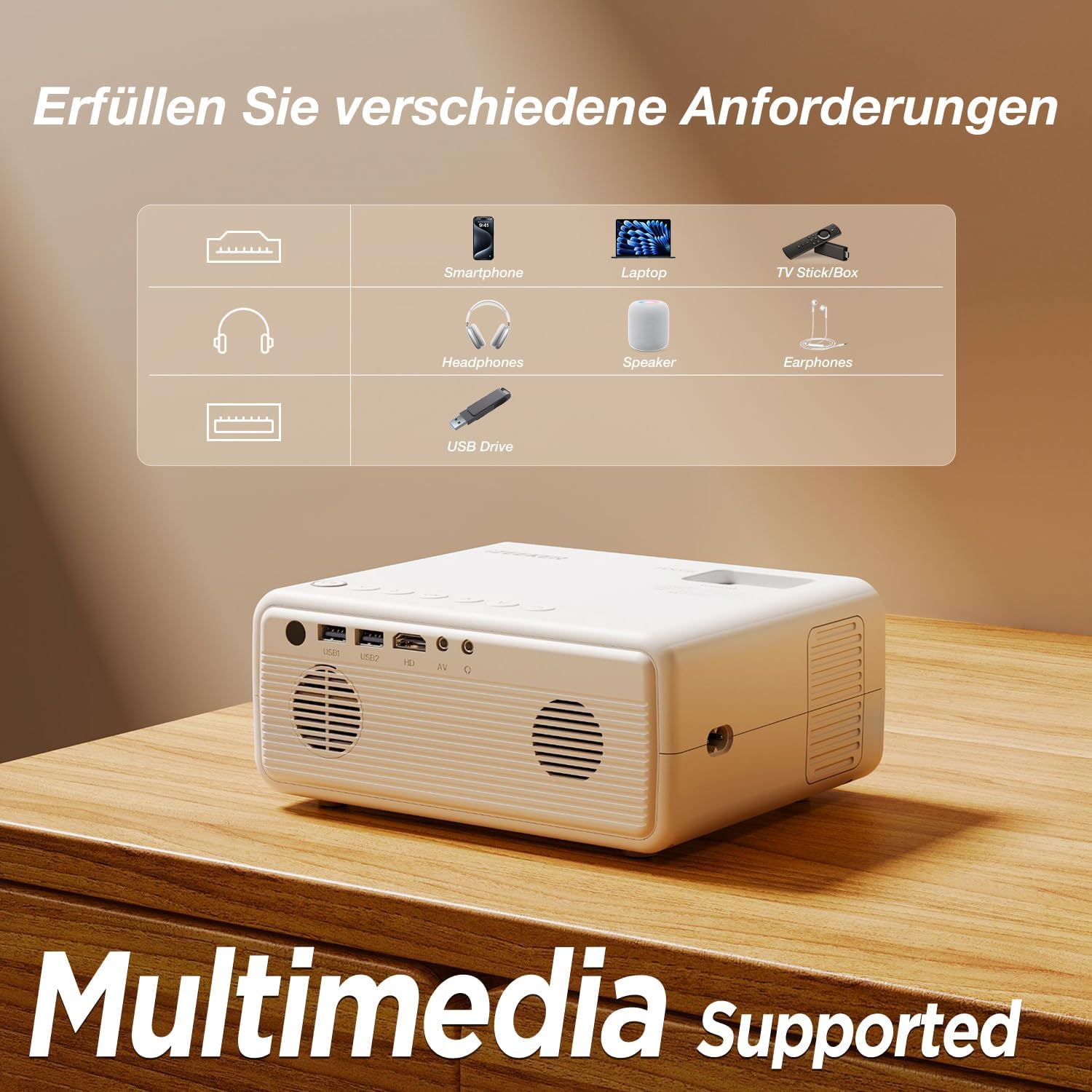
- Connectivitat multidispositiu: Equipped with HDMI, AV, USB, and Aux ports for stable connections to smartphones, laptops, PS5, TV boxes, and DVD players.
- Projecció en pantalla gran: Supports up to a 250-inch screen size with 75% zoom function for flexible screen adjustment without moving the projector.
- Protecció ocular: High-refraction lenses and diffuse reflection technology reduce blue light and eye fatigue.


4. Configuració
4.1 Col·locació
Choose a flat, stable surface for the projector. The projection distance affects the screen size. For optimal viewassegureu-vos que el projector estigui perpendicular a la superfície de projecció.
- The projector can be placed on a table, mounted on the included tripod, or ceiling-mounted.
- Adjust the distance to achieve your desired screen size, up to 250 inches.

4.2 Connexió d'alimentació
Connecteu l'adaptador de corrent al port d'entrada d'alimentació del projector i, a continuació, endolleu l'adaptador a una presa de corrent.
4.3 Ajust de l'enfocament i la distorsió trapezoidal
After powering on, adjust the focus ring on the projector lens until the image is clear. Use the keystone correction dial to adjust the image shape if it appears trapezoidal.

4.4 Connexió de dispositius
The projector supports various wired connections for stable performance:
- HDMI: Connect laptops, gaming consoles (PS5), TV boxes, or DVD players using an HDMI cable.
- USB: Inseriu una unitat USB per reproduir contingut multimèdia files directament.
- DE: Feu servir el port AV per a dispositius més antics.
- Smartphones (Wired):
- Dispositius iOS: Requires an Apple Lightning to HDMI adapter cable (not included).
- Dispositius Android: Requires a Micro USB/Type-C to HDMI cable (not included).


4.5 Connexió d'àudio Bluetooth
To connect external Bluetooth speakers or headphones:
- Assegureu-vos que el dispositiu d'àudio Bluetooth estigui en mode d'emparellament.
- Al projector, navegueu fins al menú de configuració de Bluetooth.
- Seleccioneu el dispositiu de la llista de dispositius disponibles per emparellar-lo.
NOTA: The Bluetooth function is for audio output only and does not support screen mirroring from mobile devices.

5. Instruccions de funcionament
5.1 Encès/Apagat
- Encès: Premeu el botó d’engegada del projector o del comandament a distància.
- Apagar: Press the power button again. Confirm shutdown if prompted.
5.2 Navegació de menús
Use the navigation buttons on the projector or remote control to browse the on-screen menu. The "OK" button confirms selections, and the "Back" button returns to the previous screen.
5.3 Selecció de la font d'entrada
Press the "Source" button on the remote control or projector to select the desired input (e.g., HDMI1, USB, AV).
5.4 Funció de zoom
The projector features a 75% zoom function. Access this setting in the projector's menu to adjust the screen size without physically moving the projector.


6. Manteniment
6.1 Neteja de la lent
Use a professional lens cleaning cloth or air blower to clean the projector lens. Do not touch the lens directly with your hands or use abrasive cleaners.
6.2 Neteja del cos del projector
Wipe the projector's exterior with a soft, dry cloth. Do not use liquid, abrasive, or corrosive cleaners.
6.3 Emmagatzematge
Quan no l'utilitzeu durant períodes prolongats, guardeu el projector en un lloc fresc, sec i sense pols. Feu servir l'embalatge original o una funda protectora per evitar danys.
7. Solució De Problemes
| Problema | Causa possible | Solució |
|---|---|---|
| Sense imatge/Sense senyal | Incorrect input source selected; Cable not connected properly; Device not powered on. | Select the correct input source (HDMI, USB, AV). Check all cable connections. Ensure the connected device is powered on. |
| Imatge borrosa | Focus not adjusted; Projector too far/close; Lens dirty. | Adjust the focus ring. Adjust projection distance. Clean the projector lens. |
| Imatge trapezoïdal | Projector no perpendicular a la pantalla. | Adjust the keystone correction dial. Reposition the projector. |
| Sense so | Volum massa baix; Silenciat; Dispositiu d'àudio extern no connectat/emparellat. | Increase volume. Unmute. Check Bluetooth connection for external speakers/headphones. |
| Cannot play Netflix/Prime Video | Copyright restrictions. | These services can only be played via a TV Stick (e.g., Amazon Fire Stick) connected to the projector's HDMI port. |
8. Especificacions
| Marca | iZEEKER |
| Número de model | iPL320 |
| Tipus de producte | Projector portàtil |
| Brillantor | 12000 lux |
| Resolució de visualització | 1920 x 1080 (1080P Native) |
| Resolució de visualització màxima | 1920 x 1080 |
| Relació de contrast | Fins a 10000:1 |
| Tecnologia de connectivitat | Bluetooth 5.2, HDMI, USB, AV, Aux |
| Screen Size (Max) | 250 polzades |
| Funció de zoom | 75% |
| Dimensions del producte | 19 L x 15.8 W x 8.6 H centímetres |
| Tipus de muntatge | Muntatge de trípode |
| Usos recomanats | Home Cinema |
9. Garantia i assistència
iZEEKER is committed to providing excellent customer service.
- Garantia del fabricant: The iZEEKER Projector comes with a free 2-year after-sales warranty.
- Suport tècnic: Professional lifetime technical support is available.
- Contacta amb nosaltres: If you have any questions, issues, or require assistance, please do not hesitate to contact iZEEKER customer support. Refer to the contact information provided in your product packaging or on the official iZEEKER weblloc.