1. Introducció
This manual provides essential information for the safe and efficient operation of your Generic HY300 Mini Projector. Please read this manual thoroughly before using the product and retain it for future reference.
2. Informació de seguretat
- No mireu directament a la lent del projector quan estigui encès.amp està activat.
- Assegureu-vos una ventilació adequada al voltant del projector per evitar el sobreescalfament.
- Feu servir només l'adaptador de corrent que s'inclou amb el projector.
- Mantingueu el projector allunyat de l'aigua o altres líquids.
- Eviteu col·locar el projector sobre superfícies inestables.
- No intenteu desmuntar ni reparar el projector vosaltres mateixos. Poseu-vos en contacte amb personal de servei qualificat.
3. Contingut del paquet
Verifiqueu que tots els elements siguin presents al paquet:
- Generic HY300 Mini Projector × 1
- Cable d'alimentació × 1
- Manual d'usuari × 1
4. Característiques del producte
The HY300 Mini Projector is a versatile smart projector designed for various entertainment and presentation needs.
- Sistema operatiu: Android TV 11.0 with Allwinner H713 smart chip.
- Memòria: 1GB RAM + 8GB ROM for app storage and smooth operation.
- Connectivitat: Dual-band Wi-Fi (2.4G & 5G) and Bluetooth 4.1.
- Resolució: Native 1280x720P, supporting up to 4K video decoding via HD signal.
- Mida de projecció: Adjustable from 40 to 130 inches.
- Correcció d'imatge: Manual focus and automatic keystone correction.
- Àudio: Integrated 3W HiFi speaker.
- Disseny: Portable with a 180-degree rotating stand for flexible projection angles.
- Nivell de soroll: Operates at less than 25dB for a quiet viewexperiència.
5. Configuració
5.1 Col·locació
Position the projector on a stable, flat surface. The integrated 180-degree rotating stand allows you to adjust the projection angle from the floor to the ceiling. Ensure there are no obstructions blocking the lens or ventilation ports.

Image: The HY300 Mini Projector is shown being used outdoors, projecting content onto a screen at night, demonstrating its portability and flexible placement options.
5.2 Connexió d'alimentació
- Connecteu el cable d'alimentació al port d'entrada d'alimentació del projector.
- Connecteu l'altre extrem del cable d'alimentació a una presa de corrent adequada.
5.3 Enfocament inicial i correcció trapezoidal
- After powering on, use the manual focus ring on the projector to achieve a clear image.
- The projector features automatic vertical keystone correction. If further adjustment is needed for side projection, use the remote control.
6. Instruccions de funcionament
6.1 Encès/Apagat
Premeu el botó d'engegada del projector o del comandament a distància per encendre o apagar el dispositiu.
6.2 Interfície d'Android TV 11.0
Upon startup, the projector will display the Android TV 11.0 home screen. Use the remote control to navigate through applications, settings, and content.

Image: The HY300 Mini Projector is shown projecting the Android 11.0 interface, featuring icons for popular streaming applications like Netflix, YouTube, and Amazon Prime Video.
6.3 Ús de l'aplicació
The projector comes with pre-installed applications and allows access to the Google Play Store to download additional apps like Netflix, YouTube, and more. Ensure an internet connection for streaming services.
6.4 Sortida d'àudio
The projector has a built-in 3W HiFi speaker. For external audio, connect Bluetooth speakers or headphones via the Bluetooth settings.

Image: The HY300 Mini Projector is depicted operating quietly (less than 25dB), positioned near a sleeping baby, highlighting its low noise level.
7. Connectivitat
7.1 Connexió Wi-Fi
The projector supports both 2.4G and 5G Wi-Fi networks for stable and fast internet access. Navigate to Settings > Network > Wi-Fi to connect to your preferred network.

Image: The HY300 Mini Projector projects a vibrant car race scene, illustrating its capability for ultra-fast wireless connection via 2.4G and 5G Wi-Fi.
7.2 Connexió Bluetooth
To connect Bluetooth devices like speakers or headphones, go to Settings > Connected Devices > Pair new device. Ensure your Bluetooth device is in pairing mode.
7.3 Connexió HDMI
Connect external devices such as laptops, gaming consoles, or media players using an HDMI cable. Select the HDMI input source from the projector's input menu.
7.4 Mirall de pantalla
The projector supports Airplay and Miracast for screen mirroring from compatible smartphones, tablets, and laptops. Access the screen mirroring function from the projector's main menu and follow the on-screen instructions.
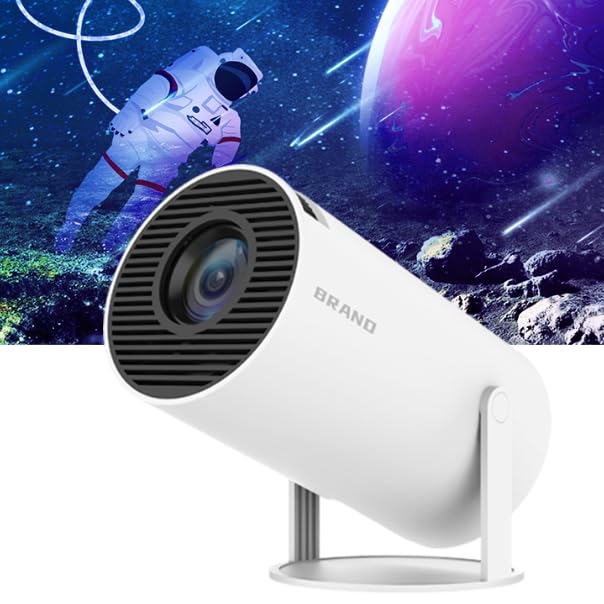
Image: The HY300 Mini Projector is shown mirroring content from a smartphone to a large projection screen, demonstrating its convenient screen mirror feature.
8. Manteniment
8.1 Neteja de la lent
Gently wipe the projector lens with a soft, lint-free cloth specifically designed for optical surfaces. Do not use abrasive cleaners or harsh chemicals.
8.2 Atenció general
- Mantingueu el projector en un entorn net i sec.
- Protect the projector from dust and extreme temperatures.
- When not in use, store the projector in a protective case or cover.
9. Solució De Problemes
If you encounter issues with your HY300 Mini Projector, refer to the following common problems and solutions:
| Problema | Causa possible | Solució |
|---|---|---|
| Imatge borrosa | Incorrect focus; Projector too close/far; Slightly blurry edges (inherent to some projectors) | Adjust the manual focus ring. Ensure optimal projection distance (1.2m for 40", 2m for 80", 4m for 130"). |
| No image/signal | Incorrect input source; Loose HDMI cable; Device not powered on | Select the correct input source (e.g., HDMI). Check cable connections. Ensure connected device is on. |
| Sense so | Volum massa baix; Silenciat; Dispositiu d'àudio extern no connectat/seleccionat | Increase volume. Check mute settings. Verify Bluetooth audio connection or select internal speaker. |
| Problemes de connexió Wi-Fi | Incorrect password; Out of range; Router issues | Re-enter Wi-Fi password. Move projector closer to router. Restart router. |
| USB drive not recognized | Incorrect format (e.g., not FAT32); Incompatible file sistema | Ensure USB drive is formatted to FAT32. Check if the file system is supported by Android 11.0. |
| No horizontal keystone correction | Funció no disponible | The HY300 features automatic vertical keystone correction. Horizontal adjustment is not supported. Adjust projector placement for optimal image. |
10. Especificacions
Detailed technical specifications for the Generic HY300 Mini Projector:
| Característica | Especificació |
|---|---|
| Marca | Genèric |
| Sèrie Model | HY300 |
| Color | Blanc |
| Resolució nativa | 1280 x 720P |
| Resolució màxima de pantalla | 3840 x 2160 (4K support) |
| Sistema operatiu | Android TV 11.0 |
| Processador | Quad-core ARM Cortex-A53 (Allwinner H713) |
| GPU | Mali-G31 (admet OpenGL ES3.2, Vulkan 1.1, OpenCL2.0) |
| RAM | 1 GB |
| ROM | 8 GB |
| Wi-Fi | 2.4G i 5G |
| Bluetooth | BT 4.1 |
| Relació de contrast | 1500:1 (Dynamic 10000:1) |
| Mida de la pantalla de projecció | 40-130 polzades |
| Correcció de pedra clau | Automatic (Vertical) |
| Àudio | Built-in 3W HiFi speaker |
| Nivell de soroll | < 25 dB |
| Tecnologia de connectivitat | HDMI |
| Dispositius compatibles | Laptop, Smartphone, Game Console, Media Player |
| Tipus de muntatge | Muntatge de trípode |
| Tipus de visualització | LCD |
| Factor de forma | Portàtil |

Image: A diagram illustrating the optimal projection distances for achieving 40-inch, 80-inch, and 130-inch screen sizes with the HY300 Mini Projector.

Imatge: Una imatge detallada view of the Allwinner H713 quad-core ARM Cortex-A53 processor chip, highlighting the projector's internal hardware.
11. Garantia i Suport
Per obtenir informació sobre la garantia i assistència tècnica, consulteu la documentació proporcionada en el moment de la compra o poseu-vos en contacte amb el vostre distribuïdor. Conserveu el comprovant de compra per a reclamacions de garantia.


