
ODK ZJZ-JJYJZ
ODK L Shaped Gaming Desk Instruction Manual
Model: ZJZ-JJYJZ
1. Introducció
Thank you for choosing the ODK L Shaped Gaming Desk. This desk is designed to provide a spacious and stable workspace for various activities, including gaming, studying, and office work. Its L-shaped design maximizes corner space, and features like the monitor stand and storage bag enhance functionality and organization. Please read this manual carefully before assembly and use to ensure proper setup and long-term enjoyment of your new desk.
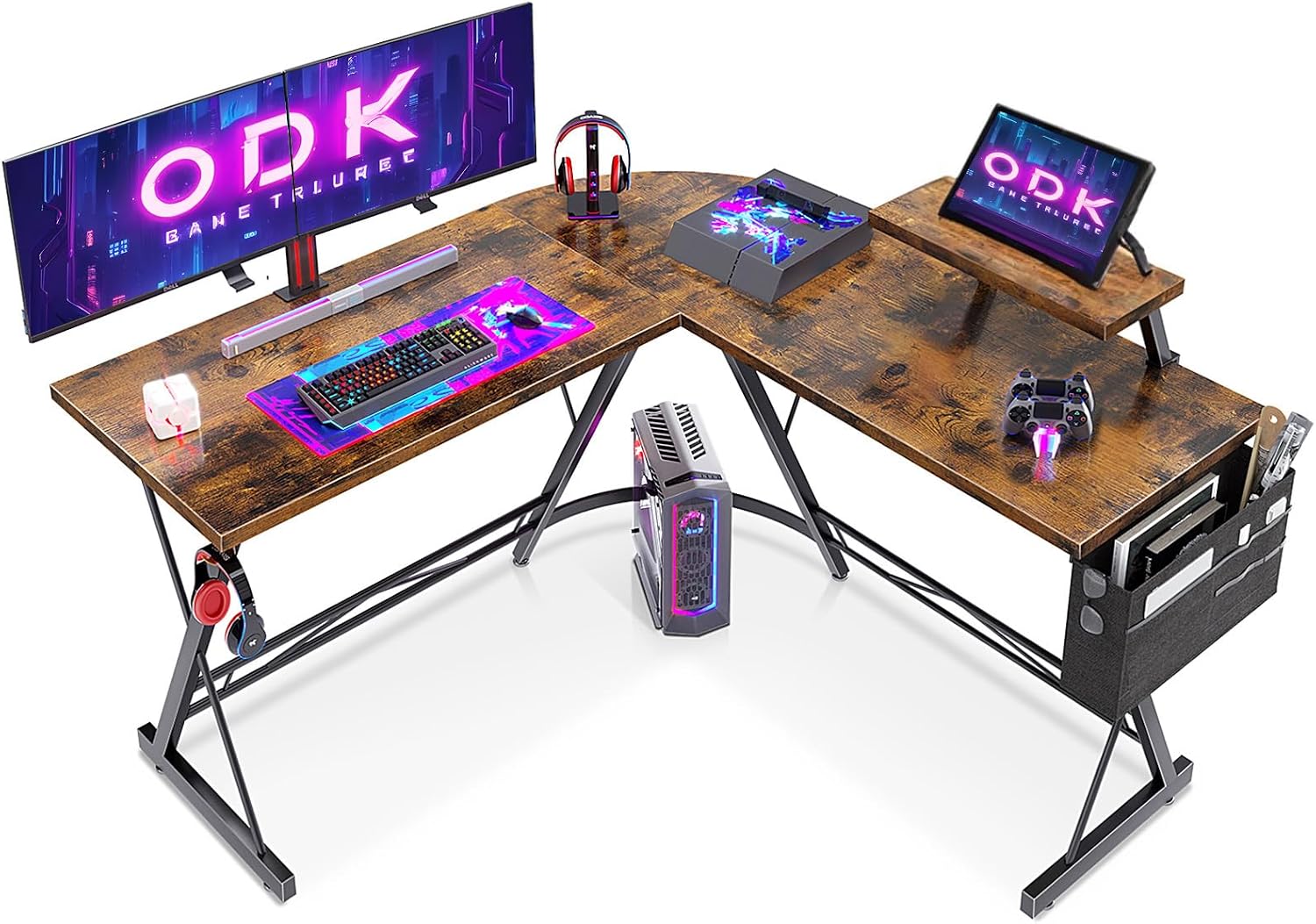
Image: The ODK L Shaped Gaming Desk, showcasing its design and potential for a complete gaming or work setup.
2. Informació de seguretat
- Seguiu sempre atentament les instruccions de muntatge. Un muntatge incorrecte pot provocar inestabilitat i possibles lesions.
- Assegureu-vos que tots els cargols i elements de fixació estiguin ben ajustats abans d'utilitzar-los. Comproveu-los periòdicament i torneu-los a apretar si cal.
- Do not overload the desk. Refer to the specifications section for weight capacity.
- Mantingueu les peces petites i els materials d'embalatge lluny dels nens per evitar perills d'asfixia.
- Be cautious of sharp edges during assembly and use. Consider applying edge protectors if desired, especially in households with children.
- Col·loqueu l'escriptori sobre una superfície plana per evitar que es mogui.
3. Contingut del paquet
Si us plau, verifiqueu que tots els components siguin presents abans de començar el muntatge. Si falta alguna peça o hi ha alguna peça danyada, poseu-vos en contacte amb el servei d'atenció al client.
- Panells d'escriptori (seccions en forma de L)
- Metal Frame Components (legs, support bars)
- Suport de monitor
- Switchable Storage Bag
- Helmet Hook
- Maquinari de muntatge (cargols, perns, femelles, volanderes)
- Assembly Tools (Allen wrench, screwdriver)
- Manual d'instruccions
4. Muntatge i muntatge
The ODK L Shaped Gaming Desk is designed for straightforward assembly. It is recommended to assemble the desk with two people for ease and safety. Lay out all components on a soft, clean surface to prevent scratches.
Passos de muntatge:
- Desempaquetar i identificar les peces: Carefully remove all components from the packaging. Refer to the parts list in the included manual to identify each piece and ensure nothing is missing.
- Muntar el marc: Begin by connecting the main metal frame components according to the diagrams in your manual. Ensure the X-shaped frame sections are correctly oriented for stability.
- Adjunta els panells d'escriptori: Secure the desktop panels to the assembled frame using the provided screws. Pay attention to the alignment of the L-shaped sections.
- Instal·leu el suport del monitor: Attach the monitor stand to the designated area on the desktop.
- Adjuntar accessoris: Install the switchable storage bag and helmet hook as desired. The storage bag can be positioned on either side of the desk.
- Ajust i estrenyiment final: Once all parts are in place, carefully tighten all screws. Adjust the foot pads at the bottom of the desk legs to ensure stability and level the desk on uneven floors.

Image: Detailed dimensions of the ODK L Shaped Gaming Desk, useful for planning your space.

Image: The robust X-shaped frame, highlighting the desk's stable construction.
5. Característiques i ús
Àmplia superfície de treball:
The L-shaped design provides an expansive area for multiple monitors, keyboards, mice, and other peripherals, allowing for an organized and efficient workspace. This design is particularly beneficial for multi-tasking or dual-monitor setups.

Image: The desk positioned in a corner, illustrating its space-saving capabilities.
Suport de monitor integrat:
The elevated monitor stand helps to raise your screen to an ergonomic viewing height, reducing neck and eye strain. It also frees up valuable desktop space underneath for other items.
Switchable Storage Bag:
The included storage bag can be attached to either side of the desk, providing convenient access to documents, stationery, or other small items, helping to keep your desktop clutter-free.

Image: The versatile storage bag, demonstrating its capacity for organizing small objects.
Helmet Hook:
A dedicated hook is provided for hanging headphones or a gaming headset, keeping them within reach and off the desktop.

Image: Close-up of the helmet hook and the monitor stand, highlighting these convenient features.
6. Manteniment
- Neteja: Netegeu la superfície de l'escriptori amb un damp drap. Eviteu utilitzar productes químics agressius, netejadors abrasius o humitat excessiva, ja que poden danyar l'acabat.
- Comprovacions periòdiques: Inspeccioneu periòdicament tots els cargols i connexions per assegurar-vos que romanen ajustats. Torneu a estrènyer les fixacions soltes per mantenir l'estabilitat.
- Eviteu la llum solar directa i la calor: Prolonged exposure to direct sunlight or extreme heat sources can cause discoloration or warping of the desk surface.
- Protegir la superfície: Use coasters for drinks and mouse pads to protect the desktop from spills and wear.
7. Solució De Problemes
L'escriptori és tambaleant:
- Assegureu-vos que tots els cargols de muntatge estiguin completament apretats.
- Check that the desk is placed on a level surface. Adjust the adjustable foot pads at the bottom of the legs to compensate for uneven flooring.
Peces que falten o danyades:
- Reviseu acuradament tots els materials d'embalatge per assegurar-vos que no s'hagin passat per alt cap peça petita.
- If parts are genuinely missing or damaged, contact ODK customer support with your purchase details and a description of the issue.
Dificultat durant el muntatge:
- Review the instruction manual diagrams and steps carefully. Sometimes a small detail can be missed.
- Ensure you are using the correct screws for each step, as there are typically only a few different sizes.
- If possible, have a second person assist with assembly, especially when aligning larger components.
8. Especificacions
| Atribut | Detall |
|---|---|
| Marca | ODK |
| Número de model | ZJZ-JJYJZ |
| Color | marró |
| Dimensions del producte | 127D x 127W x 76.4H centimetres (approx. 147 x 120 x 95.5 cm; 16 kg as per some listings) |
| Material | Fusta dissenyada (tapa), metall (base) |
| Pes de l'article | 16 kg |
| Característiques especials | Built-In Monitor Stand, Switchable Storage Bag, Helmet Hook, Adjustable Foot Pads |
| Usos recomanats | Treballar, escriure, jugar |
9. Garantia i Suport
For information regarding product warranty, please refer to the documentation provided at the time of purchase or visit the official ODK website. If you encounter any issues or have questions not covered in this manual, please contact ODK customer support for assistance. Have your model number and purchase date ready when contacting support.
Ask a question about this manual
Ask about setup, troubleshooting, compatibility, parts, safety, or missing instructions. Manuals+ will review the question and use this page’s manual context to help answer it.