
LS VISION LS-MS2
LS VISION 4K 180-Degree Ultra-Wide Angle 4G Solar-Powered Outdoor Security Camera
Model: LS-MS2
Marca: LS VISION
1. Introducció
This user manual provides detailed instructions for the installation, operation, and maintenance of your LS VISION 4K 180-Degree Ultra-Wide Angle 4G Solar-Powered Outdoor Security Camera. Please read this manual thoroughly before using the product to ensure proper functionality and safety.
2. Producte acabatview
2.1 Característiques clau
- 4K/8MP Resolution for clear video capture.
- 180-Degree Ultra-Wide Angle Dual Lens for comprehensive coverage without distortion.
- Integrated 4G Module for connectivity without Wi-Fi, ideal for remote locations.
- Solar-Powered with 6W solar panel and built-in 18000 mAh batteries for continuous operation. Supports integrated and separate solar panel installation.
- Two-Way Audio for real-time communication.
- Cloud Storage and local TF card storage (up to 128GB, TF card not included).
- Remot Viewing and Playback via Niview app (Android/iOS).
- PIR + Human Detection with automatic human tracking, wake-up video recording, and push notifications.
- Multiple Recording Modes: 24-hour continuous recording, 24-hour + trigger recording, and three trigger recording modes.
- Dual Light Source Design: Full-color night vision up to 20 meters and infrared night vision up to 40 meters.
- IP66 Waterproof Rating for outdoor durability.
2.2 Diagrama del producte
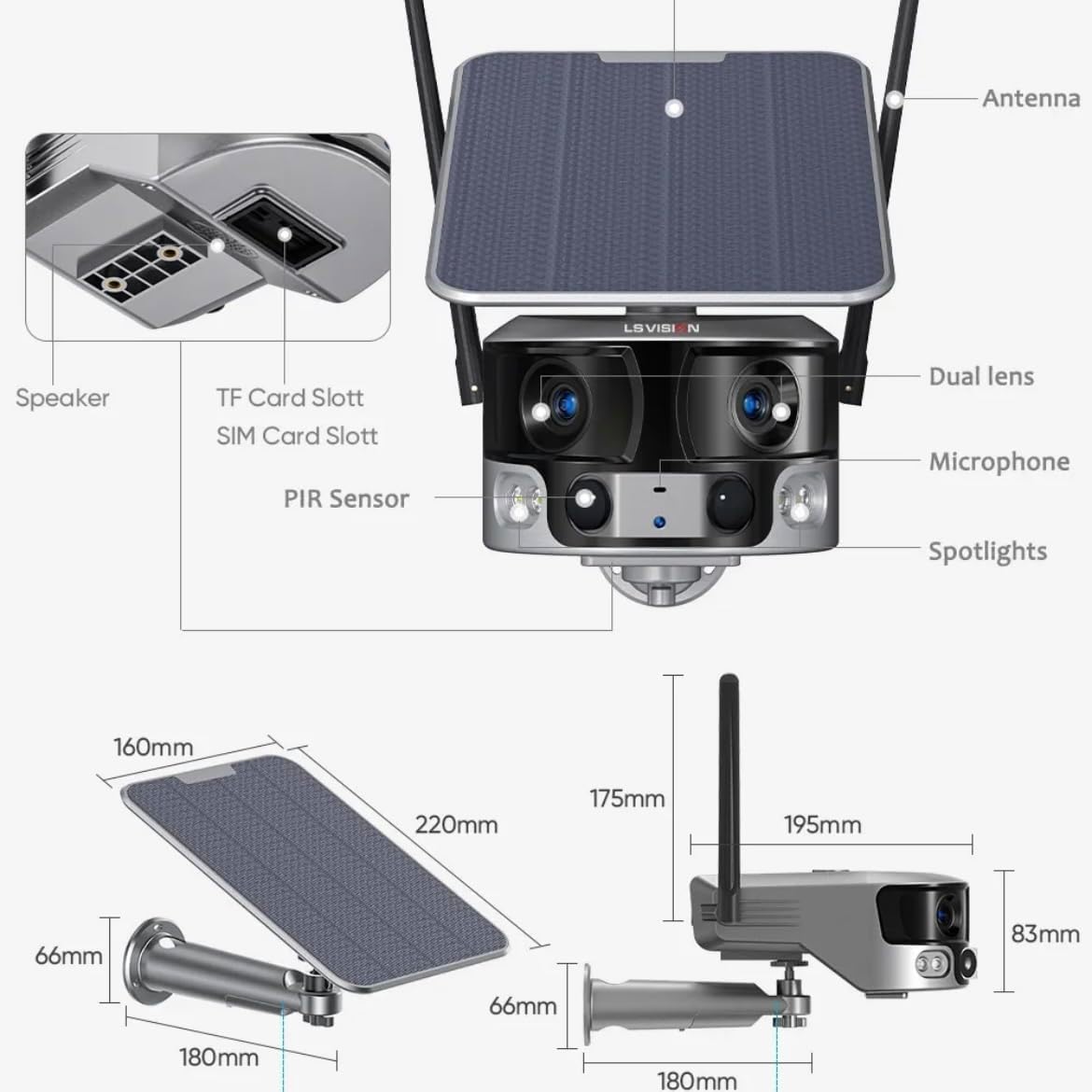
Figure 2.1: Product components and dimensions. Key parts include the solar panel, antennas, dual lens, microphone, spotlights, PIR sensor, speaker, TF card slot, and SIM card slot.
3. Contingut del paquet
Si us plau, comproveu el contingut del paquet en obrir-lo per assegurar-vos que hi hagi tots els elements i que no estiguin danyats:
- 1 x LS VISION 4K 180-Degree Ultra-Wide Angle 4G Solar-Powered Outdoor Security Camera
- 1 x Solar Panel (6W)
- 1 x Joc de suports de muntatge
- 1 x antena 4G
- 1 x Set of Screws and Wall Plugs
- 1 x 2-meter Extension Cable for Solar Panel
4. Guia de configuració
4.1 Càrrega inicial
Although the camera is solar-powered, it is recommended to fully charge the built-in batteries before the first use. Connect the camera to a 5V/2A USB power adapter (not included) using a standard USB cable for initial charging. The charging indicator will show the status.
4.2 SIM Card & TF Card Installation
Locate the SIM card slot and TF card slot on the camera (refer to Figure 2.1). Ensure the camera is powered off before inserting or removing cards.
- Open the protective cover of the card slots.
- Insert a standard 4G SIM card into the SIM card slot with the gold contacts facing down. Ensure it clicks into place.
- Insert a TF (microSD) card (up to 128GB, not included) into the TF card slot with the gold contacts facing down. Ensure it clicks into place.
- Tanqueu fermament la coberta protectora per mantenir la classificació d'impermeabilitat IP66.
4.3 Muntatge de la càmera
The camera is designed for wall mounting and outdoor use. Consider the following for optimal placement:
- Trieu una ubicació amb ampllum solar directa per al panell solar.
- Assegureu-vos que la càmera tingui clar view de la zona que voleu controlar.
- Mount the camera at a height that provides good coverage and deters tamperrant.

Figure 4.1: The LS VISION camera shown with its solar panel and mounting bracket, ready for outdoor installation.

Figure 4.2: The camera operates on a 4G network, eliminating the need for a Wi-Fi router, making it suitable for locations without existing Wi-Fi infrastructure.
The solar panel can be installed integrated with the camera or separately using the 2-meter extension cable for optimal sun exposure.
4.4 Instal·lació i connexió de l'aplicació
To access and control your camera, download the Niview app from your smartphone's app store (available for Android and iOS).
- Cerca "Niview" in the App Store or Google Play Store and install it.
- Registra un compte nou o inicia la sessió si ja en tens un.
- Segueix les instruccions de l'aplicació per afegir la càmera. Normalment, això implica escanejar un codi QR a la càmera o introduir-ne l'ID manualment.
- Un cop connectat, pots view viu footage, access recordings, and configure settings.
5. Instruccions de funcionament
5.1 Viu View & Reproducció
Access the Niview app on your smartphone or tablet to view live video streams from your camera anytime, anywhere. The app also allows you to review foo gravattage.

Figure 5.1: The Niview app interface demonstrating real-time monitoring and timeline playback, ensuring no moment is missed.
5.2 Detecció de moviment i alertes
The camera features advanced PIR and human detection capabilities. When motion or a human figure is detected, the camera will:
- Automatically begin recording a wake-up video.
- Send instant push notifications to your connected smartphone.
- Initiate automatic human tracking to follow the detected subject.

Figure 5.2: The camera's human tracking feature automatically follows detected individuals, ensuring continuous monitoring of their movement.
5.3 Visió nocturna
The camera is equipped with a dual light source design for enhanced night vision:
- Visió nocturna a tot color: Provides clear, colored images up to 20 meters in low-light conditions when spotlights are activated.
- Visió nocturna per infrarojos (IR): Offers black and white vision up to 40 meters using infrared LEDs.
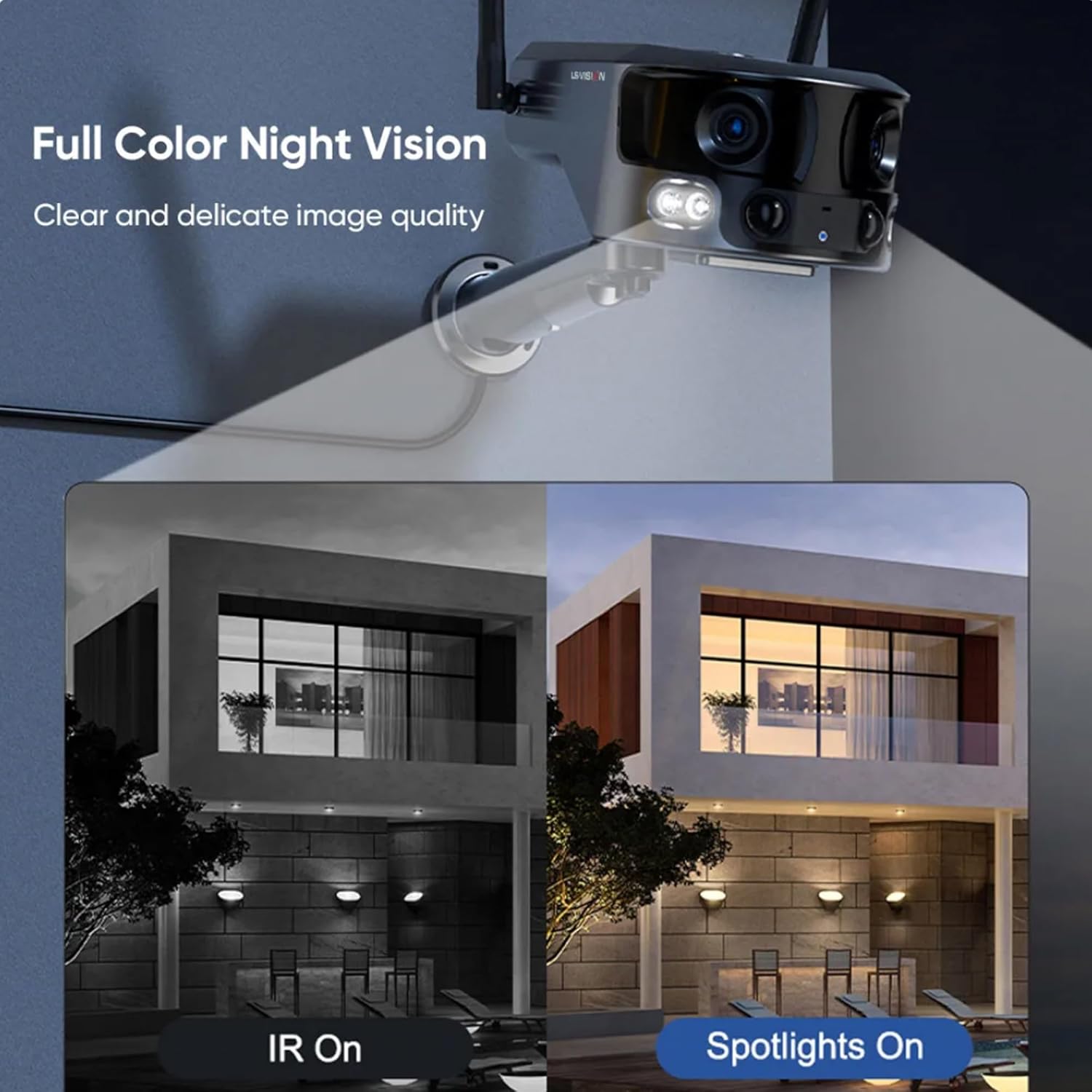
Figure 5.3: Comparison illustrating the difference between standard IR night vision and full-color night vision when the camera's spotlights are active.
5.4 Àudio bidireccional
Utilize the built-in microphone and speaker for two-way audio communication through the Niview app. This allows you to listen in on the camera's surroundings and speak through the camera.
5.5 Modes d'enregistrament
The camera supports various recording modes to suit your needs:
- 24-Hour Continuous Recording: Records continuously throughout the day.
- Trigger Recording: Records only when motion or human detection is triggered. This mode has three sub-options for customization.
6. Manteniment
Un manteniment regular garanteix un rendiment òptim i una llarga vida útil de la càmera:
- Neteja: Netegeu periòdicament la lent de la càmera i el panell solar amb un drap suau i sec.amp drap per eliminar la pols i les restes. No utilitzeu productes químics agressius.
- Cura de la bateria: Ensure the solar panel is exposed to sufficient sunlight to keep the built-in batteries charged. In prolonged periods of low sunlight, consider manually charging the camera.
- Actualitzacions de firmware: Check the Niview app regularly for firmware updates. Keeping the firmware updated ensures the latest features and security patches.
- Protecció del medi ambient: While IP66 rated, avoid exposing the camera to extreme weather conditions beyond its specified operating range if possible.

Figure 6.1: The camera's IP66 industrial-grade waterproof design ensures reliable operation even in adverse outdoor weather conditions like rain.
7. Solució De Problemes
Si teniu problemes amb la càmera, consulteu els problemes i solucions més comuns següents:
| Problema | Causa possible | Solució |
|---|---|---|
| Càmera fora de línia | No 4G signal; Low battery; SIM card issue. | Check 4G signal strength; Recharge battery; Reinsert SIM card or try a different one. |
| Mala qualitat d'imatge | Dirty lens; Insufficient light; Network bandwidth. | Clean the lens; Ensure adequate lighting or enable night vision; Check 4G network speed. |
| La detecció de moviment no funciona | Detection sensitivity too low; Incorrect settings; Obstructions. | Adjust sensitivity in app; Verify detection zone settings; Clear any obstructions. |
| La bateria no es carrega | Insufficient sunlight; Dirty solar panel; Faulty connection. | Relocate solar panel to direct sunlight; Clean solar panel; Check cable connections. |
Si el problema persisteix, poseu-vos en contacte amb l'atenció al client.
8. Especificacions
| Característica | Especificació |
|---|---|
| Nom del model | LS-MS2 |
| Resolució de captura de vídeo | 4K |
| Viewangle ing | 180 Degrees (Ultra-Wide) |
| Tecnologia de connectivitat | 4G Cellular Network (also supports Wi-Fi) |
| Font d'alimentació | Energia solar (panell solar de 6 W) |
| Capacitat de la bateria | 18000 mAh (incorporat) |
| Night Vision Range (Color) | Fins a 20 metres |
| Night Vision Range (IR) | Fins a 40 metres |
| Emmagatzematge | Cloud Storage, TF Card (Max 128GB, not included) |
| Classificació impermeable | IP66 |
| Material | Acrylonitrile Butadiene Styrene (ABS) and Metal |
| Tipus d'instal·lació | Muntatge de paret |
| Dispositius compatibles | Tablet, Smartphone (Android/iOS) |
| Dimensions del producte | 18 x 18 x 15 cm |
| Pes de l'article | 1.25 quilos |
9. Informació de la garantia
This product comes with a standard manufacturer's warranty. For specific warranty terms, duration, and claim procedures, please refer to the warranty card included in your product packaging or contact the retailer/manufacturer directly. Keep your purchase receipt as proof of purchase.
10. Atenció al client
For technical assistance, product inquiries, or troubleshooting beyond this manual, please contact LS VISION customer support. Contact details can typically be found on the product packaging, the manufacturer's official weblloc web o a través del vostre punt de compra.
Ask a question about this manual
Ask about setup, troubleshooting, compatibility, parts, safety, or missing instructions. Manuals+ will review the question and use this page’s manual context to help answer it.