
Cuifati Cuifatifmy6aqtcde
Cuifati X99 D8 DDR4 Motherboard User Manual
Model: Cuifatifmy6aqtcde
Introducció
This manual provides essential information for the installation, operation, and maintenance of your Cuifati X99 D8 DDR4 Motherboard. Please read this manual thoroughly before proceeding with installation to ensure proper setup and optimal performance.

Figura 1: Mésview of the Cuifati X99 D8 DDR4 Motherboard. This image displays the full layout of the motherboard, including the CPU socket, memory slots, and various expansion slots and connectors.
Especificacions
The Cuifati X99 D8 DDR4 Motherboard is designed for high-performance computing, supporting a range of modern components.
- Motherboard Model: X99 D8
- Factor de forma: ATX
- Tipus de sòcol de CPU: LGA2011 V3 / V4
- Ranures de memòria: 8 x DDR4 (Quad Channel)
- Capacitat màxima de memòria: 256 GB
- Interfícies d'emmagatzematge: 8 x SATA 3.0, M.2 NVME Interface (up to 32GB/s data transfer)
- Graphics Card Slots: 3 x PCIE 16X (configurable as X16/X8 for graphics cards)
- Interfície de xarxa: Gigabit Adaptive NIC
- Interfícies USB: 6 x USB 3.0 (2 front), 6 x USB 2.0 (2 front)
- Interfície PS/2: 1 x PS/2 Mouse/Keyboard Interface
- Connectors d'alimentació: 1 x 8-pin, 1 x 24-pin
- Interfícies d'expansió: 1 x M.2 Wifi Interface, 2 x PCIE 1X
- Àudio: Interfície d'àudio de 7.1 canals
- Diagnostic Feature: Digital Diagnostic Card for hardware detection at power-on.
- PCB Construction: 10-layer PCB for durability and signal isolation.

Figure 2: Diagram illustrating the 10-layer PCB construction. This design enhances durability, signal isolation, and overall electrical performance for stable operation and longer lifespan.

Figure 3: Key features of the motherboard. This image highlights the high-powered heat dissipation, all-metal heatsink for stable CPU operation, and audio isolation for enhanced sound experience.
Configuració i instal·lació
Follow these steps for proper installation of the Cuifati X99 D8 DDR4 Motherboard into your system.
- Prepareu el vostre espai de treball: Ensure your workspace is clean, well-lit, and static-free. Use an anti-static wrist strap if available.
- Instal·leu la CPU:

Figure 4: Close-up of the LGA2011 V3/V4 CPU socket. This socket is compatible with a range of high-performance processors for gaming and professional applications.
Carefully open the CPU socket lever. Align the CPU with the socket, ensuring the triangular mark on the CPU matches the mark on the socket. Gently place the CPU into the socket without forcing it. Close the lever to secure the CPU.
- Instal·leu els mòduls de memòria:
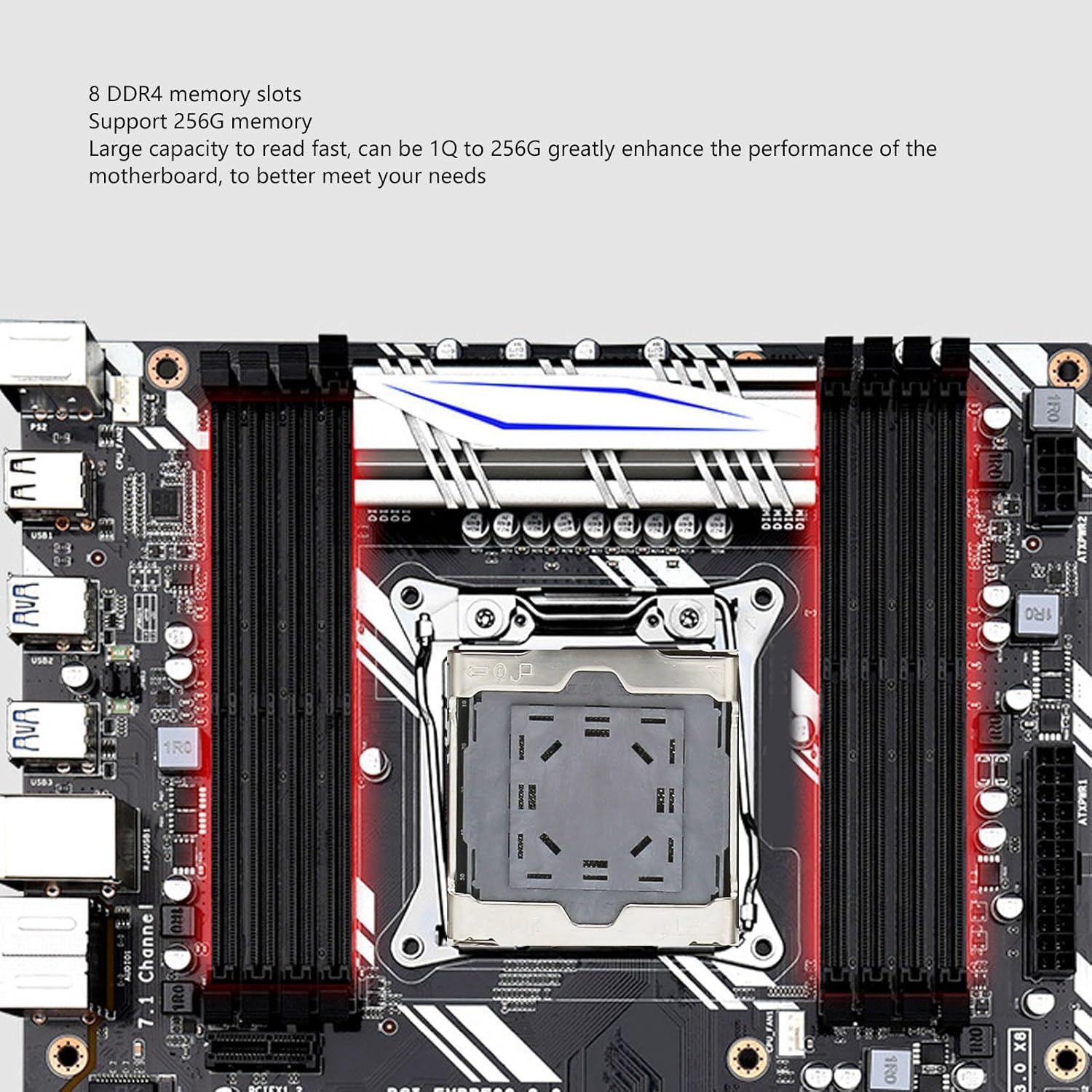
Figure 5: The 8 DDR4 memory slots on the motherboard. These slots support up to 256GB of RAM, significantly enhancing motherboard performance for demanding tasks.
Open the clips on both ends of the DDR4 memory slots. Align the memory modules with the slots, ensuring the notch on the module matches the key in the slot. Press down firmly on both ends until the clips snap into place.
- Install Storage Devices (M.2 NVME / SATA):

Figure 6: The M.2 and M.2 Wifi interfaces. The M.2 slot supports high-speed data transfer up to 32GB/s, ideal for operating systems and application drivers. The M.2 Wifi interface is designed for wireless connectivity.
For M.2 NVME SSDs, insert the module into the M.2 slot at an angle and secure it with the provided screw. For SATA drives, connect the SATA data cables to the SATA 3.0 ports on the motherboard and the power cables from your power supply.
- Install Graphics Card(s):
Insert your graphics card(s) into the PCIE 16X slots. Ensure the card is fully seated and secured with the case latch or screw.
- Connecteu la font d'alimentació:
Connecteu el connector d'alimentació ATX de 24 pins i el connector d'alimentació de la CPU de 8 pins de la font d'alimentació als ports corresponents de la placa base.
- Connecteu els cables del panell frontal:

Figure 7: Detailed diagram of the X99 D8 motherboard showing the location of various ports and connectors. This includes DDR4 memory slots, CPU power, ATX power, PCIE slots, SATA ports, M.2 interfaces, USB ports, PS/2 interface, and diagnostic card.
Refer to Figure 7 for the location of front panel headers. Connect the power switch, reset switch, HDD LED, power LED, USB, and audio cables from your computer case to the appropriate headers on the motherboard.
- Install Motherboard into Case: Carefully place the motherboard into your computer case, aligning the standoffs with the screw holes. Secure the motherboard with screws.
Instruccions de funcionament
Un cop instal·lats i connectats tots els components, podeu engegar el sistema.
- Encesa inicial: Connect your monitor, keyboard, and mouse. Power on your system. The motherboard's digital diagnostic card will automatically detect hardware devices during startup to ensure stable operation.
- Configuració de la BIOS/UEFI: Press the designated key (usually DEL or F2) during startup to enter the BIOS/UEFI setup. Here you can configure boot order, system time, and other advanced settings.
- Instal·lació del sistema operatiu: Install your preferred operating system (e.g., Windows 10) from a bootable USB drive or DVD. Ensure all necessary drivers for the motherboard components are installed after the OS installation for optimal performance.

Figure 8: A summary of the motherboard's key features, including powerful performance with 8 DDR4 memory slots, full-speed M.2 hard drive interface, digital diagnostic card, LGA2011 V3/V4 support, SATA 3.0 interface, and graphics card crossfire support.
Manteniment
Un manteniment regular ajuda a garantir la longevitat i el funcionament estable de la placa base.
- Eliminació de pols: Netegeu periòdicament la pols de la placa base i els components amb aire comprimit. Assegureu-vos que el sistema estigui apagat i desendollat abans de netejar-lo.
- Comprovació de components: Assegureu-vos que tots els cables i components estiguin ben connectats. Les connexions soltes poden provocar inestabilitat del sistema.
- BIOS/Driver Updates: Comproveu el del fabricant website for the latest BIOS/UEFI updates and drivers. Updating these can improve compatibility and performance.
- Monitorització de la temperatura: Monitor system temperatures to prevent overheating, especially for the CPU and chipset. Ensure adequate airflow within your PC case.
Resolució de problemes
Aquesta secció ofereix solucions a problemes comuns que podeu trobar.
- No Power/System Not Starting:
- Check all power connections (24-pin ATX, 8-pin CPU, graphics card power).
- Assegureu-vos que la font d'alimentació estigui encesa.
- Verify front panel power switch connection to the motherboard.
- Sense sortida de pantalla:
- Ensure the monitor is connected to the graphics card (not the motherboard, as this board does not have integrated graphics output).
- Reseat the graphics card in its PCIE slot.
- Check monitor power and input source.
- Inestabilitat/Avaries del sistema:
- Torneu a col·locar els mòduls de RAM.
- Check CPU cooler installation and thermal paste.
- Executeu eines de diagnòstic de memòria.
- The digital diagnostic card can provide error codes; consult the motherboard's specific error code list if available (not provided in this manual).
- Dispositiu no detectat:
- Assegureu-vos que el dispositiu estigui connectat correctament.
- Check device drivers are installed and up to date.
- Verifiqueu la configuració a la BIOS/UEFI.
Garantia i Suport
For warranty information and technical support, please refer to the documentation provided with your purchase or contact the seller directly. Specific warranty details and software update guarantees are not available in this manual.
Ask a question about this manual
Ask about setup, troubleshooting, compatibility, parts, safety, or missing instructions. Manuals+ will review the question and use this page’s manual context to help answer it.