
1. Introducció
Welcome to the KRUPS Sensation C10 EA910A10 Superautomatic Coffee Machine user manual. This guide provides comprehensive instructions for the safe and efficient operation, maintenance, and troubleshooting of your new coffee machine. Please read this manual thoroughly before first use and keep it for future reference.
2. Instruccions de seguretat importants
Per garantir un funcionament segur, seguiu sempre aquestes precaucions de seguretat bàsiques:
- Llegiu totes les instruccions abans d'utilitzar l'aparell.
- No submergiu l'aparell, el cable d'alimentació ni l'endoll en aigua ni en altres líquids.
- Aquest aparell està dissenyat només per a ús domèstic.
- Assegureu-vos que el voltagEl volum indicat a l'aparell correspon al volum de la xarxa elèctricatage.
- Desendolleu sempre l'aparell de la presa de corrent abans de netejar-lo o quan no l'utilitzeu.
- No feu servir cap aparell amb un cable o un endoll danyats, o després que l'aparell funcioni malament o s'hagi fet malbé de cap manera.
- Mantenir els nens allunyats de l'aparell durant el funcionament.
- Utilitzeu només accessoris recomanats pel fabricant.
- Avoid contact with hot surfaces, such as the coffee spouts or steam nozzle.
3. Components del producte
Familiarize yourself with the main components of your KRUPS Sensation C10 EA910A10 coffee machine:
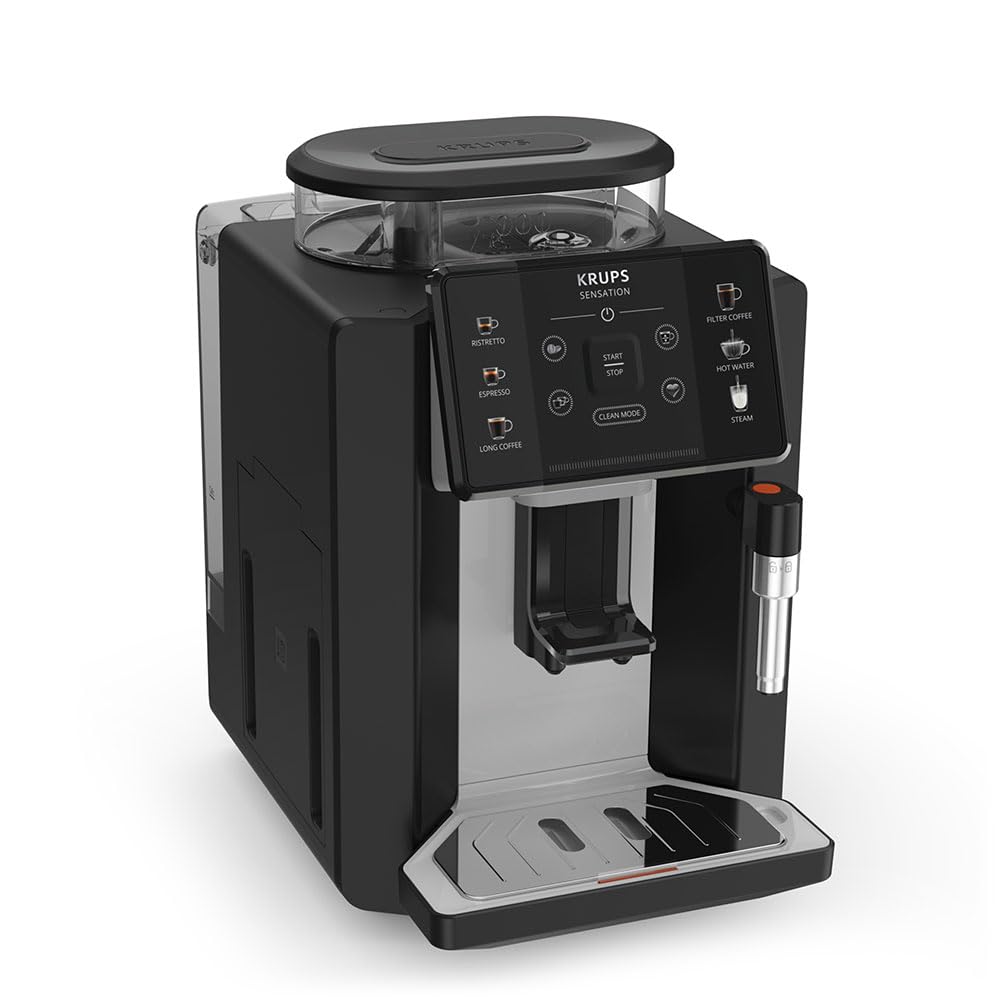
Imatge: Davant dret view of the KRUPS Sensation C10 EA910A10 Superautomatic Coffee Machine, showing the bean hopper, control panel, coffee spouts, and drip tray. Two cups of coffee are being dispensed.
- Tremuja de mongetes amb tapa
- Dipòsit d'aigua
- Control Panel (Touchscreen)
- Coffee Spouts (Adjustable)
- Drip Tray with Grid
- Contenidor de marcs de cafè
- Steam Nozzle / Hot Water Spout
- Connexió del cable d'alimentació
4. Configuració inicial
4.1. Desembalatge
- Traieu amb cura la màquina de cafè del seu embalatge.
- Traieu tots els materials d'embalatge, incloses les pel·lícules protectores i els adhesius.
- Col·loqueu la màquina sobre una superfície estable, plana i resistent a la calor, allunyada de fonts d'aigua i de calor.
4.2. Preparació per al primer ús
- Rinse the Water Tank: Remove the water tank, rinse it thoroughly with fresh water, and fill it to the MAX level. Reinsert the tank securely.
- Ompliu la tremuja de mongetes: Open the lid of the bean hopper and fill it with fresh coffee beans. Do not use ground coffee in the bean hopper.
- Connexió d'alimentació: Plug the power cord into the machine and then into a grounded electrical outlet.
- Cicle d'esbandida inicial: The machine will prompt you to perform an initial rinse cycle. Follow the instructions on the touchscreen. This primes the system and cleans internal components.
5. Instruccions de funcionament
5.1. Tauler de control acabatview

Image: A hand interacting with the intuitive touchscreen control panel of the KRUPS Sensation C10 EA910A10, highlighting its ease of use.
The KRUPS Sensation C10 EA910A10 features an intuitive touchscreen control panel for easy operation. Key functions include:
- Ristretto: For a very short, concentrated espresso.
- Cafè espresso: For a classic espresso shot.
- Cafè llarg: For a larger volume of coffee.
- Filter Coffee: For a milder, filter-style coffee.
- Aigua calenta: Per a te o altres begudes calentes.
- Vapor: Per escumar llet.
- Inici/Parada: To begin or end a brewing cycle.
- Mode de neteja: Initiates cleaning cycles.
- Coffee Strength/Volume Adjustment: Icons to customize your drink.
5.2. Elaboració de cafè
To brew a coffee beverage:
- Ensure the water tank is filled and the bean hopper contains sufficient beans.
- Col·loca una tassa sota els brocs del cafè. Ajusta l'alçada del broc si cal.
- Select your desired coffee type (e.g., Espresso, Long Coffee) from the touchscreen.
- Adjust coffee strength and volume using the on-screen options if desired.
- Press the "Start" button to begin brewing.
- The machine will grind the beans, brew the coffee, and dispense it into your cup.
- The machine will automatically stop when the brewing is complete.

Image: A selection of coffee beverages, including espresso, long coffee, and a milk-based drink, demonstrating the versatility of the KRUPS Sensation C10 EA910A10.
5.3. Funció d'aigua calenta
- Col·loqueu una tassa sota el broc d'aigua calenta.
- Select the "Hot Water" option on the touchscreen.
- Press "Start" to dispense hot water. Press "Stop" to cease dispensing.
5.4. Steam Function (for milk frothing)
- Ompliu una gerra amb llet freda.
- Position the steam nozzle into the milk.
- Select the "Steam" option on the touchscreen.
- Press "Start" to activate the steam. Move the pitcher up and down to froth the milk.
- Press "Stop" when desired froth is achieved.
- Important: Clean the steam nozzle immediately after use to prevent milk residue buildup.
6. Manteniment i Neteja
Una neteja i un manteniment regulars garanteixen un rendiment òptim i una llarga vida útil de la teva màquina de cafè.
6.1. Neteja diària
- Safata de degoteig i contenidor de cafè mòlt: Buideu i esbandiu la safata de degoteig i el contenidor de cafè mòlt diàriament o quan ho demani la màquina.
- Broquets de cafè: Netegeu els brocs del cafè amb anuncisamp tela.
- Dipòsit d'aigua: Esbandiu el dipòsit d'aigua amb aigua fresca diàriament.
6.2. Descalcificació
The machine will indicate when descaling is required. Follow the on-screen instructions and use a KRUPS-approved descaling solution.

Image: A hand inserting a cleaning tablet into the designated slot of the KRUPS Sensation C10 EA910A10, illustrating the ease of the cleaning process.
6.3. Substitució del filtre d'aigua
If your machine uses a water filter, replace it every 2-3 months or as indicated by the machine to ensure optimal water quality and prevent limescale buildup.
7. Solució De Problemes
Consulteu la taula següent per veure els problemes habituals i les seves solucions.
| Problema | Possible causa/solució |
|---|---|
| La màquina no s'encén. | Check if the power cord is securely plugged into the machine and the electrical outlet. Ensure the outlet is functional. |
| No es dispensa cafè. | Water tank empty: Fill the water tank. Bean hopper empty: Fill with coffee beans. Coffee grounds container full: Empty and clean. Descaling required: Perform descaling cycle. |
| El cafè és massa feble. | Adjust coffee strength settings on the control panel. Check if the bean hopper is sufficiently filled. Ensure fresh beans are used. |
| Fuites d'aigua de la màquina. | Check if the water tank is correctly inserted. Ensure the drip tray is properly positioned. If leakage persists, contact customer support. |
| "Clean Mode" alert persists. | Perform the indicated cleaning cycle (e.g., descaling, rinsing). Ensure all removable parts are clean and correctly reinserted. |
| Steam nozzle not frothing milk effectively. | Clean the steam nozzle thoroughly after each use to prevent blockages. Ensure cold milk is used. |
| Grinder is unusually loud or not grinding. | Check for foreign objects in the bean hopper. Ensure the bean hopper is not empty. Contact customer support if the issue persists. |
8. Especificacions tècniques
| Característica | Especificació |
|---|---|
| Número de model | EA910A10 |
| Marca | KRUPS |
| Voltage | 145 Volts |
| Poder | 1450 watts |
| Material | Acer |
| Pes del producte | 7.5 kg |
| Interfície | Pantalla tàctil |

Image: The KRUPS Sensation C10 EA910A10 coffee machine with indicated dimensions: 24 cm width, 34.6 cm depth, and 36.4 cm height.
9. Informació de la garantia
Your KRUPS Sensation C10 EA910A10 Superautomatic Coffee Machine is covered by a manufacturer's warranty. Please refer to the warranty card included in your product packaging for specific terms, conditions, and duration. Keep your proof of purchase for warranty claims.
10. Atenció al client
For further assistance, technical support, or spare parts, please contact KRUPS customer service. Contact details can typically be found on the KRUPS official website or in the warranty documentation provided with your appliance.