
1. Introducció
Gràcies per la compraasing the Audiobox TRK Pickup Truck Bluetooth Speaker. This manual provides essential information for the safe and efficient operation of your speaker. Please read it thoroughly before use and retain it for future reference.
The Audiobox TRK is a versatile portable speaker designed with a classic pickup truck aesthetic. It features multiple audio playback options including Bluetooth, FM radio, USB, TF card, and AUX input. It also includes LED headlights and taillights, and WaveSync technology for wireless stereo pairing.
2. Contingut del paquet
- Audiobox TRK Pickup Truck Bluetooth Speaker
- Cable de càrrega USB-C
- Manual d'usuari (aquest document)
3. Producte acabatview
Familiaritzeu-vos amb els components i els controls de l'altaveu.
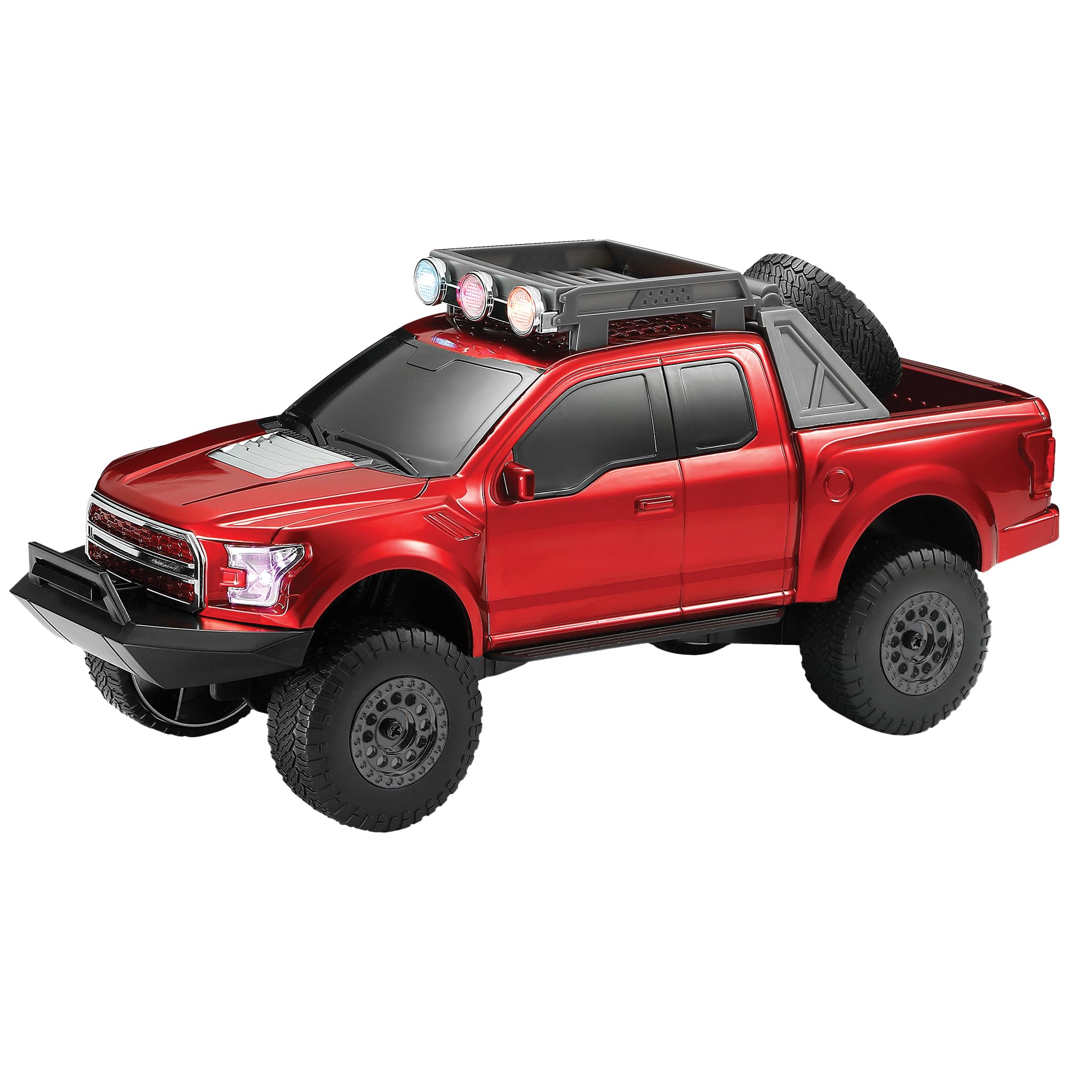
Figura 3.1: Complet view of the Audiobox TRK Pickup Truck Bluetooth Speaker.

Figura 3.2: Frontal view highlighting LED headlights and grille details.

Figura 3.3: posterior view highlighting LED taillights and exhaust details.
3.1 Tauler de control i ports

Figura 3.4: Mésview of connectivity ports.
The speaker features various ports and controls, typically located on the underside or rear of the unit, or accessible via the included remote control:
- Botó d'encesa: Activa o desactiva l'altaveu.
- Mode/Source Button: Switches between Bluetooth, FM Radio, USB, TF Card, and AUX input modes.
- Botó Reproduir/Pausa: Controla la reproducció d'àudio.
- Controls de volum: Adjusts the speaker's output volume.
- Track Navigation Buttons: Salta a la pista següent o anterior.
- Control de llum LED: Toggles the LED headlights and taillights on or off.
- Port USB: Per reproduir àudio des de unitats flash USB.
- Ranura per a targetes TF: Per reproduir àudio des de targetes TF (MicroSD).
- Entrada AUX: Per connectar dispositius d'àudio externs mitjançant un cable d'àudio de 3.5 mm.
- Port de càrrega USB-C: Per recarregar la bateria interna.
4. Configuració
4.1 Càrrega de l'altaveu
Before initial use, fully charge the speaker's built-in 1500mAh rechargeable battery.

Figura 4.1: Ubicació del port de càrrega USB-C.
- Connect the supplied USB-C charging cable to the speaker's USB-C port.
- Connecteu l'altre extrem del cable a un adaptador de corrent USB (no inclòs) o al port USB d'un ordinador.
- El llum indicador de càrrega (si n'hi ha) s'il·luminarà durant la càrrega i s'apagarà o canviarà de color quan estigui completament carregat.
- Una càrrega completa sol trigar aproximadament 2-3 hores.
4.2 Engegada/apagada
Manteniu premut el botó Botó d'engegada for a few seconds to turn the speaker on or off. A sound prompt will indicate the power status.
5. Instruccions de funcionament
5.1 Vinculació Bluetooth
Per connectar l'altaveu a un dispositiu amb Bluetooth:
- Assegureu-vos que l'altaveu estigui encès i en mode Bluetooth. Si no, premeu el botó Mode/Source Button until you hear a Bluetooth pairing prompt.
- Al dispositiu mòbil (telèfon intel·ligent, tauleta, ordinador portàtil), activeu el Bluetooth i cerqueu els dispositius disponibles.
- Select "Audiobox TRK" from the list of devices.
- Once paired, the speaker will emit a confirmation sound, and the Bluetooth indicator light will remain solid.
- Ara pots reproduir àudio des del teu dispositiu a través de l'altaveu.
5.2 Funcionament de la ràdio FM
Per utilitzar la funció de ràdio FM:
- Premeu el botó Mode/Source Button per canviar al mode de ràdio FM.
- Premeu el botó Botó Reproduir/Pausa per escanejar i desar automàticament les emissores de FM disponibles.
- Utilitza el Track Navigation Buttons to switch between saved stations.
Reproducció de targetes USB/TF de 5.3
Per reproduir música des d'una unitat USB o una targeta TF:
- Insert a USB flash drive or TF card (with MP3 audio files) al port corresponent.
- The speaker will automatically switch to USB or TF card mode and begin playback. If not, press the Mode/Source Button per seleccionar el mode correcte.
- Utilitza el Reproduir/Pausa i Track Navigation Buttons per controlar la reproducció.
5.4 Entrada AUX
To connect an external audio device via AUX:
- Connect one end of a 3.5mm audio cable (not included) to the speaker's AUX input port.
- Connecteu l'altre extrem a la presa d'auriculars o a la sortida d'àudio del dispositiu extern.
- Premeu el botó Mode/Source Button per canviar al mode AUX.
- Controla la reproducció i el volum des del teu dispositiu extern.
5.5 WaveSync Technology
WaveSync technology allows you to wirelessly pair two Audiobox TRK speakers for a synchronized stereo sound experience.
- Ensure both Audiobox TRK speakers are powered on and in Bluetooth mode, but not yet paired to any device.
- En un altaveu, premeu i manteniu premut el botó WaveSync Button (if available, or a combination of buttons as indicated in specific product documentation) until you hear a pairing tone.
- Els dos altaveus intentaran connectar-se entre si. Un cop connectats, sonarà un so de confirmació.
- Now, connect your mobile device to one of the paired speakers via Bluetooth (as described in section 5.1). Audio will play through both speakers in stereo.
5.6 Control de llums LED
The speaker features dynamic LED headlights and taillights. To control them:
- Premeu el botó Botó de control de la llum LED (if available, or refer to your remote control) to toggle the lights on or off.
6. Manteniment
- Neteja: Feu servir un drap suau i sec per netejar l'exterior de l'altaveu. No utilitzeu productes de neteja abrasius ni dissolvents.
- Emmagatzematge: Guardeu l'altaveu en un lloc fresc i sec, allunyat de la llum solar directa i de temperatures extremes.
- Cura de la bateria: To prolong battery life, fully charge the speaker before storing it for extended periods. Avoid completely draining the battery frequently.
- Exposició a l'aigua: Aquest altaveu és NO impermeable. Eviteu l'exposició a l'aigua o a la humitat excessiva.
7. Solució De Problemes
| Problema | Causa possible | Solució |
|---|---|---|
| L'altaveu no s'encén. | La bateria està esgotada. | Carregueu l'altaveu amb el cable USB-C proporcionat. |
| Sense so. | Volume is too low; incorrect source selected; device not paired. | Increase volume; press Mode/Source button; re-pair Bluetooth device. |
| L'aparellament de Bluetooth falla. | Speaker is too far from device; speaker already paired; device's Bluetooth off. | Move closer; disconnect from other devices; ensure device Bluetooth is on. |
| La recepció de ràdio FM és deficient. | Senyal feble; interferències. | Relocate the speaker; ensure no large metal objects are nearby. |
| La targeta USB/TF no funciona. | Incorrecte file format; card/drive not inserted correctly; card/drive corrupted. | Assegureu-vos files are MP3; reinsert card/drive; try a different card/drive. |
8. Especificacions
| Característica | Detall |
|---|---|
| Marca | Caixa d'àudio |
| Número de model | TRK |
| Potència de sortida màxima dels altaveus | 5 watts |
| Resposta de freqüència | 100 kHz |
| Tecnologia de connectivitat | Bluetooth, USB |
| Mode de sortida d'àudio | estèreo |
| Material de tancament | Plàstic |
| Tipus d'altaveu | Altaveu Bluetooth |
| Característiques addicionals | Portable, LED Headlights & Taillights, FM Radio, WaveSync Technology |
| Capacitat de la bateria | 1500mAh (Built-in Rechargeable) |
| Port de càrrega | USB-C |
| Mètode de control | Control remot |
| Mida de l'altaveu | 3 polzades |
| Nombre de canals d'àudio | 1.0 |
| Tipus de controlador d'àudio | Conductor dinàmic |
| Dimensions de l'article (D x W x H) | 5 "P x 13" W x 5" H |
| Dispositius compatibles | Smartphone, Tablet, MP3 Player, Desktop, Laptop |
| Font d'alimentació | Funciona amb piles, elèctric amb cable |
| És impermeable | FALSA |
9. Garantia i Suport
For warranty information and customer support, please contact the seller directly. The warranty type and description are listed as "Contact Seller".
If you encounter any issues not covered in the troubleshooting section, please reach out to the manufacturer or seller for assistance. Keep your purchase receipt as proof of purchase for any warranty claims.