
1. Introducció
This manual provides detailed instructions for the installation, operation, and maintenance of your RWRAPS Tm618N-2 Digital Programmable Timer Switch. This device is designed to automatically control the power supply to various electrical equipment according to a preset schedule, offering convenience and energy efficiency. Please read this manual thoroughly before use to ensure proper functionality and safety.
2. Informació de seguretat
- Ensure the power supply is disconnected before installation or maintenance to prevent electric shock.
- This device operates on 220V AC. Incorrect voltage can damage the unit and connected appliances.
- Installation should be performed by a qualified electrician or knowledgeable individual.
- Do not expose the timer to moisture, extreme temperatures, or corrosive environments.
- No intenteu desmuntar ni reparar la unitat vosaltres mateixos. Poseu-vos en contacte amb personal qualificat per al servei tècnic.
- The maximum load capacity must not be exceeded (16A/250VAC or 20A@30VDC).
3. Característiques del producte
- 1.6-inch LCD digital display for clear visibility.
- 7-day programmable timer with up to 16 ON/OFF settings per day.
- Integrated relay for high-power switching.
- Countdown time function.
- Clock correction/calibration function for high accuracy (less than 1s error per day).
- Keyboard lock function to prevent accidental operations.
- Manual ON/OFF override.
- Long-life silicone buttons.
4. Contingut del paquet
En obrir el paquet, comproveu que tots els components hi siguin presents i que no estiguin danyats.
- 1 x RWRAPS Tm618N-2 Digital Programmable Timer Switch
- 1 x Manual d'usuari (aquest document)
5. Producte acabatview

Figura 5.1: Frontal View of the Timer Switch. This image displays the front of the RWRAPS Tm618N-2 timer switch, showing the LCD screen, control buttons (WEEK, HOUR, MIN, RECALL, CLOCK, PROG, MANUAL), and the 'R' reset button. The screen shows "MO AM 6:18 18 AUTO".
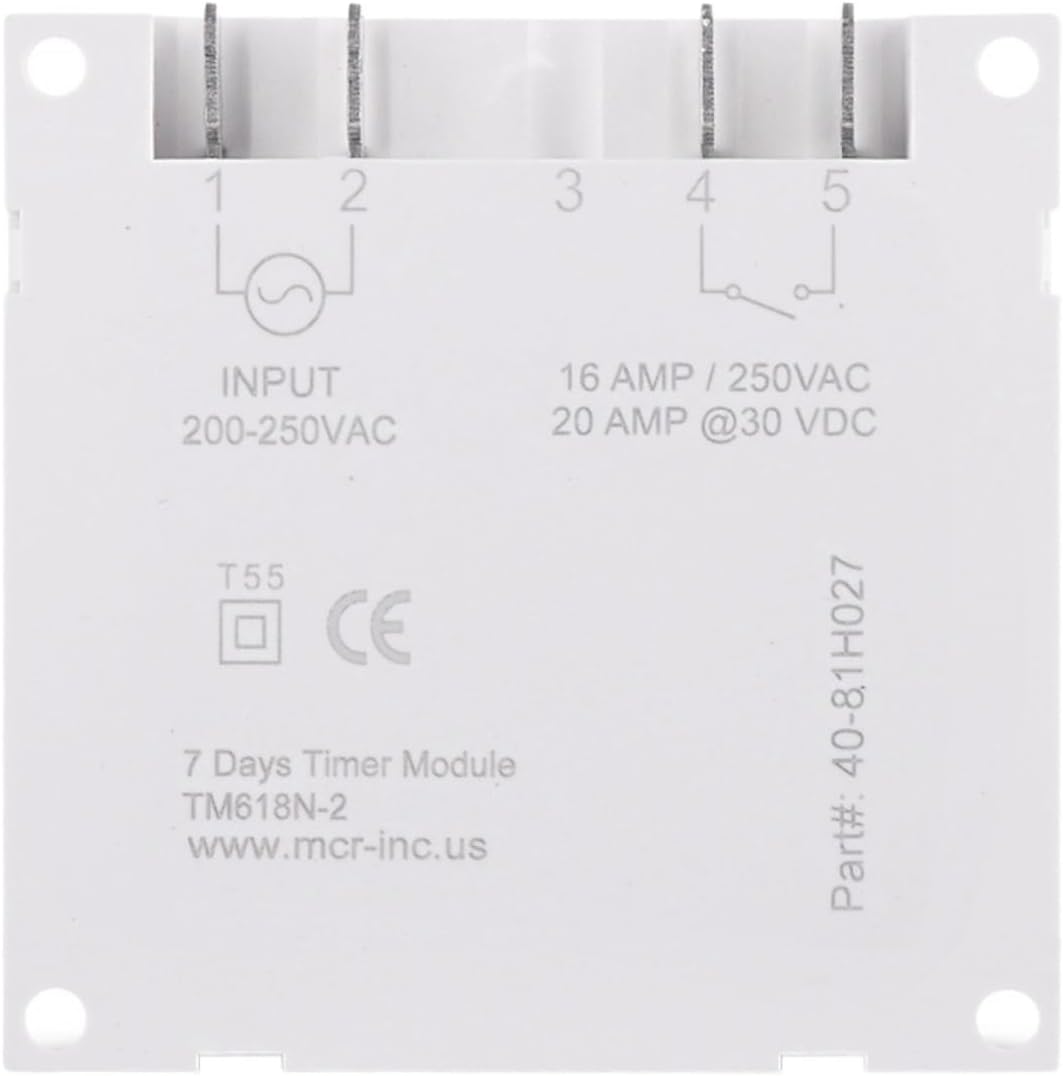
Figura 5.2: Esquena View and Wiring Diagram. This image shows the rear of the timer switch, detailing the input and output terminals. It indicates "INPUT 200-250VAC" on terminals 1 and 2, and "16 AMP / 250VAC, 20 AMP @30 VDC" on terminals 4 and 5, which are the relay contacts. Terminal 3 is not used. The model number "TM618N-2" is also visible.
6. Instal·lació i cablejat
Important: Ensure power is disconnected before proceeding with installation. Incorrect wiring can cause damage or injury. If you are unsure, consult a qualified electrician.
- Muntatge: The timer switch is designed for panel mounting or DIN rail mounting (if an adapter is used, not included). Secure the unit in a suitable enclosure or panel.
- Power Input (200-250VAC): Connect the live (L) and neutral (N) wires of your 220V AC power supply to terminals 1 i 2 on the back of the timer. Refer to Figure 5.2.
- Load Output (Relay Contacts):
- Connect the live wire from your load (e.g., light, fan) to terminal 4.
- Connect the live wire from your power source (the same 220V AC supply or a separate DC supply) to terminal 5.
- The neutral wire of your load should be connected directly to the neutral of your power source, bypassing the timer switch.
Nota: Terminals 4 and 5 are dry contacts (voltage-free relay contacts). They can switch either AC (up to 250V, 16A) or DC (up to 30V, 20A) loads. Ensure your load's power requirements do not exceed these ratings. Terminal 3 is not used.
- Engegada inicial: After wiring, restore power. The LCD screen should illuminate. If it does not, check your wiring.
7. Instruccions de funcionament
7.1. Initial Setup and Clock Setting
- Restablir: Press the 'R' button (recessed, use a pointed object) to clear all settings and reset the timer. The display will show "0:00".
- Estableix l'hora actual:
- Manteniu premut el botó RELOJ botó.
- Mentre aguanta RELOJ, premeu SETMANA to set the current day of the week (MO, TU, WE, TH, FR, SA, SU).
- Mentre aguanta RELOJ, premeu HORA to set the current hour (0-23 for 24-hour format).
- Mentre aguanta RELOJ, premeu MIN per ajustar els minuts actuals (0-59).
- Format 12/24 hores: Premeu RELOJ i PROG simultaneously to toggle between 12-hour (AM/PM) and 24-hour formats.
7.2. Programació dels temps d'encesa/apagada
El temporitzador permet fins a 16 programes d'encesa/apagada.
- Premeu el botó PROG button once. The display will show "1 ON" and the time will flash.
- Premeu SETMANA to select the day(s) for this program. You can choose a single day, weekdays, weekends, or various combinations.
- Premeu HORA per configurar l'hora d'encesa desitjada.
- Premeu MIN per ajustar el minut d'encesa desitjat.
- Premeu PROG again. The display will show "1 OFF" and the time will flash.
- Repeat steps 2-4 to set the desired OFF time for the first program.
- Premeu PROG to cycle through "2 ON", "2 OFF", and so on, up to "16 OFF". Repeat the setting process for each desired program.
- Per sortir del mode de programació, premeu RELOJ botó.
Nota: If you need to cancel a program, press RECORDA mentre viewing the specific ON or OFF program. This will replace the time with "--:--", effectively disabling that program step.
7.3. Anul·lació manual
Premeu el botó MANUAL botó per circular pels modes següents:
- AUTO ON: The timer is currently ON and will follow the programmed OFF times.
- APAGAT AUTOMÀTIC: The timer is currently OFF and will follow the programmed ON times.
- ACTIVITAT: La sortida del temporitzador està contínuament activada, anul·lant tots els programes.
- DESACTIVAT: La sortida del temporitzador està contínuament en OFF, anul·lant tots els programes.
For automatic operation, ensure the timer is set to either "AUTO ON" or "AUTO OFF".
7.4. Funció de compte enrere
The countdown function allows you to set a specific duration after which the timer will switch its state (ON to OFF, or OFF to ON).
- While in normal clock display mode, press and hold the PROG button for approximately 3 seconds. The display will show "d ON" or "d OFF" and the time will flash.
- Premeu HORA i MIN to set the desired countdown duration (up to 99 hours and 59 minutes).
- Premeu PROG again to start the countdown. The display will show the remaining time.
- Per cancel·lar el compte enrere, premeu PROG de nou.
8. Manteniment
- Keep the timer switch clean and free from dust. Use a soft, dry cloth for cleaning.
- No utilitzeu netejadors abrasius ni dissolvents.
- Reviseu periòdicament les connexions del cablejat per assegurar-vos que estiguin ben fixades.
- The internal battery (for timekeeping during power outages) is not user-replaceable. If the timer loses time frequently, the battery may need professional service.
9. Solució De Problemes
| Problema | Causa possible | Solució |
|---|---|---|
| La pantalla està en blanc. | No power supply; internal battery depleted. | Check power connections. If power is present, the internal battery may need charging (leave connected to power for several hours) or replacement (professional service). |
| El temporitzador no s'encén/apaga tal com està programat. | Incorrect program settings; timer in manual ON/OFF mode; incorrect wiring. | Verify program settings (ON/OFF times, days). Ensure the timer is in "AUTO ON" or "AUTO OFF" mode. Check wiring connections. |
| El temps és inexacte. | Internal clock drift; internal battery issue. | Reset and re-set the clock. If the issue persists, the internal battery may be failing. |
| Els botons no responen. | Keyboard lock engaged; unit malfunction. | Mantén premut RELOJ for 3 seconds to unlock the keyboard. If still unresponsive, try resetting the unit. |
10. Especificacions tècniques
| Model | Tm618N-2 |
| Marca | RWRAPS |
| Entrada Voltage | 200-250VAC |
| Output (Relay) Capacity | 16A / 250VAC, 20A @ 30VDC |
| Programmable Cycles | 16 programes d'encesa/apagada per dia/setmana |
| Mostra | LCD de 1.6 polzades |
| Error de temps | Less than 1 second per day |
| Material | Plàstic |
| Pes | Approx. 200 Grams (7.1 ounces) |
11. Informació de la garantia
As per product specifications, this RWRAPS Tm618N-2 Digital Programmable Timer Switch comes with Sense garantia. Please refer to your retailer's return policy for details on product returns or exchanges.
12. Atenció al client
For any questions, technical assistance, or issues not covered in this manual, please contact your product retailer or the manufacturer, RWRAPS, through their official support channels.