
Producte acabatview
The Hikity 1 Din Car Stereo is a versatile in-car entertainment system featuring a 6.9-inch HD touchscreen. It integrates modern connectivity options such as wired Apple CarPlay and Android Auto, Bluetooth 5.0, and Mirror Link functionality. The unit also includes an FM radio tuner, multi-band equalizer, support for steering wheel controls, and a dedicated input for a rear view càmera.

Imatge: Frontal view of the Hikity 1 Din Car Stereo with its 6.9-inch touchscreen display.
Característiques principals:
- Pantalla tàctil HD de 6.9 polzades: Provides a clear and vivid display with a resolution of 1280 x 480 pixels.
- Wired Apple CarPlay & Android Auto: Seamlessly connect your smartphone via USB for navigation, music, calls, and more.
- Bluetooth 5.0: For stable hands-free calling and wireless audio streaming.
- Funció d'enllaç mirall: Display your phone's screen content directly on the car stereo via USB cable.
- Sintonitzador de ràdio FM: Access preset stations for music, news, and weather broadcasts.
- Multi-band EQ: Customize audio output with various sound effect adjustments.
- Steering Wheel Control (SWC) Support: Control essential functions directly from your vehicle's steering wheel.
- HD Rear Camera Input: Automatically displays the rear view when reversing (camera included).
- Ports USB dobles: For connectivity and charging.
Configuració i instal·lació
Proper installation is crucial for the optimal performance of your Hikity car stereo. It is recommended to have this unit installed by a professional car audio technician.
Contingut del paquet:
Abans de la instal·lació, comproveu que hi hagi tots els components:
- Car MP5 Player (Main Unit)
- Cable d'alimentació
- Cable de banya
- Accessories (Mounting brackets, screws)
- Micròfon (MIC)
- Control remot
- Manual d'usuari
- Rear Camera (12LED)

Image: Product dimensions (187mm width, 70mm height, 80mm depth) and a visual list of included accessories: Horn Cable, Power Cable, Remote Control, User Manual, MIC, 12LED Rear Camera.
Dimensions d'instal·lació:
The installation dimensions for this 1 Din car stereo are approximately 187mm (Width) x 80mm (Depth) x 70mm (Height).

Image: Visual comparison showing the installation effect of the Hikity car stereo compared to a traditional car radio, highlighting the larger screen.
Esquemes de cablejat:
Refer to the following diagrams for correct wiring connections. Incorrect wiring can damage the unit or your vehicle's electrical system.

Image: Main wiring diagram illustrating connections for front/rear speakers, auto antenna power, steering wheel controls (SW1, SW2), reverse input, illumination, ACC (ignition switch), B+ (constant power), and GND (ground).
Backup Camera Wiring:
Connect the included rear camera according to the diagram below. The pink wire (Reverse) should be connected to the vehicle's reverse light signal for automatic camera activation.

Image: Backup camera wiring diagram detailing the connection of the camera's power and video signal to the car stereo and the reverse light circuit.
Instruccions de funcionament
Encès/apagat:
- Press and hold the power button on the front panel to turn the unit on or off.
- A short press of the power button typically mutes/unmutes the audio.
Interfície de pantalla tàctil:
Navigate through menus and functions by tapping or swiping on the 6.9-inch HD touchscreen. The main menu provides access to various features like Radio, PhoneLink (CarPlay/Android Auto/Mirror Link), USB, AUX, Movie, BT (Bluetooth), and Setup.

Image: The car stereo's 1080P HD display showcasing the Bluetooth connection screen and a high-definition image.
Apple CarPlay / Android Auto:
Connect your iPhone or Android smartphone to the car stereo via a USB cable. The system will automatically launch Apple CarPlay or Android Auto, allowing you to access compatible apps, navigation, music, and voice assistants directly from the stereo's screen.
- Ensure your phone is unlocked and has CarPlay/Android Auto enabled.
- Use a high-quality USB data cable for stable connection.
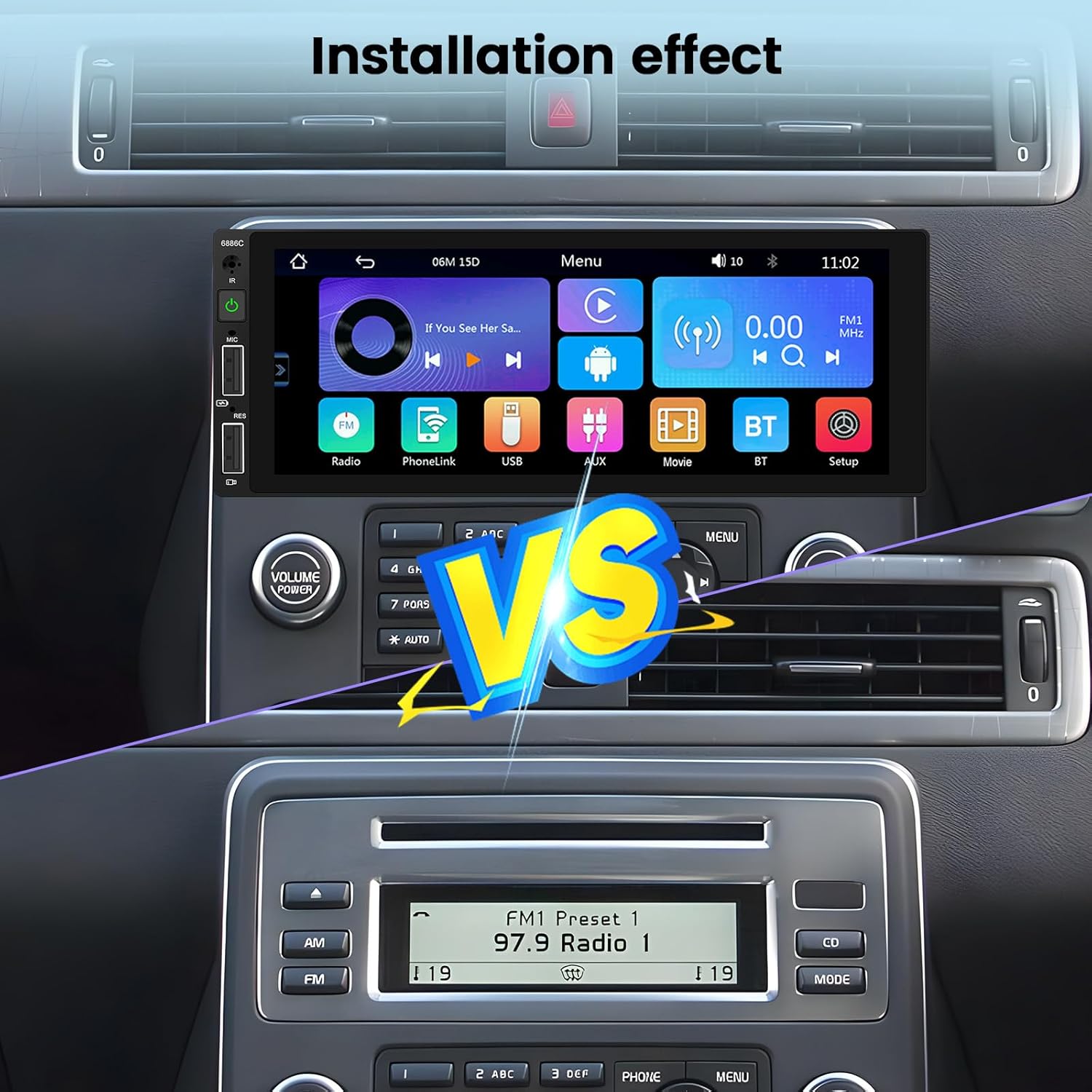
Image: The car stereo demonstrating wired CarPlay and Android Auto functionality, showing phone integration via USB.
Enllaç mirall:
Mirror Link allows you to display your smartphone's screen content on the car stereo. Connect your phone via USB cable and follow the on-screen prompts to activate Mirror Link. This feature is useful for displaying maps, videos, or other applications not natively supported by CarPlay/Android Auto.

Image: The car stereo displaying a mirrored navigation app from a smartphone, connected via USB for Mirror Link.
Connectivitat Bluetooth:
Pair your smartphone with the car stereo via Bluetooth for hands-free calling and audio streaming.
- Go to the 'BT' or 'Bluetooth' menu on the car stereo.
- Activeu el Bluetooth al vostre telèfon intel·ligent i cerqueu els dispositius disponibles.
- Select 'Hikity' or the device name displayed on the stereo.
- Confirma el codi d'emparellament si se't demana.

Image: The car stereo interface showing Bluetooth call management (answer/hang up) and music playback, as well as the USB port for fast charging and data.
Ràdio FM:
Access the 'Radio' function from the main menu. You can manually tune to stations or use the auto-scan feature to find and save available stations.
Configuració de l'equalitzador (EQ):
Customize your audio experience by adjusting the equalizer settings. Access the EQ menu through 'Setup' or 'Sound Setup'. You can select from preset modes (e.g., Jazz, Classic, Pop) or manually adjust frequency bands for a personalized sound.

Image: The car stereo interface displaying the FM radio tuner with preset stations and the multi-band equalizer for sound customization.
Control del volant (SWC):
If your vehicle supports steering wheel controls, you can configure them to operate the car stereo. This requires a learning process within the stereo's settings.
- Go to 'Settings' > 'Steering Wheel Control' or 'Wheel' in the menu.
- Follow the on-screen instructions to assign functions to your vehicle's steering wheel buttons. This typically involves pressing a button on the steering wheel and then selecting the corresponding function on the stereo's screen.

Image: The car stereo displaying the backup camera view and the interface for setting up steering wheel controls.

Imatge: Una imatge detallada view of the steering wheel control setup screen, with a note emphasizing the need to complete the button learning process for functionality.
Càmera posterior:
When the vehicle is shifted into reverse gear, the car stereo will automatically display the feed from the connected rear camera. The camera provides a 140° wide-angle view with HD night vision capabilities.
Adjustable Button Colors:
You can customize the color of the physical buttons on the car stereo to match your vehicle's interior lighting or personal preference. This setting is typically found in the 'Display Settings' or 'Setup' menu.

Image: Visual representation of the car stereo's buttons with different color options, demonstrating the customizable button backlighting.
Manteniment
To ensure the longevity and optimal performance of your Hikity car stereo, follow these maintenance guidelines:
- Neteja de la pantalla: Feu servir un drap suau i sense borrissol per netejar suaument la pantalla tàctil. Per a taques difícils, fregueu lleugeramentampNetegeu el drap amb aigua o un netejador de pantalles. Eviteu materials abrasius o productes químics agressius.
- Neteja general: Mantingueu la unitat neta de pols i deixalles. Feu servir un raspall suau o aire comprimit per netejar els voltants dels botons i els ports.
- Eviteu temperatures extremes: No exposeu la unitat a temperatures extremes de calor o fred durant períodes prolongats, ja que això pot afectar els seus components electrònics.
- Gestió de cables: Assegureu-vos que tots els cables estiguin connectats correctament i que no estiguin pinçats ni danyats.
Resolució de problemes
Si teniu problemes amb l'estèreo del vostre cotxe, consulteu els passos habituals següents per resoldre problemes:
Sense energia:
- Check all power connections (B+, ACC, GND) to ensure they are secure and correctly wired.
- Verify the vehicle's fuse for the car stereo.
- Ensure the ignition is on (ACC power).
Sense so:
- Comproveu les connexions del cablejat dels altaveus.
- Ensure the volume is not muted or set to zero.
- Verify the audio source (FM, USB, Bluetooth) is correctly selected.
CarPlay/Android Auto no es connecta:
- Use an original or certified high-quality USB data cable.
- Assegureu-vos que el sistema operatiu del vostre telèfon intel·ligent estigui actualitzat.
- Restart both your phone and the car stereo.
- Check phone settings to ensure CarPlay/Android Auto is enabled.
La càmera posterior no mostra:
- Verifiqueu les connexions d'alimentació i de senyal de vídeo de la càmera.
- Ensure the pink 'Reverse' wire is correctly connected to the vehicle's reverse light signal.
- Check if the camera itself is functioning.
Els comandaments del volant no funcionen:
- Ensure the SWC wires (SW1, SW2) are correctly connected.
- Perform the steering wheel button learning process in the stereo's settings.
If these steps do not resolve the issue, please contact Hikity customer support for further assistance.
Especificacions
| Marca | Hikity |
| Número de model | 6886C |
| Mida de la pantalla | 6.9 polzades |
| Resolució de pantalla | 1280 x 480 |
| Tecnologia de connectivitat | Bluetooth, USB (Wired CarPlay/Android Auto/Mirror Link) |
| Versió Bluetooth | 5.0 |
| Característiques especials | Android Auto, Apple CarPlay, Built-in Bluetooth, FM Tuner, Mirror Link, Rear Camera Input, Steering Wheel Control Support |
| Dispositius compatibles | Smartphones (iOS and Android) |
| Mode de sortida d'àudio | estèreo |
| Configuració de so envoltant | 2.0 |
| Suport de codificació de vídeo | MKV/RMVB/AVI/MP4/MDV, etc. |
| Color | Negre |
| Dimensions del producte (P x A x A) | 80 mm x 187 mm x 70 mm |
| Potència de sortida | 45 watts x 4 canals |
| Mètode de control | Touchscreen, Remote Control, App (via connected smartphone) |
| País d'origen | Xina |
Garantia i Suport
Garantia del producte:
This Hikity car stereo comes with a 12 mesos de garantia des de la data de compra, cobrint defectes de fabricació i avaries en condicions d'ús normal.
Atenció al client:
Hikity provides lifetime online support for this product. If you have any questions, require technical assistance, or need to claim warranty service, please contact our support team. We aim to respond to all inquiries within 24 hours.
Correu electrònic de contacte: hikitysales@163.com
Please include your product model number (6886C) and a detailed description of your issue when contacting support to ensure a prompt resolution.