
Introducció
Thank you for choosing the ODK 140cm L-Shaped Gaming Desk. This manual provides essential information for the safe and efficient assembly, operation, and maintenance of your new desk. Please read these instructions carefully before beginning assembly and retain them for future reference.
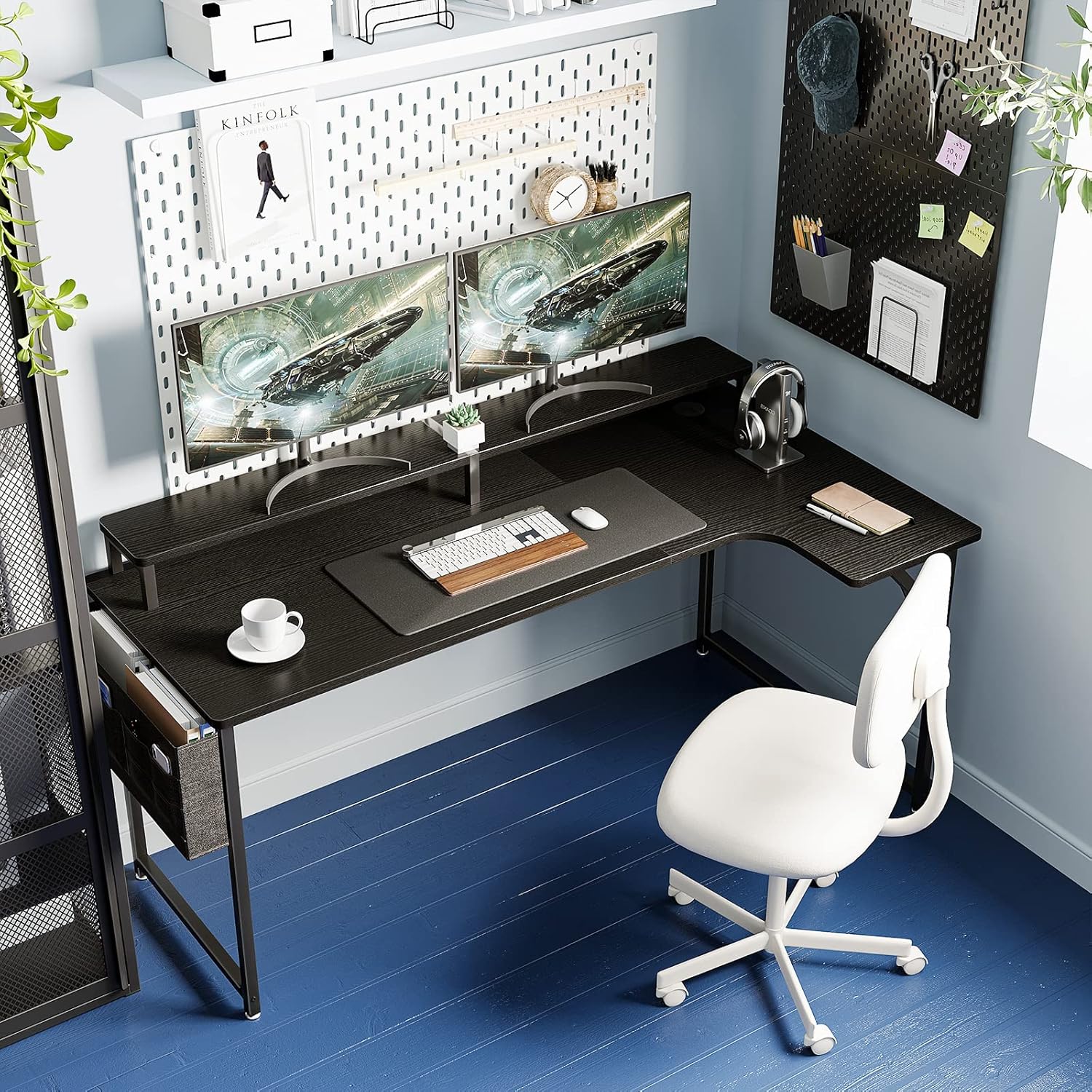
Image: The ODK L-shaped gaming desk set up with dual monitors, a keyboard, mouse, and a comfortable office chair, showcasing el seu disseny espaiós.
Informació de seguretat
- Munta sempre l'escriptori sobre una superfície suau i neta per evitar ratllades.
- Assegureu-vos que tots els cargols i elements de fixació estiguin ben ajustats abans d'utilitzar-los. Comproveu-los i torneu-los a apretar periòdicament si cal.
- Do not overload the desk. Refer to the specifications for weight capacity.
- Mantingueu les peces petites fora de l'abast dels nens durant el muntatge per evitar riscos d'asfíxia.
- Eviteu col·locar objectes calents directament sobre la taula sense protecció.
Contingut del paquet
Before assembly, verify that all components are present and undamaged. A Japanese assembly manual and necessary tools (e.g., wrench) are included.
- Desk Top Panels (2 sections)
- Monitor Stand Panels (2 sections)
- Components de l'estructura d'acer (potes, barres de suport)
- Hardware Pack (Screws, bolts, dowels, adjustable feet)
- Fabric Storage Bag
- Assembly Tools (Wrench)
- Japanese Assembly Manual
Instruccions de muntatge i muntatge
Assembly requires two people for ease and safety. Please follow the detailed steps provided in the included Japanese assembly manual. The main tabletop consists of two panels that connect to form the L-shape.
- Desempaquetar i identificar les peces: Lay out all components on a clean, soft surface. Refer to the parts list in the manual to identify each piece.
- Muntar el marc principal de l'escriptori: Connect the steel frame components according to the manual. Ensure all connections are stable.
- Attach Desk Top Panels: Carefully align and attach the two desk top panels to the frame. Note that these panels connect using wooden dowels and are secured from underneath with an iron frame. Do not overtighten screws.
- Assemble and Attach Monitor Stand: The monitor stand also consists of two panels. Connect them using the provided metal fittings. Exercise caution not to overtighten screws to prevent cracking. Secure the assembled monitor stand to the main desk top.
- Instal·leu la bossa d'emmagatzematge: Attach the fabric storage bag to the designated area on the side of the desk.
- Ajustar els peus de nivellació: Un cop muntat, col·loca l'escriptori a la ubicació desitjada. Ajusteu els peus anivelladors a la part inferior de les potes per assegurar-vos que l'escriptori estigui estable i anivellat en terres irregulars.

Image: Detailed diagram illustrating the overall dimensions of the ODK L-shaped desk, including the main desk surface height, monitor stand height, and total width and depth.
Instruccions de funcionament
L-Shaped Design for Enhanced Workspace
The L-shaped design maximizes corner space, allowing for simultaneous multi-tasking. The extended right side provides ample room for various activities, whether for home use or office work. The tabletop features rounded corners to minimize the risk of injury and prevent scratches, making it suitable for children's study areas.

Imatge: Una vista aèria view of the ODK L-shaped desk, demonstrating how the extended section provides additional workspace for a laptop and other items, facilitating efficient multi-tasking.
Integrated Monitor Stand for Ergonomics
The elevated monitor stand raises your screen by approximately 11.5 cm, promoting a correct sitting posture. This reduces strain on your neck and shoulders, allowing for comfortable use even during long hours. The two-tier structure of the monitor stand also effectively increases your usable desktop area, boosting work efficiency.

Image: A visual comparison illustrating the ergonomic benefits of the monitor stand, showing how it helps achieve a better posture and reduces neck and shoulder strain during extended desk work.
Bossa d'emmagatzematge convenient
The included storage bag is designed to resist deformation even when holding heavy items. It offers ample space for documents, stationery, and other small items you want to keep within reach. This helps keep your desk tidy and organized, allowing you to quickly access what you need.

Imatge: Un primer pla view of the practical fabric storage bag attached to the desk, demonstrating its capacity to hold various items like documents, a smartphone, and eyeglasses, keeping them organized and accessible.
Gestió de cables
The desk includes a cable management grommet to help organize and route your computer and peripheral cables, keeping your workspace neat and clutter-free.

Imatge: Una imatge detallada view of the cable management grommet integrated into the desk surface, designed to help users keep their cables tidy and out of sight.
Manteniment
- Neteja de la taula: The melamine tabletop material is easy to clean. Simply wipe away dirt or spills with a damp tela. Eviteu netejadors abrasius que puguin danyar la superfície.
- Cura del marc: The high-strength steel frame is durable. Wipe with a dry or slightly damp drap per eliminar la pols.
- Comprovacions periòdiques: Periodically inspect all screws and connections to ensure they remain tight. Retighten if any looseness is detected to maintain stability.
Resolució de problemes
- Desk Wobbles: Ensure all assembly screws are tightened. Adjust the leveling feet at the bottom of the desk legs to compensate for uneven floor surfaces.
- Missing Parts or Initial Defects: If you encounter any initial defects or find that parts are missing upon delivery, please contact ODK customer support immediately for assistance.
- Monitor Stand Screws Cracking: When assembling the monitor stand, avoid overtightening the screws to prevent potential cracking of the panels.
Especificacions
| Característica | Detall |
|---|---|
| Marca | ODK |
| Número de model | B0CLY5JHFM |
| Dimensions totals (L x P x A) | 140 cm x 50/74 cm x 85.5 cm |
| Alçada de la superfície de l'escriptori | 74 cm |
| Monitor Stand Height Increase | Aprox. 11.5 cm |
| Pes del producte | 16.4 kg |
| Pes del paquet | 18.5 kg |
| Color | Negre |
| Estil | en forma de L |
| Material | Melamine tabletop, Steel frame |
| Tipus d'acabat | Powder coating (frame) |
| Característiques especials | Monitor stand, Storage bag, Cable management grommet, Adjustable feet |
| Ús recomanat | Gaming, Computer Desk, Study Room |
Garantia i Suport
ODK is committed to providing quality products. In the event of any initial defects or missing parts with your purchased product, please do not hesitate to contact our customer support team at any time. We are here to assist you with any issues or questions you may have regarding your ODK L-Shaped Gaming Desk.
For support, please refer to the contact information provided with your purchase documentation or visit the official ODK weblloc.