
1. Introducció
This user manual provides detailed instructions for the setup, operation, and maintenance of your BL Android TV Box 11.0. Designed for an enhanced home entertainment experience, this device transforms your television into a smart hub, offering access to a wide range of streaming content, applications, and multimedia features. Please read this manual carefully before using the product to ensure optimal performance and longevity.
2. Contingut del paquet
Si us plau, verifiqueu que tots els elements que s'enumeren a continuació estiguin inclosos al vostre paquet:
- Android TV Box (1 unit)
- Comandament a distància (1 unitat)
- Adaptador de corrent (1 unitat)
- Cable HDMI (1 unitat)
- Manual d'usuari (1 unitat)

Image: All components included in the BL Android TV Box 11.0 package.
3. Configuració
Follow these steps to set up your BL Android TV Box:
- Connecteu el cable HDMI: Insert one end of the HDMI cable into the HDMI OUT port on the TV Box and the other end into an available HDMI input on your television.
- Connecteu l'adaptador de corrent: Plug the power adapter into the DC IN port on the TV Box, then plug the other end into a power outlet.
- Connecteu-vos a la xarxa: Once powered on, connect the TV Box to your network. You can use either Wi-Fi (2.4G/5G Dual Band) or an Ethernet cable for a wired connection. Navigate to 'Settings' > 'Network' to configure your connection.
- Configuració inicial: Follow the on-screen prompts to complete the initial setup, including language selection, time zone, and Google account login.
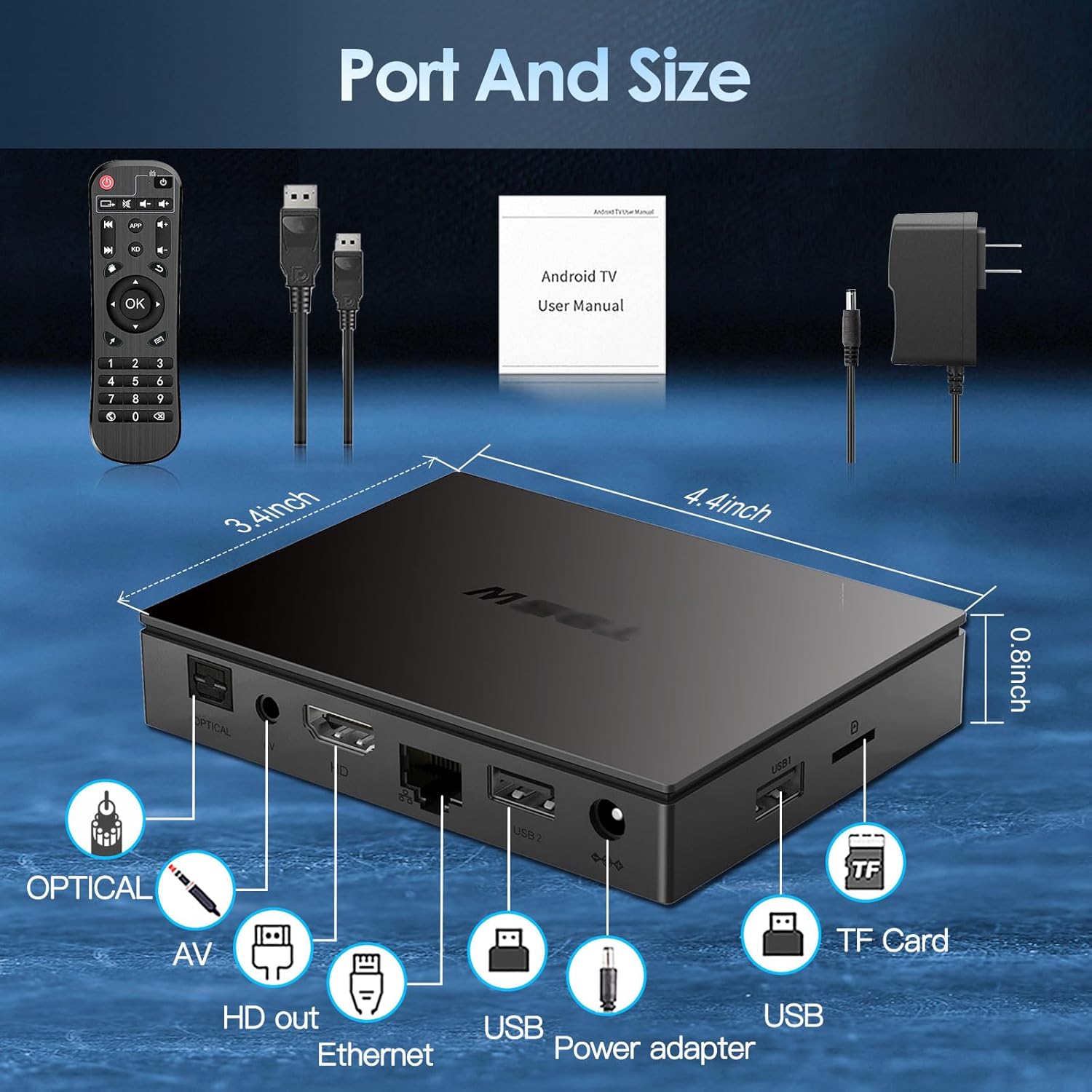
Image: Visual guide for connecting the BL Android TV Box to your television and power.
4. Instruccions de funcionament
Once set up, you can begin using your BL Android TV Box to access various features:
- Navegació: Use the included remote control to navigate through the Android 11.0 interface. The directional pad and 'OK' button are used for selection, while 'Back' and 'Home' buttons provide quick navigation.
- Accés a l'aplicació: The home screen displays pre-installed applications like YouTube, Netflix, Google Play Store, and Chrome. You can download additional apps from the Google Play Store.
- Reproducció multimèdia: Play local media files from USB drives or TF cards connected to the TV Box. The device supports various video and audio formats.
- Replica de pantalla: Utilize the wireless screen mirroring function to cast content from your smartphone or tablet to your TV. This feature supports Airplay, DLNA, and Miracast protocols.

Image: The user interface of the Android 11.0 operating system on the TV Box.

Image: Demonstration of wireless screen mirroring from mobile devices to the TV.
5. Característiques
The BL Android TV Box 11.0 is equipped with advanced features for a superior entertainment experience:
- Powerful Amlogic S905W2 CPU: Powered by a Quad-Core Cortex-A35 processor, ensuring smooth performance, efficient image processing, and broad app compatibility.
- Ultra-High Definition Viewing: Supports 4K HDR10+ technology and the latest AV1 encoding, delivering realistic visuals, efficient video compression, and enhanced picture quality.
- Dual-Band Wi-Fi & Bluetooth 5.0: Features 2.4G/5G dual-band Wi-Fi for stable and fast wireless connectivity, and Bluetooth 5.0 for connecting peripherals like headphones, speakers, keyboards, and gamepads.
- Mirall de pantalla sense fil: Allows you to mirror content from your mobile devices to your TV, facilitating easy sharing of photos and videos.

Imatge: Més deview of the Amlogic S905W2 processor.
Image: Highlighting 4K HDR10+ video decoding capabilities.

Image: Connectivity options including Dual Wi-Fi and Bluetooth 5.0.
6. Manteniment
To ensure the longevity and optimal performance of your BL Android TV Box, follow these maintenance guidelines:
- Neteja: Feu servir un drap suau i sec per netejar l'exterior del dispositiu. Eviteu utilitzar netejadors líquids o materials abrasius.
- Ventilació: Ensure the TV Box is placed in a well-ventilated area to prevent overheating. Do not block the ventilation openings.
- Actualitzacions de programari: Periodically check for system updates in the 'Settings' menu to ensure you have the latest features and security patches.
- Apagueu correctament: Always power off the device correctly before unplugging it to prevent data corruption.
7. Solució De Problemes
If you encounter issues with your BL Android TV Box, refer to the following common troubleshooting steps:
- Sense energia: Assegureu-vos que l'adaptador de corrent estigui connectat correctament tant al televisor com a una presa de corrent que funcioni. Proveu una presa diferent si cal.
- Sense imatge/senyal: Verify that the HDMI cable is correctly connected to both the TV Box and your television. Ensure your TV is set to the correct HDMI input source.
- Sense connexió Wi-Fi: Check your router and ensure it is working correctly. Re-enter your Wi-Fi password in the TV Box settings. If issues persist, try restarting both the TV Box and your router.
- El control remot no respon: Comproveu les piles del comandament a distància i substituïu-les si cal. Assegureu-vos que no hi hagi cap obstacle entre el comandament a distància i el descodificador de televisió.
- Bloqueig/bloqueig de l'aplicació: Try clearing the cache of the problematic app in 'Settings' > 'Apps'. If the issue persists, uninstall and reinstall the app.
- Rendiment lent: Close unused applications running in the background. Consider performing a factory reset if performance issues are severe and persistent (Note: This will erase all data and settings).
8. Especificacions
| Característica | Especificació |
|---|---|
| Número de model | BL-Android-TV-Box-11.0 |
| Sistema operatiu | Android 11.0 |
| CPU | Amlogic S905W2 Quad-Core Cortex-A35 |
| RAM | 4 GB |
| ROM | 32 GB |
| Sortida de vídeo | 4Kx2K@60fps (HDMI 2.1) |
| Descodificació de vídeo | AV1, HDR10+, H.265, H.264, etc. |
| Connectivitat Wi-Fi | 2.4G/5G Dual-Band Wi-Fi |
| Bluetooth | Bluetooth 5.0 |
| Ethernet | 10/100M |
| Ports | HDMI 2.1*1, USB 2.0*2, Optical, AV, Ethernet, TF Card Slot, Power Adapter Port |
| Dimensions | 11.2L x 8.6W x 2.1H cm |

Image: Port layout and dimensions of the BL Android TV Box.
9. Garantia i Suport
Your BL Android TV Box 11.0 comes with a standard manufacturer's warranty. For specific warranty terms and conditions, please refer to the documentation provided with your purchase or contact the seller directly. If you require technical assistance or have questions not covered in this manual, please reach out to the customer support team of the brand BL. Contact information can typically be found on the product packaging or the brand's official weblloc.