
IPC672LR-AX4DUPKC
Uniview IPC672LR-AX4DUPKC 2MP IR WDR 2D/3D DNR LightHunter Active Deterrence Outdoor Network Ultra 265 PoE PTZ Dome Camera User Manual
Model: IPC672LR-AX4DUPKC | Marca: Generic (Manufactured by Uniview)
1. Introducció
This manual provides comprehensive instructions for the installation, operation, and maintenance of the Uniview IPC672LR-AX4DUPKC 2MP IR WDR 2D/3D DNR LightHunter Active Deterrence Outdoor Network Ultra 265 PoE PTZ Dome Camera. This advanced surveillance camera is designed for outdoor security applications, offering high-resolution imaging, robust night vision capabilities, and intelligent deterrence features.
Key features include LightHunter illumination for superior low-light performance, Wide Dynamic Range (WDR) for clear images in varying light conditions, and advanced noise reduction (2D/3D DNR). It supports Ultra 265 video compression for efficient storage and bandwidth usage, and features a built-in microphone and speaker for two-way audio, along with an alarm light for active deterrence. The camera's motorized zoom lens allows for flexible field of view ajustos.
2. Informació de seguretat
Please read all safety instructions carefully before installation and operation to prevent damage and ensure proper functioning.
- Font d'alimentació: Use only the specified Power over Ethernet (PoE) or external power supply. Ensure the power source meets the camera's voltage requisits.
- Entorn d'instal·lació: Install the camera in a stable location that can support its weight. Avoid direct exposure to extreme temperatures, humidity, or corrosive environments. Ensure proper ventilation.
- Aigua i humitat: The camera is rated IP66 for outdoor use, providing protection against dust and powerful water jets. However, do not immerse the camera in water.
- Neteja: Disconnect power before cleaning. Use a soft, dry cloth. Do not use strong detergents or abrasive cleaners.
- Manteniment: No intenteu desmuntar ni modificar la càmera. Encarregueu tot el manteniment a personal qualificat.
3. Contingut del paquet
Verifiqueu que tots els articles siguin presents i en bon estat en desempaquetar-los:
- Uniview IPC672LR-AX4DUPKC PTZ Dome Camera
- Suport de muntatge i cargols
- Kit de connectors impermeables
- Plantilla de perforació
- Guia d'inici ràpid
- Targeta de garantia (si escau)
4. Producte acabatview
The IPC672LR-AX4DUPKC camera integrates advanced features for reliable surveillance.
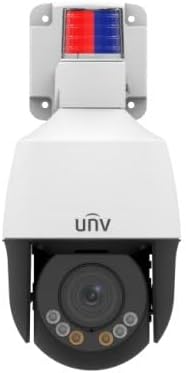
Figura 4.1: Frontal view of the IPC672LR-AX4DUPKC camera, showing the dome lens, IR illuminators, and the active deterrence alarm light at the top.
- Motorized Zoom Lens: 2.8-12mm AF automatic focusing lens for flexible field of view.
- Il·luminadors d'infrarojos: Provides infrared light for night vision up to 50m (164 ft).
- Llum càlida: Additional illumination for color night vision up to 10m (33 ft).
- Llum d'alarma: Integrated red and blue alarm light for active deterrence.
- Micròfon i altaveu integrats: Permet la comunicació d'àudio bidireccional.
- Ethernet Port (PoE): For network connection and power supply.

Figure 4.2: Feature icons highlighting LightHunter technology, WDR, Ultra H.265 compression, Edge Storage, Built-in Microphone, and Power over Ethernet (PoE).
Característiques avançades:
- LightHunter Illumination: Enhances low-light performance for clear images in challenging conditions.
- Optical WDR (Wide Dynamic Range): Up to 120 dB for balanced exposure in scenes with both bright and dark areas.
- 2D/3D DNR (Digital Noise Reduction): Reduces image noise for cleaner video streams.
- Ultra 265 Compression: Efficient video compression standard, also supporting H.265, H.264, and MJPEG.
- Triple Streams: Allows for multiple video streams at different resolutions and bitrates.
- ROI (Region of Interest): Focuses encoding resources on specific areas for higher quality.
5. Configuració i instal·lació
Follow these steps for proper installation of your camera.
5.1 Muntatge de la càmera
- Trieu una ubicació: Select an outdoor location that provides the desired viewing angle and is within range of your network infrastructure. Consider the camera's IP66 rating for weather resistance.
- Prepara la superfície: Use the provided drilling template to mark the screw holes on the mounting surface.
- Forats: Drill pilot holes according to the template. Insert wall anchors if mounting on masonry or drywall.
- Col·loqueu el suport de muntatge: Fixeu el suport de muntatge a la superfície amb els cargols subministrats.
- Connecta la càmera: Mount the camera onto the bracket, ensuring it is securely fastened.
5.2 Connexió de xarxa i alimentació
The camera supports Power over Ethernet (PoE) for simplified installation, requiring only a single Ethernet cable for both power and data.

Figure 5.1: An Ethernet cable, used for both power and data with PoE-enabled cameras.
- Connecteu el cable Ethernet: Connect one end of an Ethernet cable to the camera's Ethernet port. Use the waterproof connector kit to ensure a sealed connection for outdoor use.
- Connect to PoE Switch/NVR: Connect the other end of the Ethernet cable to a PoE-enabled network switch or a Network Video Recorder (NVR) with PoE ports.
- Alternative Power (if not using PoE): If PoE is not available, connect a compatible 12V DC power adapter (not included) to the camera's power input.
- Configuració de la xarxa: Refer to the camera's Quick Start Guide or the full user manual (available online) for initial network configuration, including setting up IP addresses and accessing the camera's web interfície.
6. Funcionament de la càmera
Once installed and configured, you can begin operating your Uniview PTZ Dome Camera.
6.1 Accés a Live View
- Via NVR/DVR: If connected to an NVR, access the live view directly through the NVR's interface or connected monitor.
- Via Web Navegador: Introduïu l'adreça IP de la càmera en un web browser on a computer connected to the same network. Log in using your credentials.
- A través de l'aplicació mòbil: Download the official Uniview mobile application (if available) and add your camera for remote viewing.

Figura 6.1: Example of a multi-camera surveillance feed displayed on a monitor.
6.2 PTZ Control and Zoom
The camera features Pan, Tilt, and Zoom (PTZ) capabilities with a 2.8-12mm motorized zoom lens.
- Panorama/inclinació: Use the PTZ controls in your NVR interface, web browser, or mobile app to remotely adjust the camera's horizontal (pan) and vertical (tilt) viewangles d'ajust.
- Zoom: Utilize the zoom controls to optically zoom in or out, adjusting the focal length from 2.8mm (wide) to 12mm (telephoto). The automatic focusing (AF) ensures clear images at all zoom levels.

Figure 6.2: Remote monitoring of camera feeds via a tablet device.
6.3 Night Vision and Active Deterrence
- Visió nocturna IR: The camera automatically switches to IR mode in low light, providing clear black and white images up to 50m (164 ft).
- Llum càlida: For enhanced color night vision, the camera can utilize its warm light illuminator up to 10m (33 ft).
- Disuasió activa: Configure motion detection or other events to trigger the built-in alarm light and audible warnings via the speaker, deterring intruders.
7. Manteniment
Un manteniment regular garanteix un rendiment òptim i una llarga vida útil de la càmera.
- Neteja de lents: Gently wipe the lens with a soft, lint-free cloth. For stubborn dirt, use a lens cleaning solution designed for optical surfaces. Do not use abrasive materials.
- Neteja de l'habitatge: Netegeu la carcassa de la càmera amb anuncisamp tela. Eviteu els productes químics durs.
- Actualitzacions de firmware: Reviseu periòdicament el fabricant website (Uniview) for firmware updates. Updating firmware can improve performance, add new features, and enhance security.
- Inspecció del cable: Regularly inspect all cables and connections for signs of wear or damage, especially for outdoor installations.
8. Solució De Problemes
Consulteu aquesta secció per conèixer els problemes comuns i les seves solucions.
| Problema | Causa possible | Solució |
|---|---|---|
| Sense poder | No PoE power; faulty power adapter; loose connection. | Verify PoE switch/NVR is supplying power; check power adapter and connections. |
| Sense canal de vídeo | Network issue; incorrect IP address; camera offline; firewall blocking. | Check network cable; verify camera's IP address; restart camera/NVR/router; check firewall settings. |
| Poor Image Quality | Dirty lens; improper focus; low bandwidth; insufficient lighting. | Clean lens; adjust focus/zoom; check network bandwidth; ensure adequate lighting or IR/warm light is active. |
| PTZ Control Not Working | Software issue; camera malfunction; network latency. | Restart camera; update firmware; check network connection stability. |
9. Especificacions
Detailed technical specifications for the IPC672LR-AX4DUPKC camera.
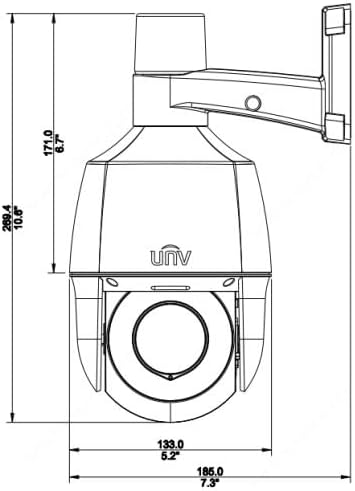
Figure 9.1: Dimensional drawing of the camera, indicating its physical size.
| Característica | Detall |
|---|---|
| Número de model | IPC672LR-AX4DUPKC |
| Resolució de captura de vídeo | 2MP |
| Lent | 2.8-12mm AF Automatic Focusing and Motorized Zoom Lens |
| Gamma de visió nocturna | Up to 50 m (164 ft) IR, 10m (33 ft) warm light |
| Tecnologia de connectivitat | Cablejat (PoE) |
| Protocol de connectivitat | Wi-Fi (for certain functions/setup, primarily wired for operation) |
| Compressió de vídeo | Ultra 265, H.265, H.264, MJPEG |
| Àudio | Micròfon i altaveu integrats |
| Interval dinàmic | Up to 120 dB Optical WDR |
| Reducció de soroll | DNR 2D/3D |
| Classificació de protecció d'entrada | IP66 |
| Factor de forma | Cúpula |
| Dimensions (L x A x A) | 5.2 x 5.2 x 10.6 polzades |
| Fabricant | Uniview |
| Usos recomanats | Seguretat exterior |
| Tipus d'alerta | Només moviment |
| Tecnologia del sensor fotogràfic | CMOS |
10. Garantia i Suport
For warranty information, please refer to the warranty card included with your product or contact the seller/manufacturer directly. Technical support may be available through the manufacturer's official weblloc o canals d'atenció al client.
Fabricant: Uniview
Ask a question about this manual
Ask about setup, troubleshooting, compatibility, parts, safety, or missing instructions. Manuals+ will review the question and use this page’s manual context to help answer it.