
1. Introducció
This manual provides detailed instructions for the proper setup, operation, and maintenance of your BROMECH ATP-30-WA1 Price Computing Scale. This scale is NTEP certified for legal trade, making it suitable for commercial applications such as farmers' markets, delis, and butcher shops. It features a 60lb capacity with 0.01lb increments, dual LCD displays, and a rechargeable battery.

Imatge: Frontal view of the BROMECH ATP-30-WA1 Price Computing Scale, showing the stainless steel platform and dual LCD displays.
2. Què hi ha a la caixa
En desembalar, comproveu que hi hagi tots els components:
- ATP NTEP Scale Unit
- Adaptador de CA
- Scale Pan (Stainless Steel)
- Manual d'instruccions (Aquest document)
3. Configuració
- Desembalatge: Traieu amb cura tots els components de l'embalatge.
- Col·locació de la plataforma: Place the stainless steel scale pan onto the main unit, ensuring it sits securely on the four support points.

Imatge: Part inferior view of the stainless steel tray showing support pins, and a close-up of the scale's anti-slip rubber pads.
- Nivell: Position the scale on a stable, flat surface. Use the adjustable leveling feet located on the bottom of the scale to ensure it is perfectly level. A bubble level is integrated into the scale for assistance.

Imatge: Primer pla views of the stainless steel panel, adjustable foot pads, and detachable scale feet.
- Connexió d'alimentació: Connect the AC adapter to the scale and plug it into a 110V power outlet. The scale can operate directly from AC power or using its internal rechargeable battery.

Image: The scale with its AC power adapter and an icon indicating the built-in rechargeable battery.
- Càrrec inicial: For optimal battery life, charge the scale for at least 8 hours before its first use.

Image: Diagram illustrating the long-lasting rechargeable battery and initial charging recommendation.
- Encès: Locate the main rocker switch underneath the scale and turn it to the "ON" position. Then, press the power button on the front panel.
4. Instruccions de funcionament
4.1 Pesatge bàsic
Place the item to be weighed on the stainless steel platform. The weight will be displayed on the LCD screen. Ensure the scale is stable and zeroed before placing items.

Image: Close-up of the scale's display showing weight, unit price, and total price, with an inset showing a 5g weight for accuracy.
4.2 Conversió d'unitats (KG/LB)
To switch between kilograms (kg) and pounds (lb), press the UNITAT button on the keypad. The display will update to show the weight in the selected unit. This scale does not support ounces or grams.
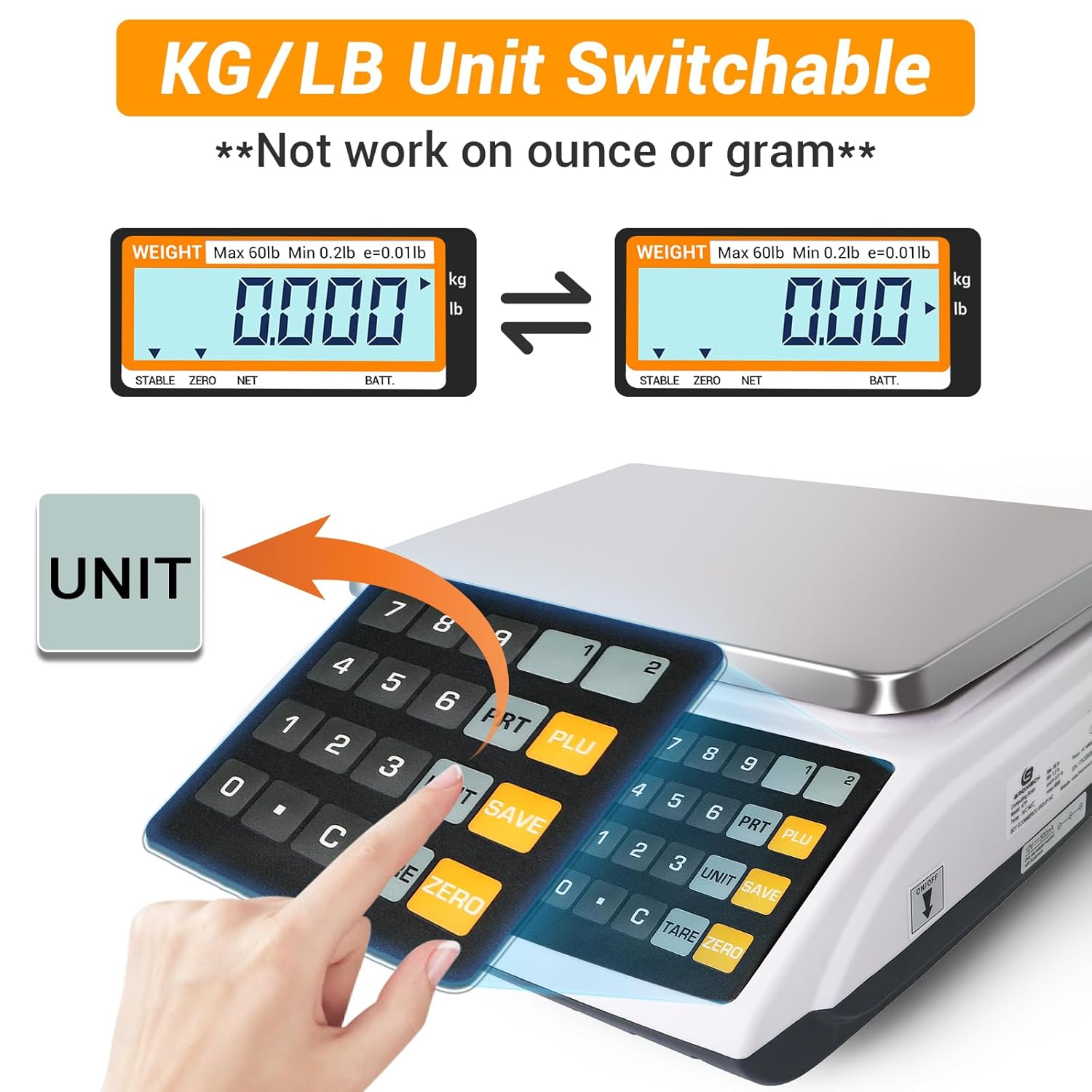
Image: Diagram showing the scale display switching between kilograms and pounds, with a hand pressing the "UNIT" button.
4.3 Setting Up Direct PLUs (Price Look-Up)
The scale supports 2 direct PLUs for frequently sold items.
- Enter the desired unit value (price per unit) using the numeric keypad.
- Long press the "PLU1" or "PLU2" button (located on the upper right corner of the keypad) to save the unit value to that direct PLU.
- The direct PLU is now set. Repeat for the second direct PLU if needed.

Image: Step-by-step visual guide on setting up direct PLUs on the scale.
4.4 Setting Up Indirect PLUs
The scale supports 10 indirect PLUs (PLU0-PLU9).
- Enter the desired unit value using the numeric keypad.
- Premeu llargament el botó PLU button, then press a number from 0 to 9 to set up the indirect PLU.
- To recall a saved indirect PLU, press the PLU button and then the corresponding number (0-9).

Image: Step-by-step visual guide on setting up indirect PLUs on the scale.
4.5 Ajust de la retroiluminació
The LCD backlight can be adjusted for visibility.
- Long press the decimal point button (.).
- Premeu el botó PLU button to cycle through backlight modes: On, Off, or Auto.
- Premeu TARA per confirmar la vostra selecció.

Image: Step-by-step visual guide on adjusting the backlight settings (On, Off, Auto).
4.6 Locking Unit Value
This feature prevents unauthorized changes to the unit price and streamlines transactions.
- Premeu el botó DESA botó.
- An arrow will point to "SAVE" on the display. Enter the unit value to lock it.

Image: Visual guide on how to use the "SAVE" function to lock the unit value on the display.
5. Característiques acabadesview
- NTEP Certified: Complies with NCWM standards (COC #21-001A3) for legal trade in commercial settings.

Image: Graphic highlighting the NTEP Certification COC# 21-001, indicating suitability for delis, butcher markets, and bakeries.
- Dual LCD Display with Backlight: Provides clear visibility for both operator and customer, showing weight, unit price, and total cost simultaneously.

Image: The scale displaying weight, unit price, and total price, with separate views for seller and buyer.
- Bateria recarregable: Offers up to 100 hours of operation on a single charge, providing portability and continuous use.
- Construcció duradora: Features a robust ABS plastic shell and a 10.5x8 inch stainless steel weighing platform designed for commercial environments.
- Selecció àmplia: Weighs up to 60 lb in 0.01 lb increments. Kilogram (Kg) and Pound (Lb) units are interchangeable.
6. Manteniment
- Neteja: Wipe the scale's surface and stainless steel platform with a damp cloth. Avoid abrasive cleaners or submerging the unit in water. Ensure the scale is dry before use.
- Cura de la bateria: To prolong battery life, recharge the scale every three months when not in regular use. Avoid fully discharging the battery frequently.
- Emmagatzematge: Store the scale in a dry, stable environment away from extreme temperatures and direct sunlight.
- Calibració: While the scale is factory calibrated and NTEP certified, periodic checks with certified weights are recommended to ensure continued accuracy, especially after transport or prolonged use.
7. Solució De Problemes
| Problema | Causa possible | Solució |
|---|---|---|
| La bàscula no s'encén. | Main rocker switch off; battery discharged; AC adapter not connected or faulty. | Ensure main rocker switch is ON. Connect AC adapter and charge battery. Check AC outlet. |
| Inaccurate readings or fluctuating display. | Scale not level; unstable surface; foreign object under platform; damaged load cell. | Ensure scale is level and on a stable surface. Check for obstructions. If problem persists, contact support. |
| La bateria no es carrega. | Faulty AC adapter; battery issue; charging port issue. | Verify AC adapter is working. Ensure secure connection. If battery is old, it may need replacement (contact support). |
| Display shows "OVERLOAD" or similar error. | Weight exceeds maximum capacity (60lb). | Remove excess weight from the platform. |
8. Especificacions
| Característica | Detall |
|---|---|
| Número de model | ATP-30-WA1 |
| Capacitat | 60 lliures / 30 kg |
| Readability (Division) | 0.01 lliures / 0.005 kg |
| Pes mínim | 0.02 lliures |
| Dimensions de la plataforma | 10.5 x 8 polzades |
| Dimensions del producte | 11 x 12 x 4 polzades |
| Pes del producte | 8.75 lliures |
| Tipus de visualització | LCD amb llum de fons |
| Font d'alimentació | 110V AC Adapter, 100-hour Rechargeable Lead Zinc Battery |
| Temperatura de funcionament | -10 a 40 °C (de 14 a 104 °F) |
| PLUs | 2 Direct, 10 Indirect |
| Certificació | NTEP Certified, COC #21-001A3 |

Image: Diagram showing the dimensions of the BROMECH Price Computing Scale: 11 inches wide, 12 inches deep, and 4 inches high.
9. Garantia i Suport
Per obtenir informació sobre la garantia o assistència tècnica, consulteu el lloc web oficial del fabricant. website or contact their customer service. The product includes a return policy of 30 days for refund/replacement through the seller.
A PDF version of the user manual and Certificate of Compliance are available online: