
COLSUR S33GY-CO-K
COLSUR Bluetooth Speaker with LED Light Makeup Mirror, Wireless Charging Station, and Digital Alarm Clock
Model: S33GY-CO-K
Introducció
This manual provides detailed instructions for the operation and maintenance of your COLSUR S33GY-CO-K multifunctional device. This product integrates a Bluetooth speaker, LED light makeup mirror, 15W wireless charging pad, and a digital alarm clock into a single unit, designed for convenience and utility in various settings.

Image: The COLSUR S33GY-CO-K device in gray, showcasing its wireless charging capability with a smartphone placed on the charging pad, and the illuminated LED makeup mirror in the background. The digital clock displays the time.
Producte acabatview i Components
The COLSUR S33GY-CO-K combines several essential functions into one compact device. Familiarize yourself with its main features and included accessories.
Característiques principals:
- Bluetooth Speaker for audio playback.
- Digital Display Alarm Clock with adjustable brightness.
- Vanity Mirror with integrated LED lighting.
- 15W Wireless Charging Station for compatible devices.
- Night Light function.
- Integrated Phone Holder.

Image: A visual representation highlighting the six main functions of the COLSUR S33GY-CO-K: Phone Wireless Charger, Vanity Mirror, LED Mirror Light, Alarm Clock (Dual Mode), Portable Bluetooth Speaker, and Phone Holder.
Què hi ha a la caixa:
- COLSUR S33GY-CO-K Multifunctional Device
- Cable de càrrega tipus C.
- Manual d'usuari

Image: The COLSUR S33GY-CO-K device, a Type-C charging cable, and the included user manual, laid out on a surface.
Configuració
- Connexió d'alimentació: Connect the provided Type-C charging cable to the device's Type-C port. Plug the other end into an external power adapter (not included) and then into a wall outlet. Ensure the power adapter provides sufficient power for optimal performance, especially for wireless charging.
- Encesa inicial: Press and hold the 'M' button to power it on. The digital display will illuminate.
- Col·locació: Place the device on a stable, flat surface. Ensure adequate ventilation around the device.
Instruccions de funcionament
Botons de control a sobreview:

Imatge: Una imatge detallada view of the control panel, showing buttons labeled 'M', 'BT', light icon, play/pause, plus, and minus symbols.
- Botó M (mode): Short press to cycle through modes (e.g., Bluetooth, Clock setting). Long press to power on/off the speaker.
- Botó BT (Bluetooth): Premeu breument per accedir al mode de sincronització Bluetooth.
- Light Icon Button: Short press to adjust LED mirror light brightness.
- Botó Reproduir/Pausa: Controls audio playback. Also functions as Alarm Switch.
- Botó '+': Increase volume, adjust time/alarm settings upwards.
- Botó '-': Decrease volume, adjust time/alarm settings downwards.
1. Setting the Clock and Alarms (12H/24H System)

Image: A graphic showing the sequence of button presses for setting the clock, alarms, and switching between 12-hour and 24-hour time formats.
- Hora fixada: Short press the 'M' button 1 time. Use the '+' or '-' buttons to adjust the hour. Press 'BT' to confirm.
- Defineix el minut: Short press the 'M' button 2 times. Use the '+' or '-' buttons to adjust the minute. Press 'BT' to confirm.
- Configura l'alarma 1: Short press the 'M' button 3 times. Use the '+' or '-' buttons to set Alarm 1. Press 'BT' to confirm.
- Configura l'alarma 2: Short press the 'M' button 5 times. Use the '+' or '-' buttons to set Alarm 2. Press 'BT' to confirm.
- 12H/24H System: Short press the 'M' button 7 times. Use the '+' or '-' buttons to switch between 12-hour and 24-hour display. Press 'BT' to confirm.
- Funció de posposar: When an alarm sounds, long touch the top surface of the device to activate snooze for 5 or 10 minutes.

Image: The digital display showing examples of set alarm times (07:30 for wake-up, 15:30 for coffee time) and an explanation of the snooze function activated by a long touch.
2. Funcionament de l'altaveu Bluetooth
The device features Bluetooth 5.0 for stable and high-speed audio transmission.
- Maridatge: Short press the 'BT' button to enter Bluetooth pairing mode. The device will become discoverable.
- Connectar: On your smartphone or other Bluetooth-enabled device, search for "COLSUR S33GY-CO-K" (or similar name) in the Bluetooth settings and connect.
- Reproducció d'àudio: Once connected, play audio from your device. Use the Play/Pause button on the speaker to control playback.
- Ajust de volum: Feu servir els botons "+" i "-" de l'altaveu per ajustar el volum.

Image: A person relaxing in bed, reading a book, with a smartphone playing music through the COLSUR Bluetooth speaker, demonstrating its use for audio entertainment.
3. Funció de càrrega sense fil
The device supports 15W fast wireless charging for compatible iOS and Android devices. Ensure the device is connected to power for this function to work.
- Requisit d'energia: Ensure the COLSUR S33GY-CO-K is plugged into an external power supply via the Type-C cable and a suitable power adapter.
- Col·locació: Place your compatible smartphone or other wireless charging device directly onto the charging area on top of the speaker.
- Indicador de càrrega: The device will indicate charging status (e.g., a flashing dot on the clock display or a charging icon on your phone screen).

Image: A diagram illustrating the internal coil of the wireless charging area and three steps for charging: connecting to power, placing the phone on the charging area, and confirming charging.

Image: A smartphone placed vertically on the device's charging pad, indicating active wireless charging.

Image: A smartphone placed horizontally on the device's charging pad, indicating active wireless charging.
4. LED Light Makeup Mirror
The integrated mirror features adjustable LED lighting for various uses, including makeup application.
- Ajust d'angle: The mirror can rotate 180 degrees, and its stand can rotate 90 degrees, allowing for customizable viewangles d'ajust.
- Turning On/Off Light: Touch the designated switch area on the mirror to turn the LED light on or off.
- Ajust de brillantor: Short press the Light Icon button on the control panel to cycle through 4 levels of brightness (dim, low, medium, high).

Image: The COLSUR device with its LED mirror light, demonstrating the touch switch for the light and showing three examples of brightness levels from 0% to 100% on a person's reflection.
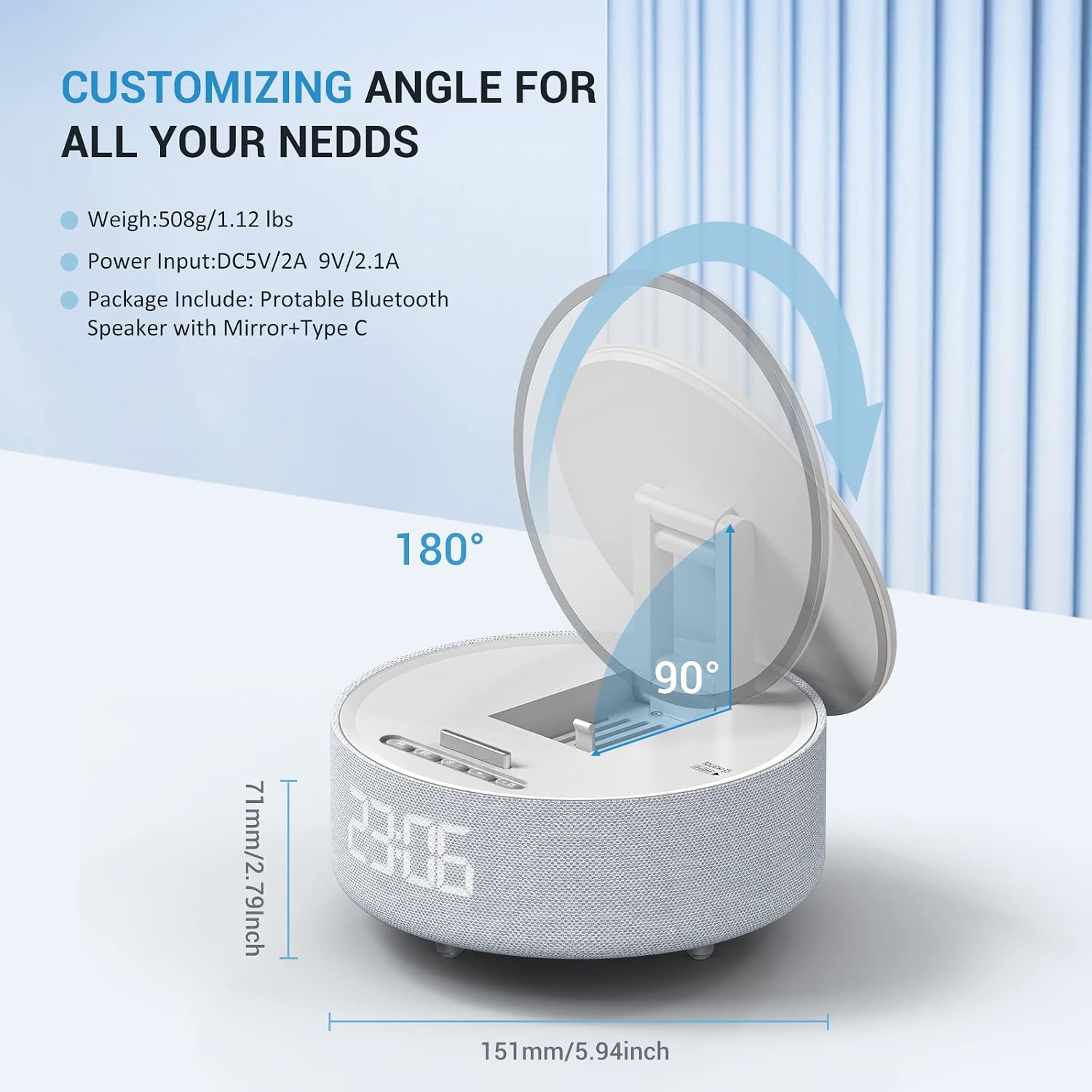
Image: A diagram illustrating the 180-degree rotation capability of the mirror and the 90-degree rotation of its stand, along with product dimensions.
5. Suport del telèfon
The device includes a built-in phone holder for convenient viewing while charging or using other functions.
- Ús: Simply place your smartphone into the designated slot on the device.
Manteniment
- Neteja: Use a soft, dry cloth to clean the device's surface. For the mirror, a slightly damp, lint-free cloth can be used, followed by a dry cloth. Avoid abrasive cleaners or solvents.
- Emmagatzematge: Quan no l'utilitzeu durant períodes prolongats, guardeu el dispositiu en un lloc fresc i sec, allunyat de la llum solar directa i de temperatures extremes.
- Potència: Always disconnect the power adapter before cleaning or moving the device.
Resolució de problemes
| Problema | Causa possible | Solució |
|---|---|---|
| El dispositiu no s'encén. | No hi ha connexió d'alimentació o cable/adaptador defectuós. | Ensure the Type-C cable is securely connected to the device and a working power adapter/outlet. Try a different cable or adapter if available. |
| La càrrega sense fil no funciona. | Device not powered, phone not compatible, phone misaligned, or phone case too thick. |
|
| L'altaveu Bluetooth no es connecta. | Device not in pairing mode, Bluetooth off on phone, or already connected to another device. |
|
| Clock display flashes between time and date. | This is a default display mode. | This behavior is inherent to the device's display. There is no option to disable the date display cycle. |
| L'alarma és massa baixa o no sona. | Alarm volume too low, alarm not set correctly, or snooze active. |
|
Especificacions
| Característica | Detall |
|---|---|
| Nom del model | S33GY-CO-K |
| Marca | COLSUR |
| Tipus d'altaveu | Speaker Systems (Portable Bluetooth Speaker) |
| Tecnologia de connectivitat | Bluetooth 5.0 |
| Potència de sortida màxima dels altaveus | 15 watts |
| Sortida de càrrega sense fils | 15W (Fast Wireless Charging) |
| Font d'alimentació | Battery Powered (Internal rechargeable battery) |
| Dimensions del producte | 7.1 cm de profunditat x 15.1 cm d'amplada x 15.1 cm d'alçada |
| Pes de l'article | 1.12 lliures (508 grams) |
| Color | Gris |
| Característica especial | Multi Room Audio (as per specification, typically for multi-speaker setups) |
| És impermeable | FALSA |
| Dispositius compatibles | LG V60 ThinQ/V50 THINQ/V50/V40 THINQ/V35/V30+/V30/G8 THINQ/G8/G6, Samsung Galaxy S22/S22 Ultra/S21/S20/S10/S10 Plus/S10E/S9/S9 Plus/Note 9/S8/S8 Plus/Note 8/S7 Edge/S7/S6 Edge plus/Note 5, iPhone 15 Pro Max, iPhone 15, iPhone 15 Plus, iPhone 14 Pro, iPhone 14 Pro Max, iPhone 13, iPhone 13 Pro, iPhone 13 Pro Max, iPhone 13 Mini, iPhone 12 Pro, iPhone 12 Pro Max, iPhone 12, iPhone 12 Mini, iPhone 11 Pro, iPhone 11 Pro Max, iPhone 11, iPhone SE (2nd generation), iPhone XS, iPhone XS Max, iPhone XR, iPhone X, iPhone 8, iPhone 8 Plus (and other Qi-compatible devices) |
Ask a question about this manual
Ask about setup, troubleshooting, compatibility, parts, safety, or missing instructions. Manuals+ will review the question and use this page’s manual context to help answer it.