
Introducció
Thank you for choosing the MageGee Cloud98 Wireless Mechanical Keyboard. This keyboard is designed for versatility and performance, featuring triple-mode connectivity, vibrant RGB backlighting, hot-swappable switches, and durable PBT keycaps. This manual provides detailed instructions to help you set up, operate, and maintain your keyboard for an optimal user experience.
Què hi ha a la caixa
- MageGee Cloud98 Wireless Mechanical Keyboard
- Cable USB-C
- Receptor USB de 2.4 GHz (emmagatzemat al teclat)
- Extractor de tecles
- Tirador de commutació
- Interruptors addicionals
Producte acabatview
Familiarize yourself with the layout and key components of your MageGee Cloud98 keyboard.
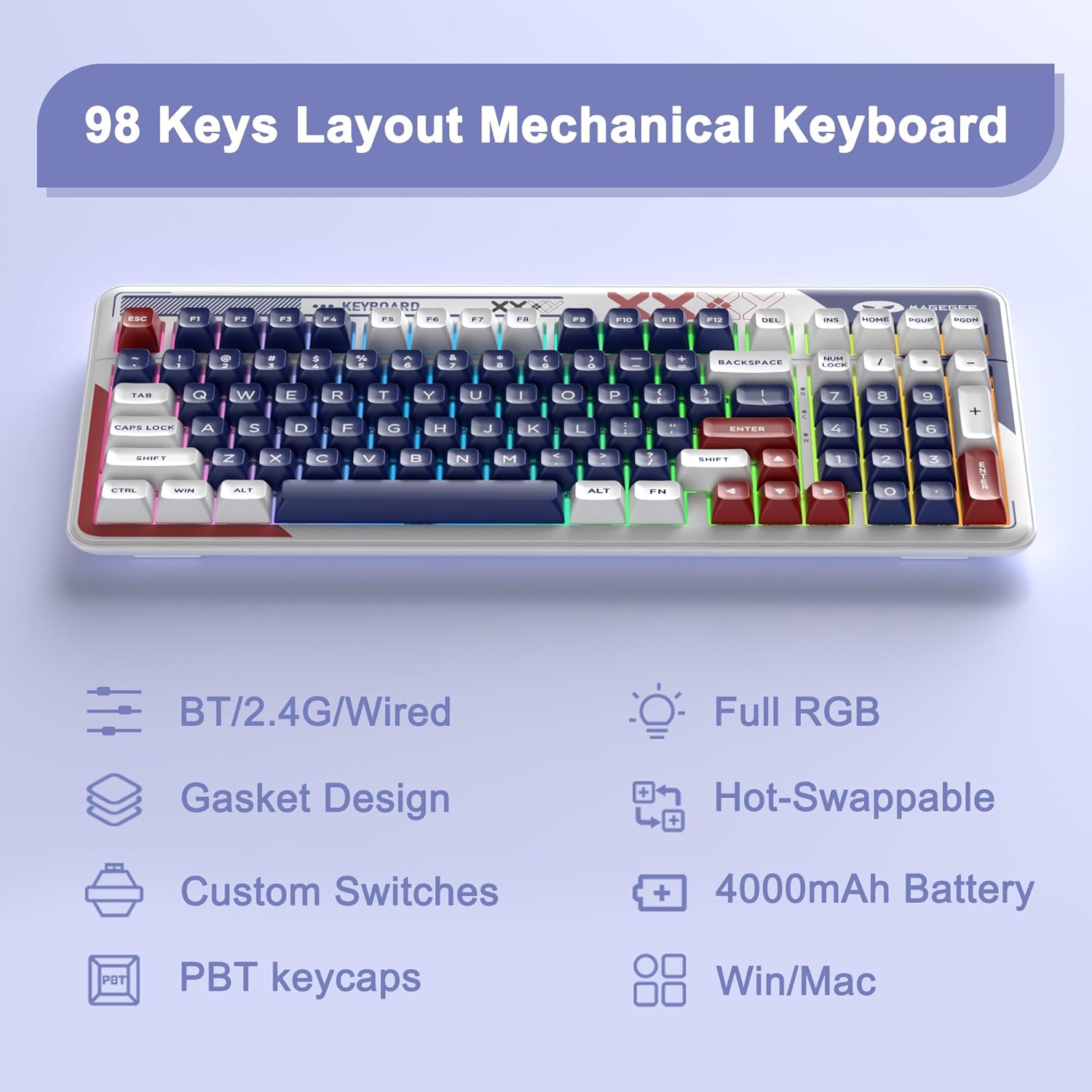
Imatge: Més deview of the MageGee Cloud98 Wireless Mechanical Keyboard, highlighting its 98-key layout, triple-mode connectivity, full RGB backlighting, gasket design, custom switches, 4000mAh battery, and compatibility with Windows/Mac.

Image: Exploded diagram illustrating the Gasket Design of the keyboard, showing layers such as PBT Keycaps, Top Case, White Elephant Switches, Gasket Design, Shock Absorbing Cotton, PCB, Battery, and Basic Case.
Configuració
1. Càrrega del teclat
Connect the provided USB-C cable to the keyboard's USB-C port and the other end to a power source (e.g., computer USB port, USB wall adapter). The keyboard features a 4000mAh battery, providing extended usage. A full charge can last up to 200 hours with the backlight off.

Image: Close-up of the USB-C charging port on the side of the keyboard, with a USB-C cable plugged in.
2. Connecting the Keyboard (Triple Mode)
The MageGee Cloud98 supports three connection modes: 2.4GHz Wireless, Bluetooth, and USB-C Wired.

Image: Diagram illustrating the three connection modes: BT Mode, 2.4G Mode, and Wired Mode, with instructions for each.
2.1. Mode sense fil de 2.4 GHz
- Locate the 2.4GHz USB receiver stored in the keyboard's bottom compartment.
- Connecteu el receptor USB a un port USB disponible de l'ordinador.
- Premeu llargament el botó Fn + 4 buttons for 3 seconds to enter 2.4G mode pairing. The indicator light will flash slowly during reconnection.

Image: A hand removing the 2.4GHz USB receiver from its dedicated storage slot on the underside of the keyboard.
2.2. Mode Bluetooth
- Premeu llargament el botó Fn + 1, Fn + 2, o Fn + 3 buttons for 3 seconds to enter Bluetooth pairing mode. The indicator light will flash quickly during pairing.
- On your device, search for Bluetooth devices and select 'MageGee Cloud98' to connect.
2.3. USB-C Wired Mode
- Ensure the USB-C cable is plugged into the keyboard and your computer.
- Premeu el botó Fn + 5 buttons for 3 seconds to switch to wired mode.
3. Compatibilitat del sistema operatiu
The keyboard supports various operating systems. Switch between modes using the following combinations:
- For Windows: Press Fn+A
- For macOS: Press Fn + S

Image: The MageGee Cloud98 keyboard on a desk with a laptop, illustrating the Fn+A shortcut for Windows and Fn+S for macOS compatibility.
Instruccions de funcionament
1. Control de retroil·luminació RGB
The Cloud98 features full RGB backlighting with multiple adjustable effects.

Image: The MageGee Cloud98 keyboard displaying various RGB lighting effects and key combinations for controlling them, including switching modes, direction, color, speed, and brightness.
- Switch backlight modes: Fn + INS (19 RGB modes, 9 monochrome modes, custom mode)
- Switch backlight flowing direction: Fn + ← / Fn + →
- Switch backlight color (single color): Fn + ↑ / Fn + ↓
- Adjust backlight flowing speed: Fn + - (disminució) / Fn + = (augment)
- Backlight on/off: Fn + Supr
- Ajusta la brillantor de la retroiluminació: Fn + PAGE UP (augmentar) / Fn + PAGE DOWN (disminució)
2. Multimedia Functions
Use the Fn key in combination with the F-keys for multimedia control:
- Fn + F1: Reproductor multimèdia
- Fn + F2: Baixar el volum
- Fn + F3: Pujar el volum
- Fn + F4: Mut
- Fn + F5: Atura
- Fn + F6: Pista anterior
- Fn + F7: Reproduir/Pausa
- Fn + F8: Pista següent
- Fn + F9: Correu electrònic
- Fn + F10: Web Navegador
- Fn + F11: El meu ordinador
- Fn + F12: Calculadora
3. Commutadors intercanviables en calent
The keyboard features a hot-swappable design, allowing you to easily change mechanical switches without soldering. It is compatible with most 3-pin and 5-pin switches on the market. Use the provided switch puller to remove switches and the keycap puller to remove keycaps for customization.

Imatge: Un primer pla view of a White Elephant Switch, showing its internal components and the hot-swappable socket on the keyboard.
4. Substitució de la tecla N
The N-Key Rollover feature ensures that every key press is registered accurately, even when multiple keys are pressed simultaneously. This is particularly beneficial for fast typing and gaming.
5. Lock WIN Key Function
To prevent accidental interruptions during gaming or typing, you can lock the Windows key function. Refer to the quick start guide for specific key combinations to activate/deactivate this feature.
Manteniment
To ensure the longevity and optimal performance of your MageGee Cloud98 keyboard, follow these maintenance tips:
- Neteja de les tecles: Use the provided keycap puller to remove keycaps. Clean them with a soft, damp un drap i sabó suau si cal. Assegureu-vos que estiguin completament secs abans de tornar-los a enganxar.
- Neteja del cos del teclat: Use a soft, lint-free cloth to wipe down the keyboard body. For dust and debris between keys, use compressed air.
- Eviteu líquids: Do not expose the keyboard to excessive moisture or liquids. In case of spills, immediately disconnect the keyboard and allow it to dry completely before use.
- Emmagatzematge: Quan no l'utilitzeu durant períodes prolongats, guardeu el teclat en un lloc sec i fresc, allunyat de la llum solar directa.
Resolució de problemes
- El teclat no es connecta:
1. Assegureu-vos que el teclat estigui carregat.
2. Verify the correct connection mode (2.4GHz, BT, Wired) is selected.
3. For 2.4GHz, ensure the USB receiver is properly inserted.
4. For Bluetooth, ensure your device's Bluetooth is on and the keyboard is in pairing mode. Try re-pairing.
5. For wired, ensure the USB-C cable is securely connected to both the keyboard and the computer. - Backlight not working or unresponsive:
1. Ensure the backlight is turned on using Fn + Supr.
2. Adjust brightness using Fn + PAGE UP/DOWN.
3. Try switching different RGB modes using Fn + INS. - Les tecles no responen:
1. Check the connection mode.
2. If in wireless mode, ensure the battery is not critically low.
3. If specific keys are not working, try replacing the switch using the hot-swappable feature. - Lag or delay in wireless mode:
1. Ensure the keyboard is close to the receiver/device.
2. Minimize interference from other wireless devices.
3. Ensure the battery level is sufficient.
Especificacions
| Característica | Detall |
|---|---|
| Model | Cloud98 |
| Connectivitat | Sense fil de 2.4 GHz, Bluetooth, USB-C amb cable |
| Tipus de clau | Mechanical (Ivory White Switch) |
| Taps de claus | PBT Material Dual Injection Molding, ASA height |
| Llum de fons | Full RGB (19 modes, 9 monochrome, custom) |
| Capacitat de la bateria | 4000 mAh |
| Dimensions | 16.54 x 7.87 x 1.57 polzades |
| Pes | 2.66 lliures |
| Compatibilitat | Win2000, Win XP, Win ME, Vista, Win7, Win8, Win10, Android, Linux, Mac |
Garantia i Suport
MageGee products come with a standard manufacturer's warranty. For detailed warranty information, technical support, or any inquiries regarding your Cloud98 keyboard, please refer to the contact information provided with your purchase or visit the official MageGee weblloc web. El nostre equip d'atenció al client està dedicat a ajudar-vos.


