
1. Introducció
Thank you for choosing the MageGee Cloud98 Mechanical Keyboard. This manual provides detailed instructions for setting up, operating, and maintaining your keyboard. The Cloud98 features a 98-key layout, triple-mode connectivity (Bluetooth, 2.4GHz wireless, and USB-C wired), RGB backlighting, hot-swappable switches, and PBT keycaps for a premium typing experience.

Image 1.1: MageGee Cloud98 Mechanical Keyboard Overview
2. Contingut del paquet
Si us plau, comproveu el paquet per veure si hi ha els elements següents:
- MageGee Cloud98 Mechanical Keyboard
- Cable USB-C
- 2.4GHz USB Receiver (typically stored in the keyboard's bottom compartment)
- Extractor de tecles (si s'inclou)
- Extractor d'interruptors (si s'inclou)
3. Característiques del producte
- Disposició de 98 tecles: Compact yet functional, retaining essential keys.
- Connectivitat en triple mode: Seamlessly switch between Bluetooth, 2.4GHz wireless, and USB-C wired connections.
- Retroil·luminació RGB: Customizable full-key RGB backlighting with multiple effects and adjustable brightness.
- Disseny muntat amb junta: Enhances typing feel and sound by reducing vibrations and cavity noise.
- PBT Material Keycaps: Durable dual-injection molded keycaps with ASA height for clear legends and ergonomic comfort.
- Interruptors intercanviables en calent: Compatible with most 3-pin and 5-pin mechanical switches, allowing for easy customization without soldering.
- Bateria de 4000 mAh: Provides extended wireless usage, up to 200 hours with backlight off.
- Canvi de clau N: Ensures every keystroke is registered accurately, even during rapid typing or gaming.
- Àmplia compatibilitat: Supports Win2000, Win XP, Win ME, Vista, Win7, Win8, Win10, Android, Linux, and Mac operating systems.
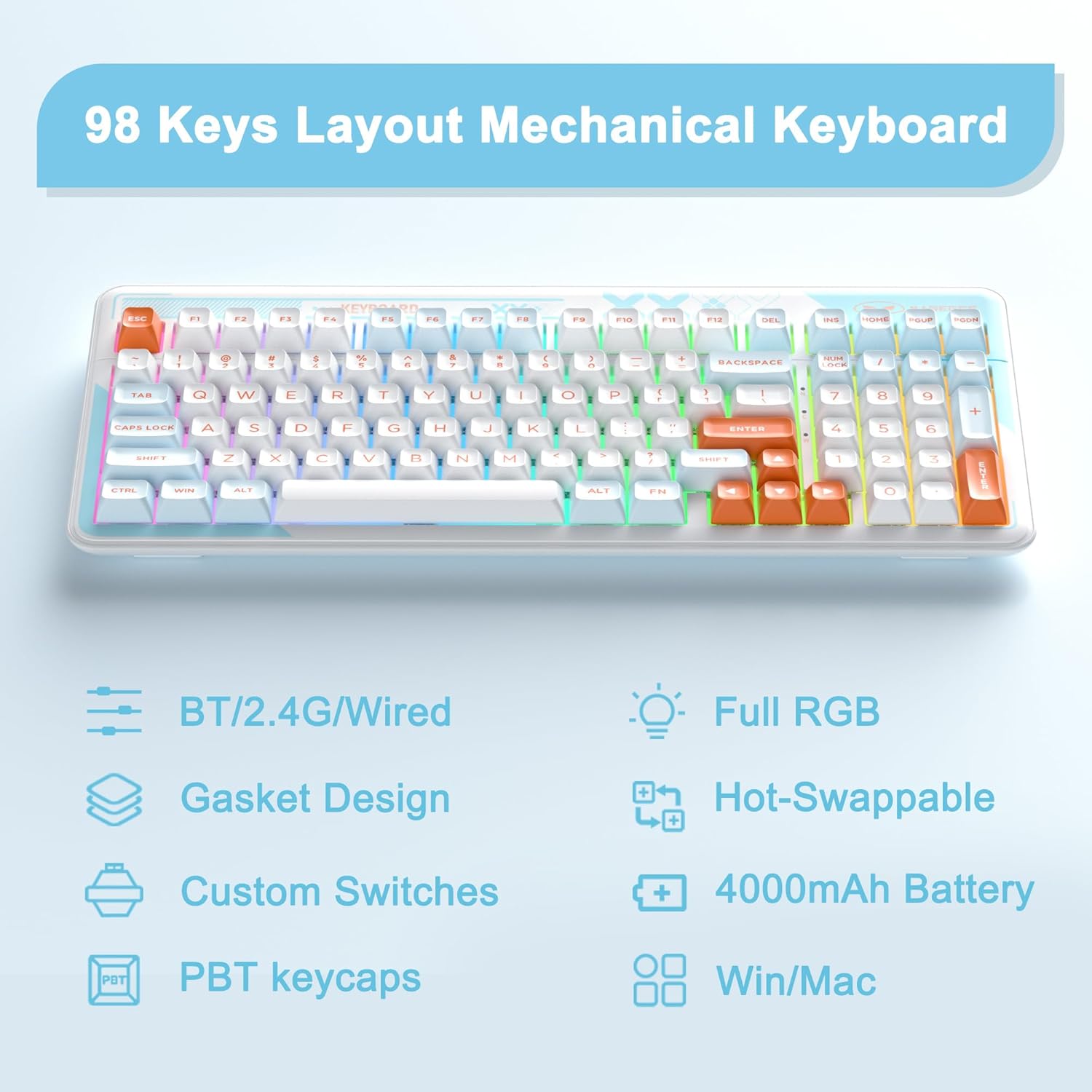
Image 3.1: Key features of the Cloud98 keyboard.

Imatge 3.2: Desplegada view illustrating the gasket-mounted design and internal components.

Imatge 3.3: Primer pla view of a Blue Whale mechanical switch.

Image 3.4: Detail of the dual-color injection PBT keycaps.
4. Configuració i connexió
4.1. Wired Mode (USB-C)
- Localitza el port USB-C del teclat (normalment a la vora superior).
- Connecteu un extrem del cable USB-C proporcionat al teclat.
- Connecteu l'altre extrem del cable USB-C a un port USB disponible de l'ordinador.
- El teclat serà reconegut automàticament i estarà llest per al seu ús.
- Premeu Fn + 5 for 3 seconds to ensure the keyboard is in wired mode.

Image 4.1: Connecting the USB-C cable to the keyboard.
4.2. Mode sense fil de 2.4 GHz
- Locate the 2.4GHz USB receiver, usually stored in a compartment on the bottom of the keyboard.
- Connecteu el receptor USB de 2.4 GHz a un port USB disponible de l'ordinador.
- Turn on the keyboard using the power switch (if present, typically on the back or side).
- Mantén premut Fn + 4 for 3 seconds to enter 2.4GHz pairing mode. The indicator light will flash.
- Un cop connectat, el llum indicador deixarà de parpellejar i es mantindrà sòlid.

Image 4.2: The 2.4GHz USB receiver.
4.3. Mode Bluetooth
- Assegureu-vos que el teclat estigui encès.
- Mantén premut Fn + 1, Fn + 2, o Fn + 3 for 3 seconds to enter Bluetooth pairing mode for the respective profile. The indicator light will flash quickly.
- Al dispositiu (ordinador, tauleta, telèfon intel·ligent), activeu el Bluetooth i cerqueu dispositius nous.
- Select "MageGee Cloud98" (or similar name) from the list of available devices to pair.
- Once paired, the indicator light will flash slowly when reconnecting, and then remain solid.
- To switch between paired Bluetooth devices, short press Fn + 1, Fn + 2, o Fn + 3.

Image 4.3: Visual guide for triple mode connection.
5. Instruccions de funcionament
5.1. Control de retroiluminació RGB
The Cloud98 keyboard features full RGB backlighting with 19 RGB modes, 9 monochrome modes, and a custom mode. Use the following key combinations to control the lighting:
- Fn + ← (Left Arrow): Switch backlight flowing direction.
- Fn + → (Right Arrow): Switch backlight color (single color mode).
- Fn + - (Minus): Decrease backlight flowing speed.
- Fn + = (Equals): Increase backlight flowing speed.
- Fn + Supr: Activa/desactiva la retroiluminació.
- Fn + espai: Switch backlight color (RGB mode).
- Fn + Ins: Switch backlight modes.
- Fn + ↑ (Up Arrow): Augmenta la brillantor de la retroiluminació.
- Fn + ↓ (Down Arrow): Reduir la brillantor de la retroiluminació.

Image 5.1: Keyboard layout showing RGB backlight control key combinations.
5.2. Commutadors intercanviables en calent
The Cloud98 keyboard supports hot-swappable switches, allowing you to change switches without soldering. This feature enables customization of typing feel and sound.
- Treure la tapa de les tecles: Feu servir l'extractor de tecles proporcionat per treure suaument la tecla desitjada.
- Treure l'interruptor: Feu servir l'extractor d'interruptors proporcionat per subjectar amb cura els clips superior i inferior de l'interruptor i estireu-lo cap amunt.
- Insereix un nou interruptor: Align the pins of the new switch with the holes on the PCB. Ensure the pins are straight. Gently push the switch down until it clicks into place. Do not force it to avoid bending pins.
- Substitueix la tapa de les tecles: Press the keycap onto the new switch stem.
Nota: Ensure the keyboard is disconnected or powered off before changing switches to prevent accidental input or damage.
5.3. WIN Key Lock Function
To prevent accidental presses of the Windows key during gaming, you can lock it. Press Fn + Win to toggle the WIN key lock function. An indicator light may illuminate when the WIN key is locked.
5.4. Substitució de la tecla N
The Cloud98 supports N-Key Rollover, meaning all keys pressed simultaneously will be registered. This is particularly beneficial for fast typists and gamers.

Image 5.2: Illustration of N-Key Rollover capability.
6. Bateria i càrrega
The Cloud98 keyboard is equipped with a 4000mAh battery, providing extended usage in wireless modes.
- Càrrega: Connect the keyboard to a USB power source using the provided USB-C cable. The charging indicator light will show the charging status.
- Durada de la bateria: The keyboard can last up to 200 hours with the backlight off. Battery life will vary depending on backlight usage and connection mode.
- Indicador de bateria baixa: The keyboard may indicate low battery status through a flashing light or reduced functionality. Charge the keyboard promptly when this occurs.

Image 6.1: Information regarding the 4000mAh battery capacity.
7. Manteniment
Un manteniment adequat garanteix la longevitat i el rendiment del teclat.
- Neteja de les tecles: Use a keycap puller to remove keycaps. Clean them with a mild soap solution and a soft cloth, then dry thoroughly before reattaching.
- Neteja del cos del teclat: Feu servir un drap suau i sec per netejar la superfície del teclat. Per a la brutícia persistent, netegeu lleugerament.amp cloth can be used, ensuring no moisture enters the keyboard.
- Eliminació de pols: Feu servir aire comprimit per eliminar la pols i les restes que hi ha entre les tecles i els interruptors.
- Emmagatzematge: Guardeu el teclat en un lloc fresc i sec, allunyat de la llum solar directa i de temperatures extremes.
8. Solució De Problemes
If you encounter issues with your MageGee Cloud98 keyboard, please refer to the following common solutions:
| Problema | Solució |
|---|---|
| El teclat no respon en mode amb cable. | Ensure the USB-C cable is securely connected to both the keyboard and the computer. Try a different USB port or cable. Confirm the keyboard is in wired mode (Fn + 5 for 3s). |
| 2.4GHz wireless connection unstable or not connecting. | Ensure the 2.4GHz USB receiver is plugged in. Press and hold Fn + 4 for 3 seconds to re-pair. Move the receiver closer to the keyboard. Check for interference from other wireless devices. |
| Problemes de connexió Bluetooth. | Ensure Bluetooth is enabled on your device. Press and hold Fn + 1/2/3 for 3 seconds to enter pairing mode. Remove previous pairings from your device and try again. Ensure the keyboard battery is charged. |
| La retroiluminació no funciona o està enganxada. | Press Fn + Del to toggle the backlight. Adjust brightness with Fn + ↑/↓. Try switching backlight modes with Fn + Ins. Ensure the keyboard battery is charged. |
| Tecles específiques no funcionen. | If hot-swappable, carefully remove the keycap and switch. Re-seat the switch firmly, ensuring pins are not bent. If the issue persists, try replacing the switch. |
| Keyboard randomly disconnects. | Ensure the battery is sufficiently charged. For wireless modes, ensure the receiver/device is within range and free from interference. Update drivers if available. |
9. Especificacions
| Característica | Detall |
|---|---|
| Número de model | Cloud98 |
| Connectivitat | Bluetooth, sense fil de 2.4 GHz, USB-C amb cable |
| Tipus de teclat | Mecànica |
| Il·luminació de fons | Full RGB |
| Material de claus | PBT (tereftalat de polibutilè) |
| Característica especial | Ergonomic, Gasket Mounted, Hot-Swappable |
| Capacitat de la bateria | 4000 mAh |
| Dimensions del producte | 16.5 x 7.87 x 1.57 polzades (41.9 x 19.99 x 3.99 cm) |
| Pes de l'article | 2.66 lliures (1.21 kg) |
| Dispositius compatibles | Laptop, PC, Android, Mac |
| Sistemes operatius | Win2000, Win XP, Win ME, Vista, Win7, Win8, Win10, Android, Linux, Mac |
10. Garantia i Suport
MageGee products come with a standard warranty. For specific warranty details, please refer to the warranty card included with your product or visit the official MageGee website. If you encounter any issues not covered in this manual or require further assistance, please contact MageGee customer support through their official channels.
Normalment podeu trobar la informació de contacte d'assistència a la pàgina web del fabricant weblloc web o a l'embalatge del producte.