
1. Introducció
The Rakstore XY-AP50H is a compact and versatile TPA3116D2 stereo digital amplifier board featuring Bluetooth 5.0 connectivity. It delivers 50W+50W output, making it suitable for various audio applications including home theater systems. This manual provides detailed instructions for setup, operation, and maintenance to ensure optimal performance and longevity of your device.
2. Informació de seguretat
- Assegureu-vos que la font d'alimentació voltage is within the specified range of DC 5-27V. Using an incorrect voltagi pot danyar el dispositiu.
- Always connect speakers and power supply before powering on the ampmés viu.
- Avoid short-circuiting the speaker outputs or power input terminals.
- Do not expose the device to moisture, water, or extreme temperatures.
- Mantingueu el dispositiu lluny dels nens.
- Disconnect power before performing any maintenance or making connections.
3. Característiques del producte
- Sortida d'alta potència: 50W + 50W stereo output.
- Connectivitat Bluetooth 5.0: Stable wireless audio transmission up to 15 meters (unobstructed).
- Vol. Amplitage Rang: Operates on DC 5-27V / 2A or above.
- Múltiples entrades d'àudio: Supports Bluetooth, AUX, and USB Sound Card functions.
- Mecanismes de protecció: Includes power supply reverse connection protection, short circuit protection, and self-recovery overheating protection.
- Compatibilitat d'altaveus: Adaptable for 10W-200W, 4Ω/8Ω speakers.
4. Producte acabatview i Components
Familiarize yourself with the various components and connection points of the XY-AP50H amptauler més viu.
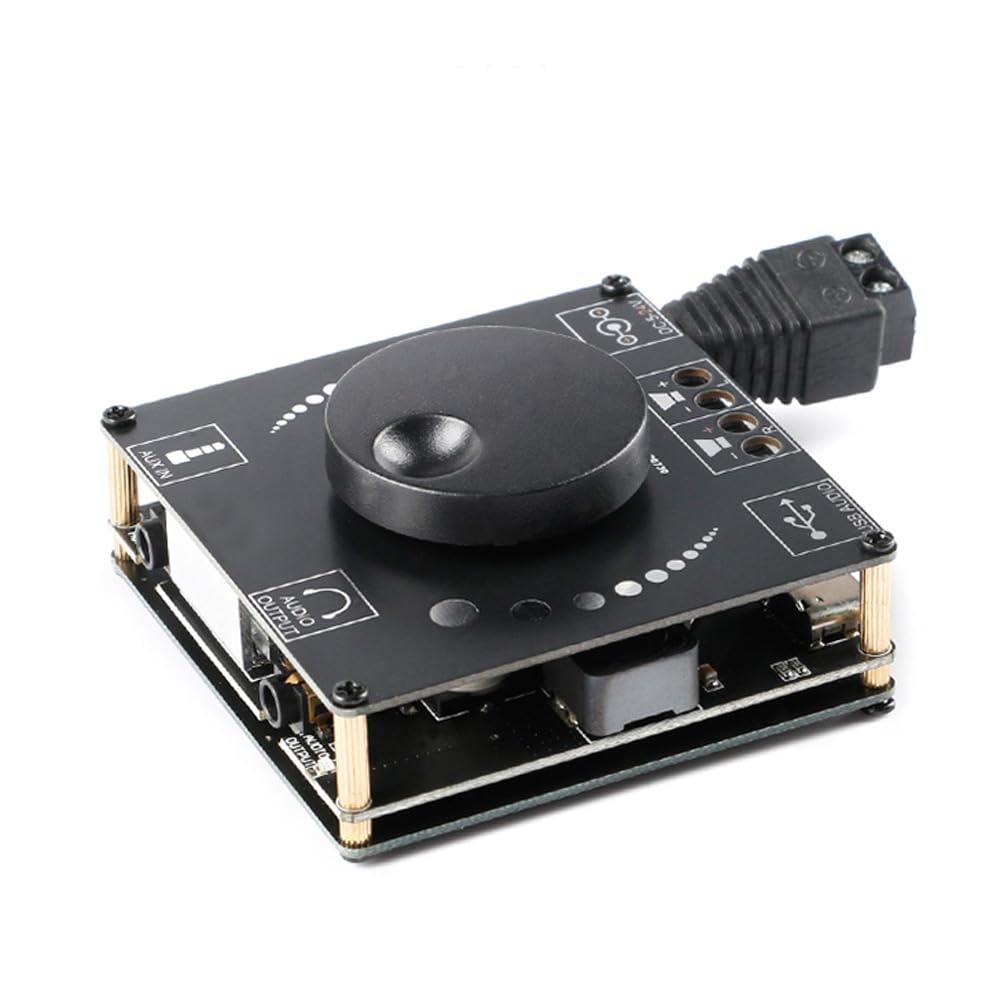
Imatge 4.1: A dalt view of the XY-AP50H amplifier board, showing the main components including the volume knob, power input, speaker terminals, AUX input, and USB port.

Imatge 4.2: A baix view of the XY-AP50H amplifier board, indicating the USB Audio input, speaker outputs (SPKR, SPKL), and DC 5-24V power input.

Imatge 4.3: Dimensions of the XY-AP50H amplifier board, measuring approximately 60mm by 60mm.
5. Instruccions de configuració
5.1 Connexió d'alimentació
- Assegureu-vos el ampL'amplificador està apagat i desconnectat de qualsevol font d'alimentació.
- Connect a DC 5-27V / 2A or above power adapter to the DC power input jack on the board. Observe polarity if using bare wires.
5.2 Connexió dels altaveus
- Identify the left (SPKL) and right (SPKR) speaker output terminals on the board.
- Connect your passive speakers (10W-200W, 4Ω/8Ω) to the corresponding terminals. Ensure correct polarity (+ to + and - to -) for each speaker.
5.3 Opcions d'entrada d'àudio
The XY-AP50H supports three audio input methods: Bluetooth, AUX, and USB Sound Card.
5.3.1 Connexió Bluetooth
- Enceneu el amptauler més viu.
- On your audio source device (e.g., smartphone, tablet), enable Bluetooth and search for available devices.
- Select "XY-AP50H" from the list to pair. A confirmation sound will indicate successful pairing.
5.3.2 AUX Input Connection
- Connect a 3.5mm audio cable from your audio source device's headphone jack to the AUX input port on the amptauler més viu.
- El amplifier will automatically switch to AUX input mode when a cable is detected.
5.3.3 USB Sound Card Function

Imatge 5.1: Illustration of connecting the XY-AP50H to a computer via a data cable to utilize its USB sound card function, providing improved audio output quality.
- Connecteu el amplifier board to your computer using a USB data cable (Type-C to USB-A or Type-C to Type-C, depending on your computer's ports).
- Most computers will automatically recognize the amplifier as an external sound card.
- If prompted, select the XY-AP50H as the audio output device in your computer's sound settings.
- Open your computer's audio playback software to play music. The amplifier will output the audio.
6. Instruccions de funcionament
6.1 Encès/Apagat
Connect or disconnect the DC power supply to power on or off the amptauler més viu.
6.2 Control de volum
Rotate the potentiometer knob on the board clockwise to increase volume and counter-clockwise to decrease volume.
6.3 Input Mode Switching
El amplifier automatically prioritizes inputs. Bluetooth is typically the default. Connecting an AUX cable will switch to AUX. Connecting via USB to a computer will activate the USB sound card mode.
7. Especificacions
| Característica | Especificació |
|---|---|
| Model | XY-AP50H |
| AmpXip lificador | TPA3116D2 |
| Versió Bluetooth | BLE 5.0 |
| Potència de sortida | 50W + 50W (Stereo) |
| Subministrament Voltage | DC 5-27V / 2A above |
| Distància de transmissió | 15 metres (sense obstacles) |
| Nombre de canals | Left and Right Dual Channels (Stereo) |
| Altaveus adaptats | 10W-200W, 4Ω/8Ω |
| Mecanismes de protecció | Power supply reverse connection protection, short circuit protection, self-recovery overheating protection |
8. Solució De Problemes
- Sense so:
- Check power supply connection and ensure it meets DC 5-27V / 2A or above.
- Verify speaker connections are secure and correctly polarized.
- Ensure the correct audio input mode is selected (Bluetooth paired, AUX cable connected, or USB sound card active).
- Ajusteu el botó de volum del amplificador i el dispositiu font d'àudio.
- So distorsionat:
- Reduce the volume from both the amplificador i la font d'àudio.
- Check speaker impedance and power rating to ensure compatibility.
- Ensure power supply is stable and sufficient (at least 2A).
- Desconnexió Bluetooth:
- Ensure the audio source device is within 15 meters of the amplifier and there are no major obstructions.
- Prova de desvincular i tornar a vincular el dispositiu.
- Assegureu-vos que cap altre dispositiu interfereixi amb el senyal Bluetooth.
- Sobreescalfament:
- Assegureu-vos una ventilació adequada al voltant amptauler més viu.
- Reduce output volume or check speaker impedance. The board has self-recovery overheating protection, which may temporarily shut down output.
9. Manteniment
- Mantenir el ampMantingueu la placa del lifter neta i sense pols. Feu servir un drap suau i sec per netejar-la.
- Avoid placing the board in environments with high humidity or extreme temperatures.
- Do not attempt to disassemble or modify the board, as this may void any potential warranty and cause damage.
10. Garantia i Suport
For warranty information and technical support, please refer to the seller's policies or contact Rakstore customer service directly. Keep your purchase receipt as proof of purchase.