
FOYCOY D8
FOYCOY D8 Bluetooth Headphones User Manual
Model: D8
1. Introducció
Thank you for choosing the FOYCOY D8 Bluetooth Headphones. These wireless earbuds are designed for an active lifestyle, offering extended playtime, secure fit, and high-fidelity audio. This manual provides detailed instructions on how to set up, operate, maintain, and troubleshoot your headphones to ensure optimal performance.

Image: The FOYCOY D8 Bluetooth Headphones, showing both earbuds and the charging case with its LED display.
2. Contingut del paquet
Assegureu-vos que tots els elements estiguin presents al vostre paquet:
- FOYCOY D8 Wireless Earbuds (Left and Right)
- 2600mAh Wireless Charging Case
- Cable de càrrega USB-C
- Manual d'usuari (aquest document)
- Additional Eartips (S, M, L sizes; M size pre-installed)

Image: An illustration showing the FOYCOY D8 earbuds, charging case, USB-C cable, and different sized eartips included in the package.
3. Producte acabatview
The FOYCOY D8 headphones feature an ergonomic design with over-ear earhooks for a secure and comfortable fit, ideal for sports and active use. The charging case provides extended battery life and doubles as a power bank.
Components dels auriculars:
- Botó multifunció: For controlling music, calls, and voice assistant.
- Micròfon: Integrat per a trucades clares.
- Contactes de càrrega: Per carregar dins de la caixa.
- Ganxo per a l'orella: Provides secure fit over the ear.
- Punta de l'orella: Soft silicone for in-ear comfort and sound isolation.
Components de la caixa de càrrega:
- Pantalla d'alimentació LED: Mostra el percentatge de bateria restanttage of the case and charging status of individual earbuds.
- Port d'entrada USB-C: Per carregar la funda.
- Port de sortida USB: To use the case as a power bank for other devices.
- Àrea de càrrega sense fil: Per a la càrrega sense fil de la funda.

Imatge: Una imatge visualview of the FOYCOY D8 headphones and their charging case, illustrating features such as extended playtime, wireless charging, and power bank capability.
4. Configuració
4.1 Initial Charge & Preparation
Before first use, ensure the earbuds and charging case are fully charged.
- Remove Insulating Film: Locate and remove the protective insulating film from the charging contacts on both earbuds. The headphones will not turn on or charge if these films are not removed.
- Carregueu el cas: Connect the charging case to a power source using the provided USB-C cable or place it on a wireless charging pad. The LED display will show the charging progress.
- Carregueu els auriculars: Place both earbuds into the charging case. Ensure they are properly seated; the LED display on the case will show their charging status.
Important: If the charging case is over-discharged (shows "0"), it may take 15-30 minutes for the LED display to update after plugging in the power supply.

Image: The charging case displaying its battery percentage and the charging status of the earbuds.
4.2 Choosing and Wearing Eartips
Selecting the correct eartip size is crucial for comfort, secure fit, and optimal sound quality.
- Trieu les puntes per a les orelles: Experiment with the included S, M, and L sized eartips to find the pair that provides the best seal and comfort for your ears. The M size is pre-installed.
- Install Eartips: Gently attach the chosen eartips to the earbuds.
- Wear Earbuds: Col·loca l'auricular al conducte auditiu.
- Adjust Earhooks: Guide the adjustable earhook over your ear to secure the earbud in place. Ensure a snug and comfortable fit for stability during movement.

Image: Instructions on selecting the correct eartip size and properly wearing the earbuds with the earhooks for a secure fit.
4.3 Emparellament amb el dispositiu
The FOYCOY D8 headphones feature one-step auto pairing for convenience.
- Encès: Traieu els dos auriculars de l'estoig de càrrega. S'encendran automàticament i entraran en mode d'emparellament.
- Activa el Bluetooth: Al telèfon intel·ligent, la tauleta o un altre dispositiu compatible amb Bluetooth, aneu a la configuració de Bluetooth.
- Connectar: Cerca "D8" in the list of available devices and select it to connect. Once connected, you will hear a confirmation tone, and the earbuds will be ready for use.
The earbuds are compatible with most Bluetooth-enabled devices, including Android smartphones, iPhone series, iPads, MacBooks, computers, and smart TVs.

Image: A visual guide to the one-step auto pairing process, showing the earbuds in their case and the Bluetooth connection screen on a smartphone.
5. Instruccions de funcionament
5.1 Encès/Apagat
- Encès: Take the earbuds out of the charging case. They will automatically power on.
- Apagar: Place the earbuds back into the charging case. They will automatically power off and begin charging. Alternatively, long press the multi-function button for 2 seconds to manually power off.
5.2 Control de música
- Reproduir/pausa: Click the multi-function button once on either the Left (L) or Right (R) earbud.
- Pista següent: Quick-click the Right (R) earbud's multi-function button twice.
- Pista anterior: Quick-click the Left (L) earbud's multi-function button twice.
- Pujar el volum: Long press the Right (R) earbud's multi-function button.
- Baixar el volum: Long press the Left (L) earbud's multi-function button.
5.3 Control de trucades
- Respondre/Finalitzar la trucada: Click the multi-function button once on either L/R earbud.
- Rebutja la trucada: Long press the multi-function button for 2 seconds on either L/R earbud.
5.4 Activació de l'assistent de veu
- Activar l'assistent de veu (Siri, Google Assistant, etc.): Quick-click the multi-function button three times on either L/R earbud.

Image: A comprehensive guide to the on-device button controls for music playback, call handling, and activating voice assistants.
5.5 Mono & Binaural Modes
The earbuds support both stereo and mono modes:
- Mode binaural: Use both earbuds simultaneously for a full stereo sound experience.
- Mode mono: Use either the left or right earbud independently. This allows you to keep one earbud charging while using the other, or to remain aware of your surroundings.
5.6 Charging the Earbuds & Case
- Càrrega dels auriculars: Place the earbuds into the charging case. They will automatically begin charging. The case's LED display will show the charging status of each earbud.
- Case Charging (USB-C): Connect the provided USB-C cable to the charging case's USB-C input port and to a power adapter (not included). The LED display will show the case's battery percentage.
- Case Charging (Wireless): Place the charging case on a compatible wireless charging pad (not included). Ensure the case is centered on the pad for efficient charging.
A full charge provides approximately 9 hours of listening time for the earbuds, and the 2600mAh charging case can provide multiple recharges for a total playtime of up to 120 hours.
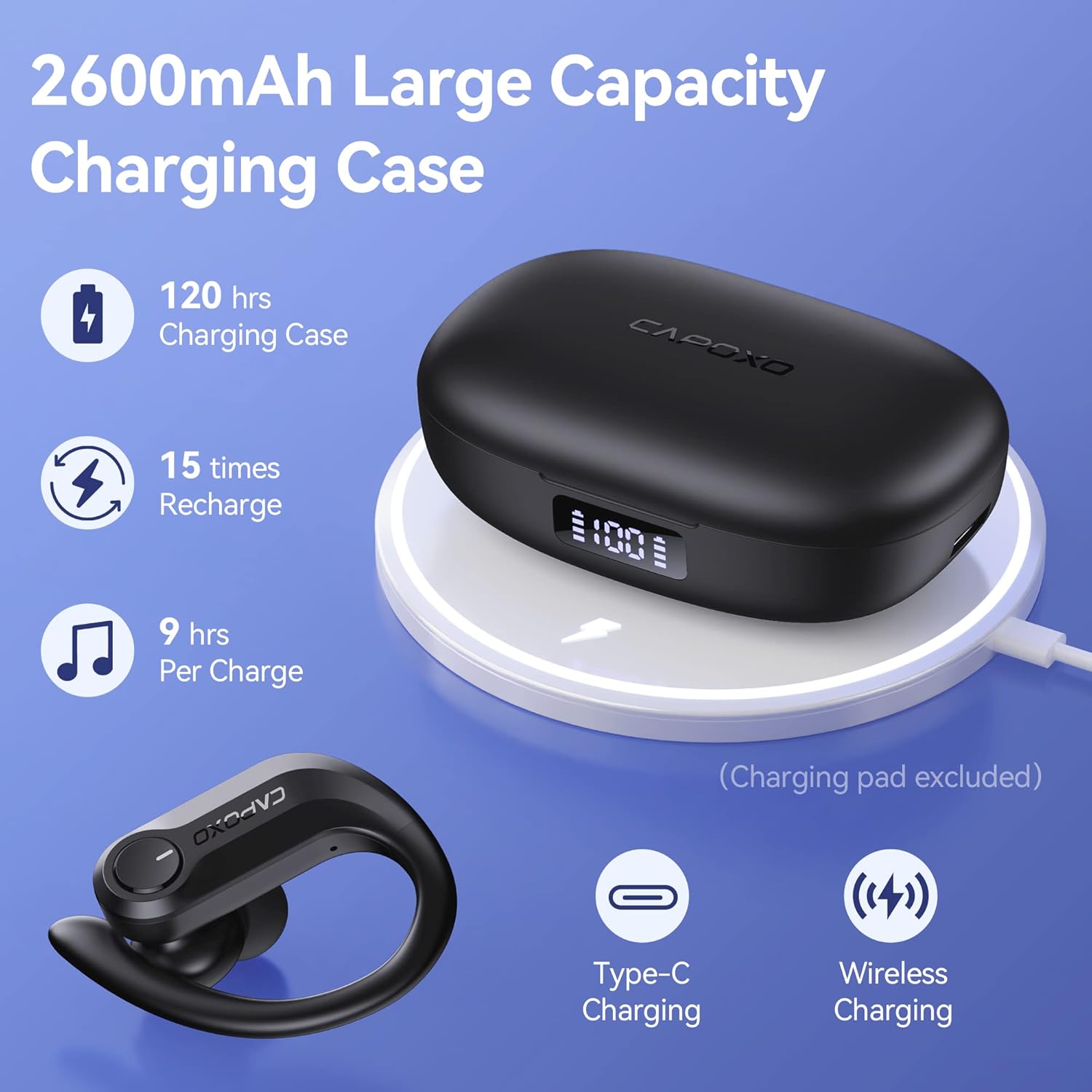
Image: The charging case highlighting its large capacity, extended playtime, and support for both Type-C and wireless charging.
5.7 Using the Charging Case as a Power Bank
The 2600mAh charging case can also function as an emergency power bank for your mobile phone or other small devices.
- Connectar el dispositiu: Use a USB cable (not included) to connect your device to the USB output port on the right side of the charging case.
- Càrrega: The charging case will begin to charge your connected device. The LED display will show the remaining power of the case.

Image: The charging case being used as an emergency power bank to charge a smartphone.
6. Manteniment
6.1 Neteja
- Netegeu regularment els auriculars, especialment les puntes i els contactes de càrrega, amb un drap suau, sec i sense borrissol.
- If the wireless earbuds cannot be charged, try wiping the pins and points with an alcohol cloth to remove any residue.
- No utilitzeu productes químics o materials abrasius per netejar.
6.2 Emmagatzematge
- Guardeu els auriculars a la funda de càrrega quan no els feu servir per protegir-los i mantenir-los carregats.
- Guardeu el dispositiu en un lloc fresc i sec, allunyat de temperatures extremes i de la llum solar directa.
- Charge the charging case at least once every two weeks to prevent over-discharge, even if not in regular use.
6.3 Resistència a l'aigua (IPX7)
The FOYCOY D8 earbuds are IPX7 waterproof, meaning they can withstand submersion in up to 1 meter of water for 30 minutes. This makes them suitable for workouts, running, and other activities where they may be exposed to sweat or light rain.
- No submergiu els auriculars intencionadament durant períodes prolongats ni a profunditats superiors a les especificades.
- The charging case is not waterproof. Keep it dry.
- Ensure earbuds are dry before placing them back into the charging case to prevent damage to the charging contacts.

Image: The earbuds demonstrating their IPX7 waterproof capability, suitable for active use.
7. Solució De Problemes
Problemes comuns i solucions:
| Problema | Causa possible | Solució |
|---|---|---|
| Earbuds do not turn on or charge when taken out of case. | Protective insulating film still on charging contacts. | Remove the insulating film from the charging points on both earbuds. Place them back in the case to activate. |
| No pairing name "D8" shown on phone, but charging case shows 100%. | Earbuds not activated or charging contacts are dirty. | Ensure insulating films are removed. Wipe the charging pins and points on the earbuds and in the case with an alcohol cloth. Place earbuds back in case, then remove to re-enter pairing mode. |
| No es poden carregar els auriculars. | Dirty charging contacts or improper placement. | Wipe the charging pins on the earbuds and the charging points in the case with an alcohol cloth. Ensure earbuds are correctly seated in the case. |
| Charging case LED display shows "0" even when plugged in. | Charging case is over-discharged. | Wait 15-30 minutes after plugging in the power supply; the LED display will update. |
| Connection drops frequently (especially with iPhone). | Interference or software issue. | Try resetting the earbuds to factory settings (see below). Ensure no other devices are interfering with the Bluetooth signal. Update your phone's operating system if available. |
7.1 How to Restore Factory Default Settings
This action will delete all pairing data between the earbuds and your devices. Perform this if you experience persistent connection issues or wish to clear previous pairings.
- Pas 1: Place both earbuds into the charging case. Ensure they are in the charging status.
- Pas 2: Hold the multi-function button on tots dos earbuds for 8 seconds. The earbuds will flash Red & Blue light alternately for 3 seconds, indicating that both earbuds have been reset completely.
- Pas 3: Pick up the earbuds to turn them on. Activate the Bluetooth setting on your device, search for "D8", and select it to connect.
If the issue persists, repeat the steps above.
8. Especificacions
| Característica | Detall |
|---|---|
| Nom del model | D8 |
| Tecnologia de connectivitat | Sense fil (Bluetooth) |
| Versió Bluetooth | 5.3 (from A+ content) |
| Components inclosos | Charging Case, Cable |
| Material | Plastic, Rubber, Silicone |
| Usos específics | Sport, Music, Exercising |
| Dispositius compatibles | Bluetooth-enabled devices (Android, iPhone, iPad, Mac Book, PC, Smart TV) |
| Tipus de control | Media Control (On-device Button) |
| Nivell de resistència a l'aigua | IPX7 impermeable |
| Durada de la bateria (auriculars) | Aprox. 9 hores per recàrrega |
| Temps de reproducció total (amb estoig) | Fins a 120 hores |
| Caixa de càrrega Capacitat de la bateria | 2600 mAh |
| Característiques de la caixa de càrrega | USB-C Input, USB Output (Power Bank), Wireless Charging, Dual LED Power Display |
| Forma de l'auricular | Over-Ear (with earhooks) |
| Col·locació de l'orella | A l'orella |
| Control de soroll | Passive Noise Cancellation (In-ear design) |
| Dimensions del producte | 6.93 x 6.93 x 11.06 polzades |
| Pes de l'article | 7.4 unces |
9. Garantia i assistència
For warranty information or technical support, please refer to the contact details provided with your purchase or visit the official FOYCOY weblloc web. Conserveu el comprovant de compra per a reclamacions de garantia.
Ask a question about this manual
Ask about setup, troubleshooting, compatibility, parts, safety, or missing instructions. Manuals+ will review the question and use this page’s manual context to help answer it.