
1. Introducció
This manual provides instructions for the ALLIMITY XMRM-M3 Voice Remote Control. This remote is designed for use with specific Xiaomi Smart TV models, offering convenient control and voice command functionality. Please read this manual carefully before using the remote control.
2. Producte acabatview
The ALLIMITY XMRM-M3 is a replacement voice remote control for various Xiaomi Smart TV models. It features dedicated buttons for popular streaming services and a built-in microphone for voice commands.

Figura 1: Frontal view of the ALLIMITY XMRM-M3 Voice Remote Control, showing power, voice assistant, navigation, and app buttons.
Característiques principals:
- Voice control capability for hands-free operation.
- Dedicated buttons for quick access to popular applications like Netflix and YouTube.
- Disseny ergonòmic per a un maneig còmode.
- No programming required after battery installation for basic functions.
3. Configuració
3.1 Instal·lació de la bateria
El comandament a distància requereix dues piles alcalines AAA (no incloses).
- Localitzeu la tapa del compartiment de la bateria a la part posterior del comandament a distància.
- Feu lliscar la coberta cap avall o premeu el pestell per obrir-la.
- Insert two AAA alkaline batteries, ensuring the positive (+) and negative (-) terminals match the diagrams inside the compartment.
- Torneu a col·locar la tapa del compartiment de la bateria, fent-la lliscar fins que faci clic de manera segura.
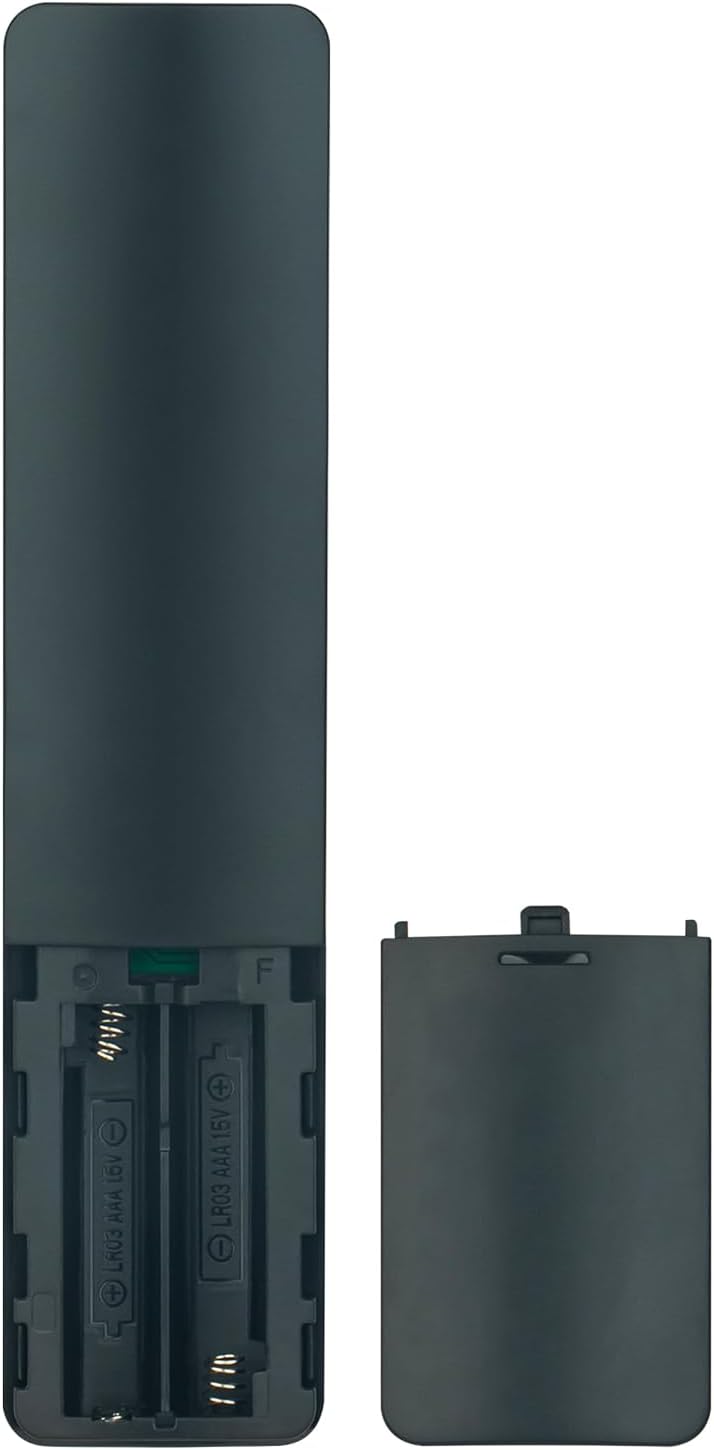
Figure 2: Battery compartment of the remote control, illustrating correct battery insertion.
3.2 Pairing for Voice Functionality
While basic functions work immediately after battery installation, the voice control feature requires pairing the remote with your Xiaomi Smart TV.
- Assegureu-vos que el televisor estigui encès.
- Navegueu fins al menú de configuració del televisor.
- Look for options related to "Remotes & Accessories" or "Bluetooth Devices."
- Select "Add device" or "Pair new remote."
- Follow the on-screen instructions to put the remote into pairing mode (often by holding specific buttons, refer to your TV's manual for exact steps if needed).
- Once paired, the voice control function will be active.
4. Funcionament del comandament a distància
This section describes the primary functions of the remote control buttons.

Figure 3: Remote control with an emphasis on the voice command button.
- Botó d'encendre (⏻): Encén o apaga el televisor.
- Voice Assistant Button (Microphone icon): Activates the voice control feature. Press and hold to speak commands.
- Navigation Pad (Circular buttons): Use the directional arrows to move through menus and the center button to confirm selections.
- Botó enrere (↩): Torna a la pantalla o menú anterior.
- Botó d'inici (🏠): Torna a la pantalla d'inici del televisor.
- Botons de volum (+/-): Ajusta el volum del televisor.
- Botó de Netflix: Accés directe a l'aplicació Netflix.
- Botó de YouTube: Accés directe a l'aplicació de YouTube.
- Botó de vídeo principal: Direct access to the Prime Video application.
- Apps Button: Opens the TV's application menu.
5. Manteniment
5.1 Substitució de la bateria
Replace batteries when the remote control's response becomes sluggish or stops working. Always replace both batteries at the same time with new AAA alkaline batteries. Do not mix old and new batteries, or different types of batteries.
5.2 Neteja
Per netejar el comandament a distància, feu servir un drap suau i sec. No utilitzeu netejadors líquids, esprais ni materials abrasius, ja que poden danyar la superfície o els components interns del comandament a distància.
6. Solució De Problemes
- El comandament a distància no respon:
- Comproveu si les piles estan inserides correctament amb la polaritat correcta.
- Replace the batteries with new AAA alkaline batteries.
- Assegureu-vos que no hi hagi obstacles entre el comandament a distància i el receptor d'infrarojos del televisor.
- El control per veu no funciona:
- Confirm that the remote control is properly paired with your TV (refer to Section 3.2).
- Ensure the TV's internet connection is stable, as voice commands often require online processing.
- Parla clarament i directament al micròfon del comandament a distància.
- Specific app buttons not working:
- Ensure the respective applications are installed and updated on your Xiaomi Smart TV.
- Check your TV's network connection.
7. Especificacions
| Característica | Detall |
|---|---|
| Model | XMRM-M3 |
| Marca | ALLIMITAT |
| Models de televisors compatibles | Xiaomi Smart TV L55M6-ESG, L55M6-ARG, MDZ-24-AA |
| Tecnologia de connectivitat | Infrared (IR) and Bluetooth (for voice function) |
| Tipus de bateria | 2 piles alcalines AAA (no incloses) |
| Característica especial | Voice Control, Ergonomic Design |
| Interval màxim | 33 peus (aprox. 10 metres) |
8. Garantia i Suport
For warranty information or technical support, please refer to the documentation provided with your purchase or contact the seller directly. Keep your purchase receipt as proof of purchase.