

Introducció
Thank you for choosing the FREEWOLF K8 Tri-Mode Mechanical Gaming Keyboard. This keyboard offers versatile connectivity options including Bluetooth, 2.4 GHz wireless, and USB-C wired modes, along with a hot-swappable design for personalized switch customization. With its vibrant RGB backlighting and long-lasting battery, the K8 is designed to enhance your gaming, programming, and general computing experience across both Mac and Windows systems. Please read this manual carefully to ensure proper setup and operation.
Contingut del paquet
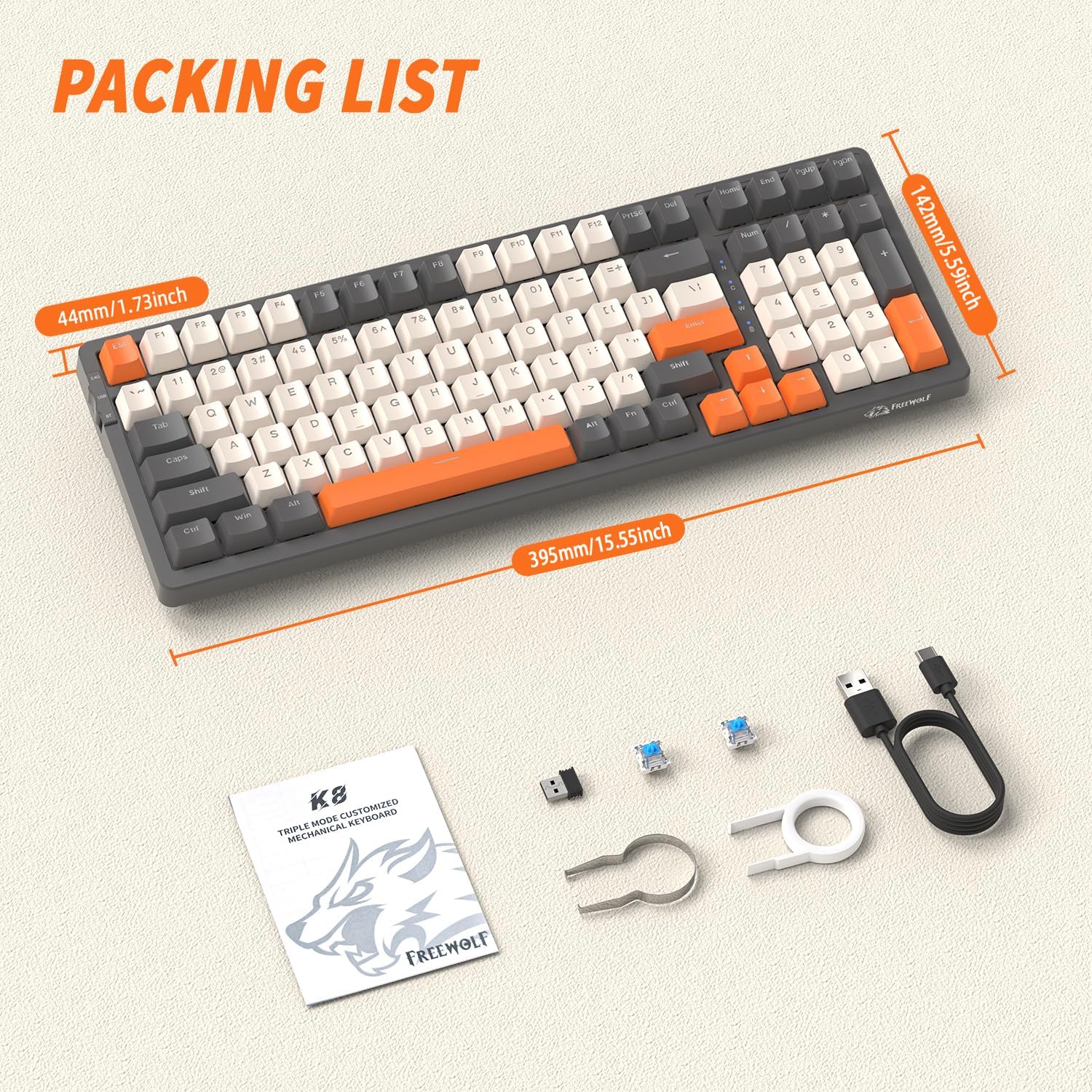
Upon opening your FREEWOLF K8 keyboard package, please verify that all the following items are included:
- FREEWOLF K8 Mechanical Gaming Keyboard
- Cable USB-C a USB-A
- Receptor sense fil USB de 2.4 GHz
- Eina d'extracció de tecles
- Eina d'extracció d'interruptors
- Two (2) Spare Mechanical Switches
- Manual d'usuari (aquest document)
Configuració i connexió
Càrrega inicial
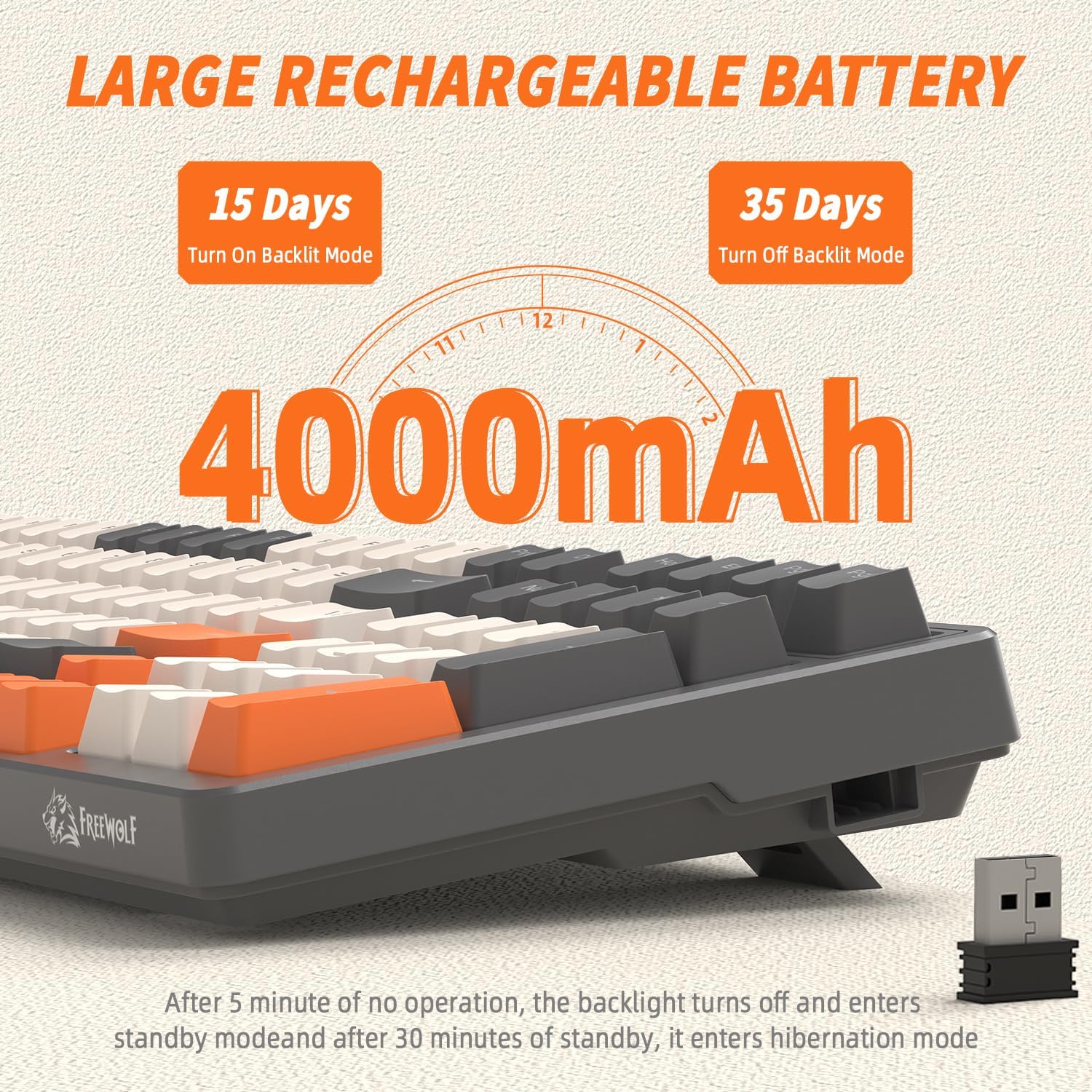
Before first use, it is recommended to fully charge the keyboard. Connect the provided USB-C cable to the keyboard's USB-C port and the other end to a USB power source (e.g., computer USB port, wall adapter). The indicator light will show charging status and turn off when fully charged. The keyboard features a 4000mAh battery for extended use.
Modes de connectivitat
The K8 keyboard supports three connection modes: USB-C Wired, 2.4 GHz Wireless, and Bluetooth.

1. USB-C Wired Mode
- Ensure the mode switch on the keyboard (usually on the back or side) is set to 'USB' or 'Wired'.
- Connect the USB-C cable to the keyboard and the USB-A end to your computer's USB port.
- El teclat es reconeixerà automàticament i estarà llest per al seu ús.
2. 2.4 GHz Wireless Mode
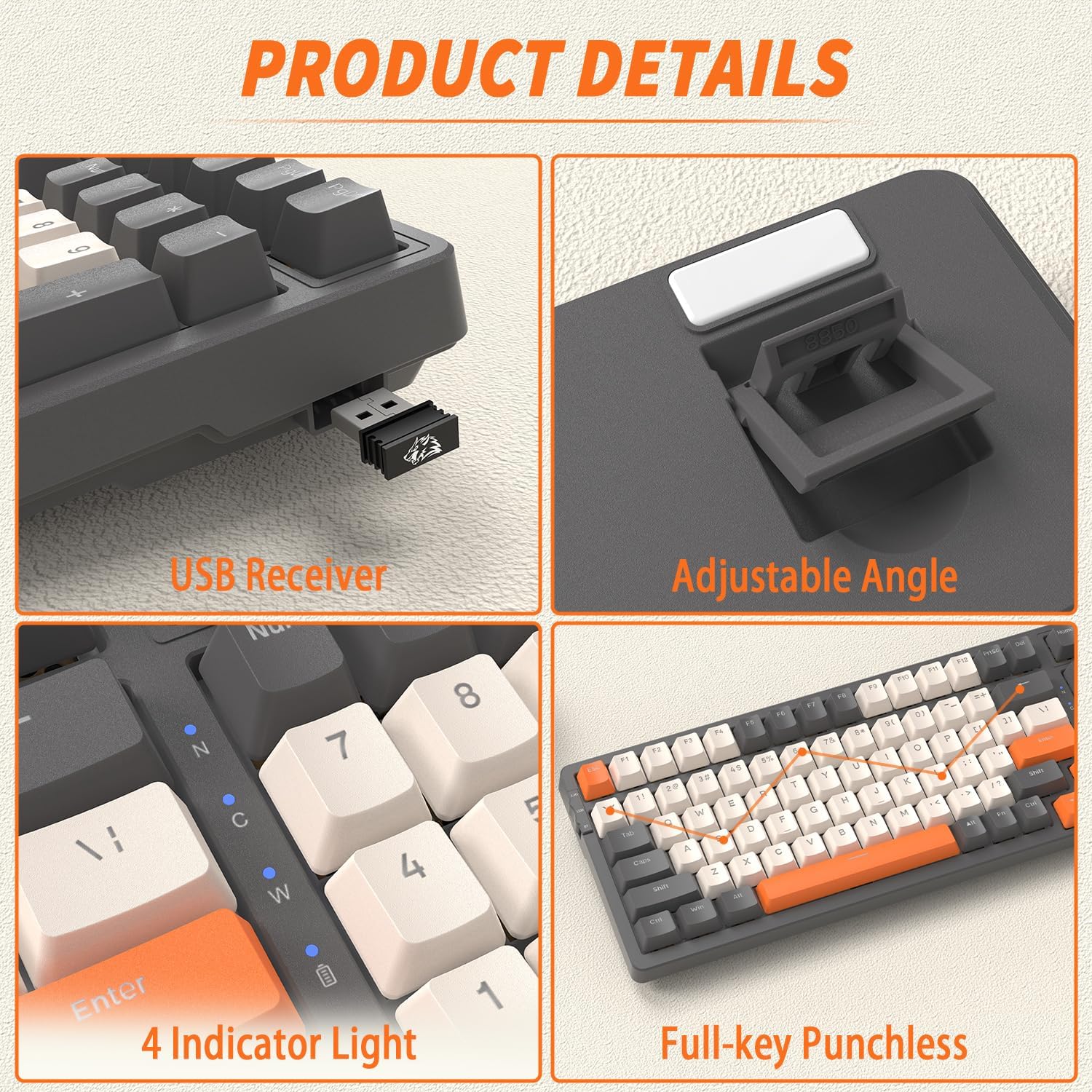
- Locate the 2.4 GHz USB receiver, typically stored in a slot on the keyboard's underside or side.
- Connecteu el receptor USB a un port USB disponible de l'ordinador.
- Ajusteu el selector de mode del teclat a "2.4G".
- El teclat s'hauria de connectar automàticament. Si no, premeu FN + R per iniciar l'aparellament.
3. Mode Bluetooth
The K8 keyboard supports up to three Bluetooth devices.
- Poseu el selector de mode del teclat a "BT".
- To enter pairing mode for a specific Bluetooth channel, press and hold FN + Q (per a BT1), FN + W (per a BT2), o FN + E (for BT3) for 3-5 seconds until the corresponding indicator light flashes rapidly.
- Al dispositiu (ordinador, tauleta, telèfon intel·ligent), activeu el Bluetooth i cerqueu dispositius nous.
- Select 'FREEWOLF K8' from the list of available devices to pair.
- Un cop emparellat, l'indicador lluminós deixarà de parpellejar i romandrà fix.
- Per canviar entre dispositius Bluetooth emparellats, només cal que premeu FN + Q, FN + W, o FN + E.
System Compatibility (Win/Mac)
The K8 keyboard is compatible with both Windows and Mac operating systems. To switch between layouts, press FN + A per al mode Windows o FN + S per al mode Mac.
Instruccions de funcionament
Ajust de l'angle del teclat
The keyboard features adjustable kickstands on the underside. Flip them out to achieve a more ergonomic typing angle, or fold them in for a flatter profile.
Control de retroiluminació RGB
The K8 keyboard offers over 20 RGB backlight effects and customizable gaming backlights.

- Canvia el mode de retroiluminació: Premeu FN + | to cycle through 19 different RGB lighting effects.
- Customized Gaming Backlights: The keyboard has three pre-set gaming backlight modes that can be customized:
- FN + 1! (FPS Mode): Lights up W/A/S/D and arrow keys.
- FN + 2@ (LOL Mode): Lights up Q/W/E/R/D/F/G/V/B/Tab/Space/1-6/Esc keys.
- FN + 3# (Office Mode): Lights up A-Z/[/]/;/'/,/.// and arrow keys.
- Record Custom Backlight: To record your own custom backlight for FN+1!, FN+2@, or FN+3#, first select the desired mode (e.g., FN+1!), then press FN + ~. The indicator light will flash. Press the keys you wish to light up. Press FN + ~ de nou per salvar.
- Ajusta la brillantor: Premeu FN + ↑ per augmentar la brillantor i FN + ↓ per disminuir la brillantor.
- Ajustar velocitat: Premeu FN + ← per disminuir la velocitat de l'efecte i FN + → per augmentar la velocitat de l'efecte.
Funcions d'estalvi d'energia
To conserve battery life, the K8 keyboard implements the following power-saving measures:
- The backlight will turn off after 5 minutes of inactivity.
- After 30 minutes of no operation, the keyboard will enter deep sleep (hibernation) mode.
- To wake the keyboard from sleep, press any key twice.
Manteniment
Neteja del teclat
Una neteja regular ajuda a mantenir el rendiment i l'aspecte del teclat.
- Desconnecteu el teclat de totes les fonts d'alimentació abans de netejar-lo.
- Utilitzeu un drap suau i sense pelusa lleugerament dampRenteu-les amb aigua o una solució netejadora suau per netejar les tecles i el xassís.
- Per a la pols i les restes entre les tecles, feu servir aire comprimit o un raspall petit.
- Eviteu utilitzar productes químics o materials abrasius.
Interruptors d'intercanvi en calent
The FREEWOLF K8 is a hot-swappable keyboard, allowing you to change mechanical switches without soldering. It supports most 3-pin switches.
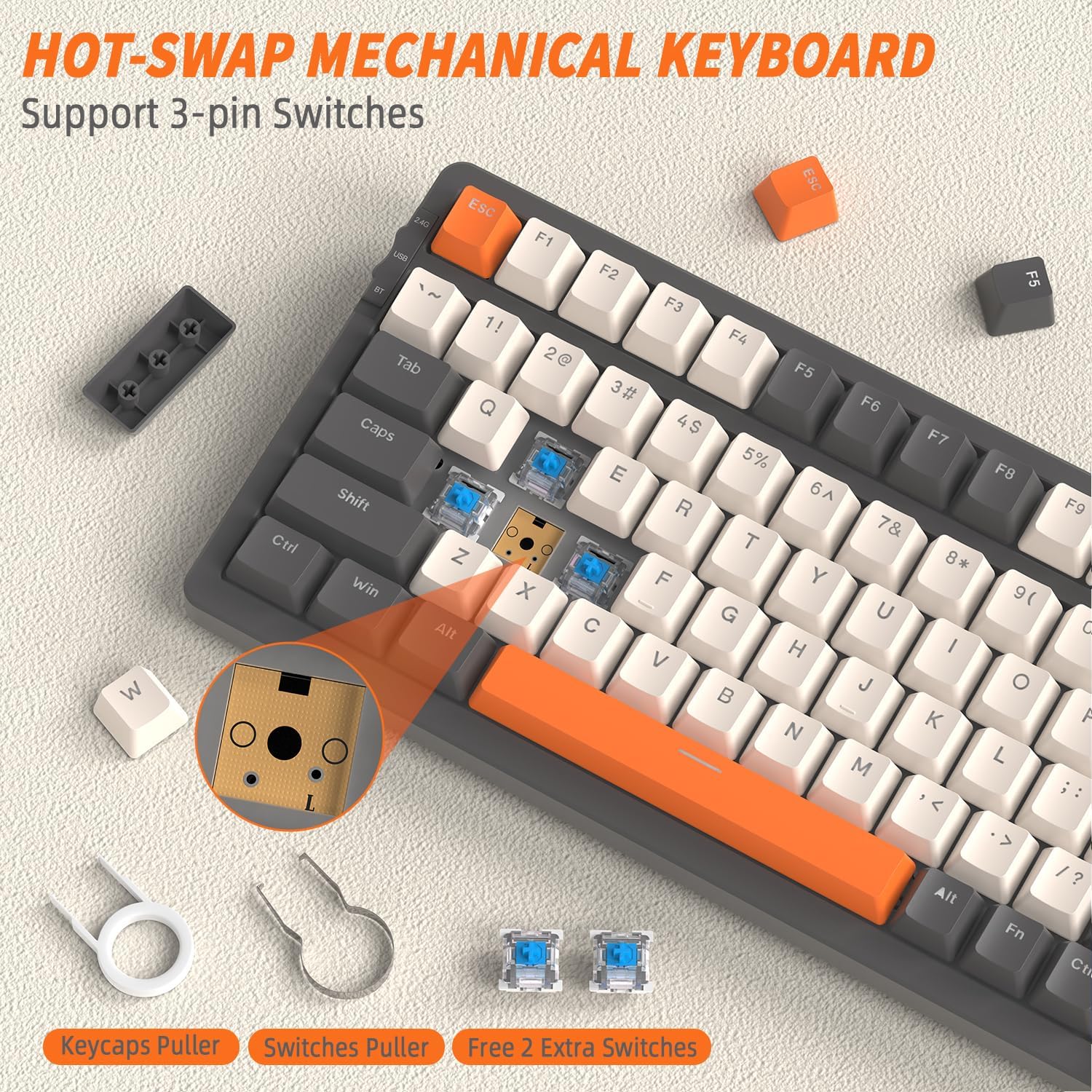
- Treure la tapa de les tecles: Use the included keycap puller tool to gently pull up the desired keycap.
- Treure l'interruptor: Use the included switch puller tool to grasp the top and bottom clips of the switch. Gently pull the switch straight up to remove it from the PCB.
- Instal·leu un nou interruptor: Align the pins of the new 3-pin mechanical switch with the holes on the PCB. Gently push the switch straight down until it clicks into place. Ensure the pins are not bent.
- Reinstall Keycap: Place the keycap back onto the new switch and press down firmly.
Resolució de problemes
| Problema | Causa possible | Solució |
|---|---|---|
| El teclat no respon (amb cable) | Connexió de cable fluixa, mode incorrecte. | Ensure USB-C cable is securely connected. Verify mode switch is set to 'USB' or 'Wired'. Try a different USB port or cable. |
| Keyboard not responding (2.4 GHz) | Receiver not plugged in, incorrect mode, pairing issue. | Ensure 2.4 GHz receiver is plugged into a USB port. Verify mode switch is set to '2.4G'. Press FN + R to re-pair. Move keyboard closer to receiver. |
| El teclat no respon (Bluetooth) | Incorrect mode, not paired, out of range, device Bluetooth off. | Verify mode switch is set to 'BT'. Ensure Bluetooth is enabled on your device. Re-enter pairing mode (FN + Q/W/E) and re-pair. Move keyboard closer to device. |
| La retroiluminació no funciona o és tènue | Backlight off, brightness too low, low battery. | Premeu FN + | to cycle modes. Increase brightness with FN + ↑. Charge the keyboard. |
| Tecles específiques que no responen | Interruptor fluix o defectuós, deixalles sota la tapa de la tecla. | Remove keycap and switch. Clean any debris. Reinstall switch firmly. If issue persists, replace the switch with a spare or new one. |
| El teclat es desconnecta sovint | Interference, low battery, too far from receiver/device. | Charge the keyboard. Reduce distance to receiver/device. Avoid strong electromagnetic interference. |
Especificacions
| Característica | Descripció |
|---|---|
| Model | K8 |
| Marca | LLOP LLIURE |
| Connectivitat | USB-C Wired, 2.4 GHz Wireless, Bluetooth (BT1, BT2, BT3) |
| Disposició del teclat | 80% (100 tecles) |
| Tipus de canvi | Mechanical (Hot-swappable, supports 3-pin switches) |
| Llum de fons | RGB (19 effects, 3 customizable gaming modes) |
| Capacitat de la bateria | 4000 mAh |
| Sistemes compatibles | Windows, macOS |
| Taps de claus | PBT Double Injection |
| Característiques especials | Hot-swappable, Adjustable Angle, Full-key Punchless (N-key rollover) |
| Color | Grey/Orange - Blue Switch (variant specific) |
Garantia i Suport
For warranty information, technical support, or service inquiries, please refer to the FREEWOLF official website or contact your point of purchase. This manual does not contain specific warranty details or support contact information.