
1. Producte acabatview
The HEANTLE WiFi Smart Lock M2-BBFLST-HNT is a keyless entry deadbolt with a handleset, offering multiple unlocking methods including fingerprint, keypad, mobile app, and physical key. It features remote WiFi control, voice control compatibility with Alexa and Google Assistant, auto-lock functionality, and real-time notifications.

Image: HEANTLE WiFi Smart Lock M2-BBFLST-HNT installed on a white door, showcasing its sleek design and integration with a smartphone app for control.
Característiques principals:
- Remote Lock & Check Logs: WiFi connectivity (gateway included) for remote control and real-time monitoring via the app.
- Múltiples mètodes de desbloqueig: Fingerprint, mobile app, passcode, and physical key.
- Customized Access Codes: Generate one-time, time-limited, permanent, and scheduled codes.
- Bloqueig automàtic i bloqueig d'un sol toc: Configurable auto-lock timer (5s-1800s) and quick one-touch locking.
- Control de veu: Compatible amb Amazon Alexa i Google Assistant.
- Fàcil instal·lació: Designed for straightforward installation without extra drilling, with detailed video guidance.
2. Configuració i instal·lació
2.1 Compatibilitat de portes
Ensure your door meets the following specifications for proper installation:
- Gruix de la porta: 1.5" - 1.89" (38-48mm)
- Diàmetre transversal: 2.13" (54 mm)
- Part posterior: 2.36"/2.76" (60/70mm)
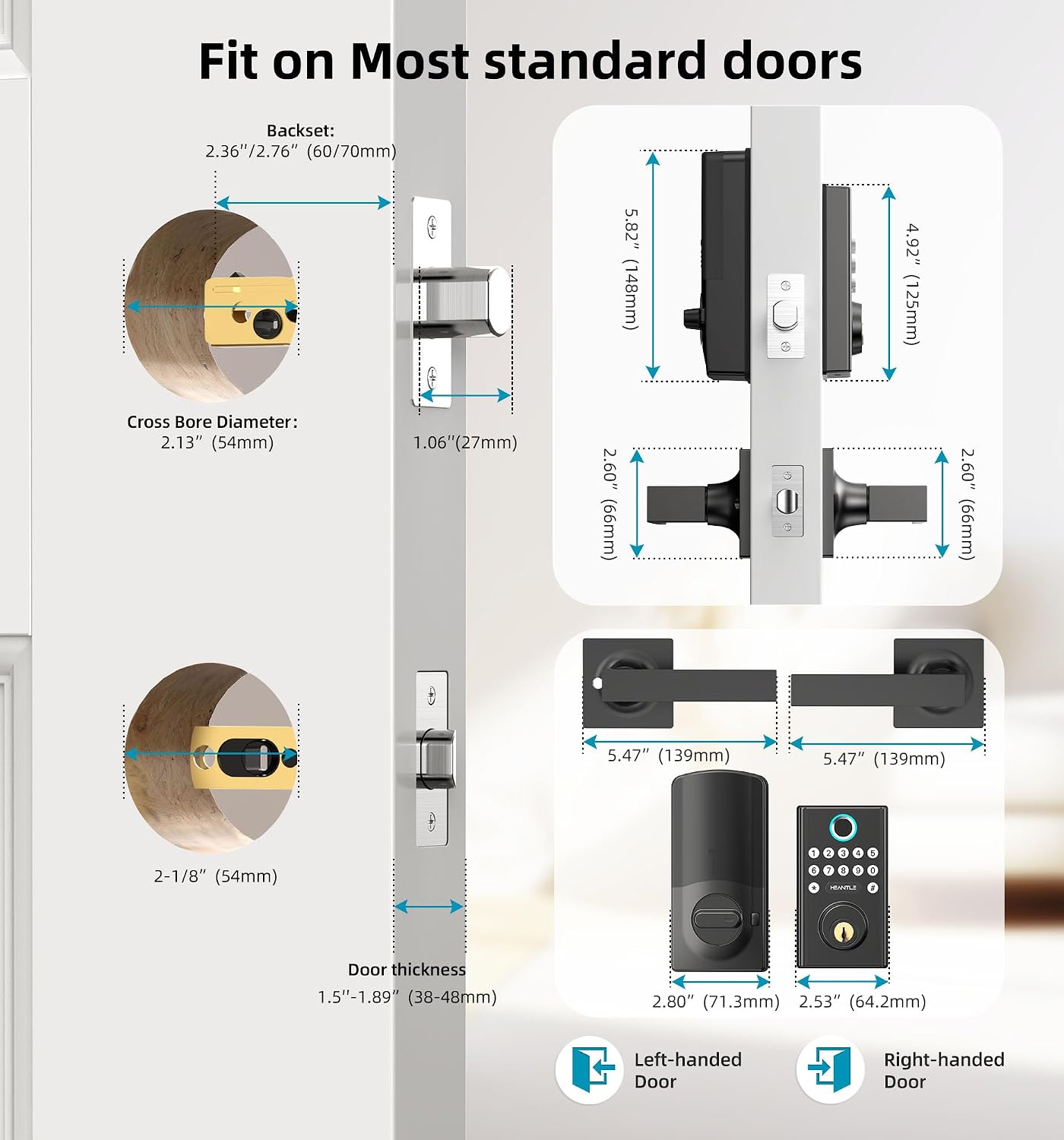
Image: Detailed diagram illustrating the necessary door measurements for installing the HEANTLE Smart Lock, ensuring proper fit and function.
2.2 Passos d'instal·lació
Follow these steps for a successful installation. A Phillips screwdriver is the only tool required. Keep the door open during installation to avoid being locked out.
- Adjust the deadbolt length to 2-3/8" or 2-3/4" based on your door size. Ensure the word "UP" on the deadbolt faces upwards.
- Secure the retracted deadbolt with 2 screws.
- Place the spindle horizontally before inserting it. Keep the spindle horizontal and pass the cable under the deadbolt.
- Pass the spindle through the central hole and the cable through the right bottom hole. Secure the mounting plate with screws.
- Plug the cable into the port on the interior assembly.
- Install the 4 AA batteries and slide the battery cover on.
- Install the exterior handle, ensuring it is properly aligned and secured.
Video: Step-by-step guide on how to install the HEANTLE WiFi Door Lock, covering deadbolt adjustment, assembly, and handle installation.
2.3 Gateway and App Connection
To enable remote control and smart features, connect the included WiFi Gateway to your lock via the Smart Life app.
- Ensure your smartphone is connected to a 2.4GHz WiFi network (5G networks are not supported).
- Activa el Bluetooth al teu telèfon.
- Plug in the Gateway. Press and hold the reset button on the back until the blue indicator remains solid and the red indicator flashes slowly.
- Open the Smart Life APP, tap the "+" icon in the top right corner, then tap "Add" to discover devices.
- Choose your 2.4GHz WiFi network and enter its password.
- Wait for the Gateway to complete the connection. Once connected, the Gateway will appear in the "All devices" list.
- Tap "Gateway" and then "Add device" to pair it with your Smart Lock. The app will automatically search for your lock.
- Wait for the Gateway to complete the connection with the lock.
Video: Instructions on how to connect the HEANTLE Smart Lock to WiFi using the gateway and the Smart Life app, including resetting the gateway and pairing devices.
3. Instruccions de funcionament
3.1 Mètodes de desbloqueig
- Empremta digital: Place your registered fingerprint on the sensor for instant unlocking.
- Keypad Passcode: Introduïu el codi d'accés programat al teclat numèric.
- Aplicació mòbil: Use the Smart Life app to remotely unlock or lock the door.
- Clau física: Feu servir les claus físiques proporcionades com a còpia de seguretat tradicional.

Image: Visual representation of the various ways to unlock the HEANTLE Smart Lock, including digital and traditional methods.
3.2 Control remot i monitorització
With the WiFi Gateway connected, you can manage your lock from anywhere:
- Desbloqueig/bloqueig remot: Control your door's status via the Smart Life app.
- Notificacions en temps real: Receive alerts for wrong entries or other events.
- Registres d'activitat: Check real-time records of who entered and when.

Image: A user demonstrating remote unlocking of the HEANTLE Smart Lock via their smartphone, highlighting the convenience of WiFi control.
3.3 Access Code Management
The app allows for flexible management of access codes:
- One-time Codes: For single-use access.
- Time-limited Codes: Valid for a specific duration.
- Permanent Codes: For regular users.
- Scheduled Codes: For recurring access during specific times.

Image: The Smart Life app interface demonstrating the creation and sharing of temporary, one-time, and scheduled access codes for various users.
3.4 Bloqueig automàtic i bloqueig d'un sol toc
- Bloqueig automàtic: The lock can be set to automatically lock after a period of 5 to 1800 seconds once the door is closed. This feature can be enabled/disabled via the app.
- Bloqueig d'un sol toc: From the outside, press the "#" key for 1 second to quickly lock the door.
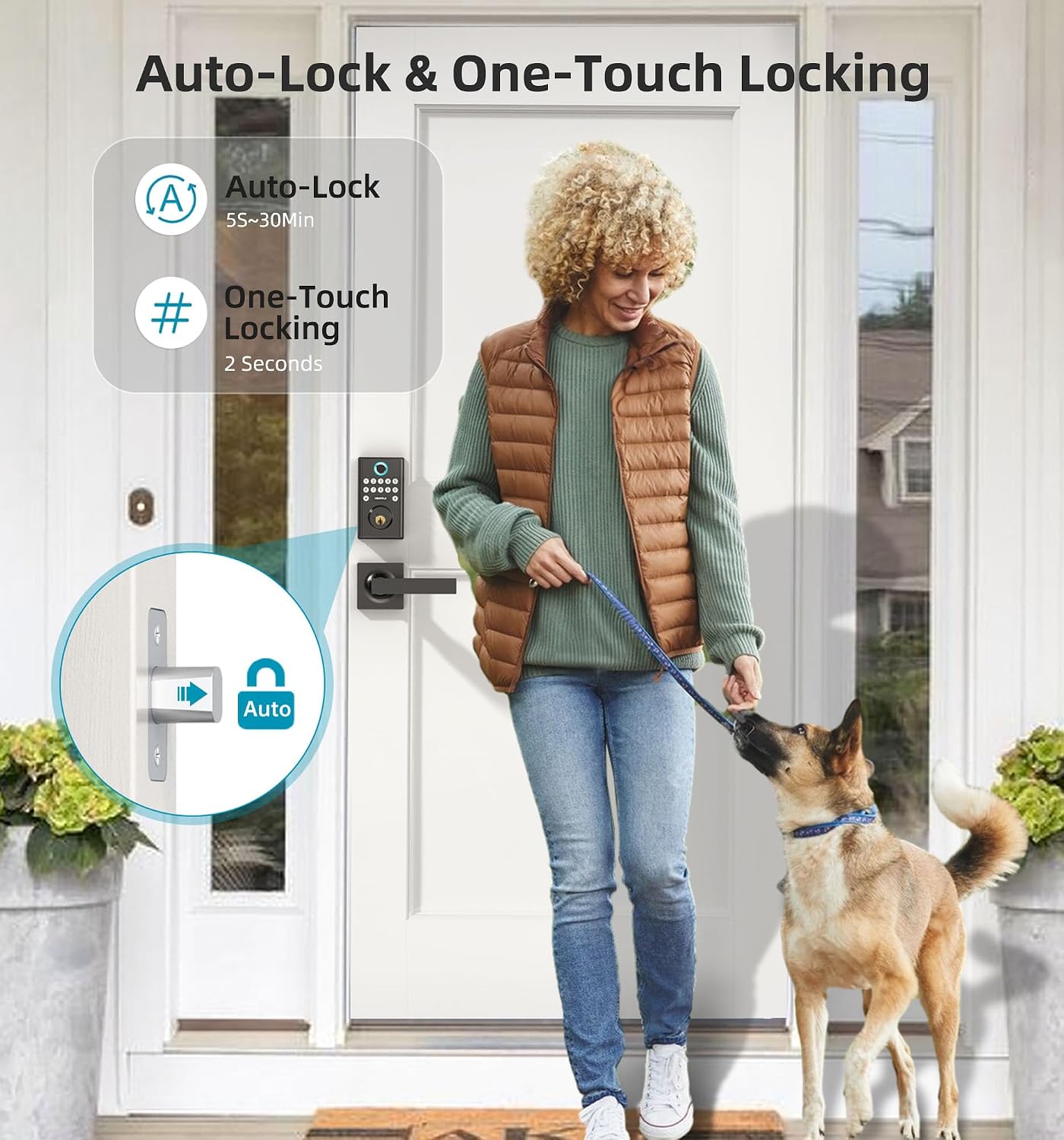
Image: A visual guide to the automatic locking feature, which secures the door after a user-defined delay, and the quick one-touch locking option.
3.5 Integració del control per veu
The HEANTLE Smart Lock is compatible with Amazon Alexa and Google Assistant, allowing for convenient voice commands to control your door.

Image: A person using voice commands with an Alexa device to unlock the HEANTLE Smart Lock, illustrating seamless integration with smart home ecosystems.
4. Manteniment
4.1 Substitució de la bateria
The lock requires 4 AA batteries (not included). When the battery level is low, you will receive an alert via the app. To replace batteries:
- Traieu la coberta de la bateria del conjunt interior.
- Substituïu les quatre piles AA per unes de noves, assegurant-vos de la polaritat correcta.
- Torneu a col·locar la tapa de la bateria.

Image: A smartphone displaying a low battery alert for the HEANTLE Smart Lock, prompting the user to replace batteries.
4.2 Atenció general
To ensure the longevity and optimal performance of your smart lock:
- Eviteu utilitzar netejadors o dissolvents abrasius a la superfície del pany.
- Regularly check for any loose screws or components and tighten them if necessary.
- Keep the fingerprint sensor clean and free from dirt or moisture.
5. Solució De Problemes
If you encounter issues with your HEANTLE Smart Lock, consider the following common solutions:
- El pany no respon: Check battery levels and replace if necessary. Ensure the lock is within Bluetooth range for app control or that the WiFi Gateway is properly connected for remote access.
- Empremta digital no reconeguda: Assegura't que el dit estigui net i sec. Torna a registrar la teva empremta digital si els problemes persisteixen.
- El codi d'accés no funciona: Verify the correct passcode is being entered. Check if the code is expired or time-limited via the app.
- Remote access issues: Confirm the WiFi Gateway is powered on and connected to a 2.4GHz WiFi network. Check your internet connection.
- El bloqueig automàtic no s'activa: Verify the auto-lock feature is enabled and the timer is set correctly in the app.
Per obtenir més ajuda, consulteu la informació de contacte a la secció Garantia i assistència.
6. Especificacions
| Característica | Detall |
|---|---|
| Marca | HEANTLE |
| Nom del model | WiFi Smart deadbolt Handle Set (M2-BBFLST-HNT) |
| Tipus de bloqueig | App Remote Control, Biometric, Deadbolt, Keypad |
| Característiques especials | Auto-Lock, Fingerprint, One-Touch Lock, WiFi Deadbolt, Keyless Entry, Work with Alexa/Google Home, App Remote Control, Real-time Notification |
| Material | Metall |
| Tipus d'acabat | Recobert de pols |
| Dimensions de l'article (L x A x A) | 15.5 x 6.5 x 4.7 polzades |
| Pes de l'article | 3.56 lliures |
| Font d'alimentació | 4 piles AA (no incloses) |
| Protocol de connectivitat | Bluetooth, Wi-Fi (només 2.4 GHz) |
| Tipus de controlador | Amazon Alexa, Android & iOS Smartphone, Google Assistant, Hand Control, Push Button |
| Components inclosos | 2 keys, A 2.4G WIFI Gateway, Installation Instruction, Lever Handle Set, WiFi Smart Lock with Keypad |
7. Garantia i Suport
HEANTLE provides comprehensive support for your smart lock:
- Garantia: 1-year coverage from the date of purchase.
- Devolucions/Substitucions: 30 days replacement policy.
- Suport tècnic: Life-time free technical support available via Online Email.
For any questions or assistance, please contact HEANTLE customer service:
- Número gratuït: 1-888-223-6660
- Correu electrònic: heantle@hotmail.com
Responses are typically provided within 24 hours.