
1. Introducció
This manual provides detailed instructions for the installation, operation, and maintenance of your MekedeTech Android Car Radio. This 9-inch car stereo touch screen unit is designed for Nissan Qashqai models manufactured between 2006 and 2013, offering an upgrade with Wireless CarPlay/Android Auto, GPS Navigation, WiFi, and FM Radio capabilities.
The unit features a 4-Core A53 CPU, 2GB RAM, and 32GB ROM, running on Android 13 OS. It is engineered for seamless integration with your vehicle's existing systems without requiring cutting or modification of original car wiring.
2. Contingut del paquet
Carefully unpack the box and ensure all items listed below are present and in good condition. If any items are missing or damaged, please contact MekedeTech customer support.

Figura 2.1: Contingut del paquetview
This image displays the main unit (Machine), Power Cable, RCA Cable, Reversing Camera, USB Cables (various types), MIC, and GPS Antenna, which are typically included in the package.
- Unitat principal (màquina)
- Cable d'alimentació
- Cable RCA
- Càmera de marxa enrere
- USB Cable (multiple types for different models)
- MIC (micròfon)
- Antena GPS
- 4G Antenna (if applicable to your specific model variant)
3. Configuració i instal·lació
The MekedeTech Android Car Radio is designed for a direct fit in Nissan Qashqai 2006-2013 models. Professional installation is recommended to ensure proper wiring and functionality.
3.1 Comprovació prèvia a la instal·lació
- Assegureu-vos que el vehicle estigui apagat i que la bateria estigui desconnectada abans de començar la instal·lació.
- Verifiqueu que hi hagi tot el contingut del paquet.
- Familiaritzeu-vos amb la disposició del quadre de comandament del vostre vehicle i el cablejat existent.
3.2 Passos d'instal·lació
- Treure la unitat original: Carefully remove the existing car radio unit from your Nissan Qashqai dashboard. Refer to your vehicle's service manual for specific instructions on panel removal.
- Connecteu el cablejat: Connect the provided power cable, RCA cables, USB cables, GPS antenna, and microphone to the corresponding ports on the new Android head unit. Ensure all connections are secure. The unit is designed to integrate with original car wiring without modification.
- Install Reversing Camera (Optional): If installing the reversing camera, route its cable to the rear of the vehicle and connect it to the appropriate input on the head unit.
- Funcionalitat de prova: Before fully securing the unit, reconnect the vehicle battery and perform a basic test of the radio, touch screen, and power functions.
- Unitat principal segura: Carefully slide the MekedeTech Android Car Radio into the dashboard opening and secure it using the vehicle's mounting brackets. Reassemble any removed dashboard panels.
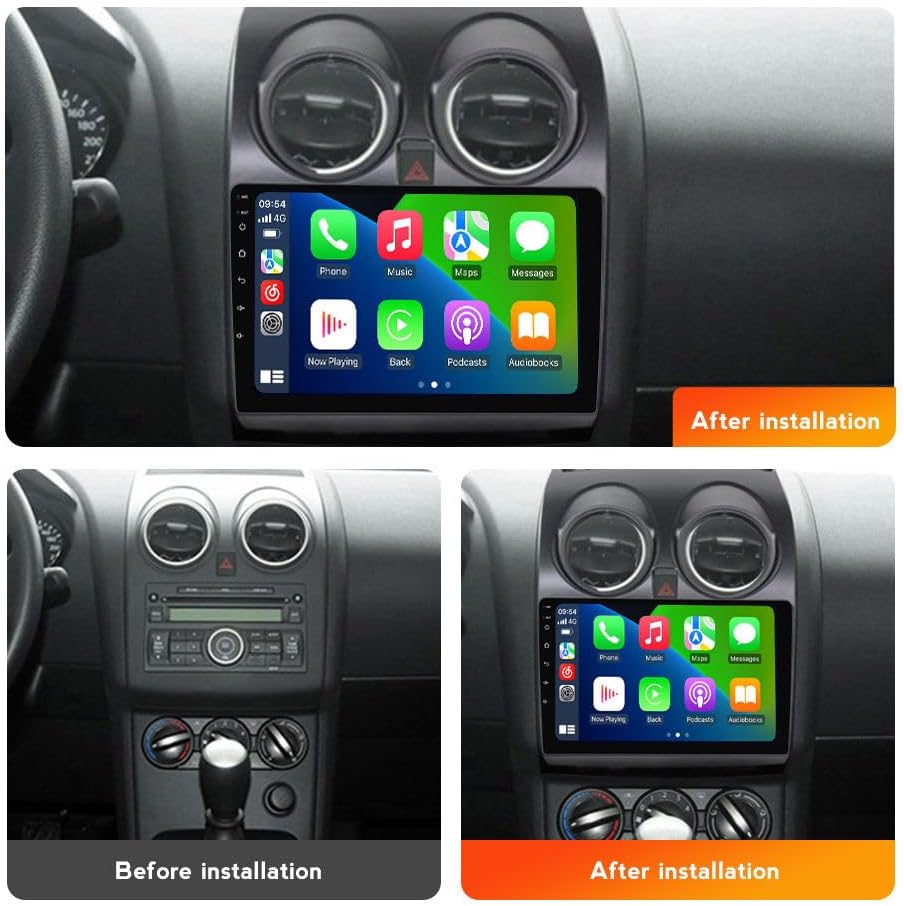
Figura 3.1: Abans i després de la instal·lació
This image illustrates the visual transformation of the Nissan Qashqai dashboard with the new 9-inch Android car radio installed, replacing the original unit.
3.3 Cooling Fan Setup (If Applicable)
Some models may include a cooling fan for optimal performance, especially in high-temperature environments. Follow these steps to ensure the cooling fan is properly configured:
- Connecta el ventilador: Ensure the cooling fan is connected to the designated port on the back of the head unit.
- Configuració d'accés: Des del menú principal, navegueu fins a Settings > Device > Sound.
- Activa AMP ACTIVITAT: In the Device settings, locate and enable the "AMP ON" option.
- Comproveu el funcionament del ventilador: The cooling fan should now activate, helping to manage the unit's temperature.

Figure 3.2: Cooling Fan and System Overview
This image details the cooling fan's function in preventing overheating, highlights the Quad Core, 2GB RAM, 32GB ROM specifications, and illustrates the setup steps for activating the cooling fan.
4. Instruccions de funcionament
Your MekedeTech Android Car Radio offers a range of features for an enhanced driving experience.
4.1 CarPlay sense fil i Android Auto
Connect your iPhone or Android smartphone wirelessly for seamless access to navigation, music, calls, and messages.
Passos de connexió:
- Activa el Bluetooth: On your car radio, ensure Bluetooth is enabled.
- Parella el dispositiu: On your smartphone, search for and connect to the car radio's Bluetooth device (e.g., "BT").
- Launch Car Link: On the car radio, open the "Car Link" application.
- Confirmeu la connexió: Your phone should now connect to either Wireless CarPlay (for iOS) or Wireless Android Auto (for Android). A wired connection via USB cable is also supported.
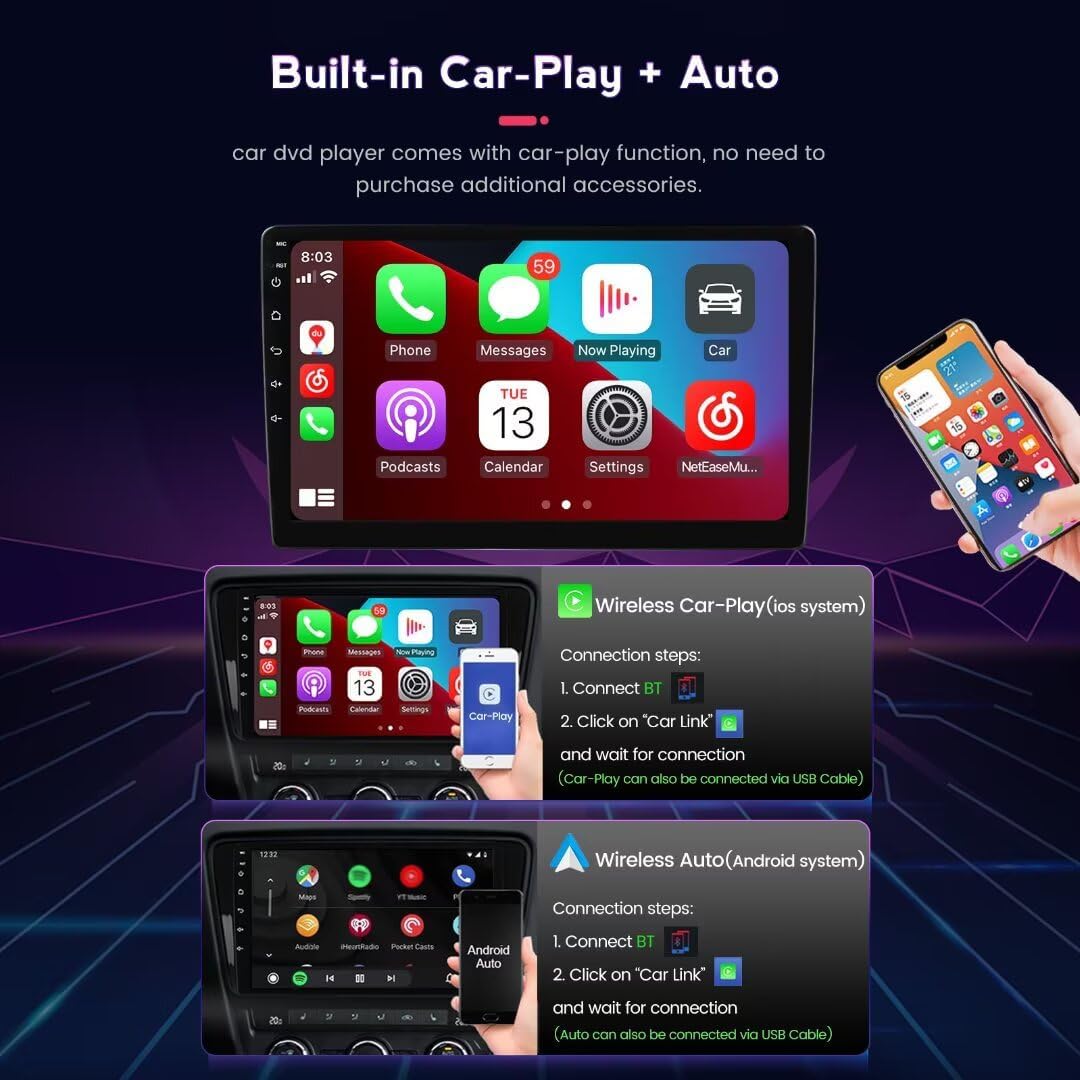
Figura 4.1: Interfície de CarPlay i Android Auto
This image displays the user interface for both Wireless CarPlay (iOS) and Wireless Android Auto (Android), along with the connection steps for each system.
4.2 Navegació GPS
The unit features a built-in global positioning system (GPS) with support for offline and online maps. Connect to WiFi for real-time traffic updates.
- Supported Maps: The system supports various navigation applications, including iGO, Navitel, Yandex, and Google Maps.
- Mapes fora de línia: Download maps for your region to use navigation without an internet connection.
- Mapes en línia: Connect to a WiFi hotspot for live traffic information and updated map data.
Pantalla dividida 4.3
The split-screen function allows two applications to be displayed simultaneously on the screen, such as navigation and music, or a map and online video, enhancing convenience and multitasking.
4.4 Ràdio FM/AM
Enjoy high-fidelity sound quality with the built-in FM RDS radio. Scan for stations and save your favorites for easy access.

Figure 4.2: Split Screen and GPS Navigation
This image illustrates the split-screen capability, showing FM radio with a map, and a map with music. It also highlights the GPS navigation features, including supported map applications and real-time traffic information.
4.5 Control del volant
The unit supports steering wheel controls, allowing you to manage essential functions like volume adjustment, track skipping, and call handling without taking your hands off the wheel.
5. Manteniment
To ensure the longevity and optimal performance of your MekedeTech Android Car Radio, follow these maintenance guidelines:
- Neteja de pantalla: Use a soft, lint-free cloth to gently wipe the touch screen. Avoid abrasive cleaners or harsh chemicals that could damage the screen surface.
- Actualitzacions de programari: Periodically check for system software updates to ensure you have the latest features and security patches. Updates can typically be found in the system settings under "About device" or "System updates."
- Control de temperatura: While the unit has a cooling fan, avoid exposing it to extreme temperatures for prolonged periods.
- Connexions de cable: Occasionally check all cable connections to ensure they remain secure and free from damage.
6. Solució De Problemes
Si teniu problemes amb la ràdio del cotxe, consulteu els passos habituals següents per resoldre problemes:
- Sense energia:
- Comproveu totes les connexions del cable d'alimentació.
- Verifiqueu que el fusible de la ràdio del vehicle estigui intacte.
- Assegureu-vos que la bateria del vehicle estigui connectada i carregada correctament.
- Sense so:
- Comproveu les connexions dels cables de l'altaveu.
- Assegureu-vos que el volum no estigui silenciat ni massa baix.
- Verifiqueu la configuració de la sortida d'àudio al menú del sistema.
- La pantalla tàctil no respon:
- Restart the unit by turning off the vehicle ignition and restarting.
- Assegureu-vos que la pantalla estigui neta i lliure de residus.
- El GPS no funciona:
- Assegureu-vos que l'antena GPS estigui connectada correctament i que tingui una visió clara view del cel.
- Reviseu la configuració del GPS al menú del sistema.
- Problemes de connexió amb CarPlay/Android Auto:
- Ensure Bluetooth is enabled on both the unit and your smartphone.
- Verify the "Car Link" app is open on the head unit.
- Try a wired USB connection to rule out wireless issues.
- Update your phone's operating system and the car radio's software.
- Unit Does Not Fit (Nissan Rogue):
- This unit is specifically designed for Nissan Qashqai 2006-2013. It is not compatible with Nissan Rogue models. Please verify your vehicle's make, model, and year before purchase.
- Not Plug and Play:
- While designed for direct fit, some vehicle configurations may require minor adjustments or specific wiring harnesses not included. Contact MekedeTech support if you encounter significant installation challenges.
For further assistance, please contact MekedeTech customer support.
7. Especificacions
| Característica | Especificació |
|---|---|
| Marca | MekedeTech |
| Model | 4-Core 2+32G |
| Sistema operatiu | OS Android 13 |
| CPU | 4-Core A53 |
| Memòria (RAM) | 2 GB |
| Emmagatzematge (ROM) | 32 GB |
| Mida de la pantalla | 9 polzades |
| Tipus de pantalla | Pantalla tàctil IPS |
| Resolució de pantalla | 1280*720 |
| Connectivitat | Wireless (CarPlay/Android Auto), WiFi, Bluetooth |
| Navegació | Built-in GPS, Supports offline/online maps |
| Ràdio | FM RDS Radio |
| Potència de sortida | 50 watts (per canal, 4 canals) |
| Wattage | 200 watts (total) |
| Mètode de control | Touch, Steering Wheel Control |
| Dispositius compatibles | Smartphone, altaveu |
| Color | Negre |
8. Garantia i Suport
8.1 Informació de la garantia
The MekedeTech Android Car Radio comes with a 1 anys de garantia from the date of purchase. This warranty covers manufacturing defects and malfunctions under normal use. It does not cover damage caused by improper installation, misuse, accidents, or unauthorized modifications.
8.2 Atenció al client
For technical assistance, troubleshooting, warranty claims, or any other inquiries, please contact MekedeTech customer support. You can typically find contact information on the seller's page or through your purchase platform.
Fabricant: Shenzhen Mekede Technology Co.,Ltd