
Introducció
This manual provides detailed instructions for the Ninetom 10.25-inch car radio touch screen. This device is designed to upgrade the infotainment system in specific BMW models, offering enhanced features while retaining original vehicle functionalities.
Compatibilitat
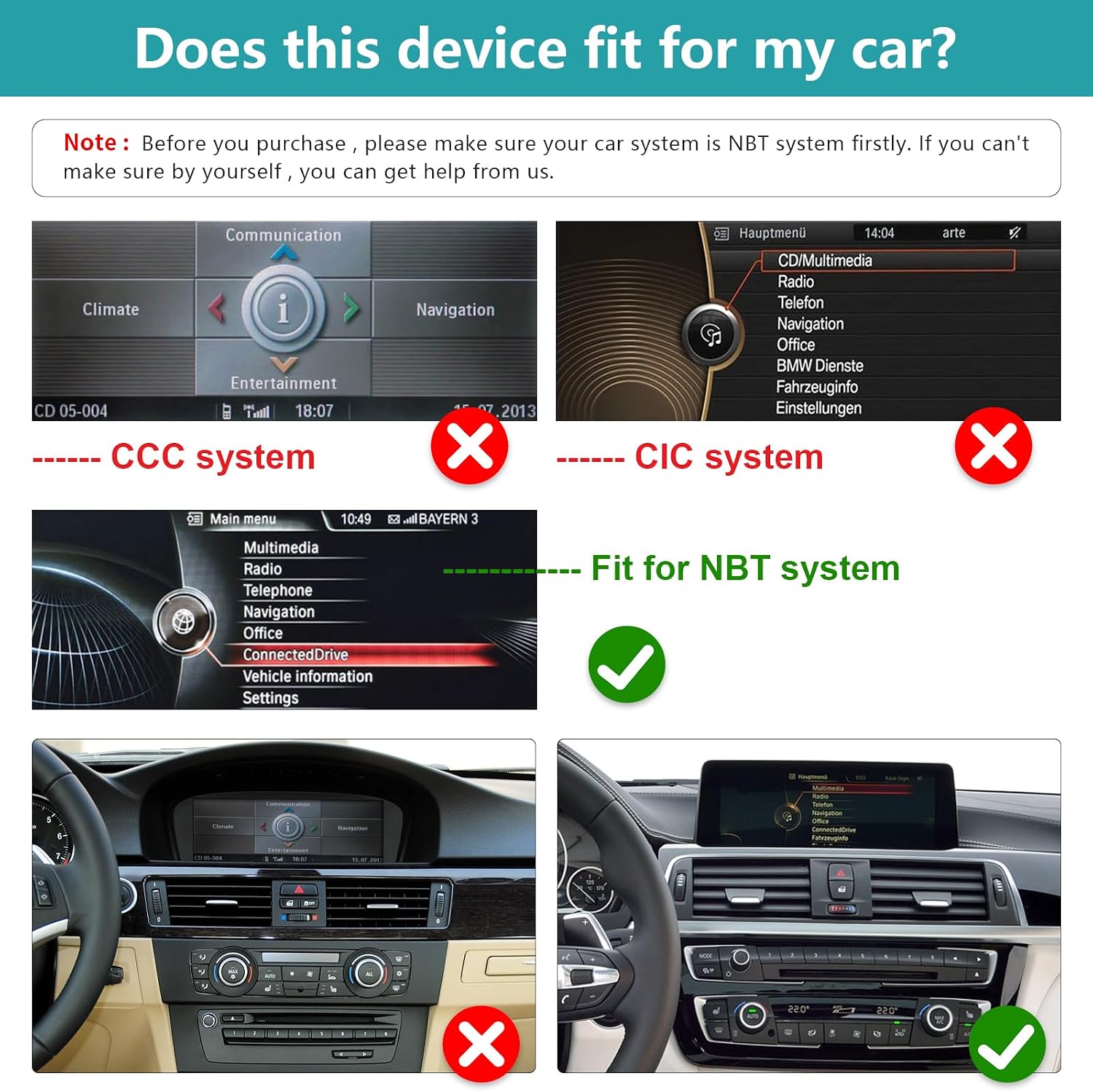
This car radio touch screen is compatible with BMW 1/2 Series F20, F21, F22, F23 models from 2011-2016 that are equipped with the Sistema NBT. It is crucial to verify your car's existing system before installation to ensure proper functionality. If unsure, consult a professional.
Característiques clau
- Wireless/Wired CarPlay & Android Auto: Seamless integration with iOS and Android smartphones for navigation, calls, messages, and music.
- Mirrorlink Functionality: Synchronize your smartphone's display (maps, videos, etc.) directly to the 10.25-inch HD capacitive touch screen (1920x720 resolution).
- Navegació GPS: Supports various navigation software.
- Original Function Retention: Preserves all original car functions, including the factory radio, amplifier, joystick control, and original reverse camera.
- One-Button System Switching: Easily switch between the new Linux system interface and the original vehicle system.
Informació de seguretat
Please read all safety instructions carefully before installation and operation. Failure to follow these guidelines may result in injury, damage to the device, or damage to your vehicle.
- Assegureu-vos que el vehicle estigui apagat i que la bateria estigui desconnectada abans de començar la instal·lació.
- Do not attempt to operate the device in a way that distracts you from driving.
- Eviteu exposar el dispositiu a temperatures extremes, humitat o llum solar directa durant períodes prolongats.
- Only use approved accessories and wiring.
- Si no esteu segurs de cap part del procés d'instal·lació, busqueu ajuda professional.
Configuració i instal·lació
Comprovació prèvia a la instal·lació
Before proceeding with installation, confirm that your BMW 1/2 Series (F20, F21, F22, F23, 2011-2016) is equipped with the NBT system. Refer to the image below for visual guidance on identifying compatible systems.
Instal·lació general acabadaview
The installation process is designed to be non-destructive, meaning no permanent modifications to your vehicle's wiring are required. It primarily involves removing the original car screen and connecting the provided cables. Detailed installation instructions are included with the product accessories.

Accessoris del producte
The package includes all necessary accessories for installation. The back bracket may vary depending on the specific model.

Instruccions de funcionament
CarPlay i Android Auto
The unit features built-in Wireless/Wired CarPlay and Android Auto. Connect your smartphone to access navigation, make phone calls, send emails, receive notifications, and play music directly through the car's display.

Mirrorlink Function
The full touch screen audio system supports Mirrorlink for both iOS and Android smartphones. This allows you to synchronize your phone's display, including maps, movies, and other content, onto the large 10.25-inch screen for a clear and responsive visual experience.
Switching Between Systems
The device allows for easy one-button switching between its Linux operating system and your car's original NBT system. This ensures that all original vehicle functions remain accessible.

Funcions originals conservades
The upgrade screen retains all original functions of your BMW, including:
- Original car radio and ampfunció de lifier.
- Factory joystick control and command knob.
- Original reverse camera and reverse trajectory display.
- Steering wheel controls.
- CD/DVD, USB, Bluetooth, and GPS navigation from the original system.

Manteniment
To ensure the longevity and optimal performance of your Ninetom car radio touch screen, follow these maintenance guidelines:
- Neteja: Feu servir un drap suau i sense borrissol per netejar suaument la pantalla. Per a taques difícils, fregueu lleugeramentampNetegeu el drap amb aigua o un netejador de pantalles. Eviteu productes químics agressius o materials abrasius.
- Actualitzacions de programari: Reviseu periòdicament el fabricant website or contact support for any available software updates. Keeping the software updated can improve performance and add new features.
- Cura del medi ambient: Protect the device from extreme temperatures, direct sunlight, and excessive moisture.
- Connexions de cable: Ensure all cables are securely connected. Avoid pulling on cables forcefully.
Resolució de problemes
If you encounter issues with your Ninetom car radio touch screen, refer to the following common troubleshooting steps:
- Sense alimentació/Pantalla en blanc:
- Comproveu totes les connexions d'alimentació per assegurar-vos que estiguin ben fixades.
- Verify the vehicle's fuse related to the infotainment system.
- Sense so:
- Assegureu-vos que el volum no estigui silenciat ni massa baix.
- Check audio cable connections (e.g., AUX cable).
- Confirm the correct audio source is selected on both the new screen and the original car system.
- CarPlay/Android Auto no es connecta:
- Assegureu-vos que el Bluetooth i la Wi-Fi estiguin activats al vostre telèfon intel·ligent.
- Try restarting both your phone and the car screen.
- Check USB cable connection if using wired CarPlay/Android Auto.
- Funcions originals que no funcionen:
- Ensure the system is correctly switched to the original car interface.
- Verify all connections related to the original system are properly seated.
- La pantalla tàctil no respon:
- Proveu de reiniciar el dispositiu.
- Assegureu-vos que la pantalla estigui neta i lliure de residus.
Si aquests passos no resolen el problema, poseu-vos en contacte amb l'atenció al client per obtenir més ajuda.
Especificacions del producte
| Característica | Especificació |
|---|---|
| Marca | ninetom |
| Nom del model | RT-LN-NBT-10-1/2S-DE |
| Mida de la pantalla | 10.25 polzades |
| Resolució de pantalla | 1920x720 (Estimated) |
| Sistema operatiu | Linux |
| Tipus de pantalla tàctil | Capacitiva |
| Tecnologia de connectivitat | Bluetooth |
| Característiques especials | Wireless/Wired CarPlay, Android Auto, Mirrorlink, GPS Navigation, Phone Calls, Emails, Notifications, Music |
| Sistema de navegació per satèl·lit compatible | GPS |
| Mode de sortida d'àudio | estèreo |
| Tipus de muntatge | Muntatge al quadre de comandament |
| Tipus de vehicle compatible | Car (BMW 1/2 Series F20 F21 F22 F23 2011-2016 with NBT system) |
| Dimensions de l'article (L x A x A) | 32.2 L x 17.8 W x 13.9 H centímetres |
| País d'origen | Xina |
Informació de la garantia
This Ninetom product comes with a 1 any de garantia from the date of purchase. This warranty covers manufacturing defects and malfunctions under normal use. It does not cover damage caused by improper installation, misuse, accidents, or unauthorized modifications.
Please retain your proof of purchase for warranty claims. For warranty service, contact customer support.
Atenció al client
For any questions, technical assistance, or support regarding your Ninetom 10.25-inch Car Radio Touch Screen, please contact our customer service team.
- Assistència en línia: Visit the Ninetom official weblloc web per a preguntes freqüents, guies de resolució de problemes i formularis de contacte.
- Suport per correu electrònic: Refer to the product packaging or included documentation for the customer support email address.
- Assistència a la instal·lació: Professional installation assistance may be available through authorized service centers.
When contacting support, please have your product model number (RT-LN-NBT-10-1/2S-DE) and purchase information ready.

