
1. Introducció
The WANLUTECH X9-MOVTADHS Pro is a versatile IP camera tester designed for professional CCTV installation and maintenance. It integrates multiple functions including IP camera testing, analog camera testing (AHD, CVI, TVI, SDI, CVBS), Power over Ethernet (PoE) testing and output, various cable tests (TDR, UTP, tracer), network tools, digital multimeter (DMM), optical power meter (OPM), visual fault locator (VFL), and Wi-Fi analysis. This manual provides detailed instructions for the safe and efficient operation of the device.
2. Informació de seguretat
- Llegiu atentament totes les instruccions abans d'utilitzar el dispositiu.
- No exposeu el dispositiu a la humitat, la pluja ni a temperatures extremes.
- Utilitzeu només el carregador i els accessoris subministrats.
- Assegureu-vos una ventilació adequada durant el funcionament i la càrrega.
- Avoid direct eye exposure to the Visual Fault Locator (VFL) laser output.
- Before using the tester, open the battery cover and remove the paper piece isolating the battery.
3. Contingut del paquet
Verifiqueu que tots els elements que s'enumeren a continuació s'inclouen al vostre paquet:
- WANLUTECH X9-MOVTADHS Pro Tester Unit
- Bossa d'eines
- Lithium Battery (pre-installed)
- Caixa d'accessoris
- Cordó de seguretat
- Digital Multi-meter Pen
- Carregador
- Cable de control RS485
- Cable BNC
- Fiber Test Head
- Cable de sortida d'alimentació
- Audio Test Cable
- Traçador de cables
- TDR Cable Clip

4. Disseny del dispositiu
Familiarize yourself with the ports and controls of the X9-MOVTADHS Pro tester:

Top Panel Ports:
- DC12V/3A Power Output: Provides 12V DC power at 3A.
- PoE Power Output / Network Testing Port: Supports up to 90W PoE power output and network testing.
- PSE/PoE Voltage Mesura: For measuring Power Sourcing Equipment (PSE) and PoE voltages.
- Localitzador visual de fallades (VFL): For fiber optic cable fault detection.
- Mesurador de potència òptica (OPM): For measuring optical power levels.
- AHD CVI TVI CVBS In: Input for analog camera signals.
- Sortida de vídeo: Port de sortida de vídeo.
- Entrada HDMI: Port d'entrada HDMI.
- EX-SDI/HD-SDI In: Input for SDI camera signals.
- TDR 3.0 Cable Test: Port for Time Domain Reflectometry cable testing.
- RS 485 Port: For PTZ control and other serial communications.
Bottom Panel Ports:
- DC5V/2A Power Output: Provides 5V DC power at 2A.
- DC24V/2A Power Output: Provides 24V DC power at 2A.
- Entrada d'alimentació de 15 V CC: Power input for charging the device.
- Entrada/Sortida d'àudio: Audio input and output ports.
- UTP / Cable Tracer Port: For UTP cable testing and cable tracing.
- Ranura per a targetes Micro SD: Per a emmagatzematge ampliable.
- Sortida HDMI: Port de sortida HDMI.
5. Configuració
5.1 Initial Battery Preparation
- Locate the battery cover on the back of the tester.
- Obriu la tapa de la bateria.
- Remove the protective paper piece isolating the battery terminals.
- Tanqueu la tapa de la bateria amb seguretat.
5.2 Càrrega del dispositiu
Connect the provided charger to the DC15V Power Input port on the bottom panel of the tester and plug it into a power outlet. The charging indicator will illuminate. Allow the device to fully charge before first use.
5.3 Engegada/apagada
- Per encendre: Premeu i manteniu premut el botó d'engegada situat al lateral del dispositiu fins que la pantalla s'il·lumini.
- Per apagar: Press and hold the power button until a power-off menu appears on the screen. Select 'Power Off' to shut down the device.
6. Instruccions de funcionament
6.1 IP Camera Testing
The X9-MOVTADHS Pro supports testing of IP cameras up to 8K 32MP resolution. Key functions include:
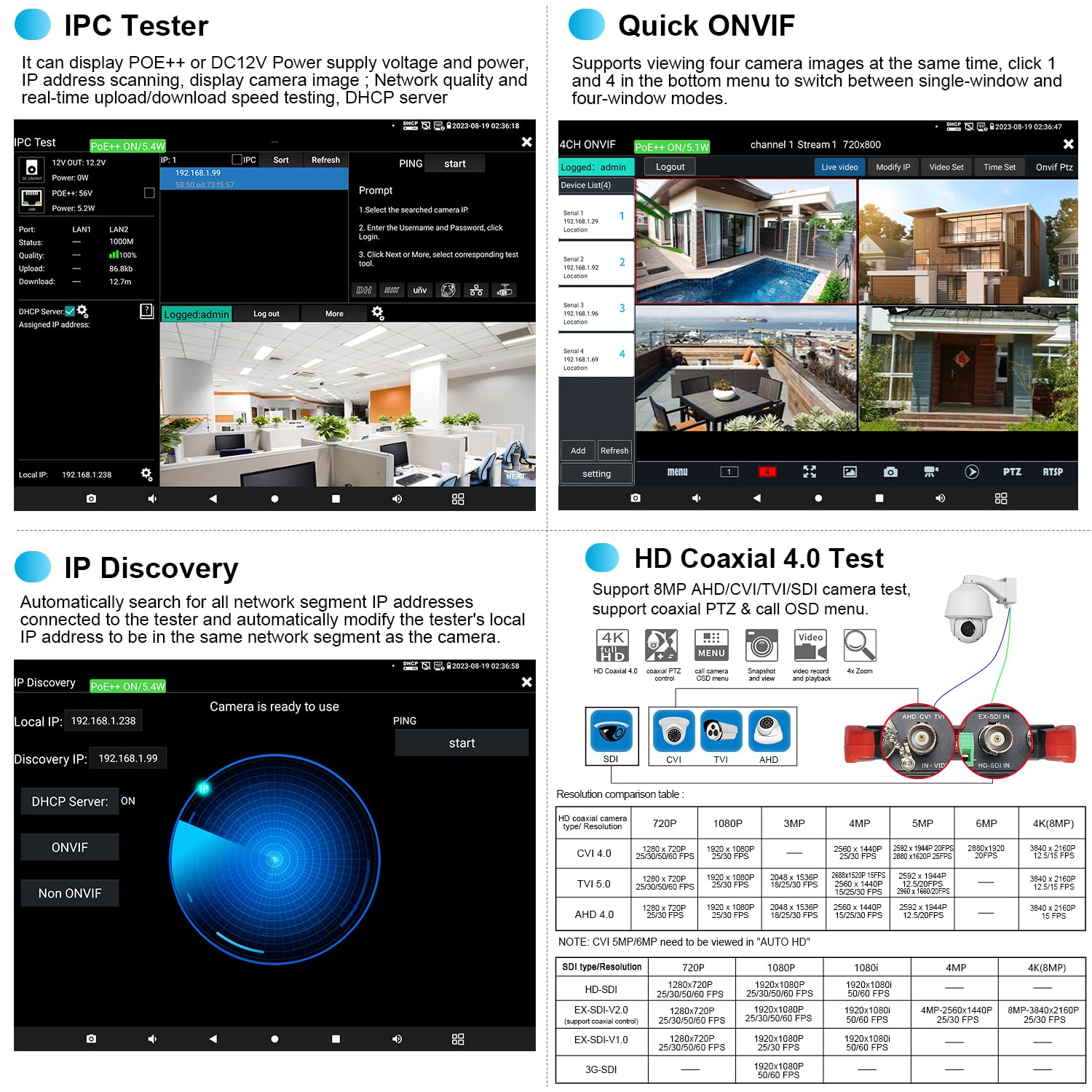
- IPC Test: Integrated IP camera test, PoE and camera test tool functions. View network information, PoE and DC 12V power/voltage. Access ONVIF and other test tools.
- IP Discovery: Automatically searches for all network segment IP addresses connected to the tester. It can modify the tester's local IP address to match the camera's network segment.
- Rapid Video: Quickly displays video streams.
- RTSP Play: Plays RTSP streams directly.
- 4CH ONVIF: Suports viewing up to four camera images simultaneously. Switch between single-window and four-window display modes.
- Hik/DH Test Tool: Supports batch activation of Dahua (DH) and Hikvision (Hik) cameras, and modification of IP addresses, passwords, etc.


6.2 AHD/CVI/TVI/SDI/CVBS Camera Testing
The tester supports analog cameras up to 8MP AHD/TVI/CVI/SDI. Use the "AUTO HD" app to automatically recognize camera types and display resolution/frame rate. Functions include UTC control, OSD menu access, video signal level measurement, and color bar generation.


6.3 Proves de cables
The tester offers comprehensive cable testing capabilities:
- Cable Tracer: Cerca BNC, network, telephone, and shielded cables from cluttered bundles.
- RJ45 Cable TDR Test: Tests cable pair status, length (up to 180m), attenuation, reflectivity, impedance, and skew.
- TDR Cable Breakpoint Short Circuit Test: Measures length (up to 1.2 KM) and detects short circuits in BNC, network, telephone, RVV, TVVB elevator, and Cat 5/6 cables.
- UTP Cable Tester: Detects near-end, mid-end, and far-end fault points of RJ45 cable plugs.

Video 6.3.1: TDR Cable Breakpoint Test demonstration.

Video 6.3.2: UTP Cable Test & Cable Tracer demonstration.
Video 6.3.3: RJ45 Cable TDR Test demonstration.

6.4 PoE Functions
- PoE++ Power Output: Supports IEEE 802.3af/at/bt standards, providing up to 90W power output to temporarily power high-power PTZ cameras or other PoE devices. Ensure the network cable connected to the PoE power output port (LAN port) is a straight-through cable and not short-circuited.
- PoE Detection: Measures PoE switch or PSE power supply voltage and cable connection status. The power supply equipment must be connected to the PSE IN port.
- Power Management V2.0: Checks real-time voltage, power, and status of PoE++, DC12V, DC24V power output, and DC15V power input.

Video 6.4.1: PoE++ power output demonstration.

6.5 Eines de xarxa
The tester includes professional network testing tools:
- Escaneig IP
- Prova PING
- PPPOE
- Traçar la ruta
- Monitor d'enllaç
- Servidor DHCP
- Port intermitent

Video 6.5.1: Network Testing Tools demonstration.
6.6 Altres funcions
- Digital Multi-meter (DMM): Mesures DC/AC voltage, DC/AC current, resistance, continuity, diode, and capacitance.
- Mesurador de potència òptica (OPM): Connect to the OPM port to measure optical power linearly or non-linearly, and for relative measurement of fiber link loss. Supports wavelengths: 850nm, 1300nm, 1310nm, 1490nm, 1550nm, 1625nm.
- Localitzador visual de fallades (VFL): Detects fiber breakage, cracking, bending, and other faults.
- Analitzador de WiFi: Analyzes Wi-Fi signal strength, channel, and other parameters. Can also create a Wi-Fi hotspot.
- HDMI Input & Output: Supports HDMI input (max 4K 30 FPS) for displaying video from DVR/NVR, and HDMI output (max 4K 60 FPS) to an external display.
- Application Update: Allows for local and online updates of applications and firmware.


7. Manteniment
- Neteja: Feu servir un drap suau i sec per netejar el dispositiu. No utilitzeu productes de neteja abrasius ni dissolvents.
- Emmagatzematge: Guardeu el dispositiu en un lloc fresc i sec, allunyat de la llum solar directa i de temperatures extremes.
- Cura de la bateria: For prolonged storage, charge the battery to approximately 50-60% every three months to maintain battery health.
- Actualitzacions de programari: Regularly check for and install application updates to ensure optimal performance and access to new features.
8. Solució De Problemes
| Problema | Causa possible | Solució |
|---|---|---|
| El dispositiu no s'encén | Battery is depleted or protective paper not removed. | Charge the device. Ensure the battery isolation paper is removed. |
| No es mostra cap vídeo de la càmera | Incorrect cable connection, incompatible camera type, or camera not powered. | Verify cable connections. Check camera compatibility and power supply. Use the correct test mode (IP, AHD, etc.). |
| PoE output not working | Cable fault, device not requesting PoE, or tester's PoE output disabled. | Check network cable for faults. Ensure the connected device supports PoE. Verify PoE output is enabled in the tester's settings. |
| Inaccurate cable test results | Cable not properly terminated, external interference, or incorrect cable type selected. | Ensure cable ends are correctly terminated. Test in an environment free from strong electromagnetic interference. Select the appropriate cable type in the test menu. |
| La pantalla tàctil no respon | Error temporal de programari o interferències del protector de pantalla. | Restart the device. If a screen protector is installed, ensure it is applied correctly and not causing issues. |
9. Especificacions
| Característica | Especificació |
|---|---|
| Marca | WANLUTECH |
| Model | X9-MOVTADHS Pro |
| Mostra | Pantalla tàctil IPS de 8 polzades |
| Prova de càmera IP | Up to 8K 32MP, H.265/H.264, ONVIF, IPC Test, IP Discovery, Rapid Video, RTSP Play, Hik/DH Test Tool |
| Analog Camera Test | Up to 8MP TVI/AHD/CVI/SDI/CVBS, AUTO HD app, UTC control, OSD menu, video signal level, color bar generator |
| Potència de PoE | Max 90W (IEEE 802.3af/at/bt standard) |
| Potència de sortida | DC12V/3A, DC24V/2A, DC5V/2A |
| Entrada de potència | DC15V |
| Prova de cables | TDR Cable Breakpoint (up to 1.2KM), RJ45 Cable TDR (up to 180m), Cable Tracer, UTP Cable Test |
| Eines de xarxa | IP Scan, PING Test, PPPOE, Trace Route, Link Monitor, DHCP Server, Port Flashing |
| Altres Funcions | Digital Multi-meter (DMM), Optical Power Meter (OPM), Visual Fault Locator (VFL), WiFi Analyzer, HDMI In/Out |
| Bateria | Bateria de liti de 3350 mAh integrada |
| Vol. Operatiutage | 15 volts (CC) |
| Certificacions | CE, CSA |
10. Garantia i Suport
WANLUTECH provides customer support for its products. For any questions or technical assistance, please contact the manufacturer directly. You can typically find support options through your purchase platform or the official WANLUTECH weblloc.
Com contactar amb l'assistència:
- Via Amazon: Find your order on your Amazon account, view order details, and click 'Get Product Support' to message the seller.
- Directly: Visit the 'WANLUTECH official store' page on Amazon and use the messaging feature.
Si us plau, consulteu la documentació de compra per conèixer els termes i condicions específics de la garantia.