
SenhE zhangying
SENHE RF Wireless 11-Key Single Color LED Dimmer User Manual
Model: zhangying | Marca: SenhE
1. Introducció
This manual provides comprehensive instructions for the installation, operation, and maintenance of the SENHE RF Wireless 11-Key Single Color LED Dimmer. This device is designed to control the brightness of single-color LED strip lights operating within a DC 12-24V range, offering precise dimming capabilities via an 11-key RF wireless remote control.
2. Característiques del producte
- RF Wireless Control: Operates with an 11-key radio frequency remote for convenient control without direct line-of-sight.
- Vol. Amplitage Compatibilitat: Supports DC 12V to 24V input voltage, suitable for various LED strip applications.
- Alta capacitat de sortida: Capable of handling up to 30A output current, with a maximum power output of 360W.
- PWM Digital Dimming: Utilizes Pulse Width Modulation for smooth, flicker-free dimming from 0% to 100% brightness, protecting LED lights from rush current.
- Construcció duradora: Features a high-quality aluminum housing for excellent corrosion resistance and efficient heat dissipation, ensuring long-term performance.
- Disseny compacte: Dimensions of L80 × W64 × H24 mm for easy integration into various setups.
3. Especificacions
| Paràmetre | Valor |
|---|---|
| Subministrament Voltage | DC 12-24V |
| Canal de sortida | Canal 1 |
| Corrent de sortida | 0-30A (Max) |
| Potència màxima de sortida | 360W |
| Rang de regulació | 0-100% brillantor |
| Mètode d'atenuació | PWM Digital Dimming |
| Dimensions (L×W×H) | 80 × 64 × 24 mm |
| Pes de l'article | 1.76 unces (aprox. 50 g) |
| Material de l'habitatge | Alumini |
4. Configuració i instal·lació
Before installation, ensure all power is disconnected to prevent electrical shock. This dimmer is designed for low-voltage DC LED lighting systems.
4.1 Esquema de cablejat
Refer to the diagram below for proper wiring connections. Ensure correct polarity (+ and -) for both input power and LED strip output.

Image 1: SENHE RF Wireless LED Dimmer and Remote Control. This image displays the dimmer unit with its input/output terminals clearly labeled, alongside the 11-key RF wireless remote control.
- Entrada d'alimentació: Connect your DC 12-24V power supply to the "Input" terminals on the dimmer unit. Ensure the positive (+) wire from the power supply connects to the dimmer's (+) input, and the negative (-) wire connects to the dimmer's (-) input.
- LED Strip Output: Connect your single-color LED strip to the "Output" terminals on the dimmer unit. Ensure the positive (+) wire from the LED strip connects to the dimmer's (+) output, and the negative (-) wire connects to the dimmer's (-) output.
- Connexions segures: Tighten all screw terminals securely to prevent loose connections, which can cause flickering or malfunction.
- Muntatge: The dimmer unit features mounting tabs for easy installation. Secure the unit in a suitable location, ensuring adequate ventilation.

Image 2: SENHE RF Wireless LED Dimmer Dimensions. This image illustrates the physical dimensions of the dimmer unit, showing its length (80mm), width (64mm), and height (24mm) for installation planning.
5. Instruccions de funcionament
The SENHE RF Wireless LED Dimmer is controlled by an 11-key remote. Ensure the remote has a working battery (typically CR2025 or similar, not always included).
5.1 Funcions de control remot
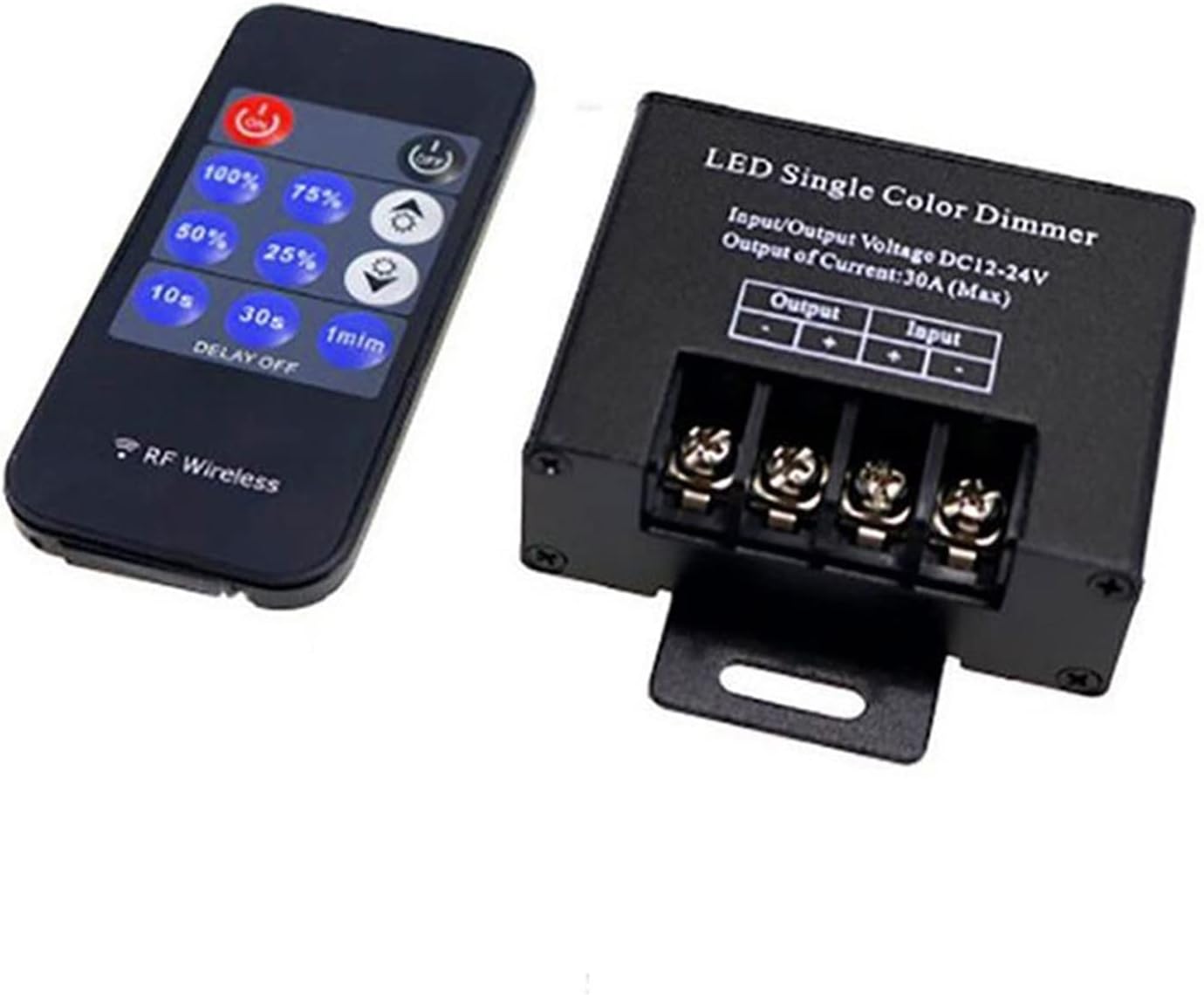
Image 3: SENHE RF Wireless LED Dimmer Remote Control Layout. This image provides a clear view of the 11-key remote control, highlighting the various buttons for power, brightness levels, and delay off functions.
- ON / OFF: Power on/off the LED lights.
- 100% / 75% / 50% / 25%: Direct brightness level selection.
- Brightness Up (sun with plus) / Brightness Down (sun with minus): Gradually increase or decrease brightness.
- 10s / 30s / 1min (DELAY OFF): Set a timer for the lights to turn off after 10 seconds, 30 seconds, or 1 minute.
6. Manteniment
The SENHE LED Dimmer is designed for low maintenance. Follow these guidelines to ensure optimal performance and longevity:
- Neteja: Use a soft, dry cloth to clean the dimmer unit and remote control. Do not use abrasive cleaners or solvents.
- Medi ambient: Ensure the dimmer is installed in a dry environment, away from direct moisture, excessive heat, or corrosive substances.
- Connexions: Periodically check wiring connections to ensure they remain secure. Loose connections can lead to intermittent operation or damage.
- Substitució de la bateria: If the remote control's range or responsiveness decreases, replace the battery (e.g., CR2025 coin cell).
7. Solució De Problemes
| Problema | Causa possible | Solució |
|---|---|---|
| LEDs do not turn on. | No power supply; incorrect wiring; faulty LED strip; remote battery dead. | Comproveu la connexió de la font d'alimentació i el volumtage. Verify wiring polarity. Test LED strip directly. Replace remote battery. |
| Els LED parpellegen o s'atenuen de manera inconsistent. | Loose wiring connections; power supply insufficient; dimmer overloaded. | Secure all wiring connections. Ensure power supply meets LED strip requirements. Verify total wattage no supera els 360W. |
| El comandament a distància no respon. | Remote battery dead; remote out of range; interference. | Replace remote battery. Move closer to the dimmer unit. Reduce potential RF interference sources. |
| Dimmer unit is hot. | Overloaded; insufficient ventilation. | Reduce load on the dimmer (check total LED wattage). Ensure proper airflow around the unit. |
8. Garantia i Suport
This product is covered by a standard manufacturer's warranty against defects in materials and workmanship. For specific warranty details, please refer to the product packaging or contact your retailer.
For technical support or inquiries, please contact SenhE customer service through the retailer's platform where the product was purchased. Please have your model number (zhangying) and purchase date available when contacting support.
Ask a question about this manual
Ask about setup, troubleshooting, compatibility, parts, safety, or missing instructions. Manuals+ will review the question and use this page’s manual context to help answer it.