
1. Introducció
This manual provides detailed instructions for the installation, operation, and maintenance of your Mars Gaming MC-MAG ATX Gaming Case. The MC-MAG case is designed for advanced gaming setups, featuring a tempered glass side panel, dual magnetic dust filters, and efficient cooling capabilities. Please read this manual thoroughly before beginning installation to ensure proper setup and optimal performance.
Key features of the MC-MAG case include:
- Full tempered glass side panel for component visibility.
- Dual magnetic grilles on the front and top panels with removable dust filters.
- Three pre-installed 120mm Fixed RGB front fans.
- Support for liquid cooling systems up to 360mm.
- Dual-chamber design for optimized cooling and space management.
- Front panel connectivity: 2x USB 2.0, 1x USB 3.0, HD Audio, Microphone.
2. Contingut del paquet
Verifiqueu que tots els components siguin presents al paquet:
- Mars Gaming MC-MAG ATX Gaming Case
- Kit d'accessoris (cargols, brides, separadors)
- Manual d'usuari (aquest document)
3. Cas acabatview
Familiarize yourself with the main components and features of the MC-MAG case.
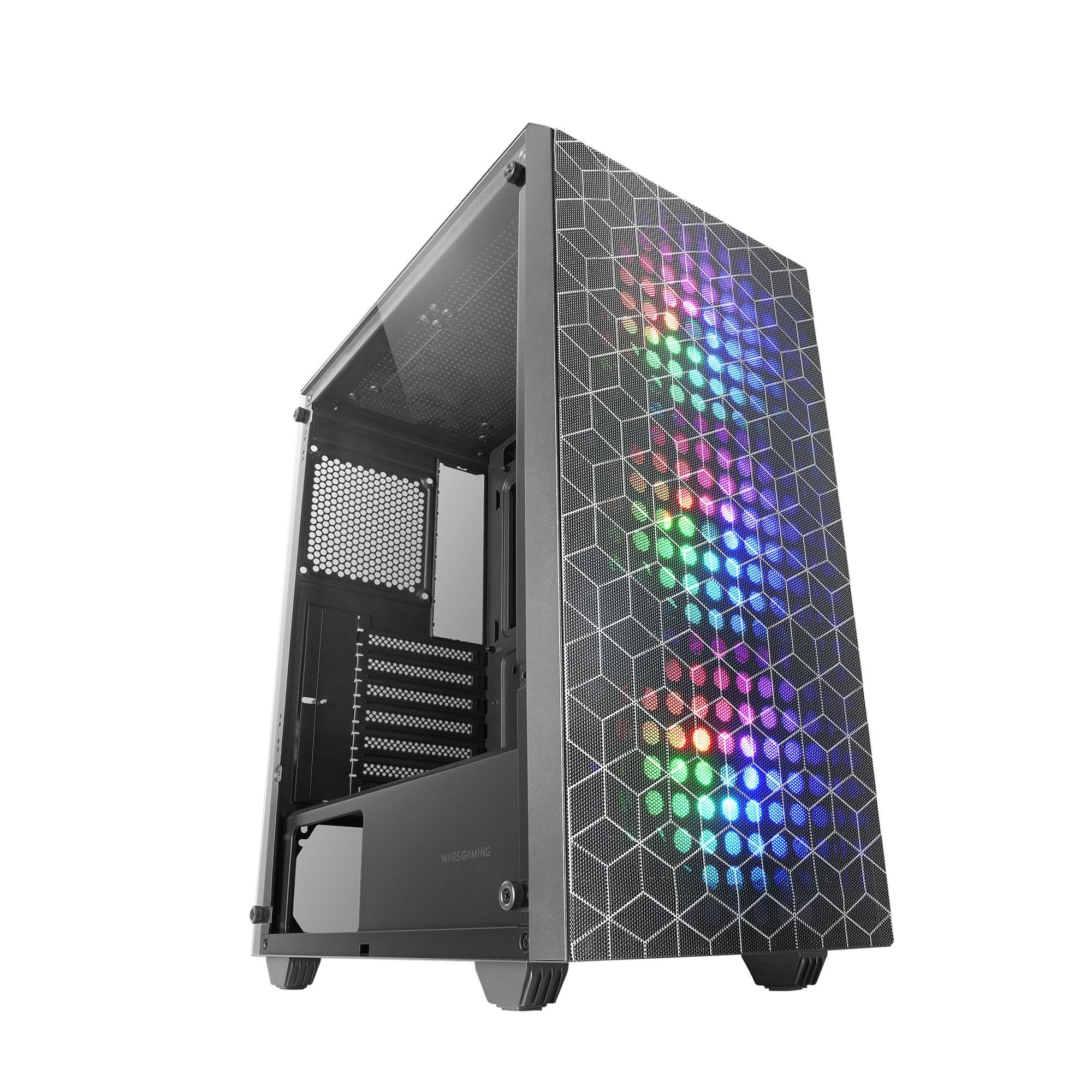
Figure 3.1: Mars Gaming MC-MAG ATX Gaming Case (Front-side view).

Figure 3.2: Tempered Glass Side Panel. This panel provides a clear view of internal components and is secured with thumbscrews.

Figure 3.3: Double Magnetic Front + Top Mesh. These removable grilles facilitate airflow and dust filtration.

Figure 3.4: Internal Layout Diagram. Illustrates fan and radiator mounting points, CPU cooler clearance (max 160mm), and VGA card length (max 350mm, 290mm with front radiator/fan).
4. Configuració i instal·lació
Follow these steps to install your PC components into the MC-MAG case.
4.1 Preparació del cas
- Col·loqueu la caixa sobre una superfície plana i estable.
- Remove the tempered glass side panel by unscrewing the thumbscrews at the rear of the case and carefully sliding the panel off. Set it aside on a soft, protected surface.
- Traieu el panell lateral posterior per accedir a la zona de gestió de cables.
4.2 Instal·lació de la placa base
- The MC-MAG case supports ATX, MicroATX, and Mini-ITX motherboards.
- Ensure the correct standoffs are installed for your motherboard size. Adjust if necessary.
- Instal·leu la protecció d'E/S a l'obertura posterior de la carcassa.
- Col·loca amb cura la placa base sobre els separadors, alineant els forats dels cargols.
- Fixeu la placa base amb els cargols proporcionats.
4.3 Instal·lació de la unitat d'alimentació (PSU).
- The PSU mounts in the bottom rear chamber of the case.
- Feu lliscar la font d'alimentació a la badia designada des de la part posterior de la carcassa.
- Secure the PSU with screws from the outside rear of the case.
4.4 Instal·lació de la unitat d'emmagatzematge
- The case supports up to 2x 3.5" HDDs and 4x 2.5" SSDs.
- Discs durs de 3.5 polzades: Locate the drive cage in the PSU shroud area. Slide the HDD into the drive tray and secure it with screws.
- SSD de 2.5 polzades: Mount SSDs to the designated brackets on the rear of the motherboard tray or within the PSU shroud area. Secure with screws.
4.5 Instal·lació de la targeta gràfica (VGA)
- Traieu les cobertes de les ranures d'expansió necessàries de la part posterior de la carcassa.
- Insert your graphics card into the PCIe slot on the motherboard.
- Secure the graphics card with the expansion slot screw.
- Note: Maximum VGA length is 350mm (290mm with front radiator/fan installed).
4.6 Cooling System Installation (Fans & Liquid Cooling)
The MC-MAG case comes with 3x 120mm Fixed RGB fans pre-installed in the front.
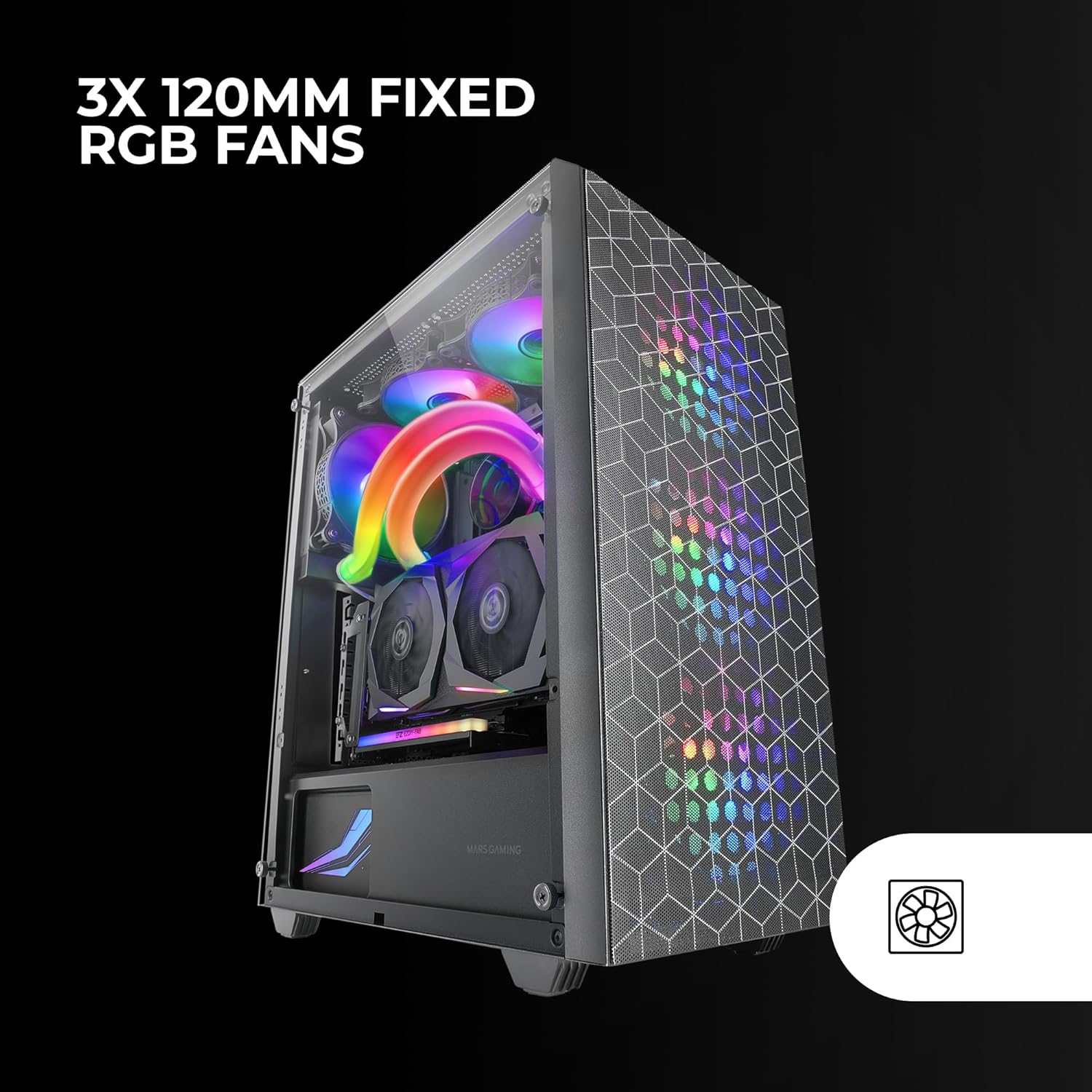
Figure 4.1: Pre-installed 3x 120mm Fixed RGB Fans.
- Ventiladors addicionals: The case supports up to 6x 120mm fans or a combination of 4x 120mm and 2x 140mm fans. Refer to Figure 3.4 for fan mounting locations.
- Refrigeració líquida: The case supports liquid cooling radiators up to 360mm.

Figure 4.2: Liquid Cooling Installation. The case supports radiators up to 360mm.
- Install radiators and fans according to their respective manufacturer's instructions.
4.7 Gestió de cables
Aprofita els retalls de cables i els punts d'amarratge que hi ha darrere de la safata de la placa base per organitzar els cables. Això millora la circulació del flux i l'estètica.
4.8 Connexió d'E/S del panell frontal
Connect the front panel cables (USB 2.0, USB 3.0, HD Audio, Microphone, Power Switch, Reset Switch, Power LED, HDD LED) to the corresponding headers on your motherboard. Refer to your motherboard manual for specific header locations.
4.9 Assemblea final
- Un cop instal·lats tots els components i gestionats els cables, torneu a fixar el panell lateral posterior.
- Carefully reattach the tempered glass side panel and secure it with the thumbscrews.
5. Instruccions de funcionament
After successful installation, your MC-MAG case is ready for operation.
- Encès: Press the power button located on the top panel of the case.
- Ports USB: Use the front USB 2.0 and USB 3.0 ports for connecting peripherals and external devices.
- Preses d'àudio: Connect your headphones and microphone to the front panel HD Audio and Microphone jacks.
- RGB Fans: The pre-installed fans feature Fixed RGB lighting. Their lighting pattern is static and does not require software control from the case itself.
6. Manteniment
Un manteniment regular ajuda a garantir un rendiment òptim i una llarga vida útil dels components del teu PC.
- Filtres de pols: The front and top panels feature magnetic dust filters. Regularly remove these filters and clean them with compressed air or by rinsing them with water (ensure they are completely dry before reattaching).
- Panell de vidre temperat: Clean the tempered glass side panel with a soft, lint-free cloth and a glass cleaner. Avoid abrasive materials that could scratch the glass.
- Neteja interior: Periodically open the case and use compressed air to remove dust from internal components, especially fans and heatsinks.
7. Solució De Problemes
Si teniu problemes, consulteu els passos habituals de resolució de problemes següents.
- Sense energia:
- Ensure the PSU is switched on and properly connected to a power outlet.
- Verify all power cables from the PSU are correctly connected to the motherboard and components.
- Comproveu la connexió del cable de l'interruptor d'alimentació del panell frontal a la placa base.
- Fans Not Spinning / RGB Not Lighting Up:
- Ensure fan power cables are securely connected to the motherboard or fan controller.
- For RGB, ensure the RGB cables are correctly connected (if applicable, for the fixed RGB fans, they should light up upon power).
- L'USB/àudio del panell frontal no funciona:
- Verify that the USB and HD Audio cables from the front panel are correctly connected to the motherboard headers.
- Sobreescalfament:
- Assegureu-vos que tots els ventiladors de la caixa girin correctament i estiguin orientats per a un flux d'aire òptim (entrada/sortida).
- Clean dust filters and internal components to prevent dust buildup.
- Verifiqueu que el refrigerador de CPU i el refrigerador de GPU estiguin instal·lats correctament i funcionin.
8. Especificacions
| Característica | Detall |
|---|---|
| Nom del model | MCMAG |
| Tipus de cas | Torre mitja |
| Compatibilitat amb la placa base | ATX, MicroATX, Mini-ITX |
| Material | Vidre temperat, acer, plàstic |
| Color | Negre |
| Ventiladors preinstal·lats | 3x 120mm Fixed RGB (Front) |
| Suport dels fans | Fins a 6 x 120 mm o 4 x 120 mm + 2 x 140 mm |
| Suport de refrigeració líquida | Up to 360mm radiator |
| Alçada màxima del refrigerador de la CPU | 160 mm |
| Longitud màxima de la targeta VGA | 350mm (290mm with front radiator/fan) |
| Drive Bays | 2 discs durs de 3.5", 4 discs SSD de 2.5" |
| Ranures d'expansió | 7 |
| Ports d'E / S frontals | 2 USB 2.0, 1 USB 3.0, àudio HD, micròfon |
| Pes de l'article | 3.96 quilos |
9. Garantia i Suport
Mars Gaming products are manufactured to high-quality standards. For information regarding warranty coverage, terms, and conditions, please refer to the warranty card included with your product or visit the official Mars Gaming weblloc.
For technical support, troubleshooting assistance beyond this manual, or to inquire about replacement parts, please contact Mars Gaming customer support through their official channels.
Oficial de Mars Gaming Weblloc: www.marsgaming.eu