
1. Introducció
The EPEVER MPPT XTRA-N series solar charge controller utilizes advanced Maximum Power Point Tracking (MPPT) technology to ensure optimal power harvesting from your solar panels. Designed for various solar power systems, this controller offers high efficiency, comprehensive protection features, and compatibility with multiple battery types, including lead-acid and lithium-ion batteries. This manual provides essential information for the safe and efficient operation of your XTRA 1210N controller.

Figura 1: Frontal view of the EPEVER MPPT XTRA-N Solar Charge Controller.
2. Característiques clau
- Tecnologia MPPT avançada: Ensures maximum power point tracking efficiency of over 99.5% and conversion efficiency up to 98%, leading to 20-30% more power from your solar panel.
- Compatibilitat versàtil de bateries: Supports various battery types including lead-acid (AGM, GEL, Flooded, USER) and lithium-ion batteries.
- Multifunction LCD Display: Provides real-time energy statistics and allows manual setting of battery types and charge control parameters.
- Comprehensive Electronic Protection: Includes safeguards against PV reverse polarity, PV overload current, PV short-circuit, input overvoltage/undervoltage, battery reverse polarity, battery overvoltage/overdischarge, load short-circuit/overload, and overheating.
- Automatic Limiter: Features automatic charge power and current limiting.
- Wide MPP Operating Voltage Rang: Optimizes performance across varying solar conditions.
- Negative Grounding: Designed with negative grounding on the poles.
- Funcions programables: Fully programmable via PC software for advanced customization.
- Múltiples modes de treball: Offers various working modes for load control.

Figure 2: High efficiency and versatile compatibility of the controller.

Figure 3: Supported battery types for the EPEVER MPPT controller.
3. Configuració i instal·lació
3.1 Advertències de seguretat
- WARNING: The controller may be damaged if the maximum PV open circuit voltage (Voc) exceeds 100V (for XTRA**10N models) at minimum operating ambient temperature.
- ATTENTION: When PV modules are connected in series, the PV open circuit voltage must not exceed 92V (for XTRA**10N models) at an ambient temperature of 25℃.
3.2 Connexió acabadaview
Ensure all connections are secure and correct before powering on the system. Refer to the diagrams below for proper wiring and port identification.

Figure 4: Labeled ports on the EPEVER MPPT Solar Charge Controller.
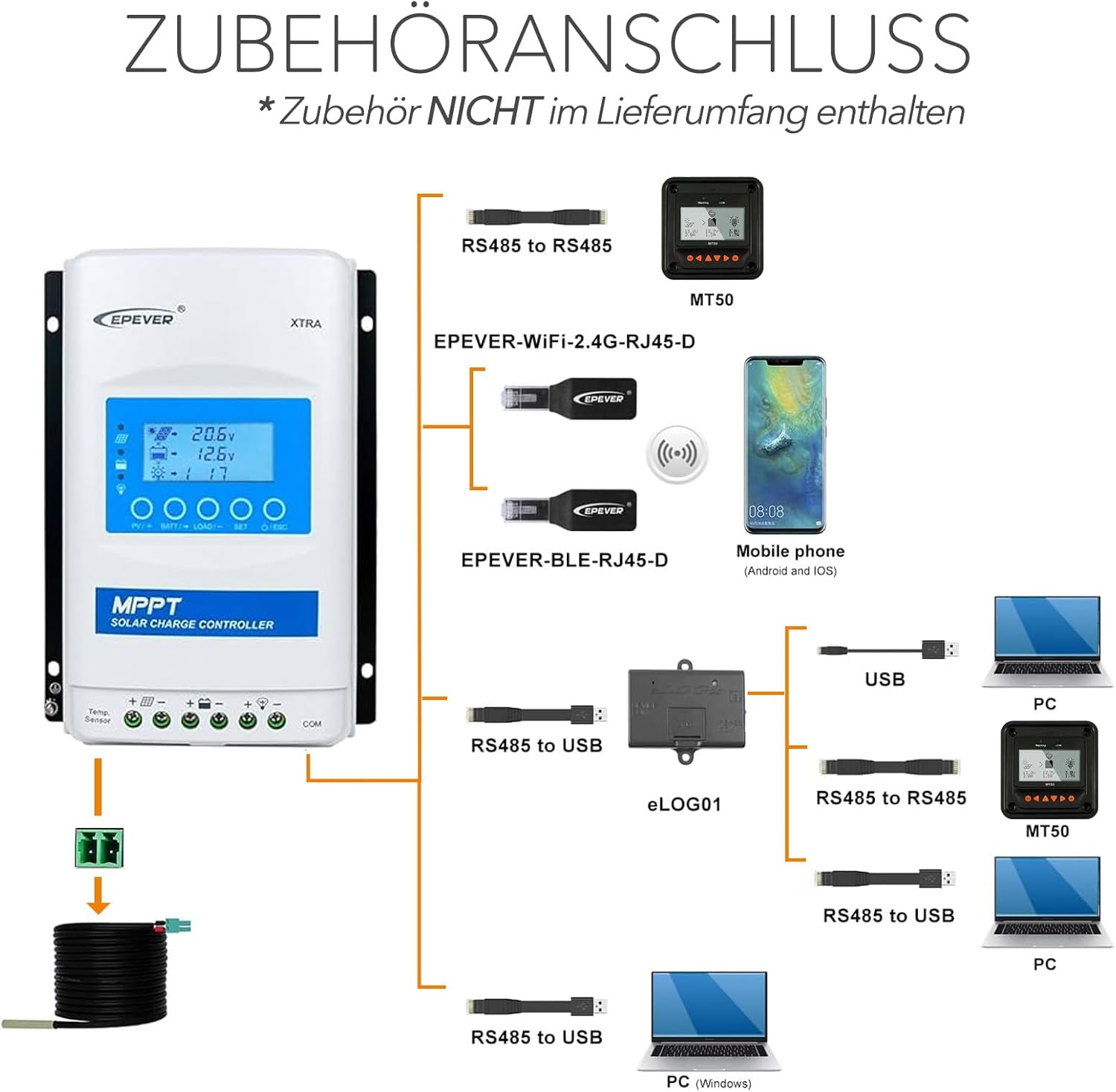
Figure 5: Accessories connection diagram for the controller.
3.3 Connection Sequence
Follow these steps for a safe and correct installation:
- Connect the battery to the charge controller. Ensure correct polarity.
- Connect the load to the charge controller (if applicable). Ensure correct polarity.
- Connect the solar panel(s) to the charge controller. Ensure correct polarity and that the PV open circuit voltage no supera el volum màxim d'entrada del controladortage.

Figure 6: Basic installation diagram.

Figura 7: Example connection sequence for solar modules and battery.
4. Instruccions de funcionament
The EPEVER XTRA-N controller features a multifunction LCD display for monitoring system status and adjusting parameters. Upon successful connection, the controller will automatically detect the system voltage (12V/24VDC auto work).
Pantalla LCD i botons 4.1
The LCD provides real-time data such as battery voltage, PV input voltage, charging current, and load status. Use the buttons below the display to navigate menus and adjust settings. Refer to the detailed product manual for specific menu navigation and parameter adjustment procedures.
4.2 Configuració del tipus de bateria
It is crucial to set the correct battery type for optimal charging and battery longevity. This can be done manually via the LCD display. The controller supports lead-acid (AGM, GEL, Flooded, USER) and lithium-ion batteries. Incorrect settings can damage your battery.
4.3 Modes de control de càrrega
The controller offers multiple working modes for load control, allowing you to customize when the load is powered. These modes can typically be configured through the LCD display or via PC software.
5. Manteniment
Regular maintenance ensures the longevity and optimal performance of your EPEVER MPPT XTRA-N controller.
- Comproveu les connexions: Periodically inspect all wiring connections to ensure they are tight and free from corrosion. Loose connections can lead to power loss or overheating.
- Netegeu el controlador: Keep the controller clean and free from dust and debris. Use a dry cloth to wipe the surface. Ensure ventilation openings are not blocked.
- Inspeccionar per danys: Visually inspect the controller for any signs of physical damage, such as cracks or discoloration.
- Monitoritzar el rendiment: Regularly check the LCD display for normal operation and energy statistics to ensure the system is performing as expected.
6. Solució De Problemes
If you encounter issues with your EPEVER MPPT XTRA-N controller, consider the following basic troubleshooting steps:
- Sense pantalla/alimentació: Comproveu les connexions de la bateria i assegureu-vos que el volum de la bateriatage is within the operating range. Verify the fuse or circuit breaker is not tripped.
- Sense càrrega: Assegureu-vos que els panells solars estiguin connectats correctament i que rebin prou llum solar. Comproveu el volum d'entrada fotovoltaica.tage on the display. Verify PV polarity.
- La càrrega no funciona: Check load connections and ensure the load current does not exceed the controller's rating. Verify the load control mode settings.
- Codis d'error: If the LCD displays an error code, consult the full product manual for specific definitions and solutions.
- Sobreescalfament: Ensure the controller is installed in a well-ventilated area and not exposed to direct sunlight or excessive heat sources. Check for blocked ventilation fins.
For persistent issues, contact EPEVER customer support or a qualified technician.
7. Especificacions

Figure 8: Physical dimensions and weight of the controller.
| Paràmetre | Valor |
|---|---|
| Model | XTRA 1210N (Xtra-N) |
| Sistema nominal Voltage | 12/24VDC Auto Work |
| Corrent de càrrega nominal | 10A |
| Corrent nominal de descàrrega | 10A |
| Màx. Circuit obert PV Voltage | 100 V |
| Màx. Potència de càrrega | 130W/12V, 260W/24V |
| Tipus de visualització | LCD |
| Temperatura de funcionament | -25 °C a +45 °C |
| Índex de protecció | IP30 |
| Dimensions (L x A x A) | 17.5 x 14.3 x 4.8 cm |
| Pes | 0.57 KG |
| Material | Metal or Metallic Composite |

Figure 9: Model and certification details on the controller's label.
8. Garantia i Suport
The EPEVER MPPT XTRA-N Solar Charge Controller comes with a 2 any de garantia del fabricant. Aquesta garantia cobreix els defectes de materials i de mà d'obra en ús normal.
For technical support, warranty claims, or further assistance, please refer to the contact information provided with your product packaging or visit the official EPEVER weblloc.