
1. Introducció
Thank you for choosing the Cyrank Z73 Smart Watch. This manual provides essential information for setting up, operating, and maintaining your device. Please read it carefully to ensure proper use and to maximize your experience with the smart watch.

Imatge 1.1: Frontal view of the Cyrank Z73 Smart Watch, showcasing its elegant design with a floral pink watch face.
2. Contingut del paquet
Si us plau, verifiqueu que tots els elements siguin presents al vostre paquet:
- Cyrank Z73 Smart Watch
- Data Cable (Charging Cable)
- Ajustador de corretja
- Manual d'usuari (aquest document)

Image 2.1: The Cyrank Z73 Smart Watch displayed alongside its included data cable and strap adjuster tool.
3. Especificacions
Detailed technical specifications for the Cyrank Z73 Smart Watch:
| Característica | Especificació |
|---|---|
| Main Control Platform | XC2806 |
| Memòria | 16+128M |
| Mode tàctil | G+F Single Touch |
| Mida de la pantalla | 1.09 polzades (2.77 cm) |
| Resolució de pantalla | 240 x 240 píxels |
| Diàmetre del dial | Aprox. 36 mm (1.4 polzades) |
| Gruix del dial | Aprox. 11.5 mm (0.5 polzades) |
| Longitud de la corretja | Aprox. 220 x 16 mm (8.7 x 0.6 polzades) |
| Bateria incorporada | Bateria de liti de 200 mAh |
| Temps d'ús normal | Uns 7 dies |
| Temps d'espera | Uns 15 dies |
| Connectivitat | Bluetooth, USB, GPS (via smartphone) |
| Pes de l'article | Aprox. 180 g (6.3 oz) |
| Dimensions del producte | 0.39 x 0.39 x 0.39 polzades |

Image 3.1: Diagram illustrating the dimensions of the Cyrank Z73 Smart Watch, including dial diameter and thickness.

Image 3.2: Visual representation of the Cyrank Z73 Smart Watch strap length, measuring approximately 220mm (8.7 inches).
4. Configuració
4.1. Càrrega del rellotge intel·ligent
Before first use, fully charge your smart watch. Connect the provided data cable to the charging port on the watch and plug the USB end into a compatible power adapter (not included) or a computer's USB port. The watch display will indicate charging status.
4.2. Instal·lació de l'aplicació
To unlock the full functionality of your Cyrank Z73 Smart Watch, you need to install the companion application on your smartphone. Scan the QR code provided in the quick start guide (if available) or search for the recommended app name in your smartphone's app store (e.g., Google Play Store for Android, Apple App Store for iOS).
4.3. Emparellament amb el telèfon intel·ligent
The Cyrank Z73 Smart Watch utilizes Dual Bluetooth (BT) connectivity. One BT connection (Z73) is for data transmission, and the other (Z73 Audio) is for audio transmission (calls, music playback).
- Ensure your smart watch is charged and powered on.
- Activa el Bluetooth al teu telèfon intel·ligent.
- Obriu l'aplicació complementària al vostre telèfon intel·ligent i seguiu les instruccions que apareixen a la pantalla per afegir un dispositiu nou.
- The app will search for available devices. Select 'Z73' from the list to establish the data connection.
- Once the data connection is established, go to your smartphone's Bluetooth settings and manually pair with 'Z73 Audio' for call and music functions.
- Confirm any pairing requests on both your watch and smartphone.
5. Instruccions de funcionament
5.1. Navegació bàsica
- Pantalla tàctil: Swipe left, right, up, or down to navigate through menus and functions. Tap to select an item.
- Botó lateral: Normalment s'utilitza per activar la pantalla, tornar a la pantalla d'inici o accedir al menú principal.
5.2. Health Monitoring Functions
The smart watch offers various health tracking features:
- Multiple Exercise Modes: Track different sports activities.
- Passos: Counts daily steps taken.
- Monitorització del son: Analyzes sleep patterns.
- Freqüència cardíaca: Monitors heart rate throughout the day.
- GPS Running: Utilizes smartphone GPS for tracking outdoor runs.
5.3. Reminder Functions
Stay informed with timely reminders:
- Despertador: Set alarms directly on the watch or via the app.
- Recordatori sedentari: Notifies you to move after periods of inactivity.
- Recordatori de beguda: Prompts you to drink water.
- Push del missatge: Receives notifications for calls, SMS, WeChat, QQ, Messenger, and other apps.
5.4. Daily Functions
Convenient features for everyday use:
- Trucades: Fes i rep trucades directament des del rellotge.
- Contactes: Access your phone's contacts.
- Registres de trucades: View el teu historial de trucades.
- Reproducció de música: Controla la música que es reprodueix al teu telèfon intel·ligent.
- Marcatge personalitzat: Personalize your watch face.
- Suport multi-idioma: Seleccioneu el vostre idioma preferit.
- Gravació: Use the watch as a voice recorder.
- Control de veu: Interactua amb el rellotge mitjançant ordres de veu.
- Temps: Get current weather updates.
- Calculadora: Realitzar càlculs bàsics.
- Cronòmetre i compte enrere: Timing functions.
- Càmera remota: Controla la càmera del teu telèfon intel·ligent de forma remota.
- Cerca el telèfon mòbil: Localitza el teu telèfon intel·ligent emparellat.
- Configuració: Adjust watch settings like brightness, screen time, and themes.
- Aixeca el canell per il·luminar la pantalla: Il·lumina automàticament la pantalla quan aixeques el canell.
- Mode No Molestis: Silence notifications.

Image 5.1: The Cyrank Z73 Smart Watch screen showing an incoming call notification, demonstrating its call answering capability.
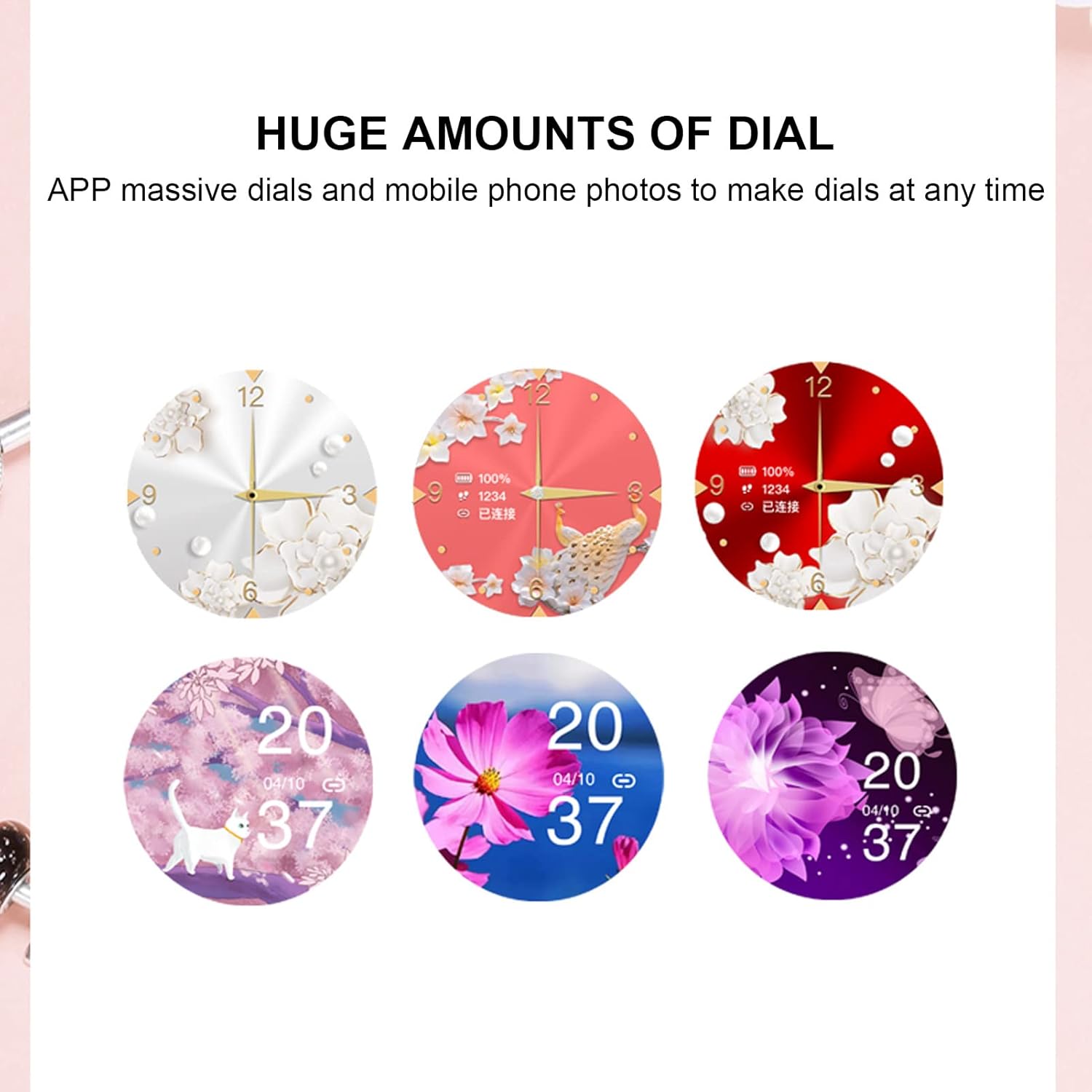
Image 5.2: A selection of diverse custom watch faces available for the Cyrank Z73 Smart Watch, allowing for personalization.
5.5. Special Purpose Functions
The Cyrank Z73 Smart Watch includes specific features for women's health:
- Feminine Functions: Prediction of menstrual period, ovulation period, ovulation day, and safe period.
6. Manteniment
To ensure the longevity and optimal performance of your smart watch, follow these maintenance guidelines:
- Neteja: Netegeu regularment la pantalla i la corretja del rellotge amb un drap suau i sec. Per a la brutícia persistent, netegeu lleugerament.amp Es pot fer servir un drap, però cal evitar la humitat excessiva.
- Eviteu temperatures extremes: Do not expose the watch to extreme heat or cold, as this can damage the battery and internal components.
- Resistència a l'aigua: Refer to the product specifications for water resistance ratings. Avoid submerging the watch beyond its rated depth or exposing it to hot water, steam, or chemicals.
- Càrrega: Use only the provided data cable for charging. Avoid using damaged cables or chargers.
- Emmagatzematge: Quan no l'utilitzeu durant períodes prolongats, guardeu el rellotge en un lloc fresc i sec.
7. Solució De Problemes
If you encounter issues with your Cyrank Z73 Smart Watch, try the following steps:
- El rellotge no s'encén: Assegura't que el rellotge estigui completament carregat. Connecta'l al carregador durant almenys 30 minuts.
- No es pot emparellar amb el telèfon:
- Assegura't que el Bluetooth estigui activat al telèfon i al rellotge.
- Assegureu-vos que el rellotge estigui dins de l'abast del telèfon.
- Reinicia tant el telèfon com el rellotge.
- Esborra la memòria cau de Bluetooth del telèfon (si escau) i torna a intentar emparellar-lo.
- Assegureu-vos que l'aplicació complementària estigui instal·lada i en funcionament.
- Notificacions no rebudes:
- Check if the watch is properly paired and connected to the app.
- Verify notification permissions are granted to the app on your phone.
- Ensure 'Do Not Disturb' mode is not active on the watch or phone.
- Dades de salut inexactes: Ensure the watch is worn snugly on your wrist, but not too tight. Clean the sensor on the back of the watch.
- Durada de la bateria curta: Reduce screen brightness, disable unnecessary features, and ensure background app usage is optimized on your phone.
- Restaura la configuració de fàbrica: If issues persist, you may try restoring the watch to factory settings via the watch's menu or the companion app. Note that this will erase all data on the watch.
8. Garantia i Suport
The Cyrank Z73 Smart Watch comes with a standard manufacturer's warranty. Please refer to the warranty card included in your package or contact your retailer for specific warranty terms and conditions. For technical support or further assistance, please reach out to Cyrank customer service through the contact information provided with your purchase or on the official Cyrank weblloc.