
1. Introducció
1.1 Producte acabatview
The Fanvil X4U v2 is an advanced IP phone designed for professional communication environments. It features 12 SIP lines, a 2.8-inch color display, Power over Ethernet (PoE) support, Gigabit Ethernet ports, and Bluetooth connectivity via a USB dongle. This manual provides instructions for setting up, operating, and maintaining your Fanvil X4U v2 IP phone.
1.2 Contingut del paquet
Verifiqueu que tots els elements siguin presents al paquet:
- Fanvil X4U v2 IP Phone Unit
- Telèfon
- Cable de l'auricular
- Cable Ethernet
- Suport de telèfon
- Guia d'instal·lació ràpida
- (Optional) Power Adapter (if PoE is not used)
2. Configuració
2.1 Instal·lació física
Follow these steps to physically set up your IP phone:
- Attach the phone stand to the main unit.
- Connect the handset to the handset port using the coiled cord.
- Connect the Ethernet cable from your network switch or router to the LAN port on the phone. If your network switch provides Power over Ethernet (PoE), the phone will power on automatically.
- If not using PoE, connect an optional power adapter (not included) to the power port and a power outlet.
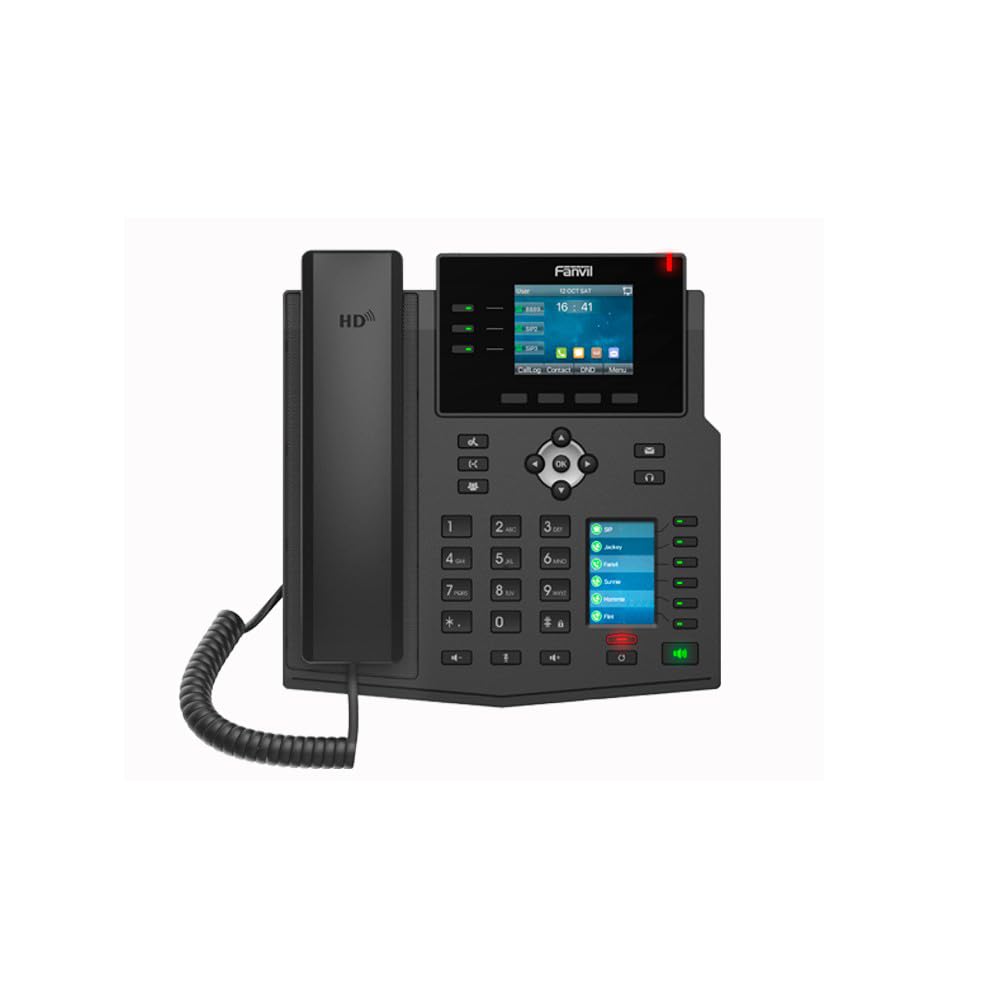
Imatge: Frontal view of the Fanvil X4U v2 IP Phone, showing the handset, color display, navigation keys, and numeric keypad.
2.2 Encès inicial
Once connected to power and network, the phone will initiate its boot sequence. The display will show the Fanvil logo and then proceed to load the operating system.
3. Instruccions de funcionament
3.1 Pantalla i navegació
The 2.8-inch (240x320) color display shows call status, menu options, and other relevant information. Use the navigation keys (up, down, left, right, OK) to browse menus and select options.
3.2 Funcions de trucada bàsiques
Fent una trucada
- Agafeu el telèfon o premeu Altaveu botó.
- Marqueu el número de telèfon desitjat amb el teclat numèric.
- Press the "Dial" soft key or wait for the call to connect automatically.
Responent una trucada
When an incoming call rings, pick up the handset or press the Altaveu button or the "Answer" soft key.
Finalitzant una trucada
Pengeu el telèfon o premeu Altaveu botó.
3.3 Conferència trucada
The Fanvil X4U v2 supports 6-way audio conferencing:
- During an active call, press the "Conf" soft key.
- Dial the number of the next participant and press "Dial".
- Once the second participant answers, press the "Conf" soft key again to merge the calls.
- Repeat for additional participants up to a total of six.
3.4 Connectivitat Bluetooth
The phone supports Bluetooth connectivity via a USB dongle (sold separately). Insert the Bluetooth USB dongle into the USB port on the phone. Navigate to the Bluetooth settings menu on the phone's display to pair with compatible devices such as headsets.
4. Manteniment
4.1 Neteja
To clean the phone, use a soft, dry cloth. For stubborn marks, a slightly damp cloth with mild, non-abrasive cleaner can be used. Avoid spraying liquids directly onto the phone.
4.2 Emmagatzematge
Guardeu el telèfon en un lloc fresc i sec, allunyat de la llum solar directa i de temperatures extremes quan no el feu servir durant períodes prolongats.
5. Solució De Problemes
5.1 Problemes comuns i solucions
El telèfon no s'encén
- Check if the Ethernet cable is securely connected to the LAN port and the network switch/router. Ensure the network switch provides PoE.
- If not using PoE, verify the power adapter is correctly connected to the phone and a working power outlet.
Sense to de marcatge
- Ensure the Ethernet cable is properly connected and the phone has network connectivity.
- Verify that your SIP account is registered and active. Check the display for SIP registration status.
Qualitat d'àudio deficient
- Comproveu l'estabilitat de la connexió de xarxa.
- Assegureu-vos que el cable del telèfon estigui connectat correctament.
- Adjust volume settings during a call.
6. Especificacions
6.1 Especificacions tècniques
- Marca: Fanvil
- Model: X4U-V2
- Línies SIP: 12
- Visualització: 2.8-inch (240x320) Color Display
- Ports Ethernet: Gigabit Ethernet (2 ports)
- Potència: Alimentació per Ethernet (PoE)
- Bluetooth: Via USB Dongle
- Audio Conference: 6 vies
- Còdec d'àudio: G.711a/u, G.729A/B, iLBC, G.722, Opus
- Versió de maquinari: V2.0
- Dimensions del producte: 13 x 9 x 3 polzades
- Pes de l'article: 2.62 lliures (1.19 quilograms)
- Color: Negre
- Material: Plàstic
- Tipus de telèfon: Cordat
- Font d'alimentació: Corded Electric (if not using PoE)
- Tipus de marcador: Teclat dual
- Tipus de contestador: Digital
7. Garantia i Suport
7.1 Informació de la garantia
For warranty details and terms, please refer to the documentation provided with your purchase or contact Fanvil customer support.
7.2 Atenció al client
If you encounter issues not covered in this manual or require further assistance, please contact your vendor or Fanvil's official customer support channels.