
1. Introducció
Thank you for choosing the ODK L-Shaped Gaming Desk, Model ZJZ-1004. This versatile desk is designed to enhance your gaming or work setup with its spacious L-shaped surface, integrated LED lighting, convenient power outlets, USB ports, and ample storage solutions. Its reversible design allows for flexible configuration to suit your space. This manual provides essential information for safe assembly, operation, and maintenance of your new desk.
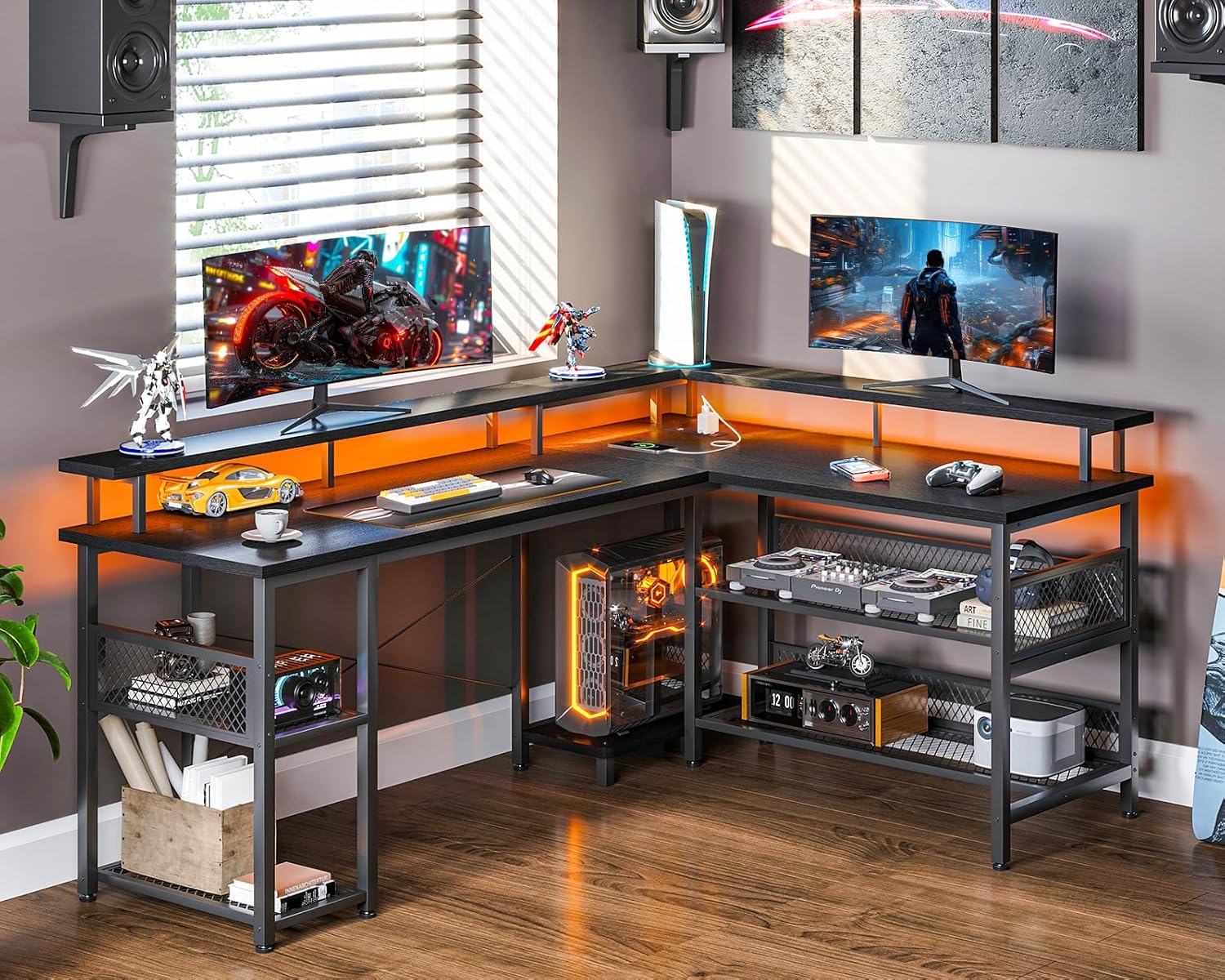
This image displays the ODK L-Shaped Gaming Desk in a complete setup, showcasing its spacious design, integrated LED lighting, and elevated monitor shelves. The desk is configured with multiple monitors, gaming peripherals, and decorative items, highlighting its functionality for a gaming or home office environment.
2. Instruccions de seguretat
- Llegiu atentament totes les instruccions abans de muntar i utilitzar.
- Mantingueu tots els materials d'embalatge fora de l'abast dels nens per evitar riscos d'asfíxia.
- Assegureu-vos que tots els cargols i elements de fixació estiguin ben ajustats durant el muntatge. Comproveu-los periòdicament i torneu-los a apretar si cal.
- Do not exceed the maximum weight capacity of the desk surfaces or shelves.
- Col·loqueu l'escriptori sobre una superfície plana i estable per evitar que bolqui.
- For electrical components (power outlets, USB ports, LED lights), ensure proper connection to a grounded power source. Do not overload the outlets.
- Keep liquids away from electrical components to prevent electric shock or damage.
- Avoid using harsh chemicals or abrasive cleaners on the desk surfaces.
3. Contingut del paquet
Abans de començar el muntatge, verifiqueu que totes les peces que s'enumeren a continuació siguin presents i no estiguin danyades. Si hi ha alguna peça que falti o estigui danyada, poseu-vos en contacte amb el servei d'atenció al client.
- Desktop Panels (Main, Side, Monitor Stands)
- Metal Frame Components (Legs, Support Bars)
- Storage Shelf Panels and Mesh Grids
- Integrated Power Strip with AC Outlets and USB Ports
- Tira de llum LED amb controlador
- Maquinari de muntatge (cargols, perns, clau Allen)
- Manual d'instruccions
4. Muntatge i muntatge
Follow these steps carefully to assemble your ODK L-Shaped Gaming Desk. It is recommended to assemble the desk with two people for easier handling, though it can be done by one person.
4.1 Reversible Configuration
The ODK L-Shaped Gaming Desk features a reversible design, allowing you to configure the longer side of the 'L' to either the left or right, depending on your room layout and preference. Plan your desired orientation before starting assembly.
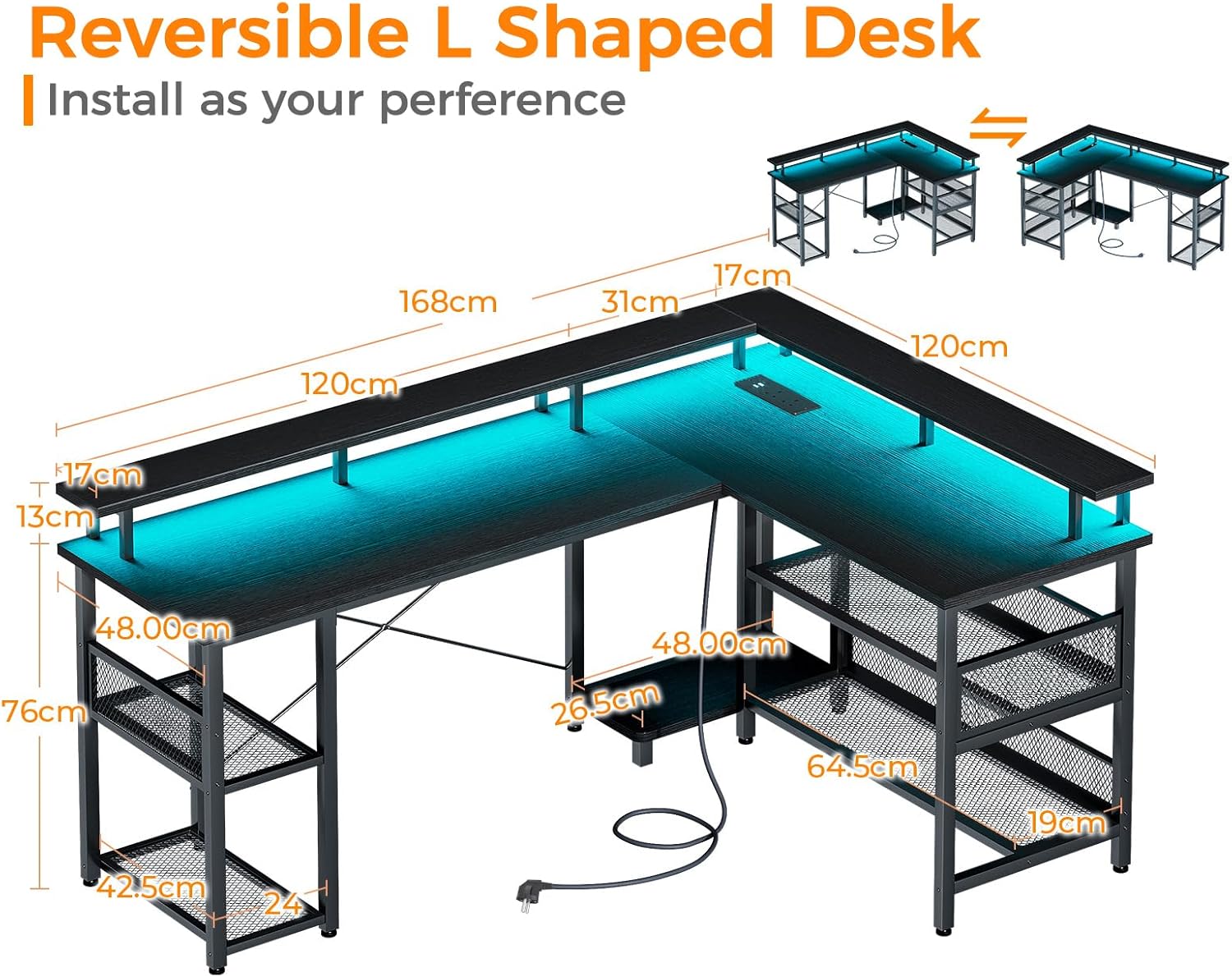
This diagram shows the ODK L-Shaped Gaming Desk's reversible design, allowing it to be assembled as a left or right-facing L-shape. Key dimensions in centimeters are provided for the desktop panels, monitor stands, and storage shelves, aiding in assembly and space planning.
4.2 Passos de muntatge (directrius generals)
- Desempaquetar i identificar: Desembaleu amb cura tots els components i col·loqueu-los sobre una superfície neta i suau per evitar ratllades. Identifiqueu cada peça utilitzant la llista de peces proporcionada.
- Muntatge del marc: Begin by assembling the metal frame components according to the diagrams in your specific assembly guide (not provided here, refer to the physical manual). Ensure all connections are aligned before tightening screws.
- Adjunta els panells d'escriptori: Secure the main and side desktop panels to the assembled frame. Important: Do not overtighten screws into the desktop panels, as this may cause cracking. Tighten until snug.
- Install Monitor Stands: Attach the elevated monitor stand panels to the designated frame supports.
- Muntar els prestatges d'emmagatzematge: Install the storage shelf panels and mesh grids into their respective positions on the desk frame. The two-tier storage on one side is adjustable for flexibility.
- Instal·leu una regleta d'endolls: Secure the integrated power strip into its recessed location on the desktop.
- Aplicar llums LED: Adhere the LED light strip to the underside of the monitor stand or desired location using its adhesive backing. Connect the LED controller.
- Comprovació final: Once assembled, gently lift and move the desk to its desired location. Ensure all connections are stable and the desk is level.

This diagram illustrates the flexible storage solutions offered by the ODK L-Shaped Gaming Desk, including two-tier shelves on both sides and a dedicated computer tower space. Different sections are highlighted to demonstrate potential storage arrangements for various items.
5. Instruccions de funcionament
5.1 Integrated Power Outlet and USB Ports
The desk is equipped with a built-in power strip for convenient access to power.
- Preses de CA: The power strip includes two standard AC outlets (110-240V/6A). Plug your computer, monitors, or other AC-powered devices directly into these outlets.
- Ports USB: Two USB ports (5V/2A) are provided for charging smartphones, tablets, gaming controllers, and other USB-powered devices.
- Cable d'alimentació: Connect the desk's power cord to a wall outlet. Ensure the wall outlet is properly grounded.
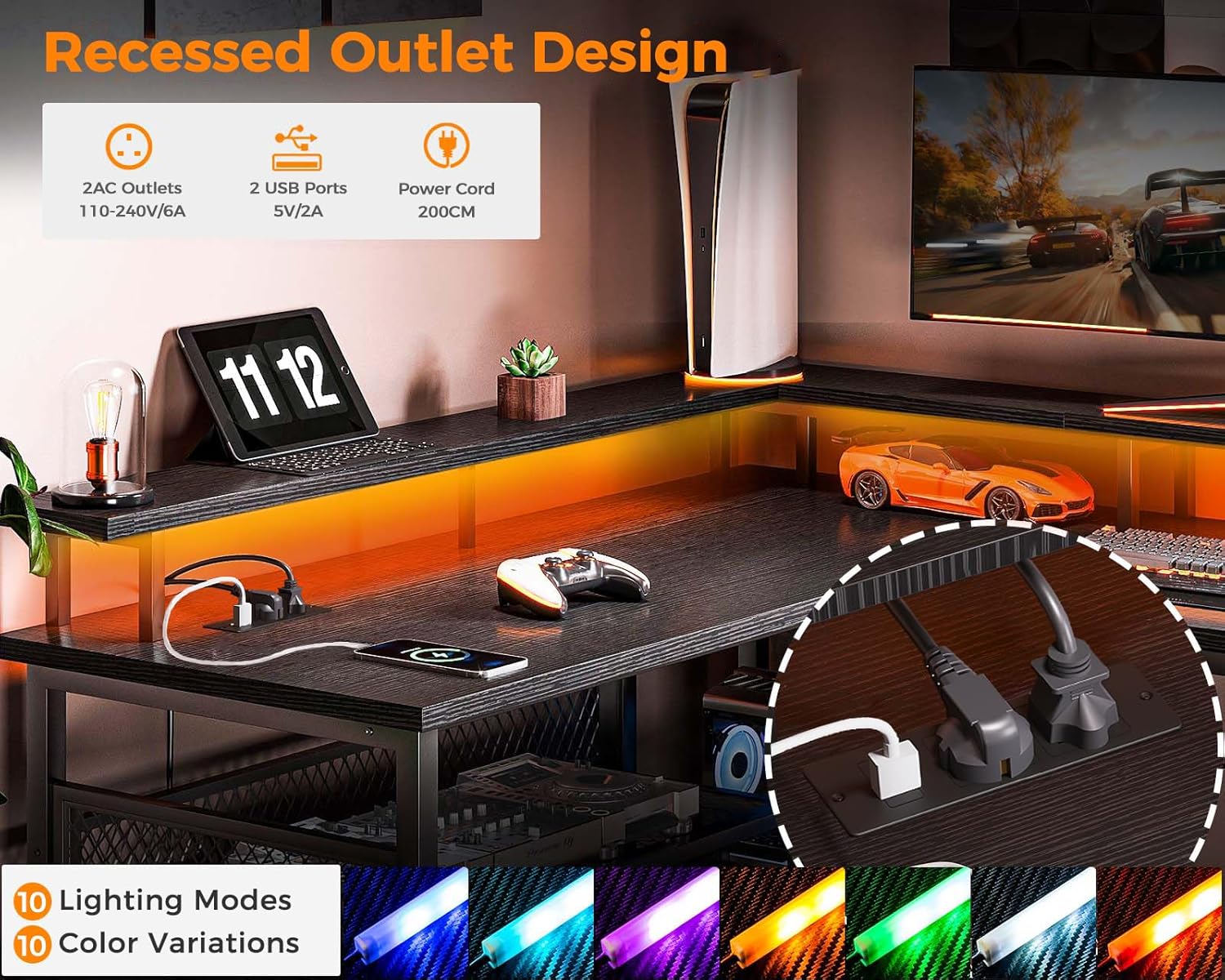
This image highlights the built-in power strip of the ODK L-Shaped Gaming Desk, featuring two standard AC outlets and two USB ports for convenient device charging. It also shows the LED light strip and various color options available.
5.2 llums LED
The integrated LED lights offer customizable ambiance for your setup.
- Encès/apagat: Use the inline controller or remote (if included) to turn the LED lights on or off.
- Selecció de color: Cycle through 7 available colors to match your mood or setup.
- Modes d'il·luminació: Choose from 13 different lighting modes, which may include static colors, fading, flashing, or other dynamic effects.
- Funció de memòria: The LED lights feature a memory function, which will recall the last selected color and mode when powered on again.
6. Manteniment
- Neteja: Wipe desk surfaces with a soft, damp drap. Per a marques difícils, feu servir un netejador suau i no abrasiu. Assequeu immediatament amb un drap net.
- Eviteu productes químics durs: Do not use abrasive cleaners, solvents, or ammonia-based products, as these can damage the finish.
- Comproveu les connexions: Periodically inspect all screws and fasteners to ensure they remain tight. Re-tighten if any looseness is detected.
- Cura elèctrica: Ensure the power cord and connections for the LED lights and power strip are free from damage. Do not attempt to repair damaged electrical components yourself.
7. Solució De Problemes
- L'escriptori està inestable: Ensure all assembly screws are fully tightened. Check that the desk is placed on a level surface. Adjust leveling feet if present.
- LED lights are not working: Verify that the power cord for the desk is securely plugged into a working wall outlet. Check the connection of the LED light strip to its controller and power source. Ensure the LED controller is functioning correctly.
- Power outlets/USB ports are not working: Confirm the desk's main power cord is plugged in. Check if the wall outlet itself is functional by plugging in another device. Ensure no circuit breaker has tripped.
- Peces que falten o danyades: If you discover any missing or damaged parts upon unboxing, do not proceed with assembly. Contact ODK customer support immediately for assistance.
8. Especificacions
| Característica | Detall |
|---|---|
| Marca | ODK |
| Número de model | ZJZ-1004 |
| Color | Negre |
| Dimensions (L x A x A) | 168 x 48 x 76 cm (66.1 x 18.9 x 29.9 polzades) |
| Pes de l'article | 27.8 quilos (61.3 lliures) |
| Material | Iron, Wood (MDF) |
| Característiques especials | Integrated USB Socket, Reversible Design, Monitor Stand, LED Lights |
| Preses de corrent | 2 Standard AC Outlets (110-240V/6A) |
| Ports USB | 2 ports USB (5V/2A) |
| Llums LED | 7 Colors, 13 Lighting Modes, Memory Function |
9. Garantia i Suport
Specific warranty information for the ODK L-Shaped Gaming Desk (Model ZJZ-1004) is not provided in this document. For details regarding warranty coverage, terms, and conditions, please refer to the product packaging or contact ODK customer support directly. For technical assistance, replacement parts, or any other inquiries, please reach out to the manufacturer's customer service department.