Introducció
This manual provides essential instructions for the setup, operation, and maintenance of your new Generic replacement remote control for various DYON Smart 4K UHD LCD LED HDTV TV models. Please read this manual carefully to ensure proper use and to maximize the functionality of your remote control.
Nota important:
- This remote is an infrared (IR) replacement and is designed to function similarly to your original remote.
- Ensure your television model is listed in the compatible models for full functionality.
- No programming is required for this replacement remote; it operates directly with compatible DYON TV models.
Configuració: Instal·lació de la bateria
To begin using your remote control, you must first install the batteries.
- Localitzeu el compartiment de la bateria a la part posterior del comandament a distància.
- Premeu el pestell i feu lliscar la tapa de la bateria cap avall per obrir-la.
- Introduïu dues (2) piles AAA, assegurant-vos que els terminals positiu (+) i negatiu (-) coincideixin amb els diagrames de l'interior del compartiment.
- Feu lliscar la coberta de la bateria al seu lloc fins que faci un clic de manera segura.
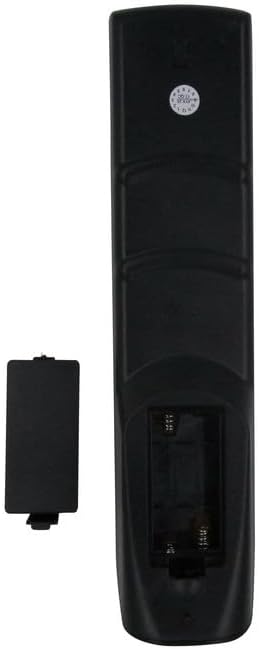
Imatge: Part posterior view of the remote control with the battery cover open, illustrating the correct orientation for AAA battery insertion.
Informació de seguretat de la bateria:
- No barregeu piles velles i noves.
- No barregeu piles alcalines, estàndard (carboni-zinc) o recarregables (níquel-cadmi).
- Traieu les piles si no heu d'utilitzar el comandament a distància durant un període prolongat.
- Eliminar les bateries usades de manera responsable d'acord amb la normativa local.
Instruccions de funcionament
This section details the primary functions of the buttons on your remote control.
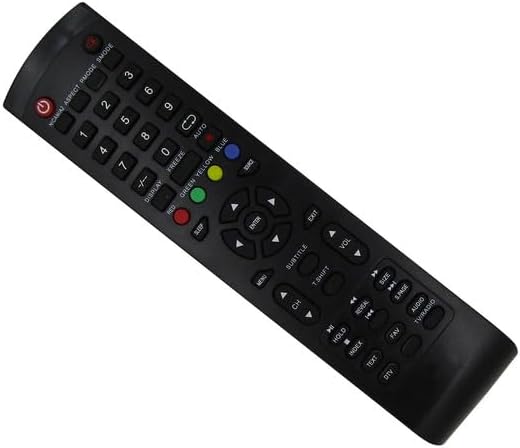
Imatge: Frontal view of the replacement remote control, highlighting the layout of all functional buttons.
Funcions bàsiques:
- POWER (Red Button): Encén o apaga el televisor.
- Botons numèrics (0-9): Selecciona els canals directament.
- CH +/-: Changes channels sequentially.
- VOL +/-: Ajusta el nivell de volum.
- MUT: Silencia o activa el so del televisor.
- MENÚ: Accedeix al menú principal del televisor.
- ENTRAR: Confirms selections within menus.
- Botons de navegació (amunt, avall, esquerra, dreta): Navega pels menús i les opcions.
- Sortida: Surt del menú o la funció actual.
- SOURCE / INPUT: Selecciona la font d'entrada (HDMI, AV, etc.).
Funcions avançades:
- VISUALITZACIÓ: Shows current channel information or status.
- DORMIR: Configura un temporitzador perquè el televisor s'apagui automàticament.
- CONGELACIÓ: Pauses the current image on screen.
- RED / GREEN / YELLOW / BLUE Buttons: Functionality varies depending on the TV's current mode or application (e.g., teletext, smart TV features).
- AUTO: Automatic channel tuning or picture adjustment.
- SUBTÍTOLS: Toggles subtitles on or off.
- T.SHIFT (Time Shift): For pausing live TV (requires compatible TV and storage).
- ÍNDEX: Accesses teletext index page.
- TEXT: Toggles teletext mode.
- REVELAR: Reveals hidden text in teletext mode.
- MANTENIM: Holds the current teletext page.
- FAV (Favorite): Accesses favorite channel lists.
- ÀUDIO: Selects audio tracks or modes.
- TV / RÀDIO: Switches between TV and Radio modes.
- TALLA: Adjusts screen aspect ratio.
- P.PAGE / S.PAGE: Page up/down in teletext or other modes.
Note: Specific functions of advanced buttons may depend on your DYON TV model and its features. Refer to your TV's original manual for detailed information on these functions.
Manteniment
Una cura adequada allargarà la vida útil del comandament a distància.
- Neteja: Use a soft, dry cloth to wipe the remote control. Do not use liquid cleaners, sprays, or abrasive materials, as these can damage the remote.
- Emmagatzematge: Guardeu el comandament a distància en un lloc fresc i sec, allunyat de la llum solar directa i de temperatures extremes.
- Substitució de la bateria: Replace batteries when the remote's response becomes sluggish or stops working. Always replace both batteries at the same time.
- Eviteu les gotes: Protegiu el comandament a distància de caigudes i impactes, que poden danyar els components interns.
Resolució de problemes
If you encounter issues with your remote control, try the following solutions:
- El comandament a distància no respon:
- Comproveu si les piles estan inserides correctament amb la polaritat correcta (+/-).
- Substitueix les piles per piles AAA noves.
- Assegureu-vos que no hi hagi obstacles entre el comandament a distància i el sensor d'infrarojos del televisor.
- Make sure you are within the effective range of the TV's IR receiver.
- Alguns botons no funcionen:
- Verify that your TV model is explicitly listed as compatible with this remote.
- Some advanced functions may not be supported by all DYON TV models or may require specific TV settings.
- Clean the remote control, especially around the unresponsive buttons, to remove any debris.
- El televisor no s'encén/s'apaga:
- Ensure the TV is plugged into a working power outlet.
- Confirm the remote's power button is functioning by checking if the IR emitter lights up (can be seen through a smartphone camera).
If the problem persists after trying these steps, please contact the seller for further assistance.
Especificacions
| Tipus de producte | Replacement Infrared (IR) Remote Control |
| Dispositius compatibles | DYON Smart 4K UHD LCD LED HDTV Televisions (Sigma 20 PRO, Sigma 24 PRO, Sigma 32 PRO, Live 22C, Movie 32) |
| Font d'alimentació | 2 piles AAA (no incloses) |
| Màxim de dispositius compatibles | 1 (Televisió) |
| Color | Negre |
| Característiques especials | Ergonomic design, Direct replacement functionality |
Garantia i Suport
As a generic replacement product, specific warranty terms may vary. Please retain your purchase receipt for any warranty claims or support inquiries.
For technical assistance, troubleshooting beyond this manual, or warranty information, please contact the seller directly through your purchase platform.