
1. Introducció
This manual provides essential information for the safe and efficient operation of your NETUM PDA58-02 Portable Receipt Printer. Please read it thoroughly before using the device and keep it for future reference.
The NETUM PDA58-02 is a versatile portable terminal designed for various business applications. It integrates receipt printing, 1D barcode scanning, and supports multiple connectivity options including 3G, Wi-Fi, and Bluetooth 4.0. Running on Android 6.0, it offers a stable and user-friendly experience with its 5.5-inch IPS capacitive touch screen.
2. Informació de seguretat
- No exposeu el dispositiu a temperatures extremes, llum solar directa ni humitat elevada.
- Eviteu deixar caure o sotmetre el dispositiu a forts impactes.
- Use only the original charger and accessories provided with the device.
- No intenteu desmuntar ni reparar el dispositiu vosaltres mateixos. Poseu-vos en contacte amb personal de servei qualificat.
- Mantingueu el dispositiu allunyat de l'aigua i altres líquids.
- Assegureu-vos de ventilar adequadament durant la càrrega per evitar el sobreescalfament.
3. Contingut del paquet
Verifiqueu que tots els elements siguin presents al paquet:
- NETUM PDA58-02 Portable Receipt Printer
- Charger Adapter (UK Plug)
- User Manual (English and Chinese)
- Thermal Printer Paper Roll (58 x 35mm)

Image: NETUM PDA58-02 printer and its accessories including charger, manual, and paper roll.
4. Producte acabatview
The NETUM PDA58-02 features a compact design with an integrated thermal printer and a large touch screen for easy interaction. It includes a built-in barcode scanner for efficient data capture.

Imatge: Frontal view of the NETUM PDA58-02 portable printer, showing the screen displaying time and date.

Image: NETUM PDA58-02 portable printer with the paper compartment open, showing a printed receipt.
5. Configuració
5.1 Càrrega del dispositiu
Before first use, fully charge the device. Connect the provided charger adapter to the DC charging port (12V 1.5A) on the device and plug it into a power outlet. The battery indicator will show charging status.
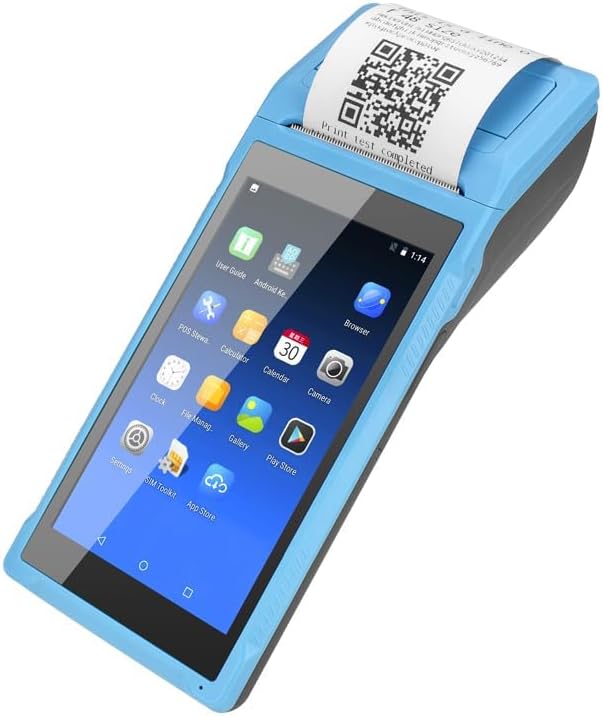
Image: Close-up of the charging port on the NETUM PDA58-02, with a charger cable connected, highlighting the 5000mAh rechargeable battery.
5.2 Càrrega de paper tèrmic
- Open the printer cover by gently pushing the latch.
- Insert a 58 x 35mm thermal paper roll into the compartment, ensuring the printing side faces the print head.
- Estireu una petita quantitat de paper per treure-la del tallador.
- Tanqueu la coberta de la impressora fermament fins que encaixi al seu lloc.
5.3 Engegada/apagada
- Per engegar: premeu i manteniu premut el botó d'engegada fins que la pantalla s'il·lumini.
- To power off: Press and hold the power button, then select 'Power off' from the options on the screen.
6. Instruccions de funcionament
6.1 Navegació bàsica
The device runs on Android 6.0. Navigate the interface using the 5.5-inch capacitive touch screen. Swipe, tap, and use gestures similar to a standard Android smartphone.

Image: NETUM PDA58-02 portable printer displaying various Android application icons on its screen, indicating its smart functionality.
6.2 Connectivitat
- Wi-Fi: Go to Settings > Wi-Fi to connect to available wireless networks (802.11 b/g/n).
- Bluetooth: Go to Settings > Bluetooth to pair with other Bluetooth 4.0 enabled devices.
- 3G: Insert a compatible SIM card (if applicable) and configure network settings under Settings > More > Mobile networks for 3G connectivity (GSM850/900/1800/1900, WCDMA B1).
- USB: Connect the device to a computer using the Micro USB 2.0 port for data transfer or charging.
6.3 Impressió de rebuts
The integrated thermal printer allows for fast receipt printing. Use compatible POS applications or built-in printing functions to generate receipts. Ensure paper is loaded correctly.
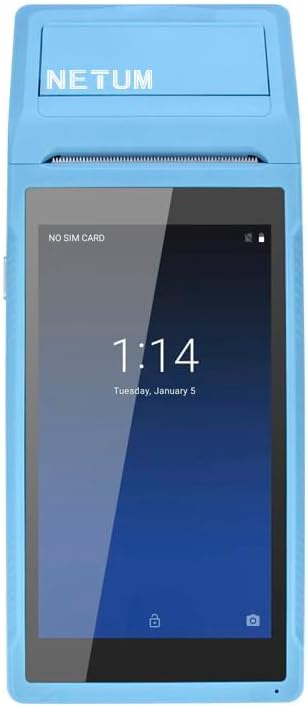
Image: NETUM PDA58-02 portable printer showing a receipt with a QR code being printed, demonstrating its receipt printing capability.
6.4 Escaneig de codis de barres
The device supports 1D barcode scanning. Open the scanning application or a compatible POS application that utilizes the scanner. Point the scanner at the barcode to capture the data.
7. Manteniment
7.1 Neteja del dispositiu
Wipe the exterior of the device with a soft, dry cloth. For stubborn dirt, use a slightly damp cloth and then dry immediately. Do not use harsh chemicals or abrasive cleaners.
7.2 Neteja del capçal d'impressió
If print quality degrades, the thermal print head may need cleaning. Use a cotton swab lightly dampHumitejat amb alcohol isopropílic per netejar suaument el capçal d'impressió. Deixeu-lo assecar completament abans d'utilitzar-lo.
7.3 Cura de la bateria
To prolong battery life, avoid fully discharging the battery frequently. Charge the device regularly. If storing the device for an extended period, charge it to about 50% and store in a cool, dry place.
8. Solució De Problemes
- El dispositiu no s'encén: Assegureu-vos que la bateria estigui carregada. Connecteu el carregador i torneu-ho a provar. Si el problema persisteix, contacteu amb el servei d'assistència.
- La impressora no imprimeix: Check if thermal paper is loaded correctly and if the printer cover is closed. Verify that the application is sending print commands.
- Mala qualitat d'impressió: Clean the thermal print head as described in the Maintenance section. Ensure you are using suitable thermal paper.
- Problemes de connectivitat (Bluetooth/Wi-Fi): Ensure Bluetooth/Wi-Fi is enabled in settings. Check if the device is within range of the network/paired device. Restart the device and try reconnecting.
- La pantalla tàctil no respon: Reinicieu el dispositiu. Si el problema continua, contacteu amb el servei d'assistència.
9. Especificacions
| Característica | Detall |
|---|---|
| Model | PDA58-02 |
| Color | Blau |
| Configuració | 3G + Camera |
| CPU | Quad-core 1.3GHz MT6580V/WA |
| RAM | 1 GB |
| Flash NAND | 8 GB |
| Sistema operatiu | Android 6.0 |
| Pantalla principal | 5.5 inch IPS Capacitive Touch Screen 1280*720 |
| Mètode de comunicació | 3G (supports all network types) |
| Càmera posterior | 8MP |
| Bateria | 7.4 V, 5000 mAh |
| Interfície de càrrega | DC Charging, 12V 1.5A |
| Interfície d'auriculars | Standard 3.5mm Headphone |
| Suport OTG | Sí |
| Interfície USB | Micro USB 2.0 x 1 |
| Sistema d'àudio | Built-in Speaker, Buzzer, Microphone |
| Wi-Fi | 802.11 b/g/n |
| GSM | 850/900/1800/1900 |
| WCDMA | B1 |
| Bluetooth | Bluetooth 4.0 |
| Tecnologia d'impressió | Impressora tèrmica |
| Paper Roll Size | 58 x 35 mm (inclòs) |
| Printer Dimensions (L x W x H) | 21.5 x 8.6 x 5.3 cm / 8.46 x 3.39 x 2.1 polzades |
| Pes de la impressora | 462 g / 16.3 oz |
| Tipus de sortida | Monocrom |
| Max Mono Print Speed | 1 (unit not specified, likely pages/minute or lines/second) |
| Tipus de control | Android, Touch |
| Tipus de suport | Etiquetes |
| Tipus d'escàner | Portàtil |
| Tipus de visualització | LCD |
| Dispositius compatibles | Telèfons intel·ligents |
| Funcions addicionals de la impressora | Escaneja |
| Nombre de processadors | 4 |
| Mida màxima del suport | 5.5 x 8.5 polzada |
| Impressió dúplex | No |
| Interfície del maquinari | USB, USB 2.0 |
| Ports USB totals | 1 |
10. Informació de la garantia
NETUM products are covered by a manufacturer's warranty. Please refer to the warranty card included in your package or visit the official NETUM weblloc web per obtenir informació detallada sobre els termes i condicions de la garantia. Conserveu el rebut de compra com a comprovant de compra per a reclamacions de garantia.
11. Suport
For technical assistance, troubleshooting, or product inquiries, please contact NETUM customer support. Contact information can typically be found on the official NETUM weblloc web o a la documentació de la garantia.
Recursos en línia: Visit the NETUM official weblloc web per a preguntes freqüents, actualitzacions de programari i materials de suport addicionals.