
1. Introducció
This manual provides essential information for the safe and efficient operation of your Datakom SBC-10A-M 12/24V Auto Select Battery Charger. Please read this manual thoroughly before installation and use to ensure proper function and to prevent damage to the unit or connected equipment.
1.1. Producte acabatview
The Datakom SBC-10A-M is an advanced battery charger designed for high efficiency and reliability in demanding environments, such as automotive applications. It features automatic voltage detection for 12V or 24V batteries, a wide input voltage range (90-305VAC), and robust protection mechanisms against overload, short circuit, high temperature, and reverse battery connection.
1.2. Instruccions de seguretat
- Always disconnect the AC power supply before making or breaking battery connections.
- Assegureu-vos una ventilació adequada al voltant del carregador durant el funcionament.
- Do not expose the charger to rain, moisture, or excessive dust.
- Avoid operating the charger near flammable materials or gases.
- No intenteu obrir ni reparar el carregador. Encarregueu totes les tasques de manteniment a personal qualificat.
- Comproveu el volum de la bateriatage and polarity before connecting the charger.
2. Característiques del producte
- Volum automàtictage Selecció: Automatically detects and adapts to 12V or 24V battery systems.
- Vol d'entrada àmpliatage Rang: Operates reliably with AC input from 90VAC to 305VAC.
- Protecció avançada: Includes overload, short circuit, high temperature, and reverse battery connection protection.
- Current Limiting Overload Protection: Maintains rated current output during overload, allowing continuous charging of empty batteries.
- Gestió de la temperatura: Automatically reduces output current in case of overheating to ensure continuous operation.
- Indicador d'estat LED: Provides visual feedback on charger status.
- Alta eficiència: Designed for optimal power conversion and minimal energy loss.
- Compact Metallic Casing: Durable and suitable for harsh environments.
3. Especificacions
| Paràmetre | Valor |
|---|---|
| Model | SBC-10A-M |
| Entrada Voltage Rang | 90 - 305 VCA |
| Vol. De sortidatage (Auto Select) | 12V / 24V CC |
| Corrent de sortida | 10A |
| Carregant Stages | 4 Stages |
| Pes | 0.58 kg (1.28 lliures) |
| Proteccions | Overload, Short Circuit, High Temperature, Reverse Battery |
4. Configuració i instal·lació
Proper installation is crucial for the safe and effective operation of the SBC-10A-M charger.
4.1. Muntatge
Mount the charger in a location that is dry, well-ventilated, and protected from direct sunlight, excessive heat, and moisture. Ensure there is sufficient space around the unit for air circulation. Use appropriate fasteners to secure the charger to a stable surface.
4.2. Connexions elèctriques
- Connexió d'entrada de CA: Connect the AC input cable to a grounded power outlet within the specified voltage range (90-305VAC). Ensure the connection is secure.
- DC Output Connection:
- Connect the positive (+) output terminal of the charger to the positive (+) terminal of the battery.
- Connect the negative (-) output terminal of the charger to the negative (-) terminal of the battery.
- Important: Double-check polarity before making connections. Reverse polarity protection is built-in, but incorrect connection should still be avoided.
- Assegureu-vos que totes les connexions estiguin ben ajustades i segures per evitar contactes solts i possibles arcs elèctrics.
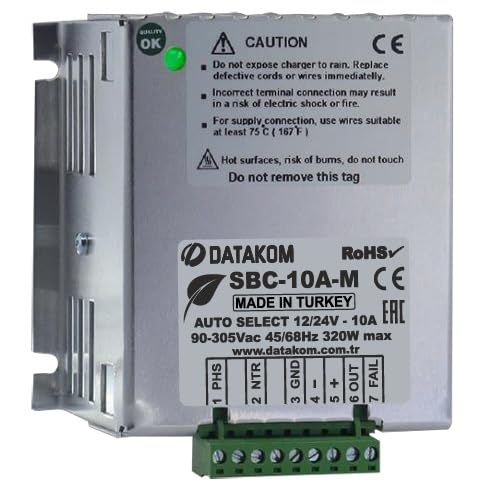
Figure 1: Datakom SBC-10A-M Battery Charger showing input and output terminals. The charger features a compact metallic casing with clearly marked connection points for AC input and DC battery output.
5. Instruccions de funcionament
Once the charger is properly installed and connected, follow these steps for operation:
- Encès: Connect the AC power supply to the charger. The charger will automatically detect the battery voltage (12V o 24V).
- Procés de càrrega: The LED status indicator will illuminate, indicating that charging has commenced. The charger employs a 4-stage charging process to optimize battery health and longevity.
- Seguiment: Observe the LED indicator for status. Refer to the troubleshooting section for interpretation of LED signals if issues arise.
- Finalització de la càrrega: The charger will automatically switch to a maintenance (float) charge mode once the battery is fully charged, preventing overcharging.
- Apagar: To disconnect, first remove the AC power supply, then disconnect the battery terminals.
6. Manteniment
The SBC-10A-M charger is designed for minimal maintenance. However, periodic checks can ensure optimal performance and longevity.
- Neteja: Mantingueu el carregador net i lliure de pols i brutícia. Feu servir un drap sec i suau per netejar-lo. No utilitzeu netejadors líquids.
- Connexions: Reviseu periòdicament totes les connexions elèctriques per assegurar-vos que estiguin ben ajustades i que no presentin corrosió.
- Ventilació: Assegureu-vos que les obertures de ventilació no estiguin obstruïdes.
- Emmagatzematge: If storing the charger for an extended period, disconnect it from both AC power and the battery, and store it in a dry, cool place.
7. Solució De Problemes
This section provides solutions to common issues you might encounter with your SBC-10A-M charger.
| Problema | Causa possible | Solució |
|---|---|---|
| Charger not operating (LED off) | No AC input power; Loose connections. | Check AC power supply and ensure all connections are secure. |
| Charging LED not illuminating | Battery not connected; Reverse polarity; Battery voltage massa baix. | Verify battery connections and polarity. Ensure battery voltage is within operational range. |
| Charger output current is low | Overheating; Battery is nearly full. | Ensure adequate ventilation. This is normal if the battery is nearing full charge or if the charger is managing its temperature. |
| Charger shuts down | Severe fault (e.g., internal component failure). | Disconnect power and battery. Do not attempt to repair. Contact customer support. |
If the problem persists after attempting the above solutions, please contact Datakom customer support.
8. Garantia i Suport
Datakom products are manufactured to high quality standards. For information regarding warranty terms and conditions, please refer to the warranty card included with your product or visit the official Datakom weblloc.
For technical support, service, or spare parts, please contact your authorized Datakom dealer or Datakom customer service directly. When contacting support, please have your product model (SBC-10A-M) and purchase details ready.
Datakom Official Weblloc: www.datakom.com.tr