
Introducció
Thank you for choosing the Havit Gamenote MS1033 RGB Gaming Mouse. This manual provides essential information for setting up, operating, maintaining, and troubleshooting your new gaming mouse. Please read these instructions carefully to ensure optimal performance and longevity of your device.
Producte acabatview
The Havit Gamenote MS1033 is a high-performance gaming mouse designed for precision and customization. It features adjustable macros, vibrant RGB lighting, and a comfortable, non-slip design.

Image: The Havit Gamenote MS1033 RGB Gaming Mouse, showcasing its overall design and illuminated RGB elements.
Característiques principals:
- RGB 16 Million Colors: Customizable lighting options to match your setup.
- Adjustable Macro: Program complex commands for enhanced gameplay.
- Alta sensibilitat: Up to 8000 DPI for precise tracking.
- Non-slip Surface Design: Ensures a secure grip during intense gaming sessions.
- Vida del botó: Durable switches rated for 3 Million clicks.
- Nombre de botons: 9 programmable buttons for versatile control.

Imatge: Un costat view of the mouse, showing the strategically placed G1 and G2 buttons, along with a profile switch for quick adjustments.
Instruccions de configuració
Setting up your Havit Gamenote MS1033 mouse is a straightforward process.
- Connecteu el ratolí: Plug the USB connector of the mouse into an available USB port on your computer or gaming console.
- Instal·lació del controlador: For most operating systems (Windows, macOS, Linux), the mouse will be recognized automatically as a plug-and-play device, and standard drivers will be installed. No additional software is typically required for basic functionality.
- Instal·lació del programari (opcional): To access advanced features such as macro programming and detailed RGB customization, you may need to download the official Havit Gamenote software from the manufacturer's website. Refer to the software's instructions for installation and usage.
Instruccions de funcionament
The MS1033 mouse offers various functions for an enhanced user experience.
Funcions bàsiques:
- Clic esquerre: Acció primària.
- Clic dret: Secondary action, often for context menus.
- Roda de desplaçament: Scroll up/down, and click for middle-button functionality.
Ajust de DPI:
The mouse features adjustable DPI (Dots Per Inch) settings, allowing you to change cursor sensitivity on the fly. Use the dedicated DPI button (often located behind the scroll wheel) to cycle through preset DPI levels. The current DPI level may be indicated by a change in the mouse's LED color or pattern.
Botons programables:
The MS1033 has 9 buttons, many of which are programmable. These can be customized using the Havit Gamenote software to perform specific actions, launch applications, or execute macros.
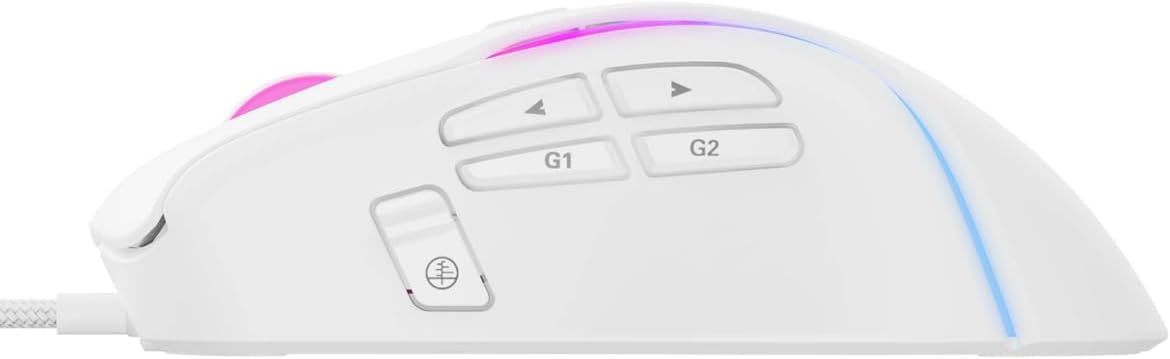
Imatge: Una imatge detallada view of the side buttons, including G1, G2, and standard navigation buttons, which can be programmed for various functions.
Programació de macros
The adjustable macro feature allows you to record a sequence of keystrokes and mouse clicks, then assign them to a single button. This is particularly useful for complex actions in games or repetitive tasks in productivity software.
- Instal·lar programari: Ensure the Havit Gamenote software is installed on your computer.
- Open Macro Editor: Launch the software and navigate to the macro editor section.
- Enregistrar macro: Start recording and perform the desired sequence of actions.
- Save and Assign: Save the recorded macro and assign it to one of the programmable buttons on your MS1033 mouse.
Refer to the software's help documentation for detailed instructions on macro creation and management.

Image: The mouse illuminated with RGB lighting, demonstrating its aesthetic appeal and highlighting its gaming-oriented design.
Personalització de la il·luminació RGB
The MS1033 features dynamic RGB lighting with 16 million color options. You can customize the lighting effects, colors, and patterns to personalize your gaming setup.
- Control de programari: Use the Havit Gamenote software to access the full range of RGB customization options. This includes static colors, breathing effects, color cycles, and more.
- On-the-fly Switching: Some lighting modes may be switchable directly from the mouse using a dedicated button or a combination of buttons. Consult the software or manufacturer's website for specific key combinations.

Imatge: Vista de dalt a baix view of the mouse, highlighting the scroll wheel and the vibrant RGB lighting emanating from its body.
Manteniment
Proper maintenance ensures the longevity and performance of your gaming mouse.
- Neteja: Regularly clean the mouse with a soft, dry cloth. For stubborn dirt, slightly dampNetegeu el drap amb aigua o una solució de neteja suau. Eviteu productes químics agressius o materials abrasius.
- Manteniment del sensor: Mantingueu el sensor òptic de la part inferior del ratolí net i lliure de pols o restes per garantir un seguiment precís.
- Cura del cable: Eviteu doblegar bruscament o estirar excessivament el cable USB per evitar danys.
Resolució de problemes
If you encounter issues with your Havit Gamenote MS1033 mouse, try the following troubleshooting steps:
- El ratolí no respon:
- Assegureu-vos que el cable USB estigui ben connectat a un port USB que funcioni.
- Try plugging the mouse into a different USB port or another computer to rule out port or system issues.
- Reinicieu l'ordinador o la consola.
- Seguiment inexacte:
- Netegeu el sensor òptic de la part inferior del ratolí.
- Ensure you are using the mouse on a suitable surface (e.g., a mouse pad). Avoid highly reflective or uneven surfaces.
- Adjust the DPI settings to a comfortable level.
- La il·luminació RGB no funciona:
- Check the Havit Gamenote software settings to ensure lighting is enabled and configured correctly.
- Ensure the mouse is receiving sufficient power from the USB port.
- Botons que no funcionen:
- Verify button assignments in the Havit Gamenote software.
- Assegureu-vos que no hi hagi obstacles físics que impedeixin prémer els botons.
If these steps do not resolve the issue, please contact Havit customer support.
Especificacions
Detailed technical specifications for the Havit Gamenote MS1033 RGB Gaming Mouse:
| Marca | Havit |
| Model | MS1033 |
| Tipus de connectivitat | USB per cable |
| Tecnologia de detecció de moviment | Òptic |
| Nombre de botons | 9 |
| Botó Vida | 3 milions de clics |
| DPI (màx.) | 8000 DPI |
| Il·luminació RGB | 16 Million Colors (LED Lights) |
| Tipus de material | Plàstic |
| Dimensions del producte | 10 x 5 x 0.1 cm |
| Pes de l'article | 1 quilograms |
| Dispositius compatibles | Gaming Consoles, PCs |
| Sistema operatiu | Console-specific OS (PlayStation, Xbox), PC compatible |
Garantia i Suport
Els productes Havit estan dissenyats per a la fiabilitat i el rendiment. Per obtenir informació sobre la cobertura de la garantia, consulteu la targeta de garantia inclosa amb el producte o visiteu el lloc web oficial de Havit. weblloc.
For technical support, driver downloads, or further assistance, please visit the Havit official support page or contact their customer service directly. Keep your purchase receipt and product model number (MS1033) handy when seeking support.


