
Cubonic M1 3 Axis Merak One Gimbal
Cubonic M1 3-Axis Merak One Gimbal User Manual
Model: M1 3 Axis Merak One Gimbal | Brand: Cubonic
Introducció
Thank you for choosing the Cubonic M1 3-Axis Merak One Gimbal. This device is designed to provide stable and smooth footage for your smartphone photography and videography, enhancing your creative capabilities. With its advanced stabilization technology, intuitive controls, and app connectivity, the M1 Gimbal is an essential tool for capturing professional-quality content.

Image: The Cubonic M1 3-Axis Merak One Gimbal, shown with a smartphone attached, ready for use. The gimbal features a foldable design and integrated tripod feet for versatile shooting.
Què hi ha a la caixa
Si us plau, comproveu el contingut del paquet en desempaquetar-lo:
- Cubonic M1 3-Axis Merak One Gimbal
- Cable de càrrega
- Manual d'usuari (aquest document)
- Cordó penjant
Característiques del producte
- 3-Axis Stabilization: Provides smooth and stable video footage by compensating for unwanted movements.
- Connectivitat Bluetooth: Seamlessly connect to your smartphone for remote control and advanced features.
- Controlat per l'aplicació: Unlock full potential with the dedicated mobile application for enhanced shooting modes and settings.
- Llarga vida útil de la bateria: Built-in 2200 mAh battery offers up to 12 hours of operation.
- Operació amb una sola tecla: Simplifies shooting with intuitive controls.
- Nivells ajustables: 8 levels of adjustment to meet various shooting needs.
- 360-Degree Rotating Gimbal: Ensures flexibility and stability in all orientations.
- Disseny plegable: Easy to pack and carry for on-the-go use.

Image: The gimbal's foldable design, illustrating how it can be easily compacted for storage and portability, fitting into a small bag.
Configuració
- Charge the Gimbal: Before first use, fully charge the gimbal using the provided charging cable. Connect the cable to the charging port on the gimbal and a USB power source. The indicator lights will show charging status.
- Desplegueu el Gimbal: Gently unfold the gimbal from its compact state until it locks into the operating position.
- Munta el teu telèfon intel·ligent: Allargar la clavilla del telèfonamp and carefully place your smartphone into the clamp. Ensure the phone is securely seated and centered.
- Balance the Smartphone:
- Adjust the phone's position within the clamp until it is roughly balanced horizontally.
- Slightly loosen the roll axis lock (if applicable) and adjust the arm until the phone remains level when released. Tighten the lock.
- Power on the gimbal. The gimbal will automatically balance and stabilize the phone.
- Encès/apagat: Premeu i manteniu premut el botó d'engegada durant uns segons per encendre o apagar el gimbal.
- Connexió Bluetooth:
- Activa el Bluetooth al teu telèfon intel·ligent.
- Open the dedicated gimbal app (refer to the app section for details).
- Cerca and connect to the gimbal (usually named "Cubonic Gimbal" or similar) within the app or your phone's Bluetooth settings.
Instruccions de funcionament
The Cubonic M1 Gimbal offers various controls and modes for optimal shooting.
Controls bàsics:
- Palanca de control: Controls the pan and tilt movements of the gimbal.
- Botó de mode: Cycles through different operating modes (e.g., Pan Follow, Lock Mode).
- Botó de l'obturador: Press once to take a photo, press and hold to start/stop video recording (when connected via Bluetooth).
- Control lliscant de zoom: Adjusts the zoom level of your smartphone camera (when connected via app).
Orientació de commutació:
Easily switch between horizontal (landscape) and vertical (portrait) shooting modes with a single key switch.

Image: Demonstration of the one-key switch feature, allowing users to quickly change between horizontal and vertical shooting orientations.
Modes de funcionament
The gimbal supports several intelligent modes to enhance your shooting experience:
Pan Following Mode (PF)
In this mode, the tilt axis and roll axis are locked, and the lens rotates with the direction of the handle. Ideal for smooth horizontal tracking shots.
Horizontal Lock Mode (HL)
The roll axis remains horizontal, and the lens rotates in the direction of the handle. This mode is useful for maintaining a level horizon while panning.
FPV primera persona View (FPV)
The lens follows the projection direction of the handle to simulate a first-person visual effect, allowing for dynamic and immersive shots.
Bloqueig global (GL)
Press and hold the trigger button to enter into full lock mode under PF/HL mode. All axes are locked, keeping the camera fixed on a single point.
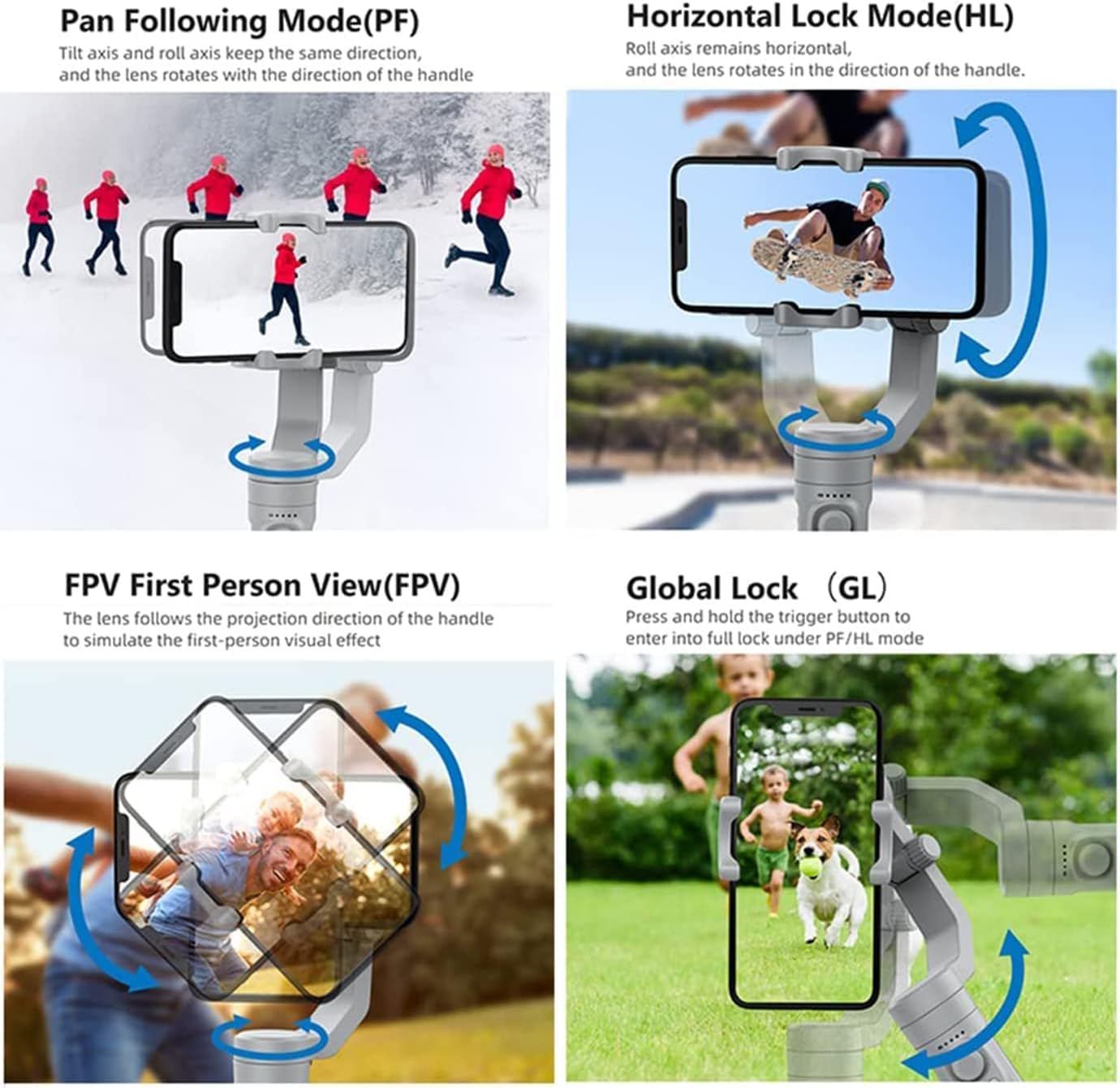
Image: Visual representation of the gimbal's various operational modes, including Pan Following, Horizontal Lock, FPV, and Global Lock, showing how the camera moves in each mode.
Bateria i càrrega
The Cubonic M1 Gimbal is equipped with a built-in 2200 mAh Lithium Ion battery, providing extended usage time.
- Durada de la bateria: Up to 12 hours on a full charge, depending on usage.
- Càrrega: Use the provided USB charging cable. Connect it to the gimbal's charging port and a standard USB power adapter (not included).
- Indicadors de càrrega: LED lights on the gimbal indicate the battery level and charging status.
- Temps de càrrega: Aproximadament 2-3 hores per a una càrrega completa.

Image: The gimbal connected to a charging cable, highlighting its long battery life for extended shooting sessions.
Característiques de l'aplicació
Download the official Cubonic gimbal app from your smartphone's app store (iOS App Store or Google Play Store) to unlock advanced features and control options.
- One-Click Photography: Capture photos instantly through the app interface.
- Control de direcció: Precise control over gimbal movement using virtual joystick or touch controls.
- Ajust del focus: Fine-tune camera focus directly from the app.
- Intelligent Shooting Modes: Access features like time-lapse, panorama, and object tracking.
- Actualitzacions de firmware: Keep your gimbal updated with the latest features and improvements via the app.

Image: The gimbal in use, demonstrating the rich app features available for enhanced control over photography and videography, including one-click capture and focus adjustment.
Manteniment
- Neteja: Feu servir un drap suau i sec per netejar el cardan. Eviteu utilitzar netejadors líquids o dissolvents.
- Emmagatzematge: Store the gimbal in a cool, dry place, away from direct sunlight and extreme temperatures. Ensure it is folded and securely packed.
- Cura de la bateria: If storing for an extended period, charge the battery to about 50-60% to prolong its lifespan. Recharge every 3 months.
- Eviteu la sobrecàrrega: Do not mount smartphones heavier than the recommended maximum weight (3 Kilograms).
- Manejar amb cura: Avoid dropping or subjecting the gimbal to strong impacts.
Resolució de problemes
| Problema | Causa possible | Solució |
|---|---|---|
| Gimbal not powering on. | Bateria baixa; el botó d'engegada no s'ha mantingut premut prou estona. | Charge the gimbal fully; Press and hold the power button for 3-5 seconds. |
| Menjar inestabletage/vibration. | Smartphone not balanced; Gimbal overloaded; Firmware issue. | Re-balance the smartphone; Ensure phone weight is within limits; Update firmware via app. |
| No es pot connectar per Bluetooth. | Bluetooth off; App not open; Interference. | Ensure Bluetooth is on; Open the gimbal app; Restart phone and gimbal. |
| Buttons/Joystick unresponsive. | Gimbal frozen; Low battery. | Restart the gimbal; Charge the gimbal. |
Especificacions
| Marca | Cubonic |
| Model | M1 3 Axis Merak One Gimbal |
| Dimensions del producte | 5D x 8W x 20H Centimeters (50 x 80 x 200 Millimeters) |
| Pes de l'article | 400 grams |
| Tipus de bateria | 1 bateria de ions de liti (inclosa) |
| Capacitat de la bateria | 2200 mAh |
| Recomanació de pes màxim | 3 quilos |
| Dispositius compatibles | Telèfon mòbil |
Garantia i Suport
For warranty information and technical support, please contact Cubonic India.
- Fabricant: Cubonic India R 1/5 Rajnagar, Ghaziabad, U.P.-201001
- Customer Care Whatsapp: +91 7011410155
Conserveu el vostre comprovant de compra per a reclamacions de garantia.
Ask a question about this manual
Ask about setup, troubleshooting, compatibility, parts, safety, or missing instructions. Manuals+ will review the question and use this page’s manual context to help answer it.