
1. Introducció
Thank you for choosing the SUNITEC BH880 Bluetooth Headset. This headset is designed for clear communication and audio enjoyment, featuring a noise-canceling microphone and versatile connectivity options. This manual provides detailed instructions to help you set up, operate, and maintain your headset for optimal performance.
2. Què hi ha a la caixa
Si us plau, comproveu el contingut del paquet per assegurar-vos que hi hagi tots els elements:
- SUNITEC BH880 Bluetooth Headset
- Cable d'àudio de 3.5 mm
- Cable de càrrega USB-C
- Dongle USB
- Manual d'usuari (aquest document)

3. Producte acabatview
The SUNITEC BH880 headset is designed for comfort and functionality across various applications, from professional calls to casual listening.
Característiques principals:
- Micròfon amb cancel·lació de soroll: Ensures clear voice transmission by reducing ambient noise.
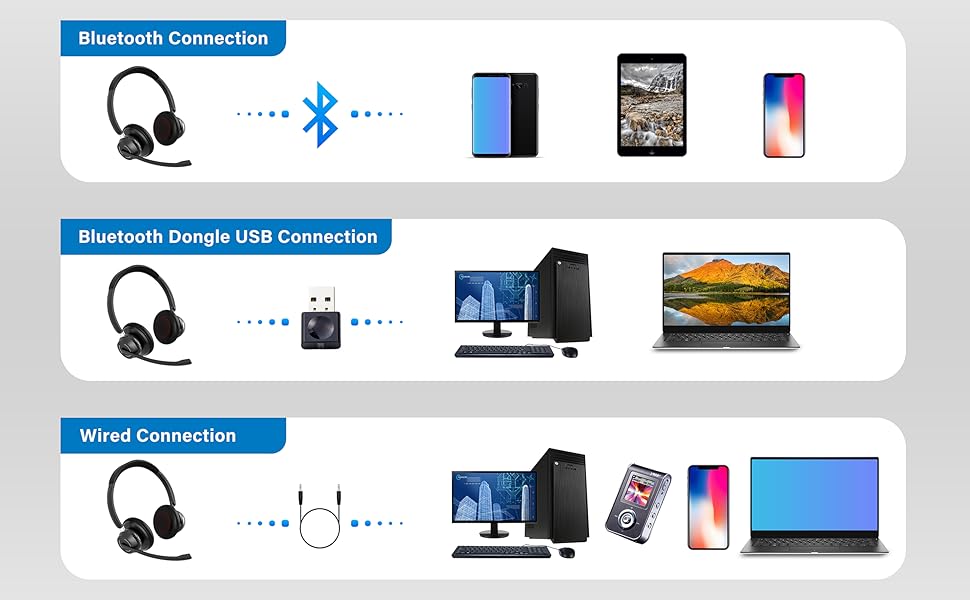
- Múltiples mètodes de connexió: Supports Bluetooth, USB Dongle, and Wired 3.5mm connections.
- Llarga vida útil de la bateria: Up to 45 hours of wireless talking time.
- Disseny còmode: Features memory foam earpads for extended wear.
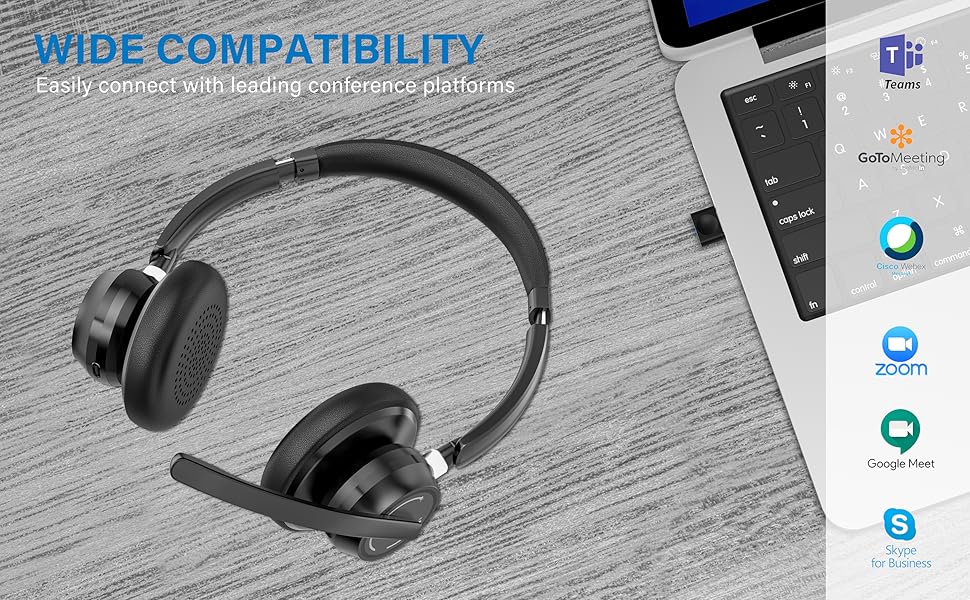
- Àmplia compatibilitat: Works with various Bluetooth-enabled devices, computers, and smartphones.


4. Configuració
The SUNITEC BH880 headset offers three primary connection methods:
4.1. Connexió Bluetooth
- Assegureu-vos que els auriculars estiguin carregats.
- Press and hold the Multi-Function Button (MFB) on the headset for 3-5 seconds until the LED indicator flashes blue and red, indicating pairing mode.
- Al dispositiu (telèfon intel·ligent, tauleta, etc.), aneu a la configuració de Bluetooth i activeu-lo.
- Select "BH880" from the list of available devices.
- Once connected, the LED indicator on the headset will show a solid blue light.
4.2. Bluetooth Dongle USB Connection
- Plug the provided USB dongle into an available USB port on your computer.
- The computer should automatically recognize and install the necessary drivers.
- Assegureu-vos que els auriculars estiguin en mode d'emparellament (el LED parpelleja en blau i vermell).
- The headset will automatically connect to the USB dongle. The LED on both the headset and dongle will show a solid blue light once connected.

4.3. Connexió per cable
- Connect one end of the 3.5mm audio cable to the audio jack on your SUNITEC BH880 headset.
- Connect the other end of the 3.5mm audio cable to the audio output port on your device (computer, smartphone, etc.).
- The headset will function as a wired headset, and Bluetooth functionality will be temporarily disabled.
5. Instruccions de funcionament
Familiarize yourself with the headset controls for seamless operation.
5.1. Encendre/apagar
- Encès: Press and hold the MFB for approximately 2 seconds.
- Apagar: Press and hold the MFB for approximately 4 seconds.
5.2. Gestió de trucades
- Respondre/Finalitzar la trucada: Premeu breument el MFB.
- Rebutja la trucada: Manteniu premut el MFB durant 2 segons.
- Torna a marcar l'últim número: Premeu dues vegades el MFB.
- Silenciar/activar el micròfon: Premeu el botó de silenci dedicat al braç del micròfon.

5.3. Reproducció de música
- Reproduir/pausa: Premeu breument el MFB.
- Pista següent: Premeu llargament el botó '+'.
- Pista anterior: Premeu llargament el botó '-'.
5.4. Control de volum
- Pujar el volum: Premeu breument el botó '+'.
- Baixar el volum: Premeu breument el botó '-'.
6. Càrrega
To charge your SUNITEC BH880 headset:
- Connecteu el cable de càrrega USB-C al port de càrrega dels auriculars.
- Connecteu l'altre extrem del cable USB-C a una font d'alimentació USB (per exemple, un port USB de l'ordinador o un adaptador de paret).
- The LED indicator will show a red light during charging and turn blue when fully charged.
- A full charge takes approximately 1.5 hours and provides up to 45 hours of talking time or 40 hours of music time.
7. Manteniment
Una cura adequada garanteix la longevitat dels auriculars:
- Keep the headset dry. Do not expose it to water or moisture.
- Clean the earpads and surfaces with a soft, dry cloth.
- Eviteu temperatures extremes.
- Guardeu els auriculars en un lloc fresc i sec quan no els feu servir.
- Do not attempt to disassemble the headset, as this may void the warranty.
8. Solució De Problemes
| Problema | Solució |
|---|---|
| Cannot power on the headset. | Assegureu-vos que els auriculars estiguin completament carregats. Connecteu-los a una font d'alimentació amb el cable USB-C. |
| No es pot emparellar amb un dispositiu Bluetooth. |
|
| Sense so o amb un volum baix. |
|
| El micròfon no funciona. |
|
| Connexió intermitent. |
|
9. Especificacions
| Característica | Detall |
|---|---|
| Nom del model | BH880 |
| Tecnologia de connectivitat | Wireless (Bluetooth), Wired (3.5mm) |
| Tecnologia de comunicació sense fils | Bluetooth |
| Components inclosos | Headset, 3.5mm Audio Cable, USB-C Charging Cable, USB Dongle |
| Material | Plàstic |
| Usos específics per al producte | Calling, Gaming, Professional Applications |
| Dispositius compatibles | Bluetooth-enabled devices, computers, smartphones |
| Tipus de control | Control de suports |
| Nivell de resistència a l'aigua | No resistent a l'aigua |
| Estil | A l'orella |
| Mètode de control | Veu, botó |
| Durada de la bateria | 45 Hours (Talking) |
| Tipus de controlador d'àudio | Conductor dinàmic |
| Latència d'àudio | 150 mil·lisegons |
| Forma de l'auricular | Tassa d'orella |
| Control de soroll | Cancel·lació activa de soroll (micròfon) |
| Dimensions del producte | 5.91 x 5.91 x 1.97 polzades |
| Pes de l'article | 10.5 unces |
| Bateries | 1 bateria de polímer de liti (inclosa) |
10. Garantia i assistència
SUNITEC products are designed for reliability and performance. For warranty information, technical support, or customer service inquiries, please refer to the contact details provided on the SUNITEC official weblloc web o la documentació de la compra.
Conserveu el vostre comprovant de compra per a reclamacions de garantia.
