
1. Producte acabatview
The WAHOO KICKR BIKE SHIFT INDOOR TRAINER offers an efficient and effective indoor cycling experience with an unmatched ride feel. Designed for seamless integration with your training regimen, it provides a realistic and immersive environment for all skill levels.

Image 1.1: A cyclist actively using the WAHOO KICKR BIKE SHIFT INDOOR TRAINER, demonstrating its compact and stable design during a training session.
Característiques principals:
- True Fit: Guided by an intuitive set-up app, KICKR BIKE SHIFT's 5-point adjustment system lets you easily adjust frame, setback and reach dimensions to optimize overall bike fit for comfort and performance.
- Your Ride. Inside: KICKR BIKE SHIFT features virtual shifting and custom gearing that allows you to match the gear ratios of your outdoor bike, replicating the major groupsets from Shimano, SRAM and Campagnolo to create a personalized ride experience.
- Real-Time Response: KICKR BIKE SHIFT's innovative brake and belt drivetrain system delivers lightning fast resistance response to grade and power changes.
- Programmable Virtual Shifting: Customize the KICKR BIKE SHIFT controls to match shifters from the leading manufacturers - SRAM, Shimano, and Campagnolo.
- Programmable Gearing: Replicate your outdoor bike down to the exact gearing configuration by selecting the number of speeds and cassette tooth count.
2. Instruccions de configuració
Proper setup of your KICKR BIKE SHIFT is crucial for optimal performance and a realistic riding experience. Follow these steps to assemble and prepare your trainer.
2.1 Desembalatge i muntatge inicial
Carefully remove all components from the packaging. The main unit, handlebar assembly, seatpost and saddle assembly, AC power adapter, and Allen wrenches are included. Ensure all parts are present before proceeding.
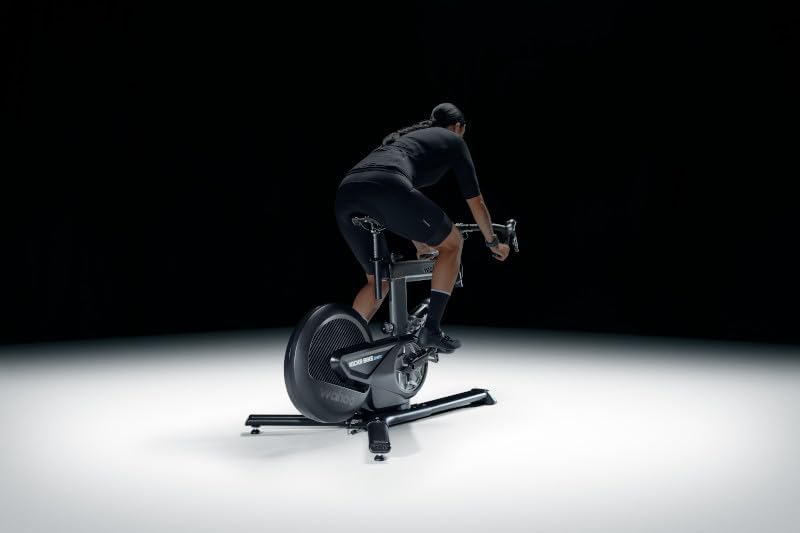
Image 2.1: The main unit of the WAHOO KICKR BIKE SHIFT INDOOR TRAINER, showcasing its robust frame and flywheel.
2.2 Col·locació de les cames
The trainer comes with two legs that need to be attached to the main unit. Use the provided Allen wrenches and bolts to secure them firmly. Ensure the longer leg is positioned at the front for stability.
Video 2.2: A detailed guide on attaching the legs to a Wahoo KICKR CORE 2 trainer. While this video features a related product, the leg attachment process is similar and provides helpful visual instructions for securing the base of the trainer.
2.3 Installing Cassette (if applicable)
The KICKR BIKE SHIFT may come with a pre-installed cassette or require you to install one. If installing, ensure you have the correct cassette for your bike's gearing (e.g., 11-speed Shimano). Use a cassette tool to secure it properly. Spacers may be required for 9 or 10-speed cassettes.
Video 2.3: A user demonstrating the installation of a Shimano cassette onto a Wahoo KICKR CORE 2. This process is similar for the KICKR BIKE SHIFT, ensuring proper gearing for your indoor training.
2.4 Adjusting Bike Fit
Utilize the 5-point adjustment system to match your outdoor bike's geometry. This includes stack, reach, setback, saddle height, and frame height. An intuitive setup app can guide you through this process for optimal comfort and performance.

Image 2.4: Close-up of the WAHOO KICKR BIKE SHIFT handlebars, highlighting the integrated shifter controls and adjustment points.
3. Instruccions de funcionament
The KICKR BIKE SHIFT is designed for seamless integration with various cycling applications, offering a dynamic and responsive training experience.
3.1 Connecting to Training Apps
The trainer is compatible with popular cycling apps like Zwift, Rouvy, and TrainerRoad. Connect your KICKR BIKE SHIFT via Bluetooth or ANT+ to your preferred device (smartphone, tablet, computer, or Apple TV). Ensure your app is updated to the latest version for best performance.
Vídeo 3.1: Una revisió completaview of the Wahoo KICKR trainer, highlighting its features and compatibility with various cycling apps. This video provides insights into the user experience and overall performance.
3.2 Virtual Shifting and Gearing
Customize your virtual shifting to mimic major groupsets (Shimano, SRAM, Campagnolo). The programmable gearing allows you to select the number of speeds and cassette tooth count, providing a realistic feel that matches your outdoor bike.

Image 3.2: A person riding the WAHOO KICKR BIKE SHIFT, demonstrating the immersive experience of indoor cycling with virtual shifting.
3.3 ERG Mode and Resistance Response
In ERG mode, the trainer automatically adjusts resistance to match your target wattage, allowing you to focus solely on your cadence. The innovative brake and belt drivetrain system ensures lightning-fast resistance response to changes in grade and power, enhancing the realism of your ride.
4. Manteniment
Regular maintenance ensures the longevity and optimal performance of your WAHOO KICKR BIKE SHIFT.
- Neteja: Wipe down the trainer regularly with a damp drap per eliminar la suor i la pols. Eviteu utilitzar productes de neteja abrasius.
- Manteniment de la cadena: Keep your bike chain clean and lubricated to ensure smooth operation and minimize noise.
- Actualitzacions de firmware: Periodically check for and install firmware updates via the Wahoo Fitness app to ensure your trainer has the latest features and performance enhancements.
- Inspecció del cinturó: Inspect the drive belt for any signs of wear or damage. Contact Wahoo Support if replacement is needed.
5. Solució De Problemes
If you encounter issues with your KICKR BIKE SHIFT, refer to the following common troubleshooting tips:
- Problemes de connectivitat: If the trainer fails to connect to your app, ensure Bluetooth/ANT+ is enabled on your device and the trainer is powered on. Try restarting both the trainer and your device. Check for any potential interference from other wireless devices.
- Lectures de potència inexactes: Perform a spin-down calibration using the Wahoo Fitness app. Ensure your trainer's firmware is up to date.
- Unusual Noises/Grinding: Inspect your bike's chain and cassette for cleanliness and proper alignment. Ensure the trainer's legs are securely fastened. If the noise persists, contact Wahoo Support.
- Resistència que no canvia: Verify that ERG mode is correctly configured in your training app. Check for any error indicators on the trainer's LED lights.
Vídeo 5.1: Un usuari reviewing the noise level of a Wahoo KICKR CORE 2 trainer. This video can help users identify if their trainer's noise levels are normal or indicative of a potential issue.
6. Especificacions
| Característica | Especificació |
|---|---|
| Marca | Wahoo Fitness |
| Nom del model | WAHOO KICKR BIKE SHIFT INDOOR TRAINER |
| Número de model | WFBIKE2 |
| Color | Negre |
| Material | Alloy Steel, Aluminum, Plastic, Stainless Steel |
| Mecanisme de resistència | Magnètic |
| Max Wattage | 1,800 watts |
| Inclinació màxima | 16% simulated grade |
| Pes de l'article | 35 quilos |
| Dimensions del producte (L x A x A) | 76 cm de llargada x 95 cm d'amplada x 121 cm d'alçada |
| Capacitat de càrrega | 250 lliures |
| UPC | 850010131801 |
7. Garantia i Suport
Your WAHOO KICKR BIKE SHIFT INDOOR TRAINER is covered by a manufacturer's warranty and dedicated customer support.
7.1 Informació de la garantia
El producte ve amb un 1 anys de garantia del fabricantSi us plau, conserveu el comprovant de compra per a qualsevol reclamació de garantia.
7.2 Atenció al client
For any questions, technical assistance, or warranty claims, please contact Wahoo Fitness Customer Support. Refer to the official Wahoo Fitness weblloc web per obtenir la informació de contacte i els recursos d'assistència més actualitzats.