
1. Introducció
This manual provides essential information for the safe and efficient use of your Amazon Basics 24 Inch FHD 100Hz Monitor. Please read these instructions carefully before operating the device and retain them for future reference.
The Amazon Basics 24 Inch Monitor features a 23.8-inch viewable IPS panel with Full HD (1080p) resolution and a maximum refresh rate of 100Hz. It includes built-in speakers and is VESA compatible for flexible mounting options. The monitor is designed for various uses, including office work, entertainment, and gaming.

Davant view of the Amazon Basics 24 Inch FHD 100Hz Monitor.
2. Contingut del paquet
Verifiqueu que tots els elements siguin presents al paquet:
- Amazon Basics 24 Inch Monitor
- Base de peu
- Coll de peu
- Adaptador d'alimentació
- Cable HDMI

Image showing the monitor's package contents: stand base, stand neck, power adapter, and HDMI cable.
3. Instruccions de configuració
3.1 Col·locació del suport
- Insert the stand neck into the stand base until it clicks securely into place.
- Align the assembled stand with the mounting slot on the back of the monitor. Push the stand into the slot until it locks. Ensure it is firmly attached.
3.2 Cables de connexió
The monitor features multiple input ports for connectivity:
- PD 1.2: DisplayPort input for high-resolution video and audio.
- HDMI 1.4: HDMI input for video and audio from compatible devices.
- VGA: VGA input for analog video signals.
- AUDIO IN: 3.5mm audio input for external audio sources.
- SORTIDA D'ÀUDIO: Sortida d'àudio de 3.5 mm per a auriculars o altaveus externs.
- Connect the provided HDMI cable from your computer's video output port to the HDMI input port on the monitor. Alternatively, use a DisplayPort or VGA cable if your device supports those connections.
- Connect the power adapter to the monitor's power input port, then plug the power adapter into a wall outlet.
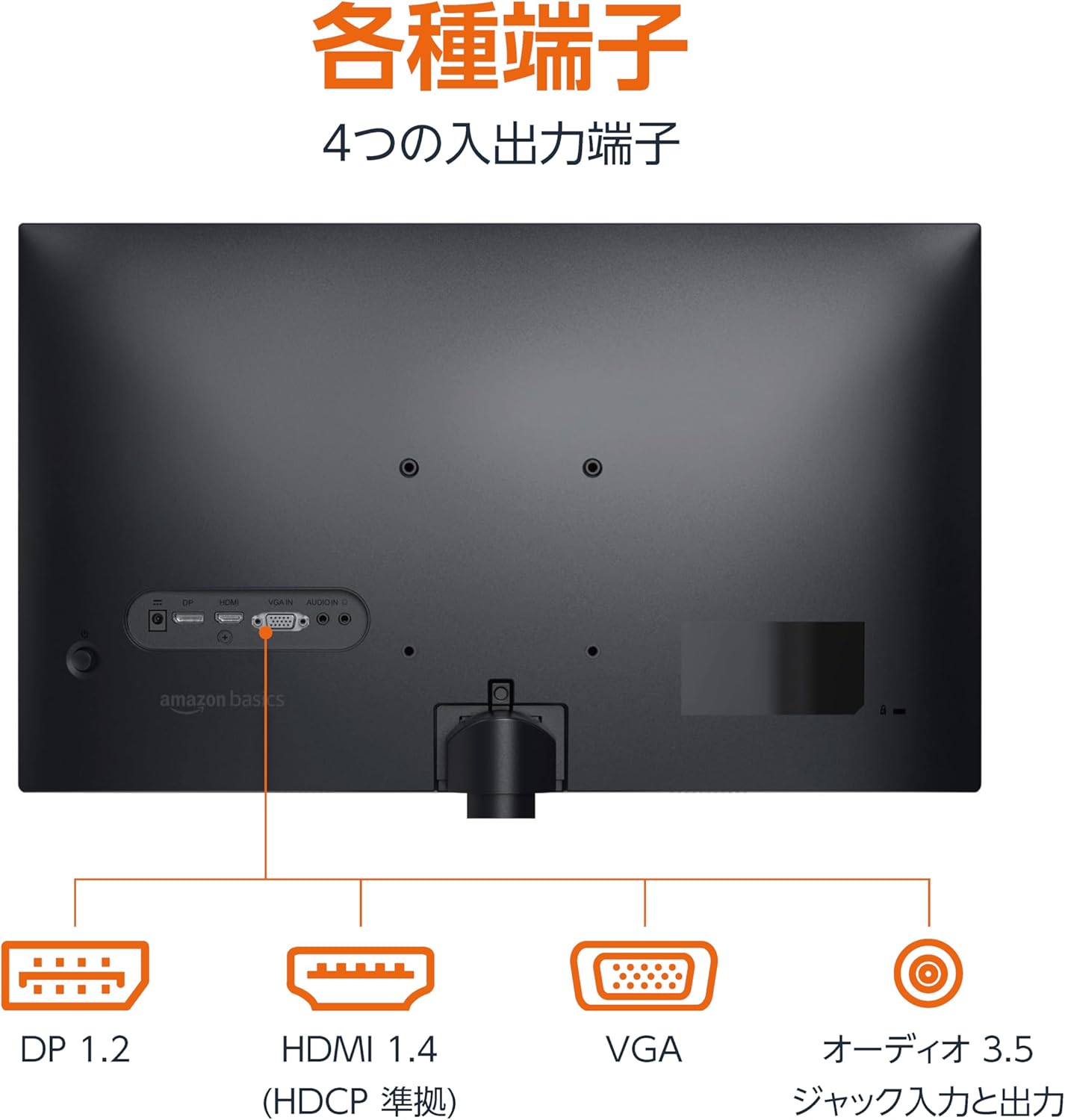
posterior view del monitor que mostra diversos ports d'entrada i sortida.
3.3 Encès
Press the power button located on the back or bottom of the monitor to turn it on. The monitor will automatically detect the active input signal.
3.4 Ajust d'inclinació
The monitor allows for tilt adjustment to achieve an optimal viewing angle. Gently hold the top and bottom edges of the monitor and tilt it forward or backward. The tilt range is approximately -5° to 20°.

Monitor demonstrating its tilt adjustment capability.
3.5 Optional: VESA Mounting and Cable Lock
The monitor is VESA compatible, allowing it to be mounted on a wall or an adjustable arm (mounting hardware sold separately). Refer to the VESA mount's instructions for installation.
An optional cable lock slot is available on the rear of the monitor to secure it to a stable object, preventing theft.
3.6 Guia de vídeo de configuració
For a visual guide on setting up your Amazon Basics monitor, please watch the video below:
This video demonstrates the assembly of the stand, connecting cables, and basic adjustments for the Amazon Basics monitor.
4. Instruccions de funcionament
4.1 Menú de visualització en pantalla (OSD)
The monitor features an On-Screen Display (OSD) menu for adjusting various settings. Use the buttons located on the back or bottom of the monitor to navigate the menu. Common settings include:
- Brillantor/Contrast: Ajusta els nivells de luminància i contrast de la pantalla.
- Configuració de color: Modifica la temperatura de color, el to i la saturació.
- Selecció d'entrada: Manually switch between DP, HDMI, and VGA inputs.
- Àudio: Ajusta el volum dels altaveus integrats o dels auriculars connectats.
- Mode d'imatge: Select from preset display modes (e.g., Standard, Game, Movie).
4.2 Using Built-in Speakers
The monitor includes integrated speakers. Audio will be played through these speakers when connected via HDMI or DisplayPort. If using a VGA connection, ensure an audio cable is connected to the 'AUDIO IN' port on the monitor and your computer's audio output.
5. Especificacions
| Característica | Especificació |
|---|---|
| Marca | Conceptes bàsics d'Amazon |
| Número de model | 24M2020DJP |
| Mida de la pantalla | 24 Inches (23.8 inch viewcapaç) |
| Tipus de panell | IPS |
| Resolució | Full HD 1080p (1920 x 1080) |
| Freqüència d'actualització | Màxim 100 Hz |
| Relació d'aspecte | 16:9 |
| Altaveus incorporats | Sí |
| Compatibilitat VESA | Sí |
| Ports d'entrada | 1x DisplayPort 1.2, 1x HDMI 1.4, 1x VGA, 1x Audio In (3.5mm) |
| Ports de sortida | 1x Audio Out (3.5mm) |
| Pes del producte | 2.8 kg |
| Gruix del bisell | 1.44 mm (slim bezel) |
| Garantia | 1 anys de garantia limitada |
5.1 Dimensions
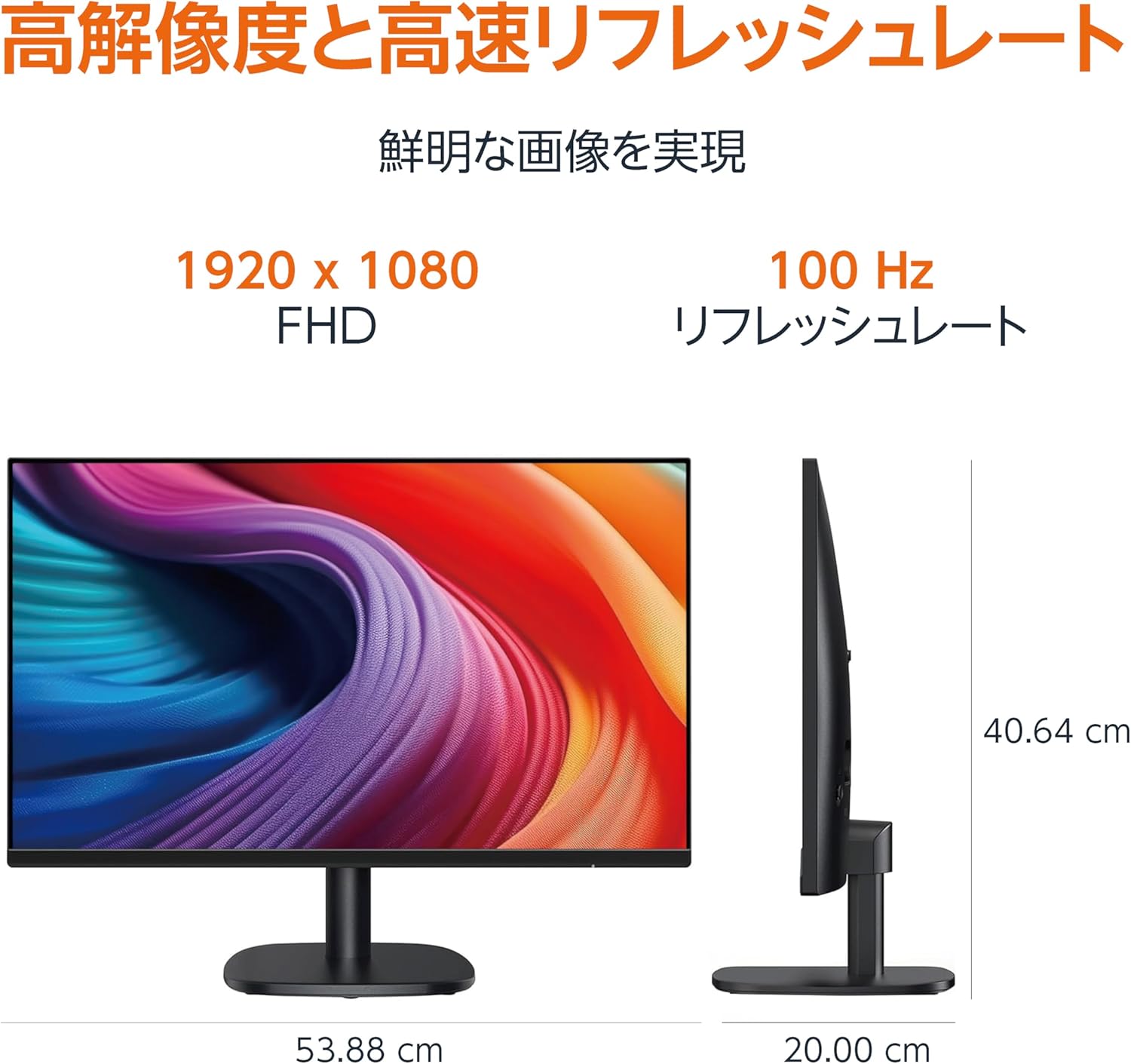
Diagram showing the monitor's dimensions (Width: 53.88 cm, Height: 40.64 cm, Depth: 20.00 cm).
5.2 Slim Bezel Design

Detail showing the monitor's slim bezel design, measuring 1.44 mm.
6. Solució De Problemes
Si teniu problemes amb el monitor, consulteu les solucions habituals següents:
- Sense energia: Ensure the power cable is securely connected to both the monitor and a working power outlet. Check if the power adapter's indicator light is on.
- Sense senyal: Verify that the video cable (HDMI, DP, or VGA) is firmly connected to both the monitor and your computer. Ensure the correct input source is selected in the monitor's OSD menu. Try restarting your computer.
- Pantalla parpellejant: Check the video cable for damage or loose connections. Ensure your computer's graphics driver is up to date. Adjust the refresh rate in your computer's display settings.
- No hi ha àudio dels altaveus: If using HDMI or DisplayPort, ensure the audio output is set to the monitor in your computer's sound settings. If using VGA, confirm the 3.5mm audio cable is connected. Check the volume level on both the monitor and your computer.
- Problemes de qualitat de la imatge: Adjust brightness, contrast, and color settings via the OSD menu. Ensure the display resolution on your computer matches the monitor's native resolution (1920 x 1080).
Si el problema persisteix després d'intentar aquests passos, poseu-vos en contacte amb l'atenció al client.
7. Manteniment
Proper maintenance helps ensure the longevity and performance of your monitor:
- Neteja de la pantalla: Netegeu suaument la pantalla amb un drap suau i sense borrissol. Per a marques difícils, netegeu suaument.ampNetegeu el drap amb aigua o un netejador de pantalles especialitzat. Eviteu utilitzar productes químics agressius, alcohol o materials abrasius.
- Neteja de la Casing: Feu servir un drap suau i sec per netejar la superfície del monitor.asing.
- Ventilació: Assegureu-vos que les obertures de ventilació del monitor no estiguin bloquejades per evitar el sobreescalfament.
- Apagueu quan no estigui en ús: Apagueu el monitor quan no l'utilitzeu durant períodes prolongats per estalviar energia i allargar-ne la vida útil.
8. Garantia i Suport
This Amazon Basics monitor comes with a Garantia limitada d'1 any des de la data de compra. Aquesta garantia cobreix els defectes de fabricació i la mà d'obra en condicions d'ús normal.
For warranty claims, technical support, or further assistance, please refer to the Amazon Basics support page or contact Amazon customer service directly. Keep your proof of purchase for warranty validation.