
1. Introducció
The FIDECO Hard Drive Docking Station YPZ03SN is a versatile external storage solution designed for easy access to various types of hard drives and solid-state drives. It supports 2.5-inch and 3.5-inch SATA HDDs/SSDs, as well as M.2 NVMe and M.2 SATA SSDs. Featuring a built-in cooling fan, this docking station ensures optimal operating temperatures for your drives during data transfer.
This manual provides detailed instructions for setting up, operating, and maintaining your FIDECO docking station, along with troubleshooting tips and product specifications.

Image 1.1: FIDECO Hard Drive Docking Station with examples of supported drives (2.5" SATA, 3.5" SATA, M.2 NVMe/SATA SSDs).
2. Contingut del paquet
Si us plau, verifiqueu que tots els elements siguin presents al vostre paquet:
- 1x FIDECO Hard Drive Docking Station (Model: YPZ03SN)
- 1x USB-C to USB-C Cable with USB-A Adapter
- 1x adaptador de corrent (DC 12V)
- 1x Manual d'usuari (aquest document)
3. Característiques del producte
- Compatibilitat universal: Supports 2.5"/3.5" SATA HDDs/SSDs and M.2 NVMe/SATA SSDs.
- Transferència de dades d'alta velocitat: Up to 10Gbps for M.2 NVMe SSDs and 5Gbps for 2.5"/3.5" SATA drives.
- Refrigeració eficient: Integrated cooling fan with an independent switch to prevent overheating.
- Plug and Play: Driver-free installation for Windows, Mac OS, and Linux operating systems.
- Connectivitat fàcil: Includes a USB-C to USB-C cable with an attached USB-A adapter for broad device compatibility.
4. Instruccions de configuració
4.1 Identificació de components

Image 4.1: Top and rear view of the docking station highlighting key components and ports.
- Interfície SATA: For 2.5-inch and 3.5-inch SATA HDDs/SSDs.
- M.2 SSD Interface: For M.2 NVMe and M.2 SATA SSDs.
- Llum LED: Indicates power and activity status.
- Ventilador de refrigeració: Provides active cooling for inserted drives.
- Port de tipus C: Connects to your computer via the provided USB cable.
- Botó d'encesa: Turns the docking station on or off.
- Cooling Fan Switch: Toggles the cooling fan on or off independently.
- Port DC 12V: Es connecta a l'adaptador de corrent inclòs.
4.2 Connexió de l'estació d'acoblament
- Connect the provided power adapter to the DC 12V port on the docking station and then to a power outlet.
- Connect the USB-C end of the data cable to the Type-C port on the docking station.
- Connect the other end of the data cable (USB-C or USB-A, using the adapter if necessary) to an available USB port on your computer.
- Press the Power Button to turn on the docking station. The LED light will illuminate.
4.3 Inserting a Hard Drive/SSD
Important: Only one hard drive or SSD can be inserted and used at a time.
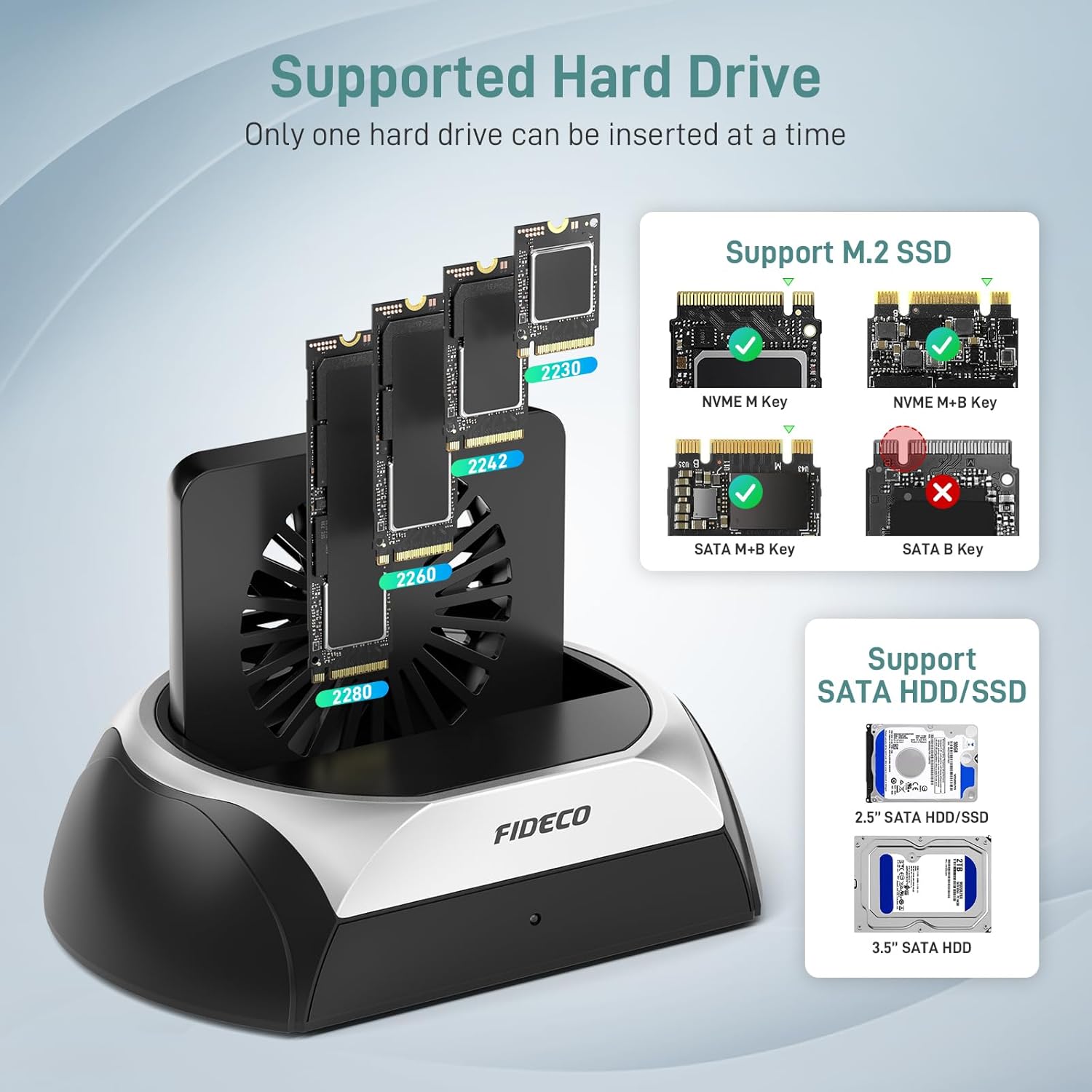
Image 4.2: Visual guide for compatible M.2 SSD and SATA HDD/SSD types.
- For 2.5"/3.5" SATA HDD/SSD: Gently slide the SATA drive into the SATA interface slot until it is firmly seated. Ensure the drive's connectors align with the docking station's connectors.
- For M.2 NVMe/SATA SSD: Insert the M.2 SSD into the M.2 SSD interface slot at an angle, then gently push down to secure it. Ensure the M.2 key type (M-Key or B+M Key for NVMe; B+M Key for SATA) matches the slot.
Note for New Drives: For new HDDs or SSDs, they must be initialized and formatted by your computer's operating system before they can be recognized and used. Refer to your operating system's disk management tools for this process.
5. Instruccions de funcionament
5.1 Transferència de dades
Once a drive is properly inserted and the docking station is connected and powered on, your computer should automatically detect the drive. You can then access, transfer, and manage files as you would with any internal or external drive.

Image 5.1: High-speed data transfer with an M.2 NVMe SSD, reaching up to 10Gbps.

Image 5.2: Data transfer with a 2.5"/3.5" SATA HDD/SSD, reaching up to 5Gbps.
5.2 Funcionament del ventilador de refrigeració
The docking station features a cooling fan to maintain optimal drive temperatures, especially during extended use or large data transfers. The fan has an independent switch located at the rear of the unit.
- To turn the cooling fan on, slide the Cooling Fan Switch to the 'ON' position.
- To turn the cooling fan apagat, slide the Cooling Fan Switch to the 'OFF' position.
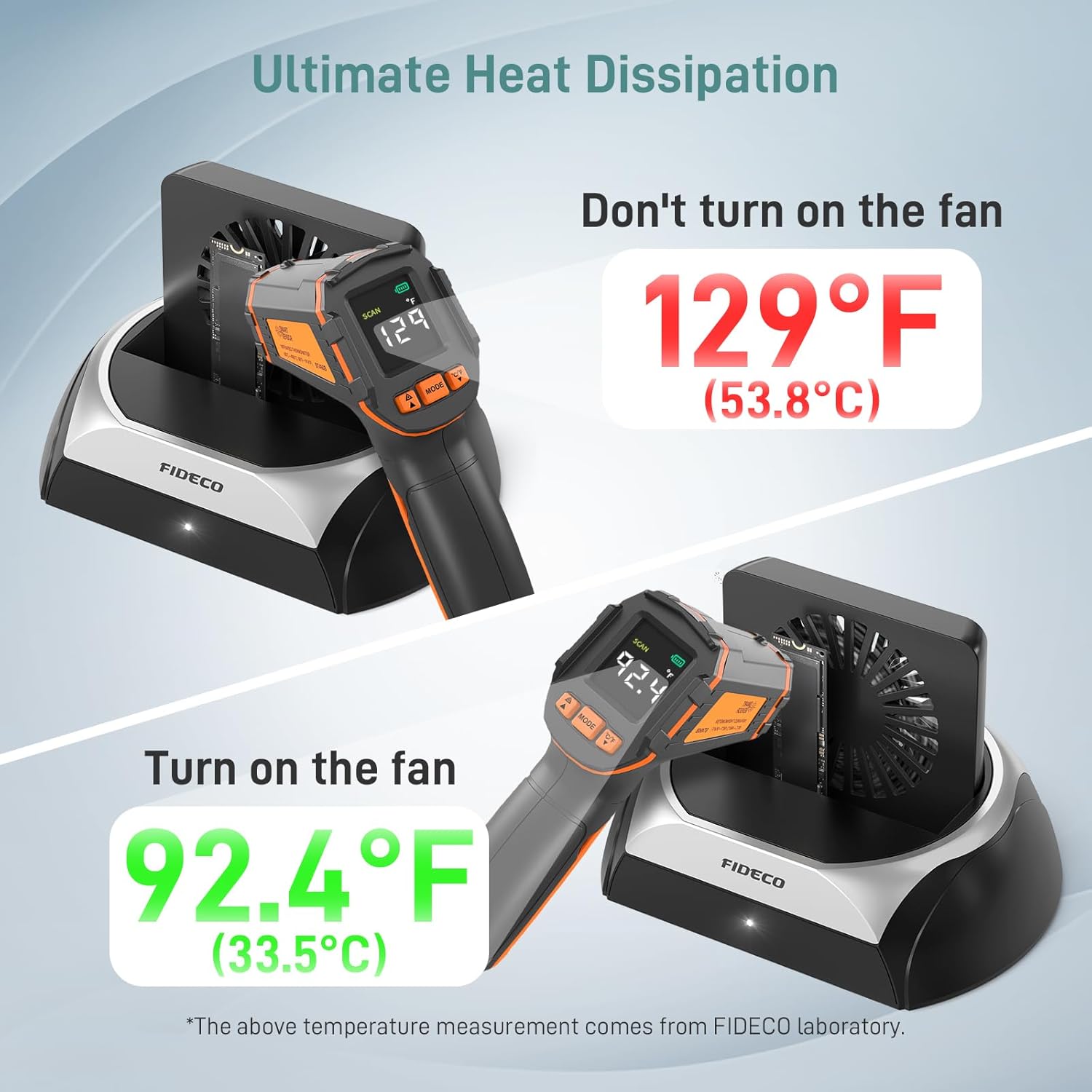
Image 5.3: Demonstrates the effectiveness of the cooling fan in reducing drive temperature.
5.3 Compatibilitat del sistema
The FIDECO docking station is designed for broad compatibility and operates without the need for additional drivers on most modern operating systems.

Image 5.4: The docking station offers driver-free, plug-and-play functionality across Windows, Mac OS, and Linux.
6. Manteniment
To ensure the longevity and optimal performance of your FIDECO Hard Drive Docking Station and the drives connected to it, consider the following maintenance guidelines:
- Mantenir net: Regularly clean the docking station and its ports with a soft, dry cloth to prevent dust accumulation, especially around the cooling fan vents.
- Tractament adequat: Always handle hard drives and SSDs with care. Avoid dropping or subjecting them to physical shock.
- Cooling Fan Use: Utilize the cooling fan during prolonged data transfers or when accessing drives for extended periods to prevent overheating, which can impact drive performance and lifespan.
- Eliminació segura: Always safely eject or unmount drives from your operating system before physically removing them from the docking station or disconnecting the docking station from your computer.
7. Solució De Problemes
If you encounter issues with your FIDECO Hard Drive Docking Station, please refer to the following common solutions:
- Unitat no detectada:
- Ensure the docking station is powered on and the LED indicator is lit.
- Verify that the drive is correctly and firmly seated in its slot.
- Prova de connectar l'estació d'acoblament a un port USB diferent de l'ordinador.
- If it's a new drive, ensure it has been initialized and formatted in your operating system's Disk Management (Windows) or Disk Utility (Mac OS).
- Test with a different known-good drive to rule out a drive issue.
- Velocitat de transferència de dades lenta:
- Ensure you are using a USB 3.0/3.1/3.2 port on your computer for optimal speeds. Connecting to a USB 2.0 port will result in slower speeds.
- Check the condition of your USB cable. Try a different cable if available.
- Ensure the cooling fan is active during large transfers to prevent thermal throttling.
- The actual speed may vary depending on the drive's performance and your computer's system configuration.
- Cooling Fan Not Working:
- Ensure the Cooling Fan Switch is in the 'ON' position.
- Check if the docking station is receiving power.
If these steps do not resolve your issue, please contact FIDECO customer support.
8. Especificacions
| Característica | Detall |
|---|---|
| Número de model | YPZ03SN |
| Marca | FIDECO |
| Dispositius compatibles | Personal Computer, Laptops, OTG-enabled Phones/Tablets |
| Supported Hard Disk Form Factors | 2.5 Inches, 3.5 Inches (SATA HDD/SSD), M.2 (NVMe/SATA SSD) |
| Nombre màxim de dispositius compatibles | 1 (one drive at a time) |
| Velocitat de transferència de dades | Up to 10 Gigabits Per Second (M.2 NVMe), Up to 5 Gigabits Per Second (SATA) |
| Interfície del maquinari | USB Docking Station (USB 3.2 Gen 2 Type-C) |
| Compatibilitat de sistemes operatius | Windows, Mac OS, Linux |
| Material | Acrilonitril butadiè estirè (ABS) |
| Color | Negre i plata |
| Dimensions del producte | 4.65 x 4.84 x 6.97 polzades |
| Pes de l'article | 7.8 unces (220 grams) |
9. Garantia i Suport
FIDECO is committed to providing quality products and customer satisfaction. For technical support, firmware updates, or warranty inquiries, please contact our support team.
- Suport per correu electrònic: support@fideco.cn
- Informació de la garantia: Please refer to the product packaging or contact FIDECO customer support for specific warranty terms and conditions.