
1. Introducció
The Sygonix SY-5044422 Digital Timer Switch is designed for easy programming and operation, helping to manage power consumption for various appliances. This device features 20 ON/OFF programs, 3 random settings, and a countdown function, with switching intervals as short as 1 minute. Programs can be set for specific days, combinations of days, or daily. Its IP44 splash-proof rating allows for outdoor use, and an integrated battery retains settings during power outages. The timer supports a maximum switching capacity of 1800 W and includes enhanced touch protection.
2. Instruccions de seguretat
- Llegiu atentament totes les instruccions abans d'utilitzar.
- This device is rated IP44, making it splash-proof for outdoor use. However, do not immerse it in water or expose it to direct jets of water.
- Ensure the total load of connected appliances does not exceed 1800 W.
- Do not open the device housing. Repairs should only be performed by qualified personnel.
- Keep out of reach of children. The device features enhanced touch protection.
- Desendolleu sempre el temporitzador de la presa de corrent abans de netejar-lo.
3. Contingut del paquet
- Sygonix SY-5044422 Digital Timer Switch
- Manual d'instruccions
- Informació de la garantia
4. Producte acabatview
Familiarize yourself with the components and controls of your digital timer switch.
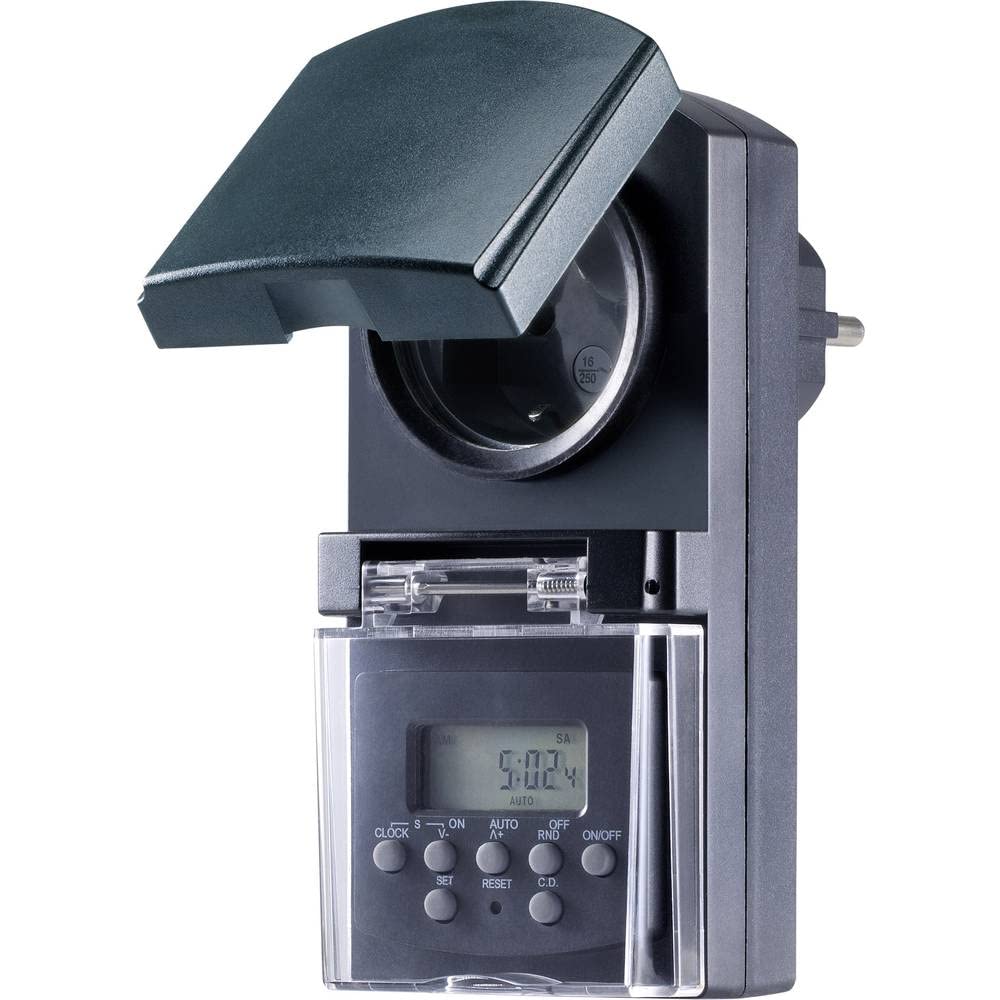
Figura 1: Davant view of the Sygonix SY-5044422 Digital Timer Switch. This image displays the LCD screen, which shows the current time and day, along with various control buttons including CLOCK, ON/OFF, SET, RESET, AUTO/A+, OFF/RND, and C.D. (Countdown).

Figura 2: Davant view of the timer with the protective cover opened, showing the integrated power socket. The display and control buttons are visible below the socket.
Botons de control:
- RELOJ: S'utilitza per configurar l'hora i el dia actuals.
- ON/OFF: Manually switches the timer output ON or OFF.
- SET: Entra en mode de programació i confirma la configuració.
- RESET: Esborra tots els paràmetres i restableix el temporitzador als valors predeterminats de fàbrica.
- AUTO/A+: Cycles through automatic mode, program settings, and adjusts values.
- APAGAT/REC: Activates or deactivates the Random function.
- C.D. (Countdown): Activates or deactivates the Countdown function.
5. Configuració
5.1 Càrrega inicial
Before first use, plug the timer into a power outlet for approximately 30 minutes to charge the internal battery. This ensures the display is active and settings are retained during power outages o quan està desconnectat.
5.2 Configuració de l'hora i el dia actuals
- Manteniu premut el botó RELOJ botó.
- Mentre aguanta RELOJ, premeu AUTO/A+ repeatedly to set the current day (MO, TU, WE, TH, FR, SA, SU).
- Mentre aguanta RELOJ, premeu SET repeatedly to set the current hour.
- Mentre aguanta RELOJ, premeu APAGAT/RETORN repetidament per ajustar els minuts actuals.
- Allibera el RELOJ per desar la configuració.
5.3 Summer Time Adjustment
The timer supports a summer time function. To activate or deactivate:
- Manteniu premut el botó RELOJ botó i el ON/OFF button simultaneously for 3 seconds. The display will show "SUMMER" or "WINTER" to indicate the mode.
6. Instruccions de funcionament
6.1 Programming ON/OFF Times (Weekly Program)
The timer allows for up to 20 ON/OFF programs. Each program can be set for specific days or combinations of days.
- Premeu el botó SET Premeu el botó una vegada per entrar al mode de programació. La pantalla mostrarà "1 ON".
- Premeu AUTO/A+ to select the desired day(s) for the program (e.g., MO, TU, WE, TH, FR, SA, SU, MO-FR, SA-SU, MO-SA, etc.).
- Premeu SET to confirm the day selection.
- Premeu AUTO/A+ per configurar l'hora d'encesa desitjada.
- Premeu APAGAT/RETORN per ajustar el minut d'encesa desitjat.
- Premeu SET again. The display will now show "1 OFF".
- Repeat steps 2-5 to set the OFF time for the same program.
- Continueu prement SET to cycle through all 20 ON/OFF programs. To exit program mode at any time, press the RELOJ botó.
Nota: After programming, ensure the timer is in AUTO mode for the programs to execute. Press ON/OFF repeatedly until "AUTO" is displayed.
6.2 Funció de compte enrere
The countdown function allows you to switch the connected appliance ON or OFF after a set duration.
- Premeu el botó CD button once. The display will show "CD ON" or "CD OFF".
- Premeu AUTO/A+ to set the desired countdown hour.
- Premeu APAGAT/RETORN to set the desired countdown minute.
- Premeu CD again to start the countdown. The display will show the remaining time.
- Per cancel·lar el compte enrere, premeu CD una vegada més.
6.3 Random Function (Presence Simulation)
The random function simulates presence by randomly switching the connected appliance ON and OFF within a set time window, deterring potential intruders.
- Assegureu-vos que el temporitzador estigui activat AUTO mode.
- Premeu el botó APAGAT/RETORN button. The display will show "RND" to indicate the random function is active.
- The timer will now randomly switch the output ON and OFF for short periods within the programmed ON/OFF times.
- To deactivate the random function, press APAGAT/RETORN again. "RND" will disappear from the display.
6.4 Manual ON/OFF Override
Podeu anul·lar manualment els paràmetres programats en qualsevol moment.
- Premeu el botó ON/OFF button repeatedly to cycle through "ON", "OFF", and "AUTO" modes.
- "ON" means the output is continuously ON.
- "OFF" means the output is continuously OFF.
- "AUTO" means the timer will follow the programmed settings.
7. Manteniment
- Before cleaning, always unplug the timer from the power outlet.
- Netegeu el dispositiu amb un drap suau i sec. No utilitzeu productes de neteja abrasius ni dissolvents.
- Assegureu-vos que no entrin líquids a l'aparell.
8. Solució De Problemes
| Problema | Causa possible | Solució |
|---|---|---|
| La pantalla està en blanc o tènue. | La bateria interna està descarregada. | Plug the timer into a live power outlet for at least 30 minutes to charge the battery. |
| Programs are not executing. | El temporitzador no està en mode AUTO. | Premeu el botó ON/OFF button repeatedly until "AUTO" is displayed. |
| Incorrect time or day displayed. | Time/day was not set correctly or reset. | Refer to Section 5.2 "Setting Current Time and Day" to re-set. |
| Tota la configuració es perd després de l'apagadatage. | Internal battery not charged or faulty. | Ensure the timer is regularly plugged in to keep the internal battery charged. If the issue persists, contact support. |
9. Especificacions
| Número de model: | SY-5044422 |
| Max. Switching Capacity: | 1800 W |
| Classe de protecció: | IP44 (a prova d'esquitxades) |
| Tipus de visualització: | Digital |
| Programes: | 20 programes d'encesa/apagada |
| Minimum Switching Interval: | 1 minut |
| Característiques especials: | Countdown function, Random function (presence simulation), Summer time, Integrated battery for settings retention, Enhanced touch protection. |
| Dimensions del producte: | 14 x 10 x 6 cm |
| Fabricant: | Sygonix |
| País d'origen: | Xina |
10. Garantia i Suport
This product comes with a minimum 2-year warranty from the date of purchase. In case of any issues or defects, please contact your retailer or Sygonix customer support for assistance. Keep your proof of purchase for warranty claims.