
JKZTJOF ASK-STI6220
ASK-STI6220 Voice Remote Control User Manual
Model: ASK-STI6220 | Brand: JKZTJOF
Introducció
This manual provides comprehensive instructions for the setup, operation, and maintenance of your new ASK-STI6220 Voice Remote Control. Designed for seamless integration with specific Verizon Stream TV models, this remote offers intuitive control and voice interaction capabilities. Please read this manual thoroughly to ensure optimal performance and longevity of your device.

Image: The ASK-STI6220 Voice Remote Control, showcasing its sleek black design from both front and side perspectives.
Compatibilitat
The ASK-STI6220 remote control is specifically designed for use with the following Verizon brand devices:
- Verizon Stream TV
- Verizon Stream TV Soundbar
- Verizon Stream TV Soundbar Pro
It is compatible with ASKSTI6220 voice remote V2 ARRIS models: CCAM21LP1890T2, 2AGOFRC451A, RC451A, and STI6220-D315.
Important Note: This remote control is NOT compatible with any other device not listed above. Compatibility is strictly limited to the specified Verizon Stream TV models and their corresponding ARRIS remote models.
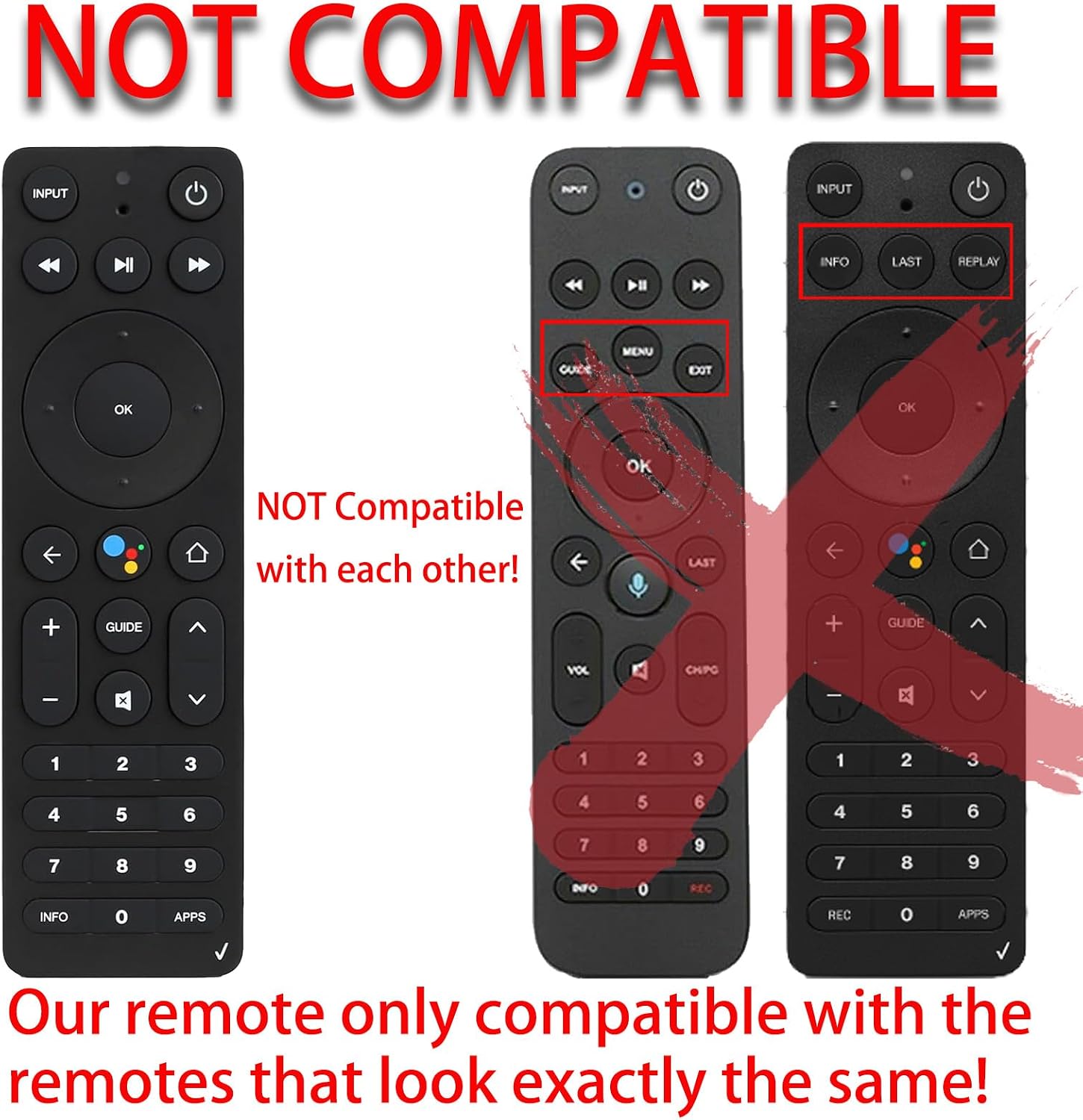
Image: A visual representation highlighting that this remote is only compatible with remotes that look exactly the same, explicitly showing other remote designs as incompatible.

Image: An illustration confirming the ASK-STI6220 remote's compatibility with Verizon Stream TV Box 4K 8K V2 Arris and specific model numbers like CCAM21LP1890T2.
Configuració
1. Instal·lació de la bateria
The remote control requires two AAA batteries (included in the package). Follow these steps to install them:
- Localitzeu el compartiment de la bateria a la part posterior del comandament a distància.
- Feu lliscar la tapa de la bateria cap avall per obrir-la.
- Introduïu dues piles AAA, assegurant-vos que els terminals positiu (+) i negatiu (-) s'alineïn correctament amb els indicadors de l'interior del compartiment.
- Torneu a col·locar la tapa de la bateria lliscant-la cap amunt fins que encaixi al seu lloc.
Once batteries are installed, the remote is ready for use. No additional programming is typically required for initial operation.

Imatge: Una clara view of the remote's battery compartment, illustrating the correct insertion of two AAA batteries.
2. Initial Pairing (If Necessary)
In most cases, the remote will work directly out of the box. However, if the remote does not respond after battery installation, you may need to pair it with your Verizon Stream TV device. There are two primary methods:
Method A: Using "Return" and "APPs" Buttons
- Ensure new batteries are installed.
- Premeu i manteniu premuda la tecla "Tornar" i "APPs" buttons simultaneously until the remote enters pairing mode (indicator light may flash).
- Segueix les instruccions que apareixen a la pantalla del televisor per completar el procés d'emparellament.
Method B: Using "OK" and "HOME" Buttons
- Ensure new batteries are installed.
- Premeu i manteniu premuda la tecla "OK" i "CASA" buttons simultaneously until the remote enters pairing mode.
- Segueix les instruccions que apareixen a la pantalla del televisor per completar el procés d'emparellament.
Method C: Pairing from Stream TV Home Screen
- From the Stream TV Home screen, navigate to the Configuració menu (usually in the upper-right corner).
- Scroll right and select "View més".
- Selecciona "Comandament i accessoris".
- Selecciona "Afegeix un accessori".
- On the remote control, press and hold the "Reproduir/Pausa" i "0" buttons simultaneously for 6 seconds.
- Release the buttons to enter pairing mode. Your Stream TV device should detect the remote.
- Follow on-screen instructions to finalize pairing.
Video: A demonstration of the ASK-STI6220 Voice Remote Control, showcasing its physical design and button layout. This video can assist with visual identification during setup and operation.
Instruccions de funcionament
The ASK-STI6220 remote control provides intuitive access to your Verizon Stream TV functions. Below are key features and their usage:
Funcions del botó
| Botó | Funció |
|---|---|
| ENTRADA | Switches input sources on your TV. |
| Potència (cercle amb línia) | Turns your Verizon Stream TV device and/or TV on/off. |
| Rebobinar (double left arrow) | Rebobina la reproducció multimèdia. |
| Reproduir/Pausa (triangle/two vertical lines) | Reprodueix o posa en pausa la reproducció multimèdia. |
| Avanç ràpid (double right arrow) | Avança ràpidament la reproducció de contingut multimèdia. |
| Coixinet direccional (amunt, avall, esquerra, dreta) | Navega pels menús i el contingut. |
| OK | Confirma les seleccions. |
| Esquena (fletxa esquerra) | Torna a la pantalla o al menú anterior. |
| Voice Assistant (colored dots) | Activa el control de veu per a ordres i cerques. |
| Inici (icona de casa) | Torna a la pantalla d'inici principal. |
| Volume Up (+) / Down (-) | Ajusta el volum. |
| Guia | Obre la guia de programes. |
| Channel Up (fletxa amunt) / Avall (fletxa cap avall) | Canvi de canals. |
| Silencia (speaker with 'X') | Silencia o activa l'àudio. |
| Teclat numèric (0-9) | Direct channel entry or input. |
| INFO | Displays information about current content. |
| APPs | Accesses installed applications. |
Control de veu
The ASK-STI6220 remote features intelligent voice control. To use this function:
- Manteniu premut el botó Assistent de veu button (colored dots icon).
- Speak your command clearly into the remote's microphone.
- Deixa anar el botó quan hagis acabat de parlar.
ExampLes ordres de veu inclouen:
- "Start music"
- "Volume set to mute"
- "Find a romance movie"
- "Play the next episode"
- "Open Hulu"

Image: A visual guide to the voice interaction feature, demonstrating how to use voice commands for various functions.
Manteniment
Per garantir la longevitat i el bon funcionament del comandament a distància, seguiu aquestes pautes de manteniment:
- Neteja: Feu servir un drap suau i sec per netejar el comandament a distància. Per a la brutícia persistent, netegeu lleugerament.ampRenta el drap amb aigua. Evita fer servir productes químics agressius, netejadors abrasius o dissolvents.
- Substitució de la bateria: Replace batteries when the remote's response becomes sluggish or if the indicator light does not illuminate during use. Always replace both batteries at the same time with new AAA batteries.
- Emmagatzematge: Guardeu el comandament a distància en un lloc fresc i sec, allunyat de la llum solar directa, de temperatures extremes i d'alta humitat.
- Eviteu les gotes: While designed to be durable, repeated drops can damage internal components. Handle the remote with care.
Resolució de problemes
If you encounter issues with your ASK-STI6220 remote control, refer to the following common troubleshooting steps:
| Problema | Possible causa/solució |
|---|---|
| El comandament a distància no respon |
|
| El control de veu no funciona |
|
| El comandament a distància funciona de manera intermitent |
|
| Remote not pairing after multiple attempts |
|
Especificacions
| Característica | Detall |
|---|---|
| Número de model | ASK-STI6220 |
| Marca | JKZTJOF |
| Dispositius compatibles | Verizon Stream TV, Stream TV Soundbar, Stream TV Soundbar Pro (Specific ARRIS models) |
| Color | Negre |
| Material | Material ABS durador |
| Distància de control | Fins a 10 metres |
| Temps de resposta | Uns 0.2 segons |
| Font d'alimentació | 2 x piles AAA |
| Pes de l'article | 3.2 unces |
| Dimensions del paquet | 6.18 x 2.68 x 0.91 polzades |

Image: An illustration highlighting the remote's quick response time and effective control range.

Image: A breakdown of the remote's physical attributes, emphasizing its construction materials and user-friendly design.

Imatge: Una imatge interna view highlighting the upgraded smart chip, which contributes to the remote's stable signal and quick response.
Garantia i Suport
JKZTJOF provides return and refund services within 30 days of purchase. If you receive an incorrect or damaged product, or if you experience any issues not covered in this manual, please contact JKZTJOF customer service for assistance. They will provide a satisfactory solution to your problem.
For further support or inquiries, please refer to the seller's contact information on the platform where you purchased the product.
Ask a question about this manual
Ask about setup, troubleshooting, compatibility, parts, safety, or missing instructions. Manuals+ will review the question and use this page’s manual context to help answer it.