
1. Introducció
El conjunt d'escàner d'empremtes dactilars ekey sLine 204710 és una solució d'accés biomètric d'última generació dissenyada per a una entrada segura i còmoda sense clau als edificis. Aquest sistema s'integra perfectament amb els sistemes d'intercomunicació, proporcionant un funcionament tàctil per a un control d'accés sense esforç. Elimina la necessitat de claus tradicionals, codis numèrics o targetes, oferint una seguretat i una facilitat d'ús millorades per a totes les persones autoritzades.
El sistema es gestiona a través de l'aplicació intuïtiva ekey bionyx, que permet una gestió d'usuaris flexible i la integració amb la llar intel·ligent. Aquest manual proporciona instruccions detallades per a la instal·lació, el funcionament i el manteniment del vostre conjunt d'escàner d'empremtes dactilars ekey sLine.
2. Informació de seguretat
Llegiu atentament totes les instruccions de seguretat abans de la instal·lació i el funcionament. Si no seguiu aquestes instruccions, podeu patir lesions, danys al dispositiu o un funcionament incorrecte.
- Assegureu-vos que el subministrament elèctric estigui desconnectat abans de realitzar qualsevol treball d'instal·lació o manteniment.
- La instal·lació només l'ha de dur a terme personal qualificat d'acord amb els codis i les normatives elèctriques locals.
- No exposeu el dispositiu a temperatures extremes, humitat ni llum solar directa més enllà de les condicions de funcionament especificades.
- Mantingueu el sensor d'empremtes dactilars net i lliure de brutícia per garantir un rendiment òptim.
- Aquest dispositiu està dissenyat per al control d'accés; no substitueix altres mesures de seguretat.
3. Components mésview
El conjunt d'escàner d'empremtes dactilars ekey sLine 204710 inclou els components principals següents:
- Escàner d'empremtes dactilars ekey sLine (blanc)
- Unitat d'estació de porta Gira 106
- Unitat de control ekey amb dos relés
Els dos relés de la unitat de control permeten controlar dos dispositius separats, com ara una porta principal i una porta de garatge, o la integració amb un sistema d'alarma.
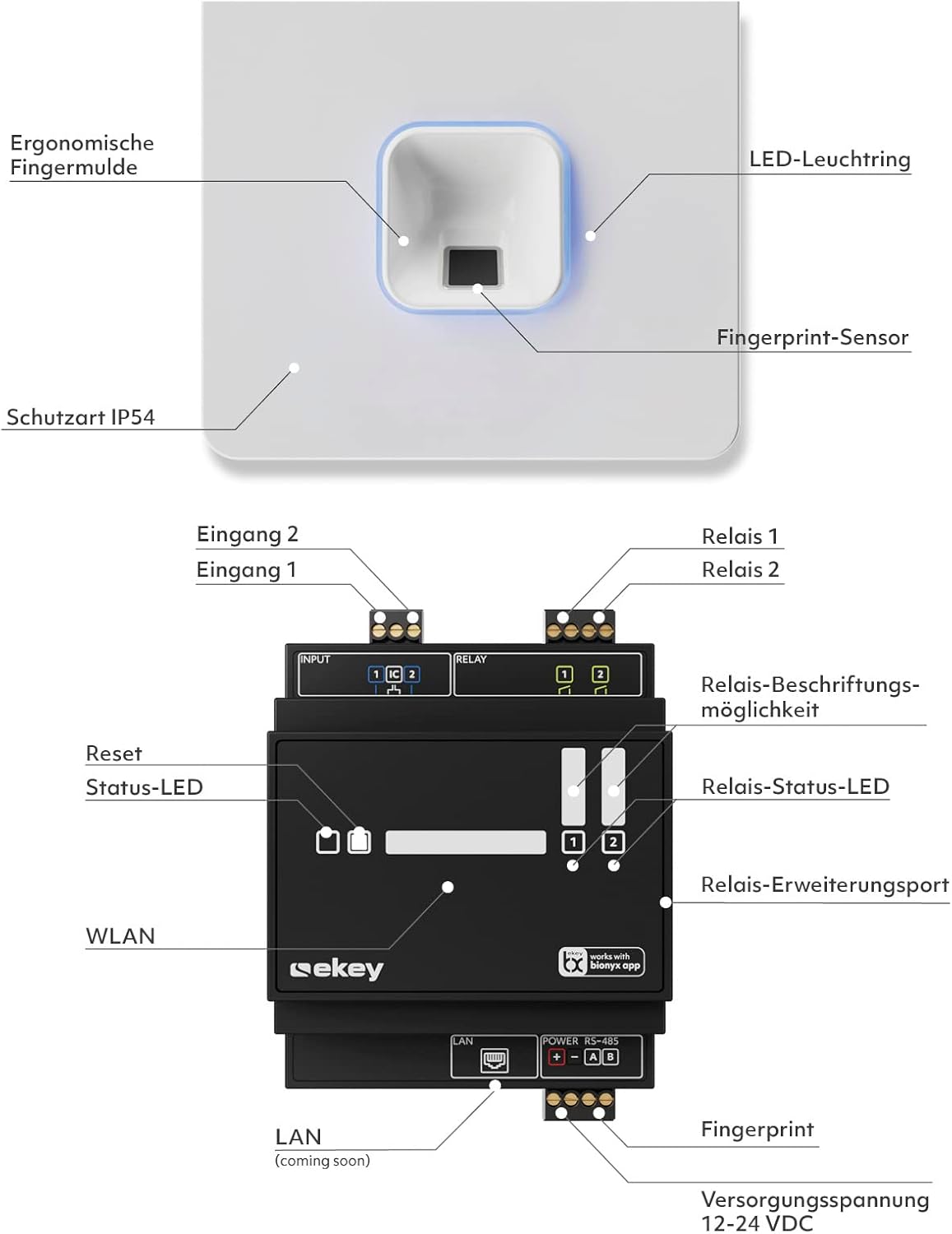
Figura 3.1: Diagrama de l'escàner d'empremtes dactilars i la unitat de control ekey sLine

Figura 3.2: Escàner d'empremtes dactilars ekey sLine
4. Configuració i instal·lació
L'escàner d'empremtes dactilars ekey sLine està dissenyat per a la instal·lació a l'estació de porta Gira 106. És adequat tant per a ús exterior com interior.
4.1 Alçada d'instal·lació recomanada
Per a un ús ergonòmic òptim i una lectura d'empremtes dactilars fiable, l'alçada d'instal·lació recomanada per a l'escàner d'empremtes dactilars és d'entre 105 cm i 155 cm del terra.
4.2 Cablejat i connexió
Connecteu l'escàner d'empremtes dactilars ekey sLine a la unitat de control ekey segons l'esquema de cablejat que s'inclou a l'embalatge del producte. Assegureu-vos que totes les connexions estiguin ben assegurades i polaritzades correctament. El sistema funciona amb 12-24 volts de corrent continu.
4.3 Configuració inicial del sistema
El sistema es gestiona mitjançant l'aplicació ekey bionyx. Baixeu l'aplicació des de la botiga d'aplicacions del vostre dispositiu (Google Play Store o Apple App Store).

Figura 4.1: Interfície de l'aplicació ekey bionyx
- Engegueu el sistema ekey sLine després de completar tot el cablejat.
- Obre l'aplicació ekey bionyx al teu telèfon intel·ligent o tauleta.
- Segueix les instruccions que apareixen a la pantalla de l'aplicació per connectar-te a la unitat de control ekey i registrar el sistema.
- Comenceu a registrar les empremtes dactilars dels usuaris autoritzats. El sistema admet fins a 20 usuaris inicialment, ampliable a 100 usuaris.
5. Funcionament
El funcionament del vostre escàner d'empremtes dactilars ekey sLine és senzill i intuïtiu.
5.1 Obrir la porta amb l'empremta digital
Per obrir la porta, només cal que col·loqueu el dit registrat al sensor d'empremtes dactilars. El sistema reconeixerà la vostra empremta dactilar i activarà el pany de la porta connectat, permetent l'accés. Això proporciona un accés sense preocupacions, fins i tot per a nens (de 6 anys o més).
5.2 Gestió d'usuaris a través de l'aplicació ekey bionyx
L'aplicació ekey bionyx permet una gestió completa del vostre sistema d'accés:
- Afegir/Eliminar usuaris: Registra fàcilment noves empremtes dactilars o elimina les existents.
- Obertura de portes remota: Obre la porta còmodament i de forma remota a través de l'aplicació.
- Registre d'accés: View un registre de tots els esdeveniments d'accés per a una supervisió de seguretat millorada.
- Notificacions push: Rebre missatges push sota demanda quan s'obre la porta.
- Integració de la llar intel·ligent: El sistema està preparat per connectar-se a l'assistent de veu d'Amazon Alexa i a altres sistemes domèstics intel·ligents, cosa que permet una expansió flexible amb noves funcions i dispositius.
6. Manteniment
Per garantir la longevitat i el rendiment òptim del vostre escàner d'empremtes dactilars ekey sLine, seguiu aquestes pautes de manteniment:
- Neteja: Netegeu suaument el sensor d'empremtes dactilars i les superfícies circumdants amb un drap suau, sec i sense borrissol. No utilitzeu netejadors abrasius, dissolvents ni humitat excessiva.
- Actualitzacions de programari: Consulteu regularment l'aplicació ekey bionyx per obtenir actualitzacions de programari o firmware disponibles per al vostre sistema. Les actualitzacions sovint inclouen millores de rendiment i millores de seguretat.
- Protecció del medi ambient: Tot i que és adequat per a ús a l'aire lliure, protegiu la unitat de l'exposició directa i prolongada a condicions meteorològiques extremes si és possible.
7. Solució De Problemes
Si teniu problemes amb el vostre escàner d'empremtes dactilars ekey sLine, consulteu els problemes i solucions més comuns següents:
| Problema | Causa possible | Solució |
|---|---|---|
| No es reconeix l'empremta digital | Sensor brut, col·locació incorrecta del dit, empremta digital no registrada, dit sec/mullat. | Netegeu el sensor. Assegureu-vos que el dit estigui en contacte complet. Torneu a registrar l'empremta digital si cal. Humitegeu o eixugueu lleugerament el dit. |
| La porta no s'obre | Sense alimentació, problema de cablejat, mal funcionament del pany, error de la unitat de control. | Comproveu el subministrament d'alimentació. Verifiqueu les connexions del cablejat. Proveu el mecanisme de bloqueig de la porta de forma independent. Comproveu els llums d'estat de la unitat de control. |
| L'aplicació no es pot connectar al sistema | Bluetooth/Wi-Fi desactivat, sistema sense alimentació, aplicació obsoleta, problemes de xarxa. | Assegureu-vos que el Bluetooth/Wi-Fi estigui activat. Verifiqueu l'alimentació del sistema. Actualitzeu l'aplicació ekey bionyx. Comproveu la connexió de xarxa local. |
| El sistema no respon | Interrupció de corrent, error intern. | Reaccioneu a l'alimentació del sistema (apagueu-lo, espereu 30 segons i reinicieu-lo). Si el problema persisteix, contacteu amb el servei d'assistència. |
Per a problemes que no figuren aquí o si les solucions no resolen el problema, poseu-vos en contacte amb el servei d'atenció al client d'ekey.
8. Especificacions
| Característica | Especificació |
|---|---|
| Fabricant | Sistemes biomètrics ekey GmbH |
| Número de model | 204710 |
| Dimensions del producte | 10.6 x 10.6 x 3.2 cm |
| Pes de l'article | 570 g |
| Color | Escàner d'empremtes dactilars blanc |
| Voltage | 12 volts (CC) |
| Nombre de subunitats | 1 |
| Components inclosos | Unitat d'intercomunicació + clau electrònica d'empremta digital ekey sLine integrada, unitat de control ekey |
| Necessites piles? | No |
| Primera data disponible | 21 de desembre de 2023 |
9. Garantia i Suport
Per obtenir informació sobre la garantia i assistència tècnica, consulteu la documentació inclosa amb el producte o visiteu el lloc web oficial d'ekey. weblloc web. Conserveu el comprovant de compra per a reclamacions de garantia.
Per a més ajuda, podeu contactar amb el servei d'atenció al client d'ekey a través dels seus canals oficials.