
awei A897BL
AWEI A897BL Air Conduction Bluetooth Headphones
Manual d'usuari
Introducció
Thank you for choosing the AWEI A897BL Air Conduction Bluetooth Headphones. These headphones are designed to provide a comfortable and safe listening experience, especially during outdoor activities, by allowing you to remain aware of your surroundings. This manual will guide you through the setup, operation, and maintenance of your new headphones.
Informació de seguretat
- No exposeu els auriculars a temperatures extremes, humitat ni substàncies corrosives.
- Eviteu deixar caure els auriculars ni sotmetre'ls a impactes forts.
- No desmunteu ni modifiqueu els auriculars. Això anul·larà la garantia.
- Netegeu els auriculars amb un drap suau i sec. No utilitzeu productes químics agressius ni materials abrasius.
- Mantenir fora de l'abast dels nens i mascotes.
- Feu servir només el cable de càrrega proporcionat o un equivalent certificat.
- While air conduction allows for environmental awareness, always exercise caution in traffic or dangerous situations.
Contingut del paquet
Si us plau, comproveu el paquet per veure si hi ha els elements següents:
- AWEI A897BL Air Conduction Bluetooth Headphones
- Cable de càrrega USB
- Manual d'usuari (aquest document)
Producte acabatview
Familiarize yourself with the components of your AWEI A897BL headphones.

Imatge: Frontal view of the AWEI A897BL Air Conduction Bluetooth Headphones, showcasing their lightweight, open-ear design with a flexible neckband and integrated controls on the earpieces.
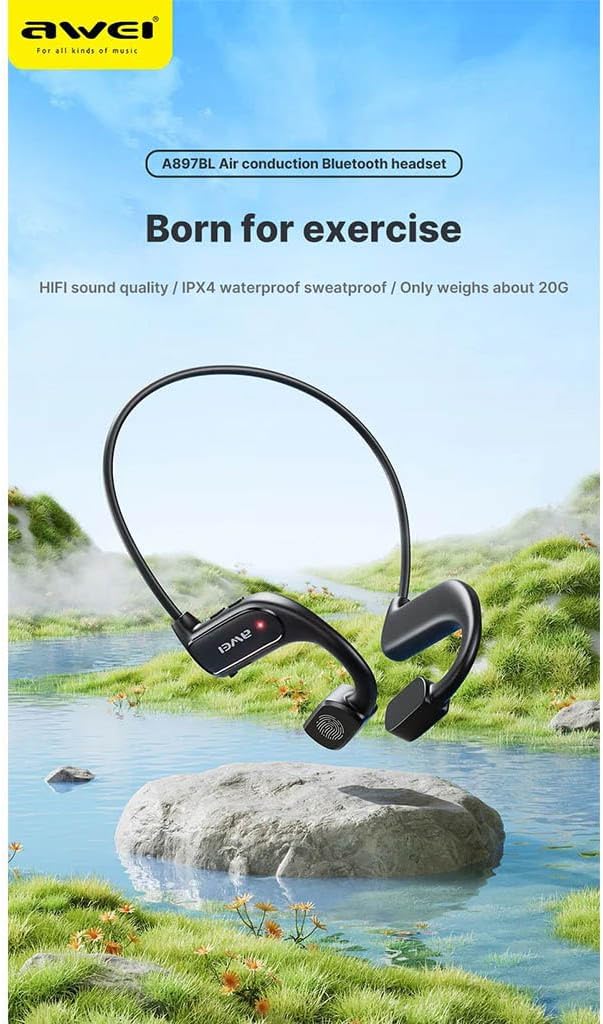
Image: AWEI A897BL headphones displayed in a serene outdoor environment, emphasizing their suitability for exercise and outdoor activities. The image highlights the sleek design and the brand logo.
- Banda flexible per al coll: Provides a secure and comfortable fit around the back of the head.
- Air Conduction Transducers: Deliver sound without blocking the ear canal.
- Botons de control: (Specific button functions will be detailed in the Operating section)
- Port de càrrega: Per recarregar la bateria interna.
Configuració
1. Càrrega dels auriculars
Before first use, fully charge your AWEI A897BL headphones.
- Connecteu l'extrem petit del cable de càrrega USB al port de càrrega dels auriculars.
- Connecteu l'extrem gran del cable de càrrega USB a un adaptador de corrent USB (no inclòs) o al port USB d'un ordinador.
- L'indicador LED mostrarà l'estat de càrrega (per exemple, vermell per a la càrrega, blau/apagat per a la càrrega completa).
- Charging typically takes approximately 1.5-2 hours for a full charge.
2. Emparellament Bluetooth
Pair your headphones with your Bluetooth-enabled device (smartphone, tablet, computer).
- Assegureu-vos que els auriculars estiguin apagats.
- Press and hold the Power button (usually a multi-function button) for approximately 3-5 seconds until the LED indicator flashes red and blue alternately, indicating pairing mode.
- Al dispositiu, vés a la configuració de Bluetooth i activa el Bluetooth.
- Cerca available devices. You should see "AWEI A897BL" or a similar name appear in the list.
- Select "AWEI A897BL" to connect. Once connected, the LED indicator on the headphones will typically turn solid blue or stop flashing.
- Si se us demana una contrasenya, introduïu "0000" (quatre zeros).
Els auriculars intentaran tornar a connectar-se automàticament amb l'últim dispositiu emparellat quan s'encenguin.

Image: A graphic representation of Bluetooth version 5.3 technology, highlighting its advanced capabilities for stable, low-power, and high-quality wireless audio transmission, ensuring an unimpeded listening experience.
Instruccions de funcionament
Portant els auriculars
The A897BL headphones are designed for air conduction, meaning they rest outside your ear canal.
- Place the flexible neckband around the back of your head.
- Position the sound transducers (the parts that deliver sound) just in front of your ears, resting on your cheekbones.
- Ajusta't per a un ajust còmode i segur.

Image: A woman wearing the AWEI A897BL headphones while running outdoors, illustrating the open-ear design that allows ambient sounds to be heard, enhancing safety during sports activities.
Controls bàsics
| Botó/Acció | Funció |
|---|---|
| Botó d'engegada (premció llarga) | Encès/Apagat |
| Botó d'engegada (pressió curta) | Reproduir/Pausar música, Respondre/Finalitzar trucada |
| Volume + Button (Short Press) | Augmenta el volum |
| Volume - Button (Short Press) | Disminuir el volum |
| Volume + Button (Long Press) | Pista següent |
| Volume - Button (Long Press) | Pista anterior |
| Botó d'engegada (premeu dues vegades) | Activa l'Assistent de veu (Siri, Google Assistant) |
Manteniment
- Neteja: Wipe the headphones regularly with a soft, slightly damp cloth. Do not use alcohol, benzene, or other chemical cleaners. Ensure the charging port is dry before charging.
- Emmagatzematge: Guardeu els auriculars en un lloc fresc i sec, allunyat de la llum solar directa i de temperatures extremes.
- Cura de la bateria: Per allargar la durada de la bateria, eviteu descarregar completament els auriculars amb freqüència. Carregueu-los regularment, fins i tot si no els feu servir durant períodes prolongats.
Resolució de problemes
| Problema | Possible solució |
|---|---|
| Els auriculars no s'encenen. | Charge the headphones fully. Ensure the power button is pressed and held long enough. |
| No es pot emparellar amb el dispositiu. |
|
| Sense so o amb un volum baix. |
|
| Entrada/sortida de so. |
|
Especificacions
| Característica | Detall |
|---|---|
| Número de model | AWE000159 (A897BL) |
| Tecnologia de connectivitat | Sense fil (Bluetooth) |
| Versió Bluetooth | V5.3 |
| Tipus de disseny | Air Conduction, Open-Ear |
| Material | Pell sintètica, Plàstic |
| Pes de l'article | Aprox. 20 grams |
| Color | Multicoloured (typically black) |
| Franja d'edat | Adult |
Garantia i Suport
AWEI products are manufactured to the highest quality standards. For warranty information, technical support, or customer service inquiries, please refer to the warranty card included with your purchase or visit the official AWEI weblloc web. Si us plau, conserveu el comprovant de compra per a reclamacions de garantia.
Ask a question about this manual
Ask about setup, troubleshooting, compatibility, parts, safety, or missing instructions. Manuals+ will review the question and use this page’s manual context to help answer it.