Introducció
This manual provides essential information for the proper use and maintenance of your EasyKeys replacement key for Craftsman 8206 toolboxes. This key is designed as a direct replacement for lost or damaged keys for Craftsman 8206 locks and is compatible with various manufacturers including Mac Tools, Proto, Sears, Waterloo, CompX Fort, Snap-On, Westward, Husky, and Kobalt. Please read these instructions carefully to ensure correct identification and operation.

Image: The EasyKeys replacement key for Craftsman 8206, a brass-colored key with a distinct cut.
Setup: Identifying Your Lock Code
Before using your new replacement key, it is crucial to verify that the lock code on your toolbox lock matches the key you have received. The lock code is typically a combination of letters and numbers.
Refer to the images below for common locations where you can find your lock code:

Image: A diagram illustrating four common places to locate a lock code: directly on the key, on the face of the lock cylinder, on a label inside or behind the lock mechanism, or on a label affixed to the cabinet or door itself.

Imatge: Un primer pla view of a key blade showing the lock code "FR322" stamped on it, demonstrating where to find the code on a key.

Image: A magnifying glass, useful for clearly reading small lock codes on keys or locks.
- On the Key: The code is often stamped directly onto the key head or blade.
- On the Lock Face: Look for the code engraved or printed on the front face of the lock cylinder.
- Inside/Behind the Lock: Some manufacturers place the code on a sticker or engraving inside the lock mechanism or on the back of the lock housing.
- On the Cabinet/Door Label: Check for a label on the toolbox itself, often near the lock or on the inside of a drawer.
Nota important: Lock codes are manufacturer-specific. Even if codes appear similar, key cuts can vary significantly between brands. Ensure your key's code and manufacturer match your lock.
Instruccions de funcionament
- Inseriu la clau: Gently insert the replacement key into the lock cylinder. Do not force the key. If it does not slide in smoothly, ensure the key is oriented correctly and that there are no obstructions in the keyway.
- Turn the Key: Once fully inserted, turn the key clockwise or counter-clockwise (depending on the lock mechanism) to engage the locking or unlocking mechanism. The key should turn smoothly.
- Treure la clau: After the lock is engaged or disengaged, return the key to its original insertion position (usually vertical) before gently pulling it out.
If the key does not turn or feels stiff, do not apply excessive force, as this can damage the key or the lock. Refer to the Troubleshooting section.
Manteniment
Proper maintenance can extend the life of your key and lock.
- Mantenir net: Keep the key clean and free from dirt, debris, or corrosive substances. Wipe with a soft, dry cloth if needed.
- Lubricació: If the lock mechanism becomes stiff or difficult to turn, apply a small amount of graphite lubricant into the keyway. Avoid using oil-based lubricants, as they can attract dust and cause further issues.
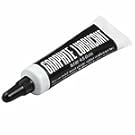
Image: A small tube of graphite lubricant, recommended for maintaining lock mechanisms.
- Emmagatzematge: Store your spare key in a safe, dry place to prevent loss or damage.
Resolució de problemes
| Problema | Causa possible | Solució |
|---|---|---|
| Key does not insert fully | Incorrect key orientation, debris in keyway, wrong key for lock. | Ensure key is oriented correctly. Check for and remove any debris. Verify lock code match. |
| Key inserts but does not turn | Wrong key for lock, stiff lock mechanism, internal lock damage. | Double-check lock code. Apply graphite lubricant to the lock. If still unresponsive, the lock may require professional service or replacement. |
| Key is difficult to remove | Key not returned to neutral position, internal lock issue. | Ensure the key is in the vertical (insertion/removal) position. Gently wiggle and pull. Do not force. |
Especificacions
- Marca: EasyKeys
- Número de model: 8206-craftsman-key-805567
- Compatible Lock Code: 8206 (Craftsman)
- Material: Llautó
- Dimensions de l'article (L x A x A): 0.5 x 0.5 x 1 polzades
- Pes de l'article: 0.015625 lbs (0.25 Ounces)
- Característiques especials: Adjustable Fit, Durable, Genuine Original Equipment Part
- Fabricants compatibles: Mac Tools, Proto, Sears, Waterloo, CompX Fort, Snap-On, Westward, Husky, Kobalt
Garantia i Suport
This product is provided by EasyKeys. For any issues or questions regarding your replacement key, please contact EasyKeys customer support.
- Política de devolució: This product is eligible for a refund or replacement within 30 days of purchase, subject to the seller's return policy.
- Fabricant: Craftsman (for the original lock system)
- Venedor: EasyKeys Inc. USA
- Assistència en línia: Visita el EasyKeys Store on Amazon per a més informació i opcions de contacte.