
Amazon Basics DBD1336
Amazon Basics Thunderbolt4/USB4 Pro Docking Station
Model: DBD1336
La teva guia completa de configuració, funcionament i manteniment.
1. Introducció
The Amazon Basics Thunderbolt4/USB4 Pro Docking Station is designed to expand the connectivity of your laptop, providing a single solution for multiple peripherals, external displays, and power delivery. This docking station is ideal for professionals and creators who require high-speed data transfer, advanced display capabilities, and efficient power management.
2. Informació de seguretat
- Ensure the docking station is placed on a stable, flat surface.
- No exposeu el dispositiu a l'aigua, la humitat ni a temperatures extremes.
- Utilitzeu només l'adaptador d'alimentació i els cables subministrats.
- Keep ventilation openings clear to prevent overheating. When fully loaded, the docking station may reach 122°F/50°C, which is normal for such products.
- Eviteu deixar caure o sotmetre el dispositiu a forts impactes.
3. Contingut del paquet
Si us plau, verifiqueu que tots els elements siguin presents al vostre paquet:
- Estació d'acoblament Thunderbolt 4
- Cable Thunderbolt 4
- Adaptador d'alimentació
- Guia de configuració ràpida
4. Producte acabatview
The Amazon Basics Thunderbolt4/USB4 Pro Docking Station offers a variety of ports to enhance your workstation setup.

Figura 4.1: Davant i posterior View of the Docking Station with Port Labels. This image highlights the various input and output ports available on the docking station, including Thunderbolt 4, USB-A, HDMI, Ethernet, and the SD card slot.
Ports frontals:
- Ranura per a targeta SD: For high-speed data transfer from SD cards.
- USB-A 3.2 (10 Gbps): Per connectar dispositius USB-A.
- Conector d'àudio de 3.5 mm: Per a auriculars o altaveus.
- Thunderbolt 4/USB-C (To Host): The primary connection to your laptop, supporting 96W Power Delivery.
Ports posteriors:
- DC IN: Power input from the provided adapter.
- Sortida HDMI 2.1: Supports up to 8K@30Hz display.
- 2x Thunderbolt 4/USB-C (40Gbps, 15W max charging, 4K@60Hz display): For connecting additional Thunderbolt devices or external displays.
- Ethernet RJ45 (Up to 2.5Gbps): Per a una connexió de xarxa per cable d'alta velocitat.
- 2x USB-A 3.1: For connecting additional USB-A devices.
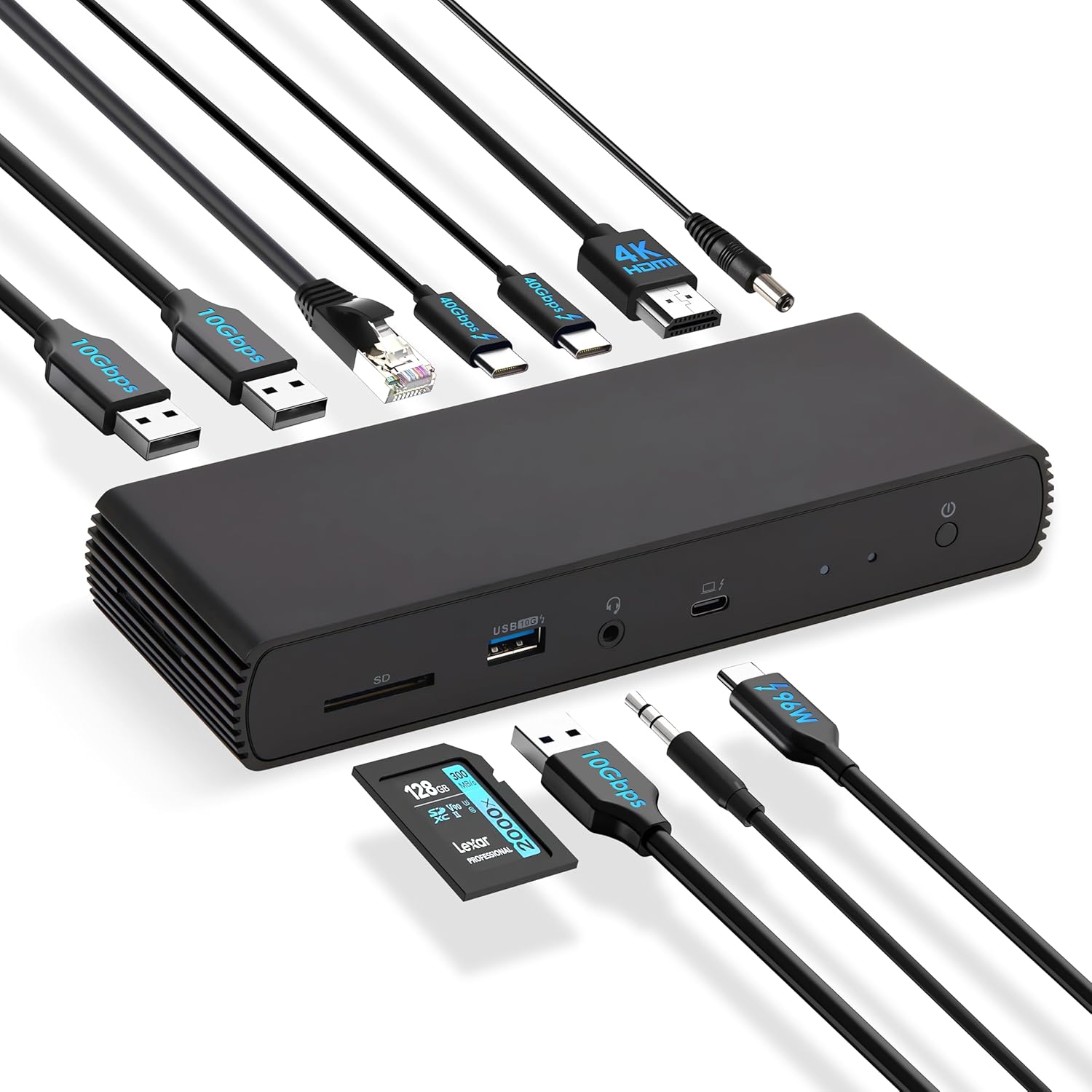
Figura 4.2: The docking station connected to various peripherals and a laptop, demonstrating its comprehensive connectivity options.
5. Configuració
Follow these steps to set up your Amazon Basics Thunderbolt4/USB4 Pro Docking Station:
- Connectar l'alimentació: Connect the provided power adapter to the "DC IN" port on the rear of the docking station, then plug it into a wall outlet.
- Connectar-se al portàtil: Use the provided black Thunderbolt 4 cable to connect the "Thunderbolt 4/USB-C (To Host)" port on the front of the docking station to a Thunderbolt 4 port on your laptop.
- Connecta les pantalles:
- For a single 8K@30Hz display, connect your monitor to the HDMI 2.1 port.
- For dual 4K@60Hz displays, connect your monitors to the two Thunderbolt 4 USB-C ports on the rear.
- Nota: Verify your laptop's Thunderbolt ports support dual 4K@60Hz output. Ensure your graphics card has the latest drivers. Confirm your monitors support 4K@60Hz display. Use high-quality Thunderbolt 4 or USB4 cables for connection (not included for monitors). Avoid connecting the HDMI port first to prevent resolution downgrade due to bandwidth limitations.
- Connecteu els perifèrics: Connecteu els dispositius USB (teclat, ratolí, unitats externes), el cable Ethernet i els dispositius d'àudio als ports corresponents de l'estació d'acoblament.
- Encès: Press the power button on the docking station. Ensure the Green Power LED and Blue Thunderbolt LED turn on.
Vídeo 5.1: How to Use the Amazon Basics Thunderbolt4/USB4 Pro Docking Station. This video provides a visual guide to connecting the docking station, including power, displays, and peripherals, and demonstrates its functionality.
If the laptop fails to detect the docking station, please ensure that your Thunderbolt 4 cable is firmly connected and wait for 60 seconds to complete the setup.
6. Instruccions de funcionament
Once set up, the docking station provides seamless integration with your laptop for various functions:
- Display Extension: Extend or mirror your laptop's display to up to two external monitors.
- Subministrament d'energia: The docking station supports dynamic Power Delivery (PD) up to 96W to charge your connected laptop.
- Transferència de dades d'alta velocitat: Utilize the Thunderbolt 4 ports for up to 40Gbps data transfer and USB-A 3.2 ports for 10Gbps data transfer.
- Connectivitat de xarxa: The Ethernet RJ45 port supports up to 2.5Gbps (approximately 300 Megabytes per sec) for stable and fast wired internet access.
- Connectivitat d'àudio: Connect your headphones or speakers via the 3.5mm audio jack.

Figura 6.1: Dual 4K@60Hz Display Setup. This image illustrates a laptop connected to two external monitors, showcasing the docking station's capability to support extended desktop environments for increased productivity.

Figura 6.2: High-Speed Data Transfer. This image visually represents the rapid data transfer capabilities of the Thunderbolt 4 connection, emphasizing its efficiency for moving large files ràpidament.
7. Compatibilitat
This docking station is compatible with:
- Laptops running Windows 10 OS or later which have a Thunderbolt 4 port.
- Non-M1/M2 chip MacBooks running macOS 11 (Big Sur) or later.
It is backwards compatible with Thunderbolt 3 laptops, but with limited functionality (e.g., may not support dual display).
No compatible amb:
- Linux or Chrome OS laptops.
- M1/M2 chip MacBooks running macOS 10.16 or earlier.

Figura 7.1: Compatibilitat acabadaview. This chart provides a quick reference for supported operating systems and laptop types, ensuring users can confirm device compatibility.
8. Manteniment
Per garantir la longevitat i el rendiment òptim de la vostra estació d'acoblament:
- Neteja: Feu servir un drap suau i sec per netejar l'exterior de l'estació d'acoblament. No utilitzeu netejadors líquids ni aerosols.
- Ventilació: Ensure the docking station has adequate airflow around it. Do not cover the ventilation holes.
- Emmagatzematge: Quan no l'utilitzeu durant períodes prolongats, guardeu l'estació d'acoblament en un lloc fresc i sec, allunyat de la llum solar directa.
9. Solució De Problemes
Si teniu problemes amb l'estació d'acoblament, consulteu els problemes i solucions habituals següents:
| Problema | Causa possible | Solució |
|---|---|---|
| No hi ha sortida de pantalla o la pantalla parpelleja. | Incorrect cable connection, outdated drivers, incompatible display settings, or bandwidth limitations. | Ensure all display cables are firmly connected. Update your laptop's graphics drivers. Verify your monitors support the desired resolution (e.g., 4K@60Hz). If using dual displays, ensure your laptop's Thunderbolt ports support dual 4K@60Hz output. Avoid connecting HDMI first if using multiple displays. |
| Laptop not charging or charging slowly. | Laptop power requirements exceed 96W, or incorrect connection. | Check your laptop manufacturer's power supply specifications. If requirements exceed 96W, the docking station may activate overload protection. Ensure the provided Thunderbolt 4 cable is used and connected to the correct upstream port. |
| Docking station not detected by laptop. | Loose Thunderbolt 4 cable connection. | Ensure the Thunderbolt 4 cable is firmly connected to both the docking station and your laptop. Wait for 60 seconds for the system to recognize the device. |
| Velocitat de xarxa lenta. | Thunderbolt bandwidth shared across devices. | Thunderbolt bandwidth is shared across devices. Display resolution and LAN speed may decrease with multiple high-bandwidth connections. Disconnect other high-bandwidth devices if maximum LAN speed is critical. |
10. Especificacions
| Característica | Detall |
|---|---|
| Marca | Conceptes bàsics d'Amazon |
| Número de model | DBD1336 |
| Dimensions (LxWxH) | 7.86 x 2.95 x 1.23 polzades |
| Pes | 2.15 lliures |
| Color | Negre |
| Interfície del maquinari | USB, Thunderbolt |
| Ports USB totals | 3 (USB-A) + 2 (Thunderbolt 4/USB-C) |
| Ports HDMI totals | 1 (HDMI 2.1) |
| Lliurament d'energia | Fins a 96 W |
| Velocitat Ethernet | 2.5 Gbps |
| Suport de visualització | Dual 4K@60Hz (via TBT4) or Single 8K@30Hz (via HDMI 2.1) |
11. Garantia i Suport
This Amazon Basics product is covered by a limited warranty. For detailed warranty information, please refer to the Warranty (PDF) document provided with your product or visit the Amazon Basics support page.
For technical support, troubleshooting assistance, or to inquire about replacement parts, please visit the Amazon customer support website or contact their customer service directly. Have your product model number (DBD1336) and purchase information ready.
Manual d'usuari (PDF): Descarrega aquí
Guia de l'usuari (PDF): Descarrega aquí
Garantia (PDF): Descarrega aquí
Ask a question about this manual
Ask about setup, troubleshooting, compatibility, parts, safety, or missing instructions. Manuals+ will review the question and use this page’s manual context to help answer it.