
1. Introducció
Gràcies per la compraasing the LDNIO BC AU BS Portable Outdoor Bluetooth Speaker. This manual provides essential information for the safe and efficient operation of your device. Please read it thoroughly before use and retain it for future reference.
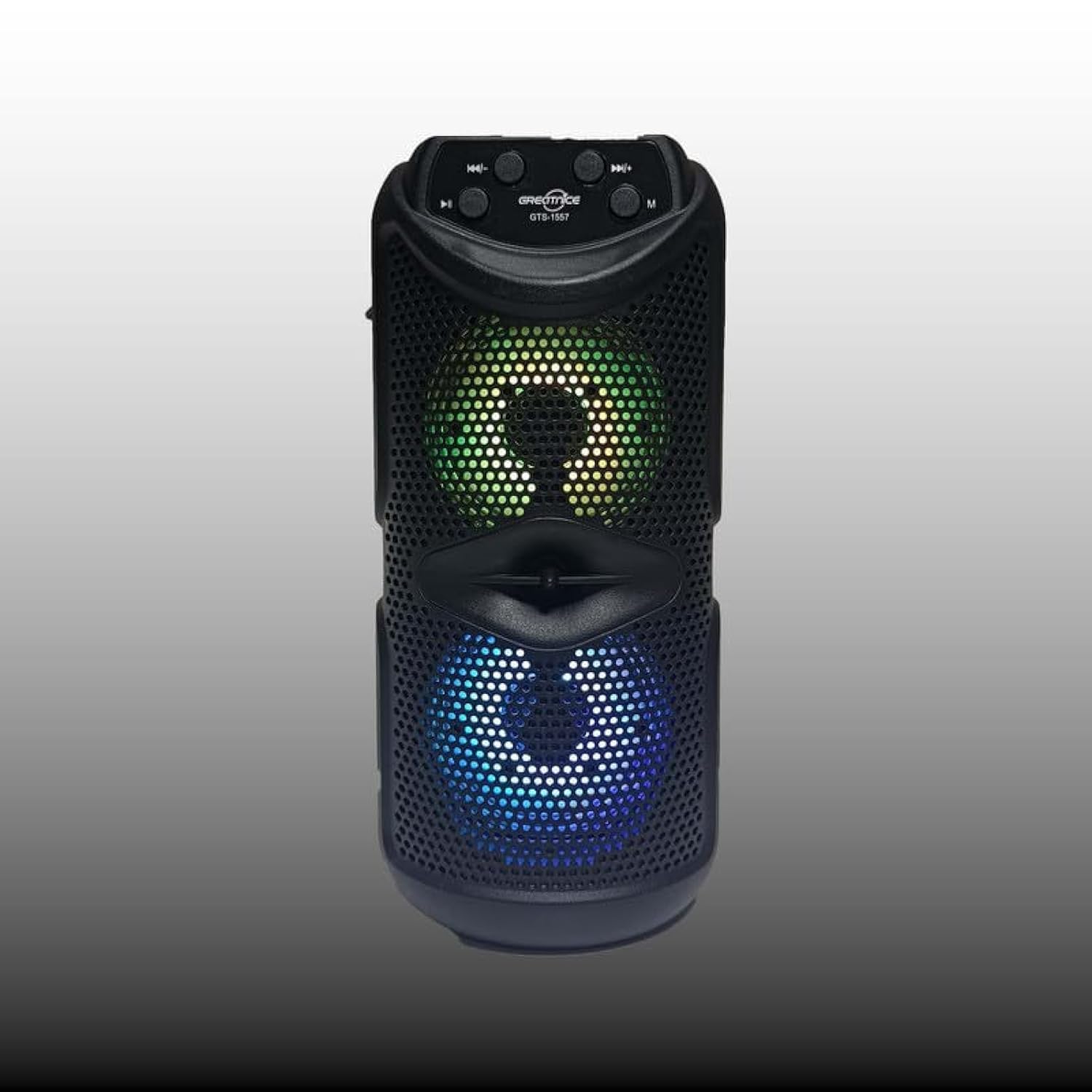
Figura 1.1: Davant view of the LDNIO BC AU BS Portable Outdoor Bluetooth Speaker. This image displays the speaker's main body, control panel at the top, and the dual speaker grilles with internal lighting visible.
2. Característiques del producte
- So d'alta qualitat: 10W output for clear and powerful audio.
- Connectivitat sense fils: Bluetooth per a una transmissió d'àudio sense interrupcions.
- Reproducció multifuncional: Supports FM radio, USB drive, and TF card playback.
- True Wireless Stereo (TWS): Connecteu dos altaveus per a una experiència estèreo millorada.
- Funció de karaoke: Integrated support for karaoke.
- Il·luminació dinàmica: Color-changing lights for bass boost and visual appeal.
- Disseny portàtil: Easy-to-carry handle, suitable for outdoor use.
- Llarga vida útil de la bateria: Up to 8 hours of use on a single charge.
- Altaveus duals: Features dual 4-inch subwoofers for rich sound.
3. Contingut del paquet
Si us plau, comproveu el paquet per veure si hi ha els elements següents:
- LDNIO BC AU BS Portable Outdoor Bluetooth Speaker
- Cable de càrrega USB
- Manual d'usuari (aquest document)
Si falta algun article o està malmès, poseu-vos en contacte amb el vostre distribuïdor.
4. Informació de seguretat
- No exposeu l'altaveu a temperatures extremes, llum solar directa ni humitat elevada.
- Eviteu deixar caure o sotmetre l'altaveu a forts impactes.
- No desmunteu ni intenteu reparar l'altaveu vosaltres mateixos. Això anul·larà la garantia.
- Keep the speaker away from water and other liquids to prevent electric shock or damage.
- Use only the provided or a certified charging cable.
- Netegeu l'altaveu amb un drap suau i sec. No utilitzeu productes de neteja abrasius.
5. Configuració
5.1 Càrrega de l'altaveu
- Connecteu el cable de càrrega USB al port de càrrega de l'altaveu.
- Connecteu l'altre extrem del cable USB a un adaptador de corrent USB compatible (no inclòs) o al port USB d'un ordinador.
- El llum indicador de càrrega s'il·luminarà, normalment en vermell, durant la càrrega.
- Once fully charged, the indicator light will change color or turn off (refer to specific model behavior). A full charge provides up to 8 hours of playback.
5.2 Engegada/apagada
- Per encendre, premeu i manteniu premut Botó d'encesa (usually marked with ⏻) for a few seconds until you hear an audible prompt or see the indicator lights activate.
- Per apagar-lo, manteniu premut el botó Botó d'encesa de nou durant uns segons fins que l'altaveu s'apagui.
5.3 Vinculació Bluetooth
- Assegureu-vos que l'altaveu estigui encès i en mode Bluetooth. Si no, premeu el botó Botó de mode (M) to switch to Bluetooth mode. The Bluetooth indicator light will flash, indicating it's ready for pairing.
- Al dispositiu mòbil (telèfon intel·ligent, tauleta, ordinador portàtil), activeu el Bluetooth i cerqueu els dispositius disponibles.
- Select "LDNIO BC AU BS" (or similar name) from the list of found devices.
- Once paired, the speaker will emit an audible confirmation, and the Bluetooth indicator light will stop flashing and remain solid.
- Ara pots reproduir àudio des del teu dispositiu a través de l'altaveu.
5.4 Other Playback Modes
- Ràdio FM: Premeu el botó Botó de mode (M) to switch to FM radio. Use the Botons de pista anterior/següent per escanejar estacions.
- Targeta USB/TF: Insert a USB drive or TF (MicroSD) card into the respective port. The speaker will automatically switch to USB/TF mode and begin playing audio files.
- TWS (True Wireless Stereo): To pair two LDNIO BC AU BS speakers for stereo sound, ensure both speakers are on and in Bluetooth mode. On one speaker, press and hold the Botó TWS (if available, or a specific pairing button) until it enters TWS pairing mode. The speakers will connect automatically.
6. Instruccions de funcionament

Figura 6.1: Close-up of the speaker's control panel and illuminated dual speakers. The control panel typically includes buttons for power, mode, play/pause, and track navigation/volume.
6.1 Funcions dels botons
- Botó d'engegada (⏻): Manteniu premut per encendre/apagar.
- Botó de mode (M): Short press to switch between Bluetooth, FM, USB, and TF card modes.
- Play/Pause Button (⏸): Premeu breument per reproduir o pausar l'àudio.
- Previous Track / Volume Down Button (⏮): Premeu breument per anar a la pista anterior. Mantingueu premut per baixar el volum.
- Next Track / Volume Up Button (⏭): Premeu curt per a la pista següent. Mantingueu premut per augmentar el volum.
6.2 Control de volum
Adjust the volume by pressing and holding the Puja el volum (⏭) or Baixa el volum (⏮) buttons. You can also control the volume from your connected device.
6.3 modes de llum
The speaker features color-changing lights. Specific controls for light modes may vary. Typically, a dedicated Botó de llum or a long press on the Botó de mode (M) can cycle through different light patterns or turn them off.
6.4 Funció de karaoke
To use the karaoke function, connect a microphone (not included) to the designated microphone input port on the speaker. Adjust the microphone volume as needed using the speaker's controls or the microphone's own controls.
7. Manteniment
- Neteja: Wipe the speaker's exterior with a soft, dry, lint-free cloth. Do not use liquid cleaners or aerosols.
- Emmagatzematge: Quan no l'utilitzeu durant períodes prolongats, guardeu l'altaveu en un lloc fresc i sec, allunyat de la llum solar directa i de temperatures extremes.
- Cura de la bateria: Per allargar la durada de la bateria, eviteu descarregar-la completament amb freqüència. Carregueu l'altaveu regularment, fins i tot si no l'esteu fent servir.
8. Solució De Problemes
| Problema | Causa possible | Solució |
|---|---|---|
| L'altaveu no s'encén. | La bateria està esgotada. | Carregueu l'altaveu completament. |
| Sense so. | Volume is too low; device not paired; incorrect mode. | Increase volume on speaker and device; ensure proper Bluetooth pairing; switch to correct playback mode (Bluetooth, USB, TF, FM). |
| L'aparellament de Bluetooth falla. | L'altaveu no està en mode d'emparellament; el dispositiu és massa lluny; interferències. | Ensure speaker is in Bluetooth pairing mode (flashing indicator); move device closer to speaker; restart both devices. |
| Mala recepció de ràdio FM. | Senyal feble. | Recol·loca l'altaveu a una zona amb millor recepció. |
9. Especificacions
- Nom del model: BC AU BS
- Tipus d'altaveu: Exterior, portàtil
- Connectivitat: Sense fil (Bluetooth)
- Potència de sortida màxima dels altaveus: 10 watts
- Diàmetre del subwoofer: Dual de 4 polzades
- Configuració del canal de so envoltant: 2
- Característiques especials: Bluetooth, Portable, Wireless, FM Radio, USB Playback, TF Card Playback, TWS, Karaoke Function, Color-changing Lights
- Dispositius compatibles: Ordinador portàtil, telèfon intel·ligent, tauleta
- Tipus de muntatge: Taula
- Dimensions aproximades del paquet: 12 x 12 x 8 cm
- Pes aproximat del paquet: 2 kg
10. Garantia i Suport
LDNIO products are designed to provide reliable performance. For warranty information, please refer to the warranty card included with your purchase or contact your local retailer. For technical support or inquiries, please visit the official LDNIO weblloc o poseu-vos en contacte amb el seu departament d'atenció al client.