Introducció
This manual provides instructions for the Generic 20A Wi-Fi Smart Plug. This device allows you to control your home appliances remotely, set schedules, and use voice commands through compatible smart home systems like Alexa and Google Home. It connects directly to your existing 2.4 GHz Wi-Fi network without requiring a separate hub.
Producte acabatview
The Generic 20A Wi-Fi Smart Plug is a compact device designed to make your home appliances smarter. It features a power button for manual control and connects to your Wi-Fi network for app and voice control.
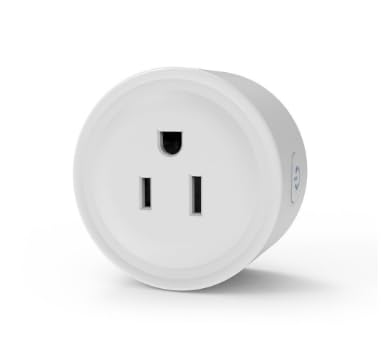
Imatge: Frontal view of the Generic 20A Wi-Fi Smart Plug, showing the three-prong outlet.
The smart plug is designed for high capacity, supporting up to 20 Amps, making it suitable for various household appliances.
Què hi ha a la caixa
- 1 x Generic 20A Wi-Fi Smart Plug
- 1 x Manual d'usuari
Instruccions de configuració
Follow these steps to set up your Wi-Fi Smart Plug:
- Descarrega l'aplicació: Cerca the companion app on the App Store or Google Play, or scan the QR code provided in the physical user manual. Install the app on your smartphone or tablet.
- Connecteu l'endoll intel·ligent: Insert the Smart Wi-Fi Plug into any standard electrical outlet.
- Configura a l'aplicació: Open the downloaded app and follow the on-screen instructions to add and configure your Smart Wi-Fi Plug. Ensure your phone is connected to a 2.4 GHz Wi-Fi network during setup, as the plug only supports this frequency band.
- Connect to Voice Assistant (Optional):
- For Alexa: Set up your Echo Speaker via the Alexa app, then enable the smart plug's skill within the Alexa app.
- For Google Home: Link the smart plug's app to your Google Home account through the Google Home app.
Note: The app should be set up first before attempting to connect the device to voice assistants. Refer to the physical user manual for more detailed steps if needed.
Operating the Smart Plug
Control manual
The smart plug features a physical power button on its side. Press this button to manually turn the connected appliance on or off.
Control remot de l'aplicació
Once configured, you can control your smart plug from anywhere using the dedicated app on your smartphone. As long as your phone has a secure network connection (2.4G, 4G, or 5G Wi-Fi), you can turn devices on or off remotely.
Control de veu
If linked with Alexa or Google Home, you can use voice commands to operate the smart plug. For example, say "Alexa, turn on the living room lamp" or "Hey Google, turn off the fan."
Programació i temporitzadors
Use the app to create custom schedules and timers for your connected devices. This allows for automated operation, such as turning lights on at sunset and off at sunrise, or running a dehumidifier for specific hours. Schedules can be set for daily, weekly, or specific days, helping to manage energy consumption.
Grouping Control and Sharing
The app allows you to group multiple smart plugs together for simultaneous control with a single tap. You can also share control of your smart plugs with family members through the app.
Manteniment
- Neteja: Disconnect the smart plug from the power outlet before cleaning. Use a dry, soft cloth to wipe the surface. Do not use liquid cleaners or sprays.
- Emmagatzematge: Store the smart plug in a cool, dry place away from direct sunlight and moisture when not in use.
- Actualitzacions de firmware: Periodically check the app for available firmware updates for your smart plug to ensure optimal performance and security.
Resolució de problemes
- El dispositiu no es connecta a la Wi-Fi:
- Ensure your Wi-Fi network is 2.4 GHz. The smart plug does not support 5 GHz networks.
- Verifiqueu que la contrasenya del Wi-Fi sigui correcta.
- Acosta l'endoll intel·ligent al teu encaminador Wi-Fi.
- Restart your Wi-Fi router and try connecting again.
- Reset the smart plug (refer to the app or physical manual for reset instructions).
- El control per veu no funciona:
- Confirm the smart plug is successfully connected to its dedicated app.
- Ensure the smart plug's skill/service is enabled and linked in your Alexa or Google Home app.
- Comproveu la vostra connexió a Internet.
- Try re-linking the smart plug's service in your voice assistant app.
- Plug Trips Breaker:
- Ensure the connected appliance's power consumption does not exceed the smart plug's maximum rating of 20A (120V, 1200W).
- If using a high-power appliance, ensure it is connected to a dedicated 20A circuit.
- El control remot no respon:
- Check if the smart plug is connected to your Wi-Fi network (indicated by an LED on the device).
- Assegureu-vos que el vostre telèfon intel·ligent tingui una connexió a Internet activa.
Especificacions tècniques
| Número de model | 20A (WP3) |
| Requisit de Wi-Fi | Només 2.4 GHz |
| Voltage | 120 V |
| Corrent nominal | 20 A màx |
| Potència màxima | 1200W (Note: Maximum power may vary with local voltage) |
| Freqüència CA | 2.4 GHz |
| Format endoll | Tipus B (3 puntes) |
| Nombre de cables | 3 |
| Certificacions | ETL, FCC, NEMA |
| Dimensions del producte | 2.09 x 2.09 x 0.98 polzades |
| Pes de l'article | 2.08 unces |
| Material | Plàstic |
| Color | Blanc |
Garantia i Suport
For warranty information and customer support, please refer to the contact details provided in the packaging or the official product website. The product includes worry-free 7x24 hrs friendly customer service.


