Introducció
Thank you for choosing the Generic TWS-S23 Wireless Earbuds. These earbuds are designed to provide a superior audio experience with advanced Bluetooth V5.3 technology, Hi-Fi stereo sound, and convenient features like smart touch control and an intelligent LED power display. This manual will guide you through the setup, operation, and maintenance of your new earbuds to ensure optimal performance.

Figure 1: Generic TWS-S23 Wireless Earbuds and Charging Case
Què hi ha a la caixa
En obrir el paquet, assegureu-vos que hi hagi tots els elements següents:
- Auriculars sense fil (esquerra i dreta)
- Charging Case with LED Power Display
- Cable de càrrega USB (tipus C)
- Manual d'usuari
- Additional Earbud Tips (various sizes)

Figure 2: Packing List Overview
Configuració
1. Càrrega dels auriculars i l'estoig
Before first use, fully charge the earbuds and the charging case. Connect the provided USB Type-C cable to the charging port on the case and a power source. The LED display on the charging case will show the battery percentage, indicating the charging status. Each earbud also has an independent battery indicator.

Figura 3: Càrrega ràpida de tipus C
2. Emparellament Bluetooth
- Assegureu-vos que els auriculars estiguin carregats.
- Obre l'estoig de càrrega. Els auriculars s'encendran automàticament i entraran en mode d'emparellament.
- Al dispositiu (telèfon intel·ligent, tauleta, etc.), activeu el Bluetooth.
- Cerca "TWS-S23" in the list of available Bluetooth devices and select it to connect.
- Once connected, the earbuds will automatically pair with your device each time you open the charging case.

Figure 4: Earbuds in Charging Case with LED Display
Instruccions de funcionament
Control tàctil intel·ligent
The earbuds are equipped with sensitive touch control panels for easy management of music and calls. Refer to the diagram below for specific functions:

Figure 5: Simple Touch Control Functions
- Reproduir/pausa: Un sol toc a qualsevol dels auriculars.
- Respondre/penjar la trucada: Un sol toc a qualsevol dels auriculars.
- Cançó anterior: Feu doble clic a l'auricular esquerre.
- Següent cançó: Feu doble clic a l'auricular dret.
- Activar l'assistent de veu (Siri): Mantén premut qualsevol dels auriculars durant 2 segons.
Funcions de trucada
The earbuds feature a built-in high-sensitive microphone with call noise reduction, ensuring clear communication. You can answer and end calls directly from the earbuds using the touch controls.

Figure 6: Call Noise Reduction for Clear Calls
Característiques
So estèreo Hi-Fi
Experience rich and detailed audio with the 10mm graphene composite diaphragm drivers. The earbuds deliver deep bass, crisp mids, and crystal-clear highs for an immersive listening experience, whether for music, movies, or games.
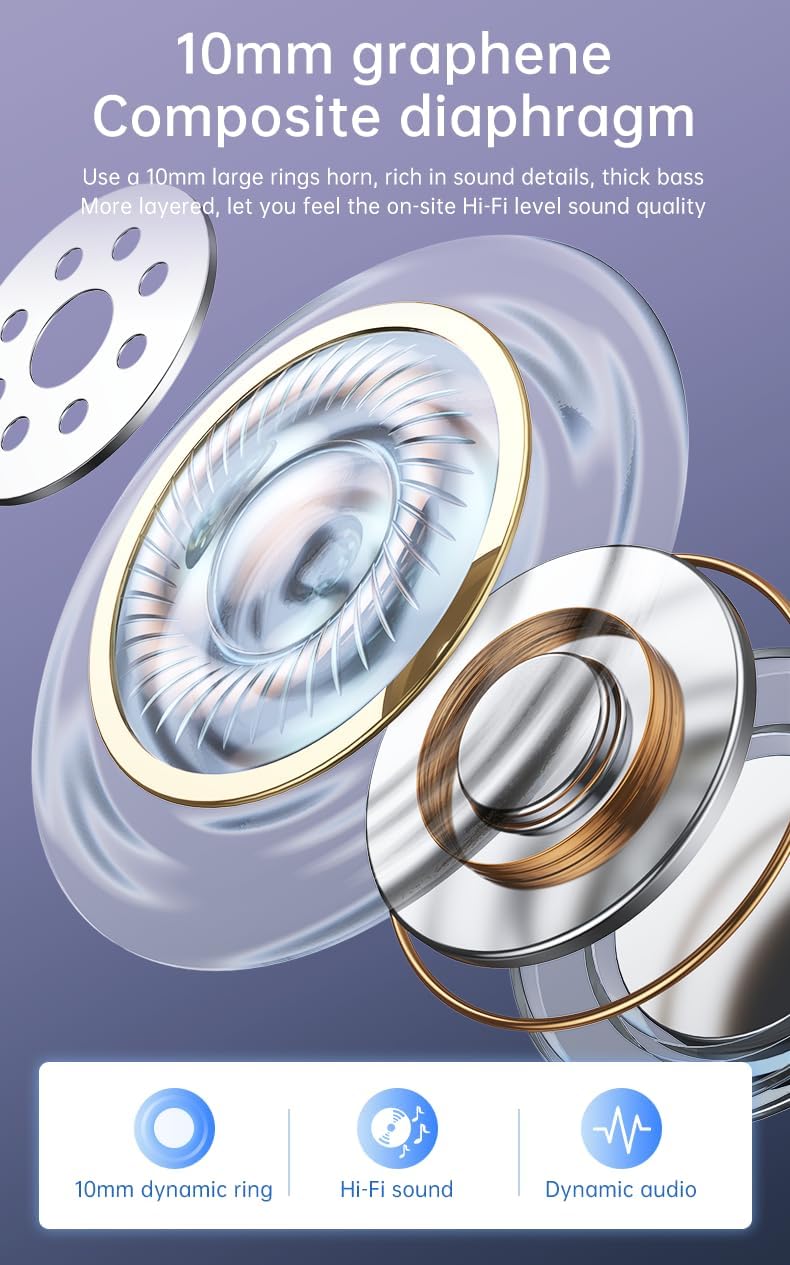
Figure 7: 10mm Graphene Composite Diaphragm
Lightweight, Portable & Ergonomic Design
Each earbud weighs only 0.14 ounces (approximately 4g), making them incredibly light and comfortable for extended wear. The ergonomic design ensures a firm and comfortable fit, suitable for various activities.

Figure 8: Comfortable and Stable Fit

Figura 9: Disseny petit i portàtil
Classificació impermeable IP7
The IP7 waterproof rating effectively protects the headphones from sweat and rain, making them ideal for sports and outdoor activities.
Zero Latency for Gaming
With an ultra-low latency of 0.05 seconds and a stable signal connection, these earbuds provide a seamless audio experience for gaming, ensuring you hear every detail without delay.

Figure 10: Perfect Headset for Gaming with Zero Latency
Manteniment
Per garantir la longevitat i el rendiment òptim dels auriculars, seguiu aquestes pautes de manteniment:
- Neteja: Netegeu regularment els auriculars i l'estoig de càrrega amb un drap suau, sec i sense borrissol. Eviteu utilitzar materials abrasius o productes químics agressius.
- Exposició a l'aigua: While the earbuds are IP7 waterproof, avoid prolonged submersion in water. Dry them thoroughly if they get wet from sweat or rain before placing them back in the charging case.
- Emmagatzematge: Guarda els auriculars a l'estoig de càrrega quan no els facis servir per protegir-los de la pols i els danys.
- Càrrega: Use only the provided charging cable or a certified Type-C cable. Avoid overcharging or completely draining the battery for extended periods.
Resolució de problemes
Si teniu algun problema amb els auriculars, consulteu els passos habituals següents per resoldre problemes:
| Problema | Possible solució |
|---|---|
| Els auriculars no s'aparellen | Ensure earbuds are charged. Turn off and on your device's Bluetooth. Forget "TWS-S23" from your device's Bluetooth list and re-pair. |
| No hi ha so d'un auricular | Place both earbuds back in the charging case, close the lid, wait a few seconds, then open and try again. Check device's audio balance settings. |
| La funda de càrrega no es carrega | Ensure the USB cable is securely connected to both the case and the power source. Try a different charging cable or power adapter. |
| Els controls tàctils no responen | Ensure earbuds are clean and dry. Restart the earbuds by placing them in the case and taking them out. |
If the issue persists after trying these steps, please contact customer support for further assistance.
Especificacions
| Característica | Detall |
|---|---|
| Nom del model | TWS-S23 |
| Tecnologia de comunicació sense fils | Bluetooth V5.3 |
| Factor de forma | A l'orella |
| Mètode de control | Toca |
| Tipus de control | Siri (Voice Assistant) |
| Classificació impermeable | IP7 |
| Mida del controlador | 10 mm |
| Pes de l'article | 3.95 unces (paquet total) |
| Hora de joc | Més de 22 hores (amb estoig de càrrega) |
| Port de càrrega | USB tipus C |
Garantia i Suport
Per obtenir informació sobre la garantia i assistència al client, consulteu la documentació inclosa amb la compra o poseu-vos en contacte directament amb el distribuïdor/fabricant. Conserveu el comprovant de compra per a qualsevol reclamació de garantia.


